← 开源
leona

helix-gpt

Code assistant language server for Helix with support for Copilot/OpenAI/Codeium/Ollama

ApplicationsCodingTypeScript
在 GitHub 打开
增长势头
+024 小时新增 Star0.0%
694
Star
44
Fork
+0
本周
7
贡献者
创建于 2024-01-24 · 更新于 2026-09-28 · 今日第 14903 名
主要开发者
leonasigmaSdSilverCoder

leona/helix-gpt 排名第 14,903,有 694 个星标。

同类别比较

leona/helix-gpt 排名第 14,903,此处有 8 个同类条目;vilassn/whisper_android 排名第 14,905。

同类别比较
名称排名指标
xynehq/xyne14,877
语言:
TypeScript
星标数:
696
分叉数:
70
简介:
AI-first Search & Answer Engine for work. Open-source alternative to Glean.
Amery2010/peinture14,878
语言:
TypeScript
星标数:
695
分叉数:
272
简介:
A general-purpose AI image generation framework that supports Hugging Face, Gitee, Model Scope, and more.
codingmoh/open-codex14,884
语言:
Python
星标数:
695
分叉数:
55
简介:
Fully open-source command-line AI assistant inspired by OpenAI Codex, supporting local language models.
m-sec-org/BreachWeave14,888
语言:
TypeScript
星标数:
695
分叉数:
103
简介:
智能渗透Agent Manager/Observer/Solver 多角色架构,基于 pi-mono SDK。
vilassn/whisper_android14,905
语言:
C++
星标数:
694
分叉数:
112
简介:
Offline Speech Recognition with OpenAI Whisper and TensorFlow Lite for Android
Wildric-Auric/MidJourney-Wrapper14,912
语言:
Python
星标数:
693
分叉数:
137
简介:
MidJourney wrapper in Discord.
evilgix/Evil14,916
语言:
Swift
星标数:
693
分叉数:
96
简介:
Optical Character Recognition in Swift for iOS&macOS. 银行卡、身份证、门牌号光学识别
juntoku9/claude_immigration_attorney14,918
语言:
Shell
星标数:
693
分叉数:
80
简介:
Claude code environment for laywers
关键参数与规格
关键参数与规格
参数值
语言TypeScript
类别Applications
子类别Coding
关键词IDE
星标数694
分叉数44
贡献者7
创建日期2024-01-24
更新日期2026-09-28
1 天星标数0
7 天星标数0
排名14,903
上次排名14,738
排名变化-165
7 天星标排名14,710
上次 7 天星标排名14,719
7 天星标排名变化9
总星标排名14,980
上次总星标排名14,957
总星标排名变化-23
国家Ireland
README 摘录

helix-gpt **⚠️ ARCHIVED**: This repository is now archived. Please use the new Go port instead: - **helix-assist** - Much more efficient Go implementation fixing common issues Code assistant language server for Helix with support for Copilot/OpenAI/Codeium. Completion example Code actions example (space + a) Available code actions: How? When a trigger character is pressed it will request a completion and use the entire file as context. Default triggers characters: can be overwritten with Use to manually trigger completions, and to

trigger code actions that only use the selected code as context. Install This was made to run with Bun, but you can also use a precompiled binary. 25) Configuration You can configure helix-gpt by exposing either the environment variables below, or by passing the command line options directly to helix-gpt in the Helix configuration step. All configuration options NOTE: Copilot is the best choice due to the model and implementation. Environment Variables Command Line Arguments (Add to in

Helix configuration) You can also use: To fetch your Copilot token. Helix Configuration Example for TypeScript tested with Helix 23. 10 (older versions may not support multiple LSPs) In case you opt out of the precompiled binary, modify as follows: All Done If there are any issues, refer to the helix-gpt and Helix log files: Special Thanks rsc1975 for their Bun Dockerfile.

常见问题

记录了多少星标和分叉?

leona/helix-gpt 有 694 个星标和 44 个分叉。

仓库排名是多少?

leona/helix-gpt 排名第 14,903。

记录的语言和类别是什么?

leona/helix-gpt 有 694 个星标,语言为 TypeScript,类别为 Applications。

哪个仓库排名最接近?

leona/helix-gpt 与 vilassn/whisper_android 比较,后者排名第 14,905,有 694 个星标。

README

helix-gpt

⚠️ ARCHIVED: This repository is now archived. Please use the new Go port instead:

  • helix-assist - Much more efficient Go implementation fixing common issues

Code assistant language server for Helix with support for Copilot/OpenAI/Codeium.

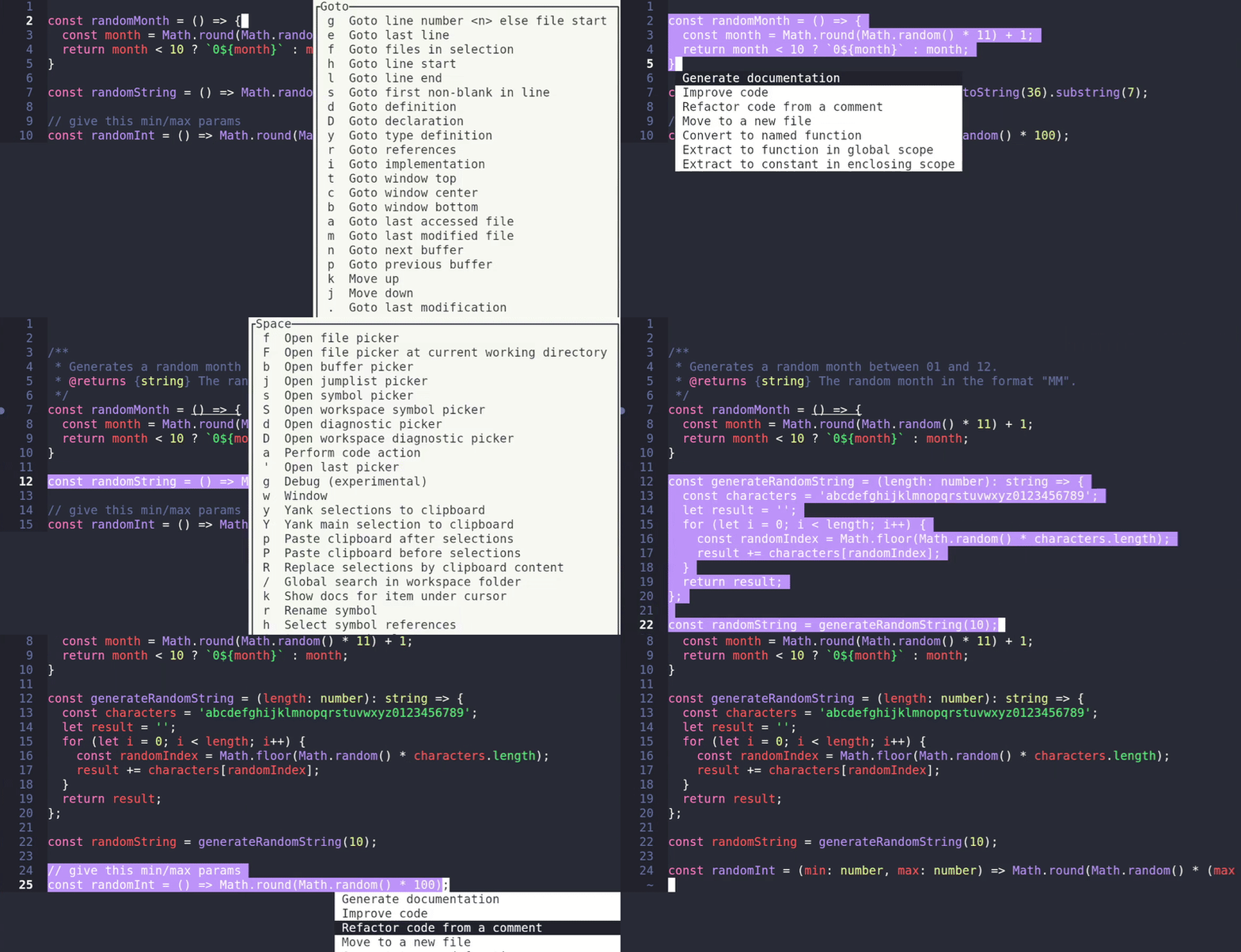
Completion example

Code actions example (space + a)

Available code actions: resolveDiagnostics generateDocs improveCode refactorFromComment writeTest

How?

When a trigger character is pressed it will request a completion and use the entire file as context. Default triggers characters: ["{", "(", " "] can be overwritten with --triggerCharacters "{||(|| "

Use ctrl+x to manually trigger completions, and space+a to trigger code actions that only use the selected code as context.

Install

This was made to run with Bun, but you can also use a precompiled binary.

Without Bun

wget https://github.com/leona/helix-gpt/releases/download/0.34/helix-gpt-0.34-x86_64-linux.tar.gz \
-O /tmp/helix-gpt.tar.gz \
&& tar -zxvf /tmp/helix-gpt.tar.gz \
&& mv helix-gpt-0.34-x86_64-linux /usr/bin/helix-gpt \
&& chmod +x /usr/bin/helix-gpt

With Bun (tested with 1.0.25)

wget https://github.com/leona/helix-gpt/releases/download/0.34/helix-gpt-0.34.js -O /usr/bin/helix-gpt

Configuration

You can configure helix-gpt by exposing either the environment variables below, or by passing the command line options directly to helix-gpt in the Helix configuration step.

All configuration options

NOTE: Copilot is the best choice due to the model and implementation.

Environment Variables

OPENAI_API_KEY=123 # Required if using openai handler
COPILOT_API_KEY=123 # Required if using copilot handler
CODEIUM_API_KEY=123 # Not required, will use public API key otherwise.
HANDLER=openai # openai/copilot/codeium

Command Line Arguments

(Add to command = "helix-gpt" in Helix configuration)

--handler openai --openaiKey 123

You can also use:

helix-gpt --authCopilot

To fetch your Copilot token.

Helix Configuration

Example for TypeScript .helix/languages.toml tested with Helix 23.10 (older versions may not support multiple LSPs)

[language-server.gpt]
command = "helix-gpt"

[language-server.ts]
command = "typescript-language-server"
args = ["--stdio"]
language-id = "javascript"

[[language]]
name = "typescript"
language-servers = [
    "ts",
    "gpt"
]

In case you opt out of the precompiled binary, modify as follows:

[language-server.gpt]
command = "bun"
args = ["run", "/app/helix-gpt.js"]

All Done

If there are any issues, refer to the helix-gpt and Helix log files:

tail -f /root/.cache/helix/helix.log
tail -f /app/helix-gpt.log # Or wherever you set --logFile to

Special Thanks

  • rsc1975 for their Bun Dockerfile.

Todo

  • [x] Copilot support
  • [x] Resolve diagnostics code action
  • Self-hosted model support (partial support if they are openai compliant)
  • Inline completion provider (pending support from Helix)
  • Single config for all languages (pending #9318)
  • Support workspace commands to toggle functionality (pending Helix support for merging workspace commands)
  • Increase test coverage
  • Async load completions to show other language server results immediately (pending Helix support)
  • Improve recovery from errors as it can leave the editor unusable sometimes
排名相邻
同类项目