Offline Speech Recognition with Whisper & TFLite
This repository offers two Android apps leveraging the OpenAI Whisper speech-to-text model. One app uses the TensorFlow Lite Java API for easy Java integration, while the other employs the TensorFlow Lite Native API for enhanced performance. It also includes a Python script for model generation and pre-built APKs for straightforward deployment.
📂 Folder Structure
-
whisper_java:
An Android app using the TensorFlow Lite Java API for model inference with Whisper, ideal for Java developers integrating TensorFlow Lite. -
whisper_native:
An Android app utilizing the TensorFlow Lite Native API for model inference, offering optimized performance for developers preferring native code. -
models_and_scripts:
Contains a Python script to convert Whisper models into TensorFlow Lite format and includes pre-generated TFLite models.generate_model.py: Script for generating TFLite models.generated_model: Directory with optimized TFLite models.
-
demo_and_apk:
Contains pre-built APKs for direct Android installation.
🚀 How to Use
-
Running the Whisper Java App
- Navigate to the
whisper_javafolder. - Open the project in Android Studio.
- Build and run on an Android device or emulator.
- Navigate to the
-
Running the Whisper Native App
- Follow similar steps as above for the
whisper_nativeapp.
- Follow similar steps as above for the
Whisper ASR Integration Guide
This guide explains how to integrate Whisper and Recorder class in Android apps for audio recording and speech recognition.
Here are separate code snippets for using Whisper and Recorder:
Whisper (Speech Recognition)
Initialization and Configuration:
// Initialize Whisper
Whisper mWhisper = new Whisper(this); // Create Whisper instance

// Load model and vocabulary for Whisper
String modelPath = "path/to/whisper-tiny.tflite"; // Provide model file path
String vocabPath = "path/to/filters_vocab_multilingual.bin"; // Provide vocabulary file path
mWhisper.loadModel(modelPath, vocabPath, true); // Load model and set multilingual mode

// Set a listener for Whisper to handle updates and results
mWhisper.setListener(new IWhisperListener() {
    @Override
    public void onUpdateReceived(String message) {
        // Handle Whisper status updates
    }

    @Override
    public void onResultReceived(String result) {
        // Handle transcribed results
    }
});
Transcription:
// Set the audio file path for transcription. Audio format should be in 16K, mono, 16bits
String waveFilePath = "path/to/your_audio_file.wav"; // Provide audio file path
mWhisper.setFilePath(waveFilePath); // Set audio file path

// Start transcription
mWhisper.setAction(Whisper.ACTION_TRANSCRIBE); // Set action to transcription
mWhisper.start(); // Start transcription

// Perform other operations
// Add your additional code here

// Stop transcription
mWhisper.stop(); // Stop transcription
Recorder (Audio Recording)
Initialization and Configuration:
// Initialize Recorder
Recorder mRecorder = new Recorder(this); // Create Recorder instance

// Set a listener for Recorder to handle updates and audio data
mRecorder.setListener(new IRecorderListener() {
    @Override
    public void onUpdateReceived(String message) {
        // Handle Recorder status updates
    }

    @Override
    public void onDataReceived(float[] samples) {
        // Handle audio data received during recording
        // You can forward this data to Whisper for live recognition using writeBuffer()
        // mWhisper.writeBuffer(samples);
    }
});
Recording:
// Check and request recording permissions
checkRecordPermission(); // Check and request recording permissions

// Set the audio file path for recording. It record audio in 16K, mono, 16bits format
String waveFilePath = "path/to/your_audio_file.wav"; // Provide audio file path
mRecorder.setFilePath(waveFilePath); // Set audio file path

// Start recording
mRecorder.start(); // Start recording

// Perform other operations
// Add your additional code here

// Stop recording
mRecorder.stop(); // Stop recording
Please adapt these code snippets to your specific use case, provide the correct file paths, and handle exceptions appropriately in your application.
Note: Ensure that you have the necessary permissions, error handling, and file path management in your application when using the Recorder class.
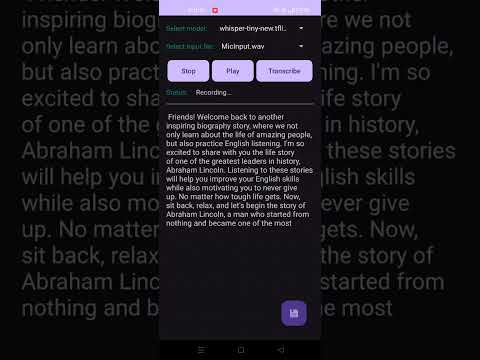
Demo Video
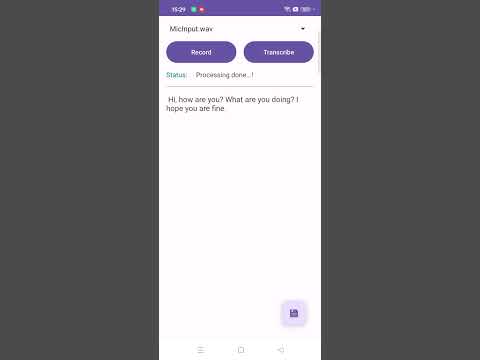
Live Transcription
Important Note
Whisper ASR is a powerful tool for transcribing speech into text. However, keep in mind that handling audio data and transcriptions may require careful synchronization and error handling in your Android application to ensure a smooth user experience.
Enjoy using the Whisper ASR Android app to enhance your speech recognition capabilities!
💖 Support This Project
Maintaining this project requires time and effort. If you find it useful and would like to support its development, you can contribute via PayPal:
🔹 PayPal Direct Link: https://www.paypal.com/vilassn
For any inquiries or business-related discussions, feel free to reach out: 📧 Email: vilassninawe@gmail.com
Thank you for your support! 🚀
Acknowledgements
This project uses the following open-source implementation:
- Niranjan Yadla (2022)
Whisper TFLite: OpenAI Whisper Model Port for Edge Devices
https://github.com/nyadla-sys/whisper.tflite
@misc{nyadla-sys,
  author = {Niranjan Yadla},
  title = {{Whisper TFLite: OpenAI Whisper Model Port for Edge Devices}},
  year = 2022,
  howpublished = {GitHub Repository},
  url = {https://github.com/nyadla-sys/whisper.tflite},
  note = {Original TFLite implementation of OpenAI Whisper for on-device automatic speech recognition}
}