
中文 | English | Official Website | Documentation | 官方网站 | 文档 | Contribute | Feedback

[](https://www.producthunt.com/products/argo-ai-rapid-go?embed=true&utm_source=badge-featured&utm_medium=badge&utm_source=badge-argo-2)
⛵️ ARGO - Your Local Super AI Agent
ARGO is an open-source AI Agent client that makes it easy to build & use AI-powered assistants capable of autonomous thinking, task planning, and handling complex tasks. It supports one-click download of open-source models and integrates closed-source models, providing convenient access to local RAG knowledge bases and MCP tools. In addition, ARGO can be fully deployed privately, secure and controllable, with 100% data stored locally, supporting offline operation, and is compatible with Windows, Mac, and Linux systems.
The vision of ARGO is to allow every user to have their own exclusive super AI Agent, enabling more people to benefit from the convenience AI Agents bring.
Why Choose ARGO?
- 🔒 Local First, Privacy Above All — Supports full offline operation, 100% local data storage, with native clients for Windows, macOS, and Linux, plug-and-play with no configuration required. Fully compatible with public cloud, private cloud, local servers, and all-in-one machines.
- 🚀 Task Execution Engine That Delivers Results — The Multi-Agent task engine autonomously plans steps, calls tools, generates reports, and executes multi-stage tasks in full.
- ⚙️ Agent Factory — Need a travel planning assistant, industry analyst, or legal advisor? Simply describe it, and ARGO can help you customize a dedicated agent for your scenario.
- 📦 Integrates Ollama and Leading Providers — Instantly access OpenAI, Claude, DeepSeek, or run local Ollama models, with open access and no platform lock-in. Seamlessly switch between local models and API models during conversations.
- 🧩 Agentic RAG Knowledge Engine — Supports various knowledge entry methods including files, folders, websites, etc., and dynamically synchronizes folders. The Agentic mode intelligently decomposes complex issues and provides more complete and reliable answers.
- 🛠️ Built-in Powerful Toolset, MCP Protocol Support — Includes a powerful toolset such as web crawlers, browser control, local file management, and more, with support for custom extensions and integration of your own tools.
- 🧠 Self-Evolving Agent — Learns work habits and preferences during use. ARGO can autonomously optimize the agent, evolving into a super agent that truly understands you. (In testing)
👏 Join us on Discord | Twitter | WeChat Group
❤️ Love ARGO? Give us a star 🌟 to receive all release notifications from GitHub!
⚠️️ The project is still in the early stages, actively being developed. We appreciate your contributions, feedback, and patience.
🔗 Official website: https://xark-argo.com/
📚 Quick Start Guide: https://docs.xark-argo.com/getting-started
📑 Table of Contents
- 🌠 Demo
- 🌟 Features
- 📝 Development Plan
- 📦 Quick Start
- 🖥️ Develop
- 🤝Contributing
- 📃 License
- ⭐️ Star History
🌠 Demo
Video
Interface
🌟 Features
-
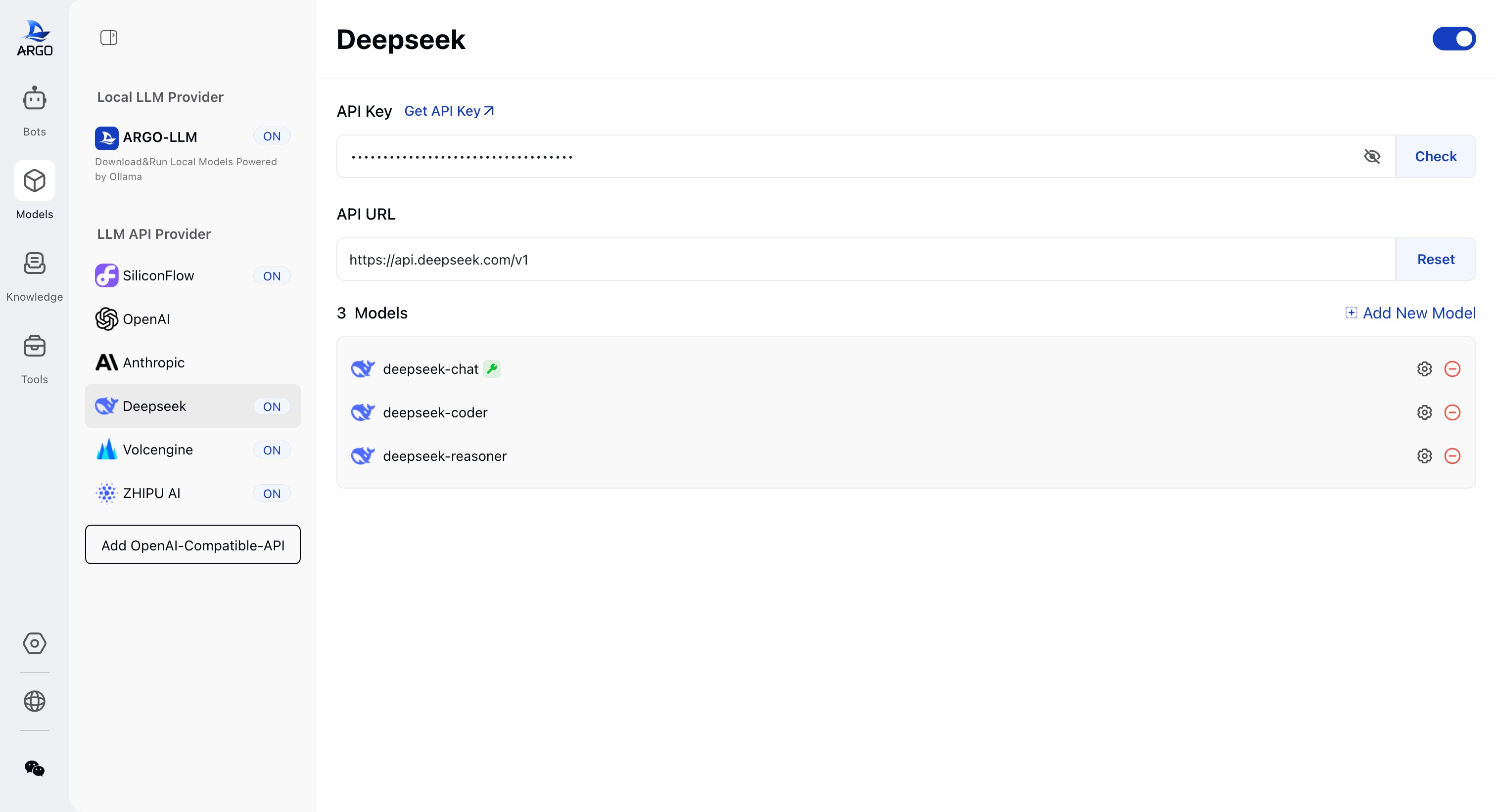
📦 Flexible Integration of Open-Source and Closed-Source Models:
- One-click Ollama Integration: Integrates Ollama with no command-line operations needed to control and manage model downloads, deployment, and running.
- Compatible with HuggingFace: Supports one-click downloading of models in HuggingFace GGUF format.
- Chat Template Adaptive to Models: Automatically adapts the chat template when downloading open-source models.
- Compatible with Leading Model APIs: Supports integration with OpenAI, Claude, DeepSeek, and any service provider compatible with the OpenAI format, breaking platform lock-in.
- Flexible Model Switching: Seamlessly switch between local models and API models during conversations to balance performance and cost.
-
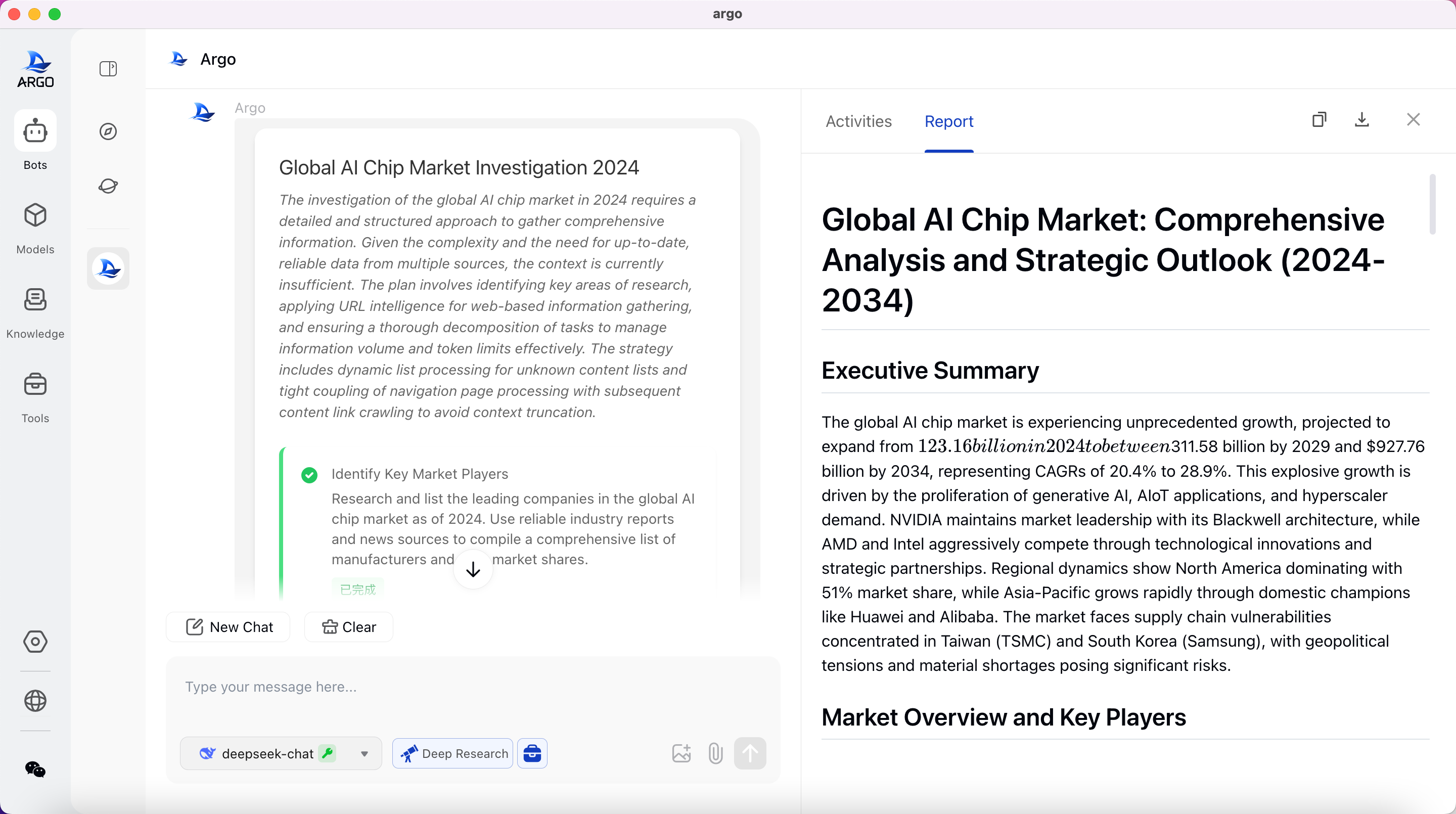
🏠 DeepResearch & Multi-Agent Collaboration:
- Multi-Agent Task Engine: Multiple agents collaborate to handle complex tasks.
- Complete Agentic Workflow:
- Intent Recognition: Precisely understands user needs.
- Task Planning: Autonomously breaks down complex tasks.
- Task Execution: Efficiently carries out multi-step processes.
- Tool Calling: Flexible use of multiple external tools.
- Self-reflection: Reflects on execution and self-corrects.
- Self-summary: Provides structured result outputs.
- Human-in-the-loop: After task planning, natural language modifications can be made to the research plan.
-
🧩 Local RAG Knowledge Base:
- Multiple Knowledge Entry Methods: Supports adding knowledge through files, folders, websites, etc.
- Dynamic Knowledge Base Sync: When binding local folders, content changes automatically synchronize to the knowledge base, ensuring information is always up to date.
- Multi-format Document Parsing: Supports parsing of PDFs, Word, Excel, PPT, web pages, Markdown, plain text, etc.
- Answer Traceability: When using the knowledge base to answer questions, it is traceable to specific reference fragments.
- Privacy Protection: Local storage of vectorized data reduces security risks.
- Agentic RAG: Smart decomposition of complex issues, autonomous assessment of information sufficiency, and generation of more complete and reliable answers.
-
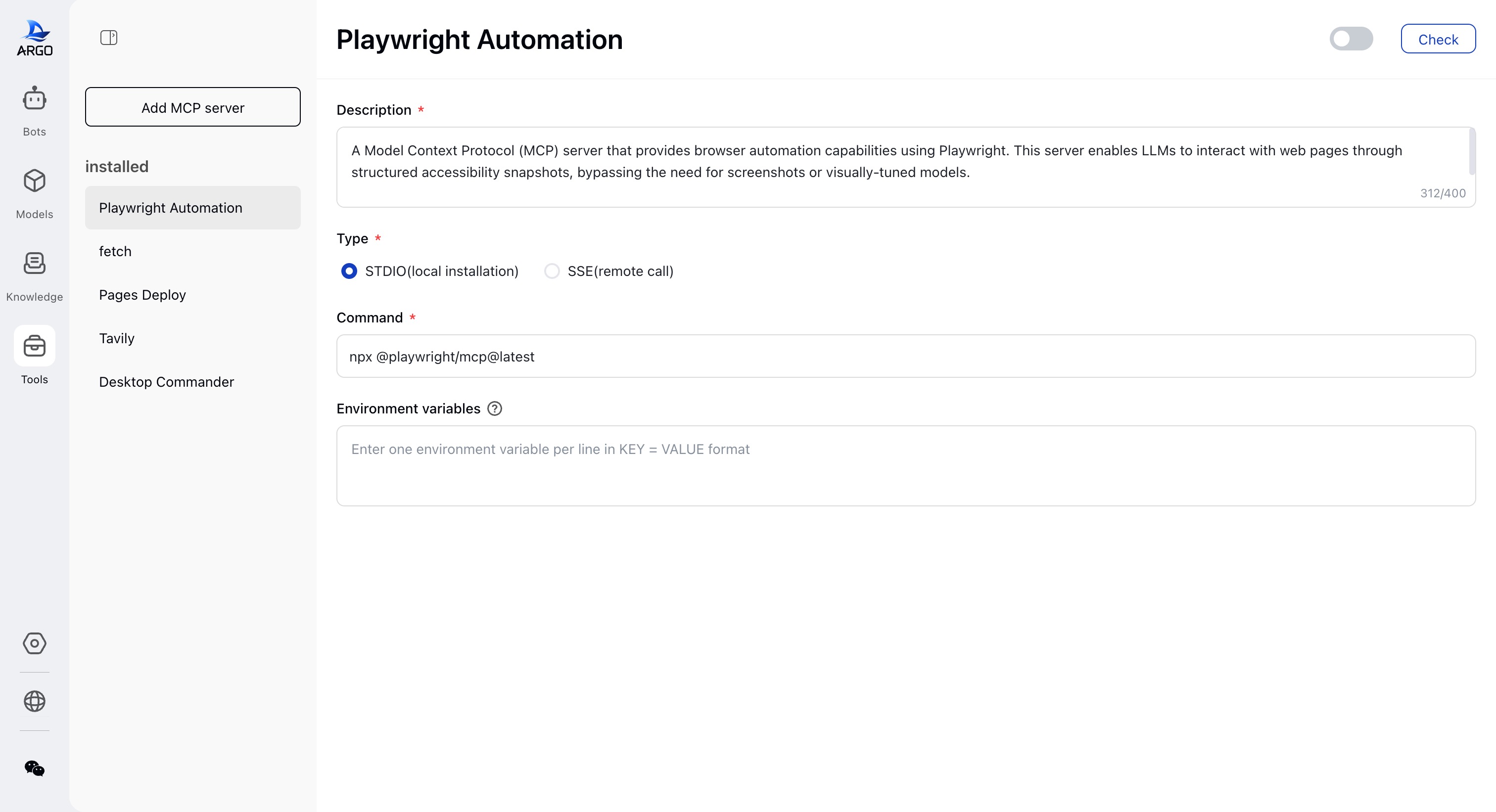
🛠️ MCP Protocol & Tool Support:
- Out-of-the-box Tool Library: Built-in tools like network search, web crawlers, browser control, local file management, and more.
- Configurable Expansion: Supports local (STDIO) and remote (SSE) integration of MCP tools for easy expansion and integration.
-
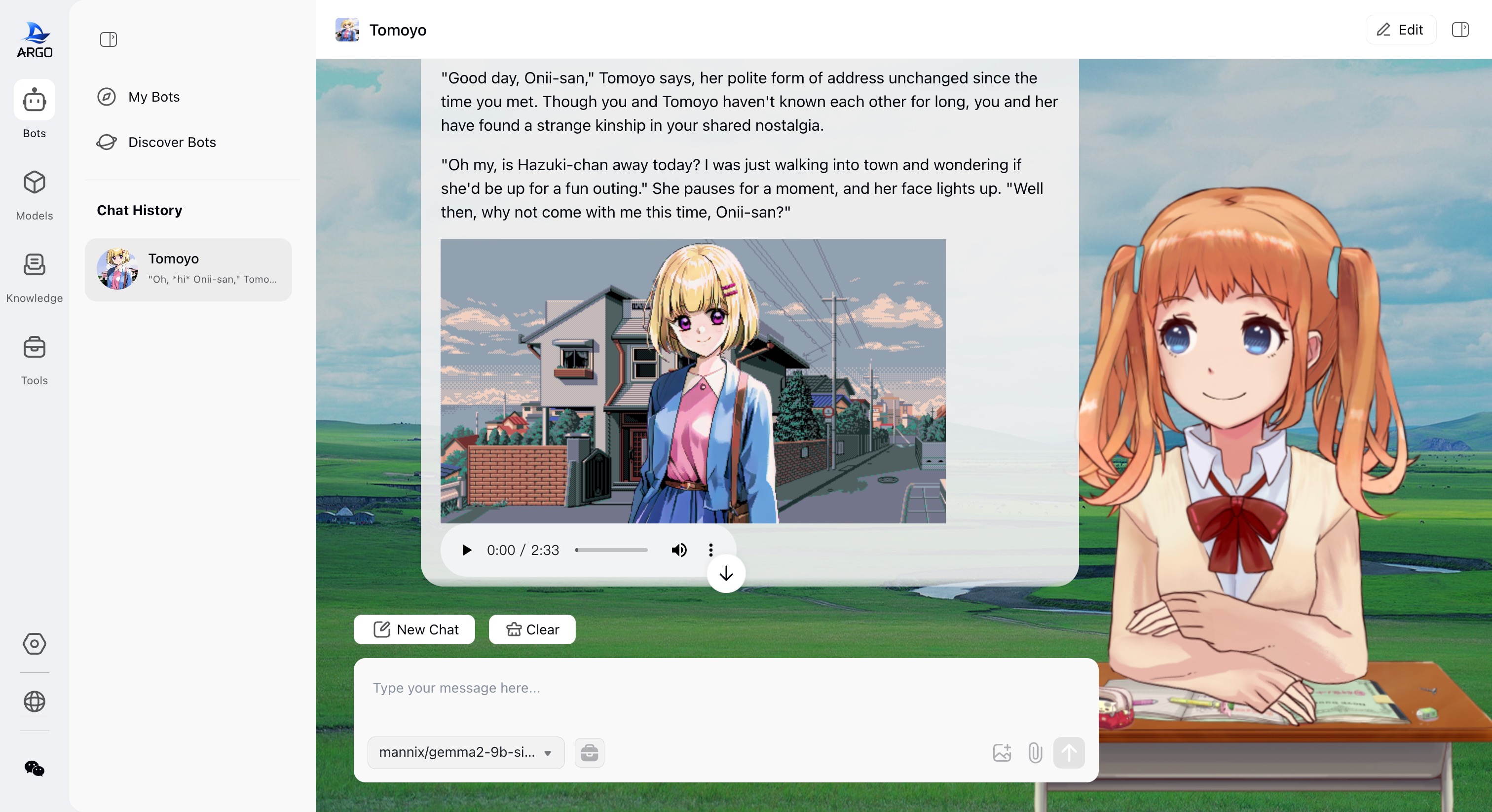
🤖 Agent Factory:
- Visual Scenario Agent Creation: Customize scenario assistants with role setting, model binding, variable configuration, and tool integration (e.g., industry research reports, travel planning).
- Continuous Iteration: The agent iterates through natural language and learns to better understand the user over time.
- One-click Sharing & Importing: Share agent configurations with the community, covering scenarios like writing, programming, translation, research, and education.
-
🤖 Chat Conversations:
- Formula Rendering: Supports KaTeX formula rendering for academic use.
- Mermaid Rendering: Supports Mermaid chart visualization, allowing creation of flowcharts, sequence diagrams, Gantt charts, etc.
- Artifacts Rendering: Supports displaying results in html, svg, xml code.
- Free Branching: Conversations can freely branch, quickly cloning the conversation process.
-
🔒 Privacy Protection & Cross-Platform Experience:
- Local Data Storage: All data is stored locally, supporting offline operation and ensuring privacy and security.
- Cross-platform Support: Supports native clients for Windows, macOS, and Linux, along with Web versions, with zero dependencies, plug-and-play, and full compatibility with public/private cloud/local servers/all-in-one machines.
- No Registration Required: No account registration or cloud dependency, making it ideal for privacy-sensitive individuals and businesses.
🔍 Use Cases
- Personal Assistant: Manage schedules, provide shopping suggestions, and help with daily tasks to improve user efficiency.
- Study Assistant: Help students understand complex concepts, offer academic resources, create custom study plans, and give revision suggestions.
- Content Creation: Automatically generate copy, optimize writing style, and assist creators in improving content creation efficiency.
- Development Assistance: Provide code generation, debugging, and technical support to help developers solve programming problems more efficiently.
- Industry-specific Assistants: Custom AI agents like legal advisors, industry analysts to meet professional needs.
- Data Analysis: Quickly analyze data, generate charts and reports to support data-driven decision-making.
- Knowledge Management: Automatically parse documents and build knowledge bases to help businesses organize and query knowledge.
- Privacy Protection: Provide offline operation and local storage to ensure user data privacy and security.
📝 Development Plan
- Save and share the agent’s operation process.
- Global personalization memory to make ARGO more understanding of users and capable of delivering results.
- Support using local browsers to simulate user web browsing to gather information.
- Support scheduled tasks.
- More vertical agent scenarios.
Feel free to join our community and share your thoughts and feedback! Discord | WeChat Group | GitHub Discussions
📦 Quick Start
Hardware Requirements
Before installing Argo, ensure that your machine meets the following minimum system requirements:
- CPU >= 4 cores
- RAM >= 8 GB
Additional software requirements when using Docker:
- Docker >= 24.0.0
- Docker Compose >= v2.26.1
Tip: To enable CUDA in Docker, you need to install the Nvidia CUDA container toolkit
Quick Desktop App Installation
Download, double-click, and complete installation.
- Macos silicon:argo-darwin-arm64.dmg
- Macos intel:argo-darwin-amd64.dmg
- Windows 64bit(win 10 and above):argo-windows-x64.exe
Quick Start with Docker 🐳
Install Argo without Ollama:
If you already have Ollama running locally or in another container and want Argo to use it, run:
docker compose -f docker/docker-compose.yaml up -d
✅ Note: This setup does not include Ollama, so some model download features (such as HuggingFace) may be unavailable. It’s recommended to pair with an external Ollama service.
Install Argo with Ollama (CPU version):
If you want Argo to include Ollama and run models using CPU inference, run:
docker compose -f docker/docker-compose.ollama.yaml up -d
📦 Ollama will be deployed as a service alongside Argo, with the service address at http://ollama:11434, supporting automatic downloading and loading of local models.
Install Argo with Ollama (GPU version):
If you want to run LLM models in a GPU-enabled environment, use:
docker compose -f docker/docker-compose.ollama.gpu.yaml up -d
🚀 This version enables --gpus all and mounts NVIDIA drivers. Make sure your host has the NVIDIA Container Toolkit properly installed.
The Ollama service is also deployed within the container at the address http://ollama:11434 and supports GPU-accelerated model inference.
Once installed, you can access Argo at http://localhost:38888.
🖥️ Develop
Refer to the development documentation
🤝 Contributing
ARGO is currently in its early stages of development, and we are actively working to improve functionality and fix issues. Before it reaches a stable version, you may encounter some usability issues or instability. We sincerely request your understanding and support!
ARGO is an active open-source community project, and we welcome contributions in various forms:
- Contribute Code: Develop new features or optimize existing code
- Submit Bugs: Submit bugs you find
- Maintain Issues: Help manage GitHub issues
- Product Design: Participate in design discussions
- Write Documentation: Improve user manuals and guides
- Community Engagement: Join discussions and assist users on Discord | WeChat Group
- Promote ARGO: Spread the word about ARGO, give us a star ❤️
Please refer to our Contribution Guide for code contributions. Thank you for your support and contributions!