
KKTerm
One cross-platform desktop workspace for terminals, SSH/SFTP, RDP/VNC, files, web pages, IT Ops, and an approval-gated AI assistant.
Because your taskbar shouldn't look like a Vegas slot machine.
Named after 乖乖 (Kuāi Kuāi), the green coconut snack Taiwanese sysadmins place on servers to keep them well-behaved.
💚 KKTerm is free, local-first, and built by an independent developer — no telemetry, no subscription, no VC. If KKTerm saves you time every day, the kindest way to keep it alive is to get your copy from the Microsoft Store or the Mac App Store. It's a one-time payment only — pay once, yours forever — the same app as the free GitHub build, and every purchase goes straight back into bug fixes, new features, and signed, auto-updating releases.
Prefer the free build? Grab the latest GitHub release — no account, no strings attached.
English ·
[繁體中文](README.zh-TW.md) ·
[简体中文](README.zh-CN.md) ·
[日本語](README.ja.md) ·
[한국어](README.ko.md) ·
[Français](README.fr.md) ·
[Deutsch](README.de.md) ·
[Español](README.es.md) ·
[Español (MX)](README.es-MX.md) ·
[Italiano](README.it.md) ·
[Português (BR)](README.pt-BR.md) ·
[ไทย](README.th.md) ·
[Bahasa Indonesia](README.id.md) ·
[Tiếng Việt](README.vi.md)
Why “KKTerm”?
KKTerm means Kuai Kuai Term — a nod to the green 乖乖 snack Taiwanese sysadmins place on servers, hoping important machines stay quiet, reliable, and well-behaved.
One window, every connection
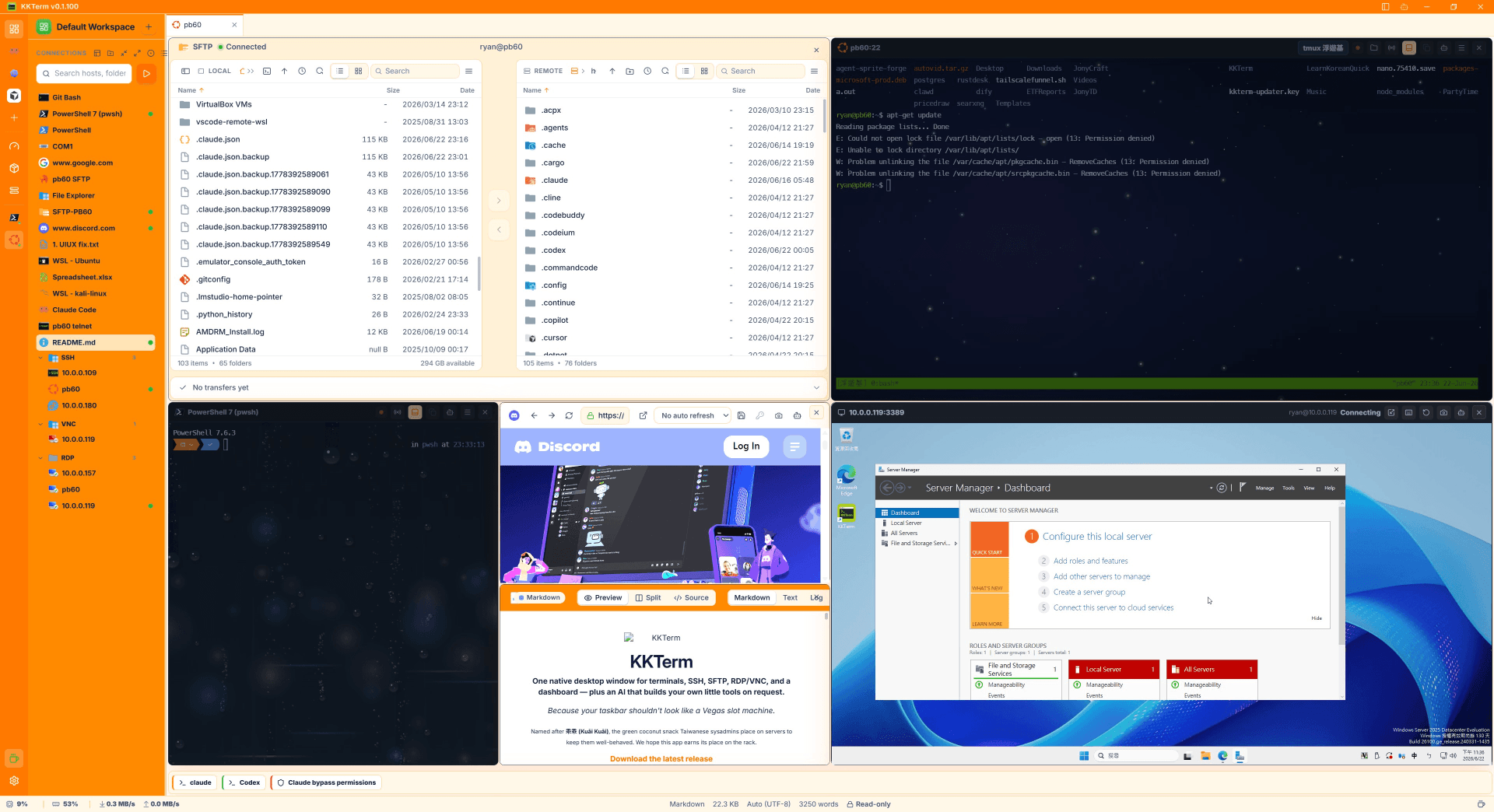
KKTerm brings local shells, SSH/SFTP, FTP/FTPS, Telnet, serial, RDP/VNC, URL Connections, local File Explorer, and the Document viewer into one desktop workspace. Tabs can mix Pane types, so a terminal, file browser, web UI, and remote screen can stay together.
| Need | KKTerm |
|---|---|
| Local shells | PowerShell, cmd, and WSL |
| Remote access | SSH, Telnet, serial, RDP, and VNC |
| Files and web | SFTP, FTP/FTPS, local files, and embedded URL Connections |
| Documents | Logs with tail-follow, text, CSV, images, and PDFs |
Built for the work around the terminal
-
Workspace — mixed Tabs and Panes, named Workspaces, tmux reattach, Connection Notes, Git Browser, and File Compare.
-
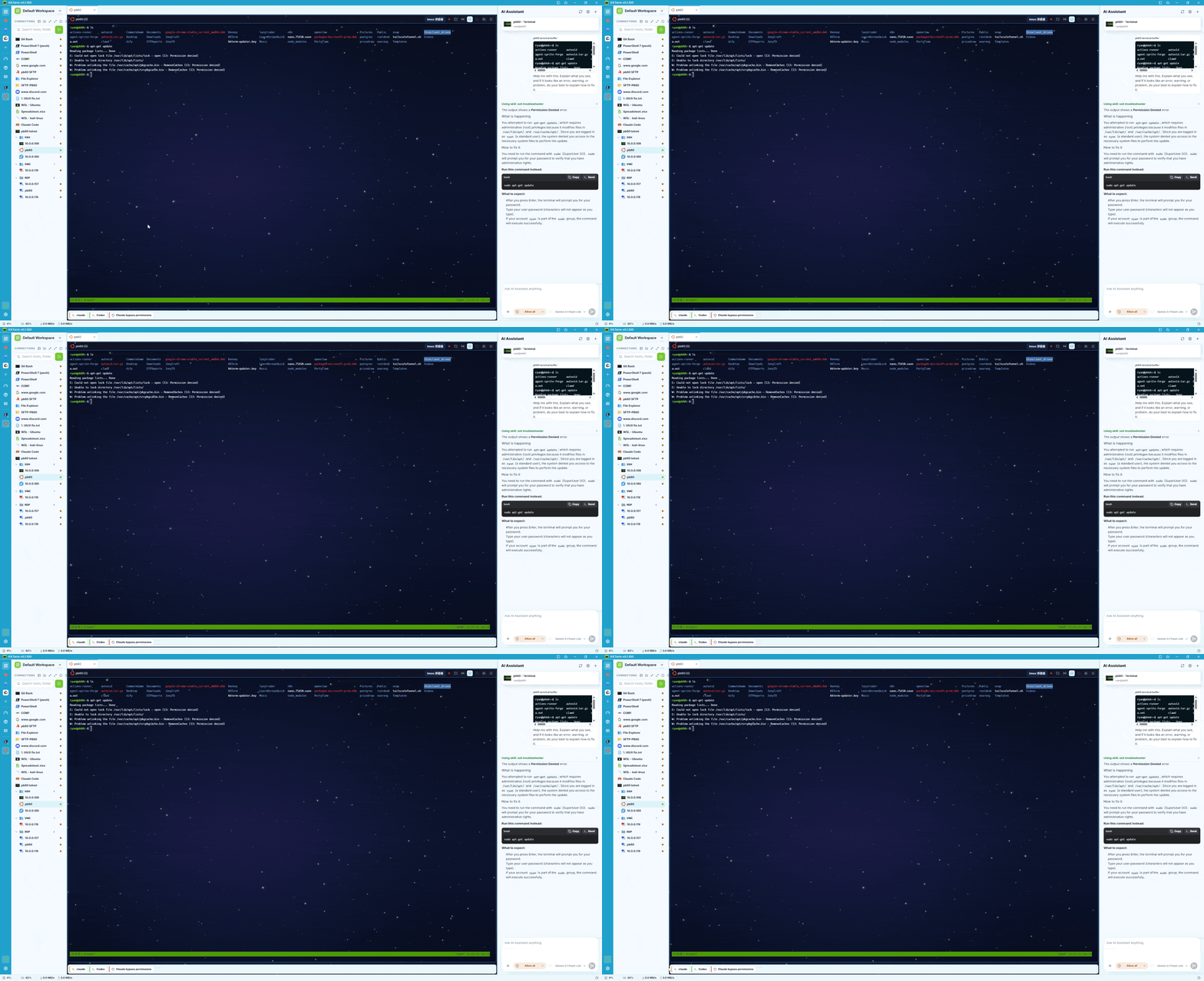
AI Assistant — approval-gated tools for Sessions, Dashboard, IT Ops, and Custom Modules, plus attachments, send-to-terminal, MCP, and reusable Assistant Skills.
-
Dashboard — switchable Views with draggable, resizable built-in or AI-created widgets, App Launcher, live Connection panels, Notes, usage meters, and utility tools.
-
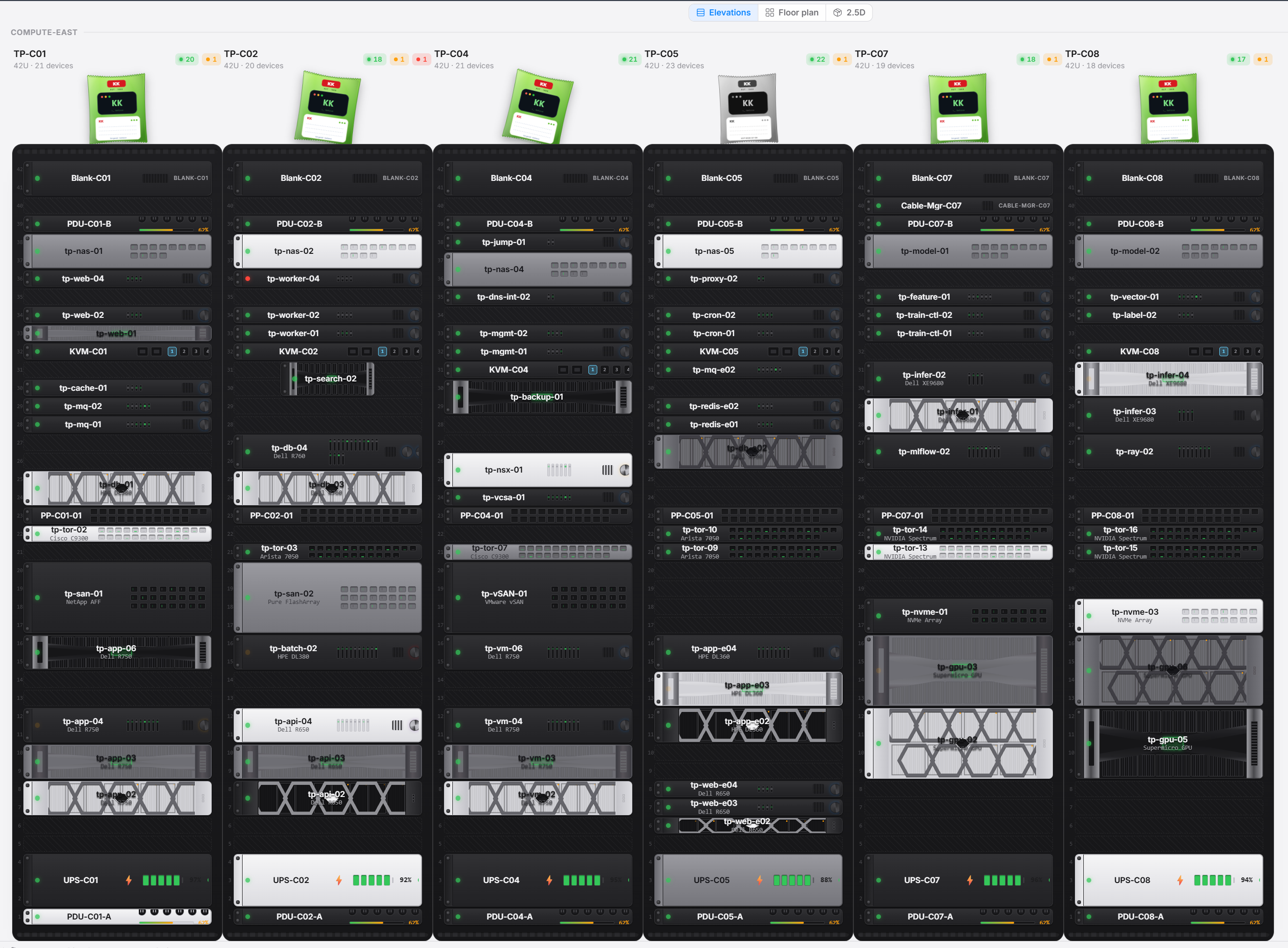
IT Ops — Sites with Server Room and Rack topology (elevation, floor plan, and 2.5D views), Host inventory and connectivity scans, reusable Script and Playbook Tasks, Batch Runs over SSH/WinRM/PsExec, IPAM, VLANs, Network Maps, run history, and PDF/CSV exports.
-
Screenshots — capture a region, window, or full desktop; save to a local library or clipboard; batch resize/convert; and annotate with crop, shapes, text, and mosaic tools.
-
Custom Modules — install isolated
.kkmodpackages from Settings, review declared permissions, add rail destinations, and manage updates, rollback, storage, and uninstall. The repository includes integrations such as Excalidraw, BentoPDF, OpenFlowKit, and TiddlyWiki. -
Install Helper (Windows) — discover, install, update, and uninstall tools, including supported local web apps and services.
Make it yours
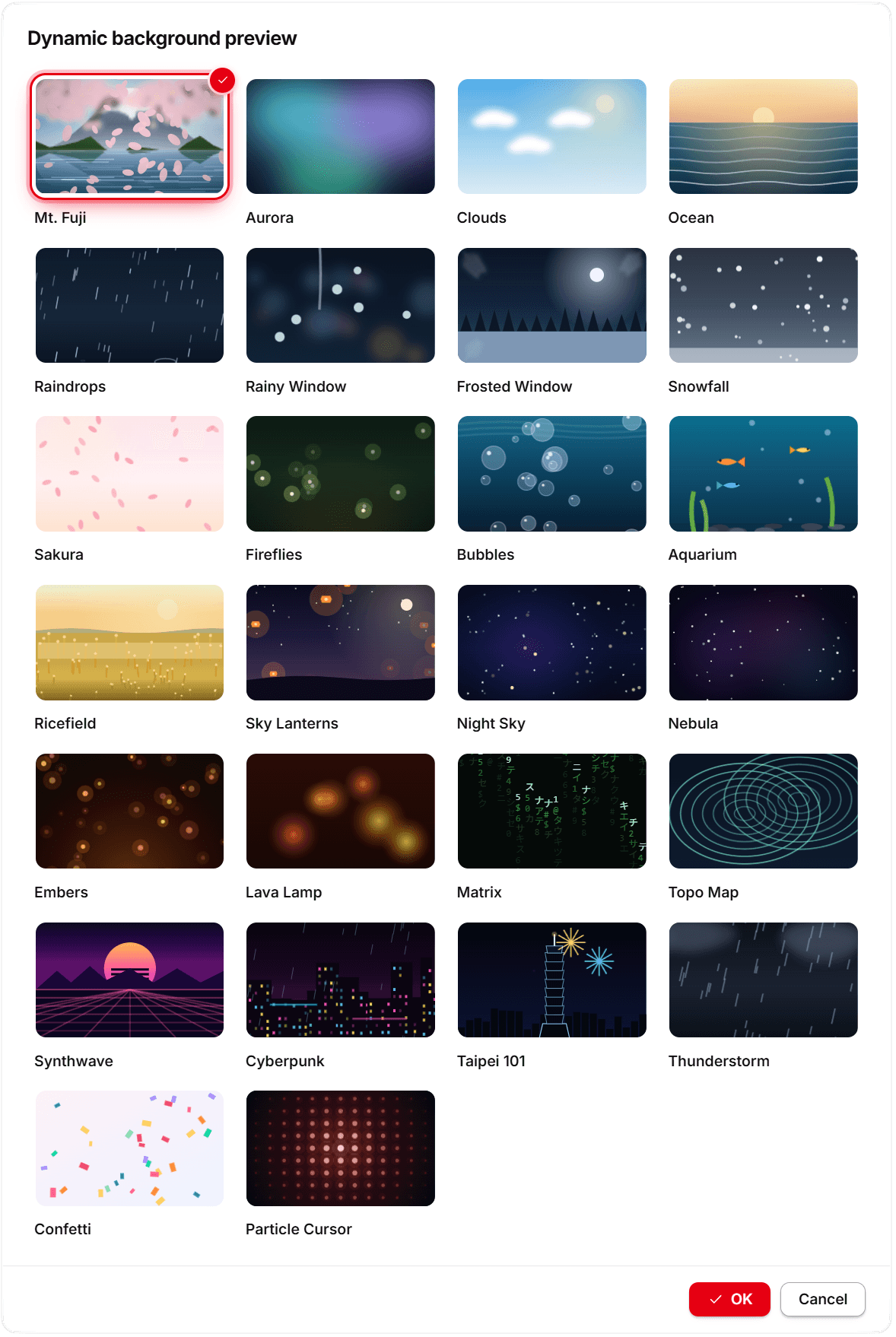
Dashboard Views, terminal Connections, the Document viewer, and IT Ops drill views share one background picker. Choose from solid and gradient presets, local images and videos, or 84 built-in dynamic backgrounds ranging from oceans and weather to WebGL scenes, space, network graphics, and abstract motion. Hidden or off-screen scenes pause and release their rendering resources. Color themes, terminal appearance settings, custom fonts, and per-Connection backgrounds round out the workspace.
Built-in dynamic background IDs
fuji, aurora, halftone, clouds, ocean, mistySea, maelstrom, sunGlitter, whitecaps, waveField, openOceanBlue, tropicalGreen, waters, raindrops, rainywindow, frostedWindow, snow, sakura, fireflies, bubbles, aquarium, jellyfish, lighthouse, balloons, ricefield, lanterns, heroGeometric, webglLiquid, silkAurora, animatedGradient, starfield, nebula, orbitals, ditherPrismHero, closingPlasma, prismGradient, embers, lava, ink, dunes, savanna, matrix, topo, synthwave, circuit, crystals, cyberpunk, taipei101, thunderstorm, confetti, particleCursor, liquidChrome, windowRain, submergedSnellOcean, spectralCascadeOcean, blackHole, predictiveArc, liquidForm, energyOrb, noiseFlow, streamConvergence, bellField, flowField, condensation, generativeTree, ribbonField, particleOrb, cloudField, voidField, recursiveErosion, quanteraTradingBackground, halftoneFlow, constellationField, particleDrift, particleNetwork, amberHalftone, matrixField, gatewayFlow, connectivityGraph, interfaceLines, defenseLines, topoField, sylvaLivingWorld, templeNight.
See it in action
Get KKTerm
Support development (recommended): get KKTerm from the Microsoft Store (Windows) or the Mac App Store (macOS). One-time payment, no subscription — same app as the free build, plus signed packaging and automatic updates through the store. Every purchase directly funds continued development.
Free builds: download the latest release for Windows, macOS, or Linux. Windows provides a setup executable and x64/ARM64 portable ZIPs; extract a portable ZIP to a writable local folder or removable drive, not a network share. Verify the adjacent .sha256 file before running a package.
To build from source, start with CONTRIBUTING.md.
Store editions: honest limitations
The Mac App Store build runs inside Apple's App Sandbox, so it is not 1:1 the free build:
- Local shells are sandboxed too —
$HOMEis the app container, so dotfiles,~/.ssh, and Homebrew tools are unavailable. Remote SSH Sessions are unaffected; use the direct-download macOS build for unconfined local shell work. - Each real folder needs a one-time grant through the native picker (remembered across restarts); the SFTP local pane starts in the container's Documents, and screenshots default to a container folder.
- No video recording and no shutdown-timer menu; the first download of a URL Connection asks for a destination folder.
- Updates come from the App Store only (no in-app updater). Sandboxed MCP clients cannot reach the built-in bridge, and ping falls back to a TCP probe. When switching from the direct-download build, remove the old Screen Recording entry under Privacy & Security and re-approve it.
The Microsoft Store build is the full Windows app with two differences: a 7-day trial (the Store license is checked once per launch and never locks the app if the Store is unreachable) and Store-owned updates.
Full details live in docs/MAC_APP_STORE.md and manual chapters 2, 5, 7, 8, 11, 14, and 15.
Contribute, support, and docs
Contributions and bug reports are welcome. See CONTRIBUTING.md, then browse the operation manual, architecture, Dashboard guide, IT Ops guide, and Custom Module host API.
If KKTerm is useful, the most impactful support is a Microsoft Store or Mac App Store purchase (one-time payment, no subscription) — or you can buy me a coffee.
License
KKTerm's source is MIT with the Commons Clause. Vendored crates, Custom Modules, fonts, and icon packs remain under their own licenses; see LICENSE and the notices in their directories.