← 开源
Spandan-Madan

Me_Bot

Build a bot that speaks like you!

TutorialsML/AI fundamentalsJupyter Notebook
在 GitHub 打开
增长势头
+024 小时新增 Star0.0%
687
Star
68
Fork
+1
本周
3
贡献者
创建于 2018-11-17 · 更新于 2026-10-13 · 今日第 14995 名
主要开发者
Spandan-MadanDiegoD94hlkcrcck

Spandan-Madan/Me_Bot 排名第 14,995,有 687 个星标。

同类别比较

Spandan-Madan/Me_Bot 排名第 14,995,此处有 8 个同类条目;jdtoscano94/NABLA-SciML 排名第 14,996。

同类别比较
名称排名指标
oreilly-japan/deep-learning-from-scratch-414,975
语言:
Jupyter Notebook
星标数:
689
分叉数:
240
简介:
『ゼロから作る Deep Learning ❹』(O'Reilly Japan, 2022)
JordiCorbilla/stock-prediction-deep-neural-learning14,980
语言:
Python
星标数:
688
分叉数:
127
简介:
Predicting stock prices using a TensorFlow LSTM (long short-term memory) neural network for times series forecasting
CHH3213/chhRobotics14,989
语言:
Jupyter Notebook
星标数:
687
分叉数:
203
简介:
自动驾驶规划控制python代码实现
DFin/Neural-Network-Visualisation14,990
语言:
JavaScript
星标数:
687
分叉数:
78
简介:
Interactive web visualisation for handwritting detection using a simple neural network
jdtoscano94/NABLA-SciML14,996
语言:
Jupyter Notebook
星标数:
687
分叉数:
202
简介:
Physics Informed Machine Learning Tutorials (Pytorch and Jax)
Azure/DeepLearningForTimeSeriesForecasting15,000
语言:
Jupyter Notebook
星标数:
686
分叉数:
283
简介:
A tutorial demonstrating how to implement deep learning models for time series forecasting
dswh/ai-engineer-roadmap15,005
星标数:
686
分叉数:
118
简介:
A roadmap describing the required skills, learning resources and sample tools to become an AI Engineer
featurestoreorg/serverless-ml-course15,006
语言:
Jupyter Notebook
星标数:
686
分叉数:
297
简介:
Serverless Machine Learning Course for building AI-enabled Prediction Services from models and features
关键参数与规格
关键参数与规格
参数值
语言Jupyter Notebook
类别Tutorials
子类别ML/AI fundamentals
关键词AI character, Digital twins
星标数687
分叉数68
贡献者3
创建日期2018-11-17
更新日期2026-10-13
1 天星标数0
7 天星标数1
排名14,995
上次排名14,824
排名变化-171
7 天星标排名10,931
上次 7 天星标排名10,988
7 天星标排名变化57
总星标排名15,099
上次总星标排名15,070
总星标排名变化-29
国家USA
README 摘录

Me_Bot A simple tool to make a bot that speaks like you, simply learning from your WhatsApp Chats. From WhatsApp on your phone, go to any chat and export it by going into the settings. Move the txt file that you receive inside the Me_Bot folder. Before running, change the names of the people by changing YOUR_NAME and OTHER_NAME in the scripts according to the txt file you have for your chats. ipynb file and you

can play with the bot at the bottom! NOTE - Actively seeking collaborators for fun side projects like this. If you're itnerested, please drop me a mail at smadan@mit. edu For wechat user: Wechat chat history is save in SQLite Database, therefore you need to export from you Phone. Basically, if you have a iPhone, there are the steps to get the database file: 1. Use iTunes to backup your phone (unselect encrypt backup) 2. Use iTools to open the

backup file and get a copy of your database file named MM. run Find more detail information about this here This is the database, each table starts with 'Chat_' corresponding to a chat history with a friend, you need to find the table id you want to generate the chat robot to run the script above. Currently only English chat is supported, Chinese version is under constructing.

常见问题

记录了多少星标和分叉?

Spandan-Madan/Me_Bot 有 687 个星标和 68 个分叉。

仓库排名是多少?

Spandan-Madan/Me_Bot 排名第 14,995。

记录的语言和类别是什么?

Spandan-Madan/Me_Bot 有 687 个星标,语言为 Jupyter Notebook,类别为 Tutorials。

哪个仓库排名最接近?

Spandan-Madan/Me_Bot 与 jdtoscano94/NABLA-SciML 比较,后者排名第 14,996,有 687 个星标。

README

Me_Bot

A simple tool to make a bot that speaks like you, simply learning from your WhatsApp Chats.

Instructions:-

  1. From WhatsApp on your phone, go to any chat and export it by going into the settings. Move the txt file that you receive inside the Me_Bot folder.

  2. Run the clean_whatsapp_chats.py script using the command. Before running, change the names of the people by changing YOUR_NAME and OTHER_NAME in the scripts according to the txt file you have for your chats.

python clean_whatsapp_chats.py whatsapp_chat.txt

  1. Run the prepare_files.ipynb ipython notebook.

  2. Run the Me_Bot.ipynb file and you can play with the bot at the bottom!

NOTE - Actively seeking collaborators for fun side projects like this. If you're itnerested, please drop me a mail at smadan@mit.edu

For wechat user:

Wechat chat history is save in SQLite Database, therefore you need to export from you Phone. Basically, if you have a iPhone, there are the steps to get the database file:

  1. Use iTunes to backup your phone (unselect encrypt backup)
  2. Use iTools to open the backup file and get a copy of your database file named MM.sqlite
  3. run python clean_wechat_chats.py YOUR_DATABASE_PATH YOUR_FRIEND_ID

Find more detail information about this here
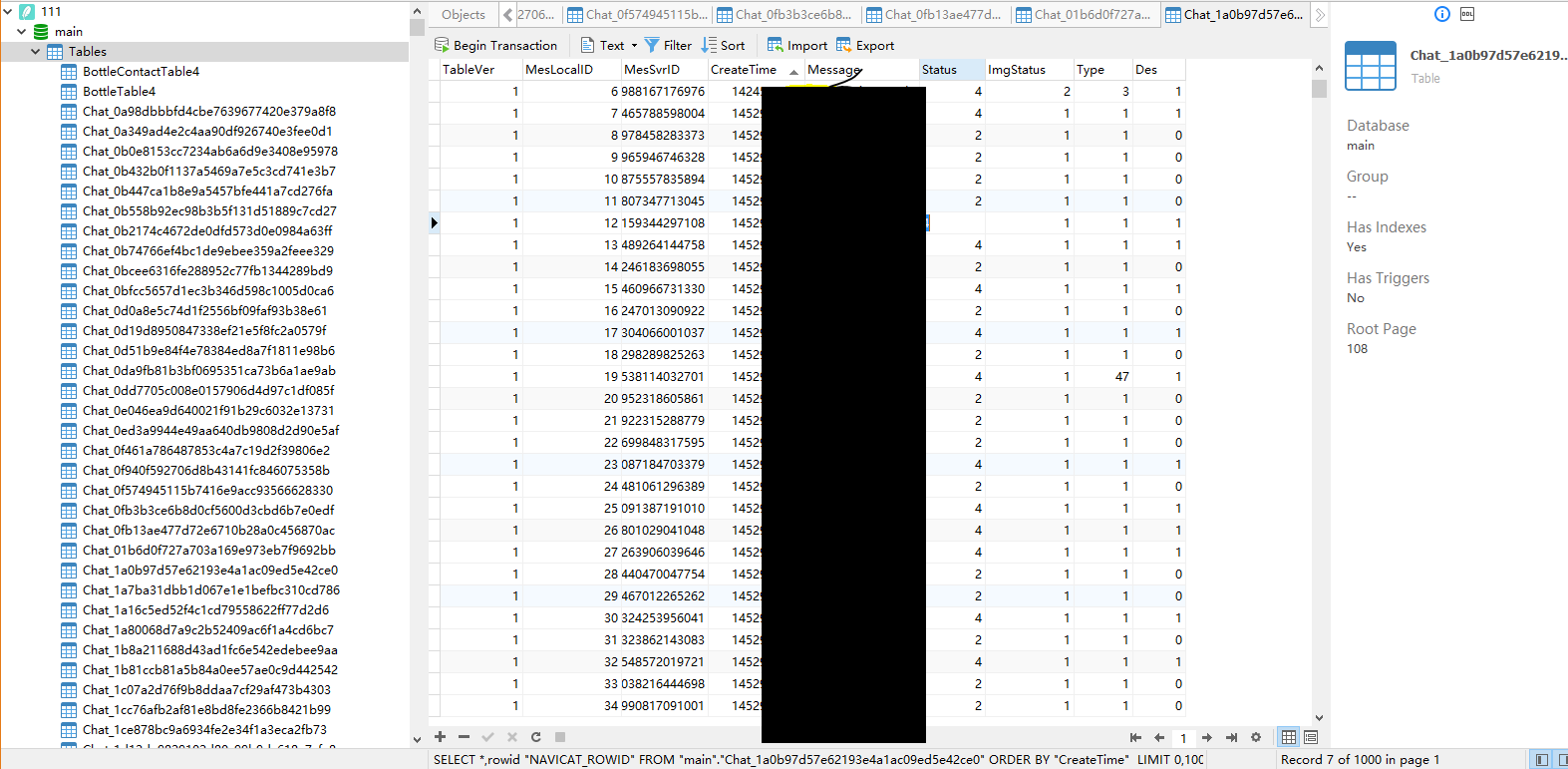
This is the database, each table starts with 'Chat_' corresponding to a chat history with a friend, you need to find the table id you want to generate the chat robot to run the script above. Currently only English chat is supported, Chinese version is under constructing.

排名相邻
同类项目