← Open Source
vietanhdev

open-adas

An open source advanced driver assistance system (ADAS) that uses Jetson Nano as the hardware. Features: Traffic sign detection, Forward collision warning, Lane departure warning.

ApplicationsSpecialistsObject detectionC++
Open on GitHub
Momentum
+0stars in 24 hours0.0%
505
Stars
140
Forks
+1
This week
3
Contributors
Created 2020-03-22 · Updated 2026-10-15 · #18219 today
Top developers
vietanhdevTrellixVulnTeamuyrusali

vietanhdev/open-adas is ranked 18,219 with 505 stars.

Same-category comparison

vietanhdev/open-adas is ranked 18,219 among these 8 peers; Intelligent-Internet/ii-researcher is ranked 18,221.

Same-category comparison
NameRankMetrics
jremillard/images-to-osm18,187
Language:
Python
Stars:
506
Forks:
80
Description:
Use Mask R-CNN/Keras/TensorFlow and OSM to find features in satellite images for fun.
martin-rizzo/AmazingZImageWorkflow18,191
Language:
Python
Stars:
506
Forks:
37
Description:
Z-Image workflow with predefined styles for high-quality image generation and a user-friendly experience. Includes pre-configured versions for GGUF and SAFETENSORS checkpoint formats.
ryantsai/KKTerm18,193
Language:
TypeScript
Stars:
506
Forks:
60
Dhravya/notty18,198
Language:
TypeScript
Stars:
505
Forks:
61
Description:
An open source, minimal AI powered note taking app and powerful markdown editor.
Intelligent-Internet/ii-researcher18,221
Language:
Python
Stars:
504
Forks:
78
Description:
II-Researcher: a new open-source framework designed to aid building search / research agents.
VelornLabs/velorn18,228
Language:
JavaScript
Stars:
504
Forks:
72
Description:
AI-native video editing built around real creative timelines, generative workflows, and local agent control.
adewaskar/jarvis18,229
Language:
TypeScript
Stars:
504
Forks:
218
Description:
J.A.R.V.I.S for automating your daily tasks using Claude Code.
deonmenezes/mantishack18,256
Language:
Rust
Stars:
503
Forks:
76
Description:
Mantis Hack.
Key parameters and specifications
ParameterValue
LanguageC++
CategoryApplications
SubcategorySpecialists, Object detection
KeywordsAutonomous vehicles, Computer vision, IoT
Stars505
Forks140
Contributors3
Created date2020-03-22
Updated date2026-10-15
Stars in 1 day0
Stars in 7 days1
Rank18,219
Previous rank7,083
Rank change-11,136
7-day stars rank11,604
Previous 7-day stars rank11,652
7-day stars rank change48
Total stars rank19,225
Previous total stars rank19,189
Total stars rank change-36
CountryVietnam
README summary

OpenADAS - An advanced driver-assistance system using Jetson Nano An advanced driver-assistance system on Jetson Nano embedded computer with four main functions: forward collision warning, lane departure warning, traffic sign recognition and overspeed warning. This repository contains source code for Jetson Nano, not including the source code for model training and conversion. Documentation: **(Blog) Intro and Hardware:** . **(Documentation) OpenADAS:** *Design, CANbus, Calibration, Model training and deployment notes*: docs/open-adas. **(Documentation) How to setup on a Jetson Xavier:** docs

/setup-jetson-xavier. **For TensorRT 7 support:** Currently, only TensorRT 5 and 6 are supported. TensorRT 7 has a lot of deprecated APIs and I think there is no way to run this project directly with that version. I don't have time to continue with this project soon, so I really need your contributions to extend this project further. Quick setup on Jetson Nano: SD Card image I created an image of my SD card here. You can flash and

run this image on Jetson Nano. **Note:** The source code and binary files in this SD card image is older than in branch. Please upgrade to the lastest source code and recompile on your device. Use Alt+F4 to exit the GUI and start editing your source code. Login information: Compile from source Requirements: CMake >= 3. **This project should work with TensorRT 5 and TensorRT 6. 04 Setup Install QT: Install OpenCV Install protobuf 3. 1 Models and test data

Download models and testing data here and put into root folder of this project. Compile and Run Update : Modify in to suit your GPU. For Jetson Nano, GPU_ARCHS = 53 and for my RTX 2070, GPU_ARCHS = 75. Read more in following posts: + Compile Replace with your own path. Setup virtual CAN (run once) Run **Arguments:** | default: : Input source. | optional : Path to video file for simulation. | optional : Path to data file for simulation. | default: : On development machine or not. When

this value is set to , OpenADAS will be launched in fullscreen mode without mouse (touch UI). You should this value to in development environment. Specify and if you want to load a simulation scenario by default. Otherwise, you can select scenarios from simulation selector. **Issue: , ** **Note:** The paths can be different on your computer. **Issue: Qt5Multimedia missing** How to fix? **Issue: Need to specify CUDA root** How to fix? You should change the path corresponding to your environment. **Issue: Qt5

library not found** **Issue: SIOCGIFINDEX: No such device** References: Objects as Points - Xingyi Zhou, Dequan Wang, Philipp Krähenbühl: U-Net: Convolutional Networks for Biomedical Image Segmentation - Olaf Ronneberger, Philipp Fischer, Thomas Brox: Deep Residual Learning for Image Recognition - Kaiming He, Xiangyu Zhang, Shaoqing Ren, Jian Sun: Dark Theme for Qt5 by Juergen Skrotzky: ICSim: .

Frequently asked questions

How many stars and forks are recorded?

vietanhdev/open-adas has 505 stars and 140 forks.

What is the repository rank?

vietanhdev/open-adas is ranked 18,219.

What language and category are recorded?

vietanhdev/open-adas has 505 stars, uses C++ and belongs to Applications.

Which repository is closest in rank?

vietanhdev/open-adas is compared with Intelligent-Internet/ii-researcher, ranked 18,221 with 504 stars.

README

OpenADAS - An advanced driver-assistance system using Jetson Nano

An advanced driver-assistance system on Jetson Nano embedded computer with four main functions: forward collision warning, lane departure warning, traffic sign recognition and overspeed warning. This repository contains source code for Jetson Nano, not including the source code for model training and conversion.
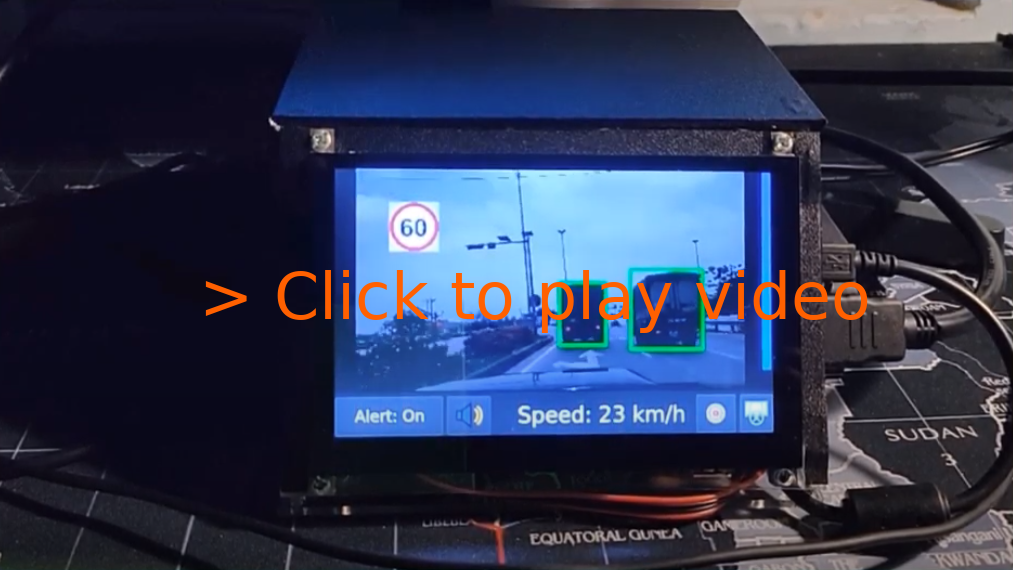
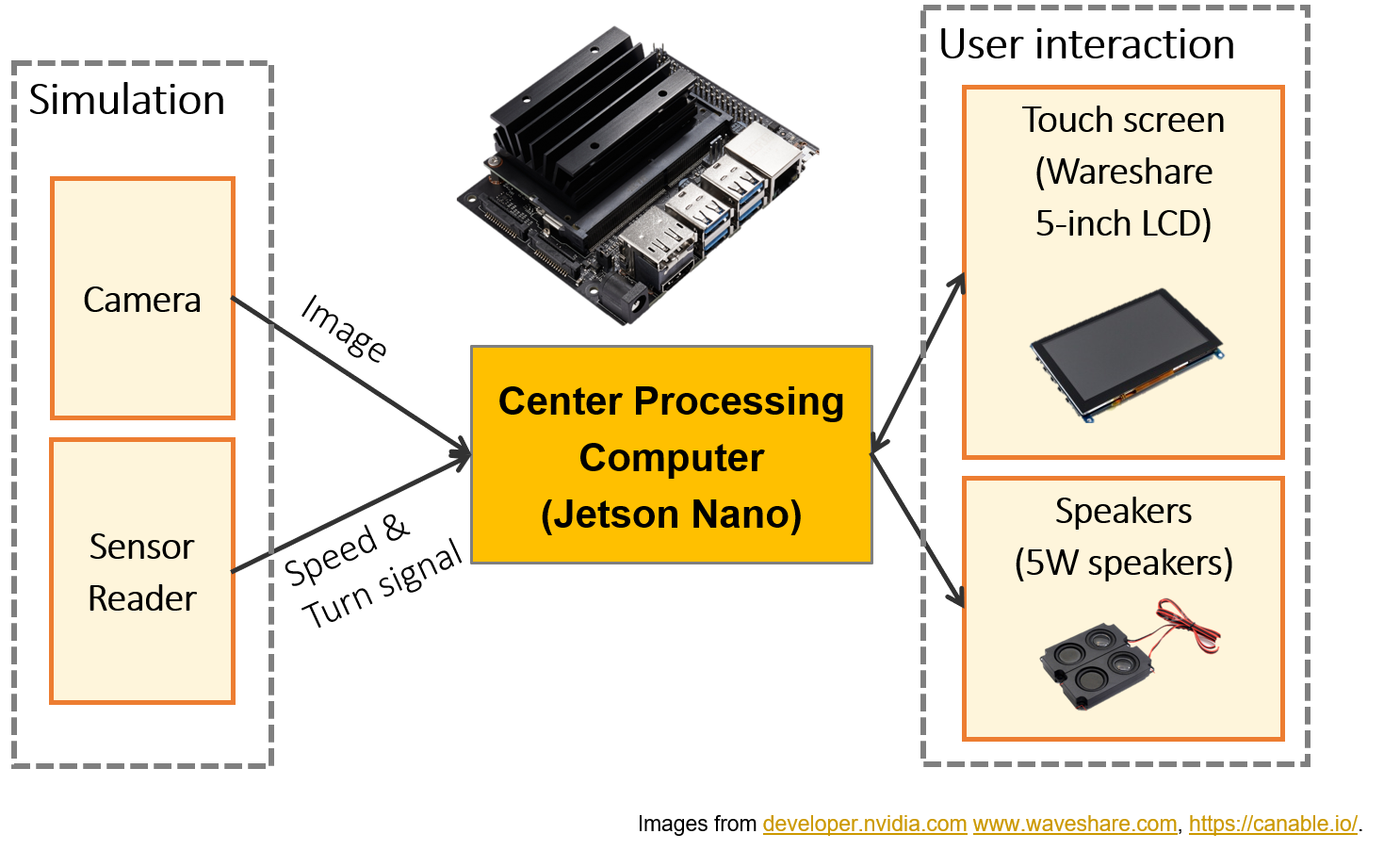
Documentation:

  • (Blog) Intro and Hardware: .
  • (Blog) Software stack: .
  • (Blog) Deep neural networks: .
  • (Documentation) OpenADAS: Design, CANbus, Calibration, Model training and deployment notes: docs/open-adas.md.
  • (Documentation) How to setup on a Jetson Xavier: docs/setup-jetson-xavier.md.

For TensorRT 7 support: Currently, only TensorRT 5 and 6 are supported. TensorRT 7 has a lot of deprecated APIs and I think there is no way to run this project directly with that version. I don't have time to continue with this project soon, so I really need your contributions to extend this project further.

Quick setup on Jetson Nano: SD Card image

I created an image of my SD card here. You can flash and run this image on Jetson Nano.

Note:

  • The source code and binary files in this SD card image is older than in master branch. Please upgrade to the lastest source code and recompile on your device.
  • Use Alt+F4 to exit the GUI and start editing your source code.
  • Login information:
    • Username: smartcam.
    • Password: Open Terminal and type sudo passwd smartcam to change the password.

Compile from source

Requirements:

  • CMake >= 3.10
  • Qt 5
  • OpenCV >= 4.0.1
  • C++ 17 compiler
  • CUDA 10.x
  • TensorRT 5.1.5-1+cuda10.1, or - TensorRT 6.0.1.8+10.2. This project should work with TensorRT 5 and TensorRT 6. TensorRT 7 is not supported for now.

Setup for Linux - Ubuntu 18.04

Setup

  • Install QT:
sudo apt-get install build-essential
sudo apt-get install qt5-default qtcreator qt5-doc qt5-doc-html qtbase5-doc-html qtbase5-examples -y
sudo /sbin/ldconfig -v
  • Install OpenCV
https://linuxize.com/post/how-to-install-opencv-on-ubuntu-18-04/
  • Install protobuf 3.6.1
https://github.com/protocolbuffers/protobuf

Models and test data

  • Download models and testing data here and put into root folder of this project.

Compile and Run

  • Update GPU_ARCHS: Modify GPU_ARCHS in CMakeLists.txt to suit your GPU. For Jetson Nano, GPU_ARCHS = 53 and for my RTX 2070, GPU_ARCHS = 75. Read more in following posts: + +

  • Compile

cd 
mkdir build
cd build
cmake -DCUDA_INCLUDE_DIRS=/usr/local/cuda-10.2/include ..
make

Replace CUDA_INCLUDE_DIRS with your own path.

  • Setup virtual CAN (run once)
sudo bash setup_vcan.sh
  • Run
cd build/bin
./OpenADAS

Arguments:

  • --input_source | default: simulation : Input source. 'camera' or 'simulation'.
  • --input_video_path | optional : Path to video file for simulation.
  • --input_data_path | optional : Path to data file for simulation.
  • --on_dev_machine | default: true : On development machine or not. When this value is set to false, OpenADAS will be launched in fullscreen mode without mouse (touch UI). You should this value to true in development environment.

Specify input_video_path and input_data_path if you want to load a simulation scenario by default. Otherwise, you can select scenarios from simulation selector.

Known issues

Issue: cublas_v2.h not found

fatal error: cublas_v2.h: No such file or directory
 #include 
          ^~~~~~~~~~~~~
compilation terminated.
  • Step 1: Find lib: find /usr/local/ -name cublas_v2.h.
  • Step 2: Export to path: export CPLUS_INCLUDE_PATH=$CPLUS_INCLUDE_PATH:/usr/local/cuda-10.2/targets/x86_64-linux/include/.
  • Step 3: Use CMake and build.

Issue: /usr/bin/ld: cannot find -lcudart, /usr/bin/ld: cannot find -lcublas

sudo ln -s /usr/local/cuda/lib64/libcudart.so /usr/lib/libcudart.so
sudo ln -s /usr/local/cuda/lib64/libcublas.so /usr/lib/libcublas.so

Note: The paths can be different on your computer.

Issue: Qt5Multimedia missing

Could not find a package configuration file provided by "Qt5Multimedia"
  with any of the following names:

    Qt5MultimediaConfig.cmake
    qt5multimedia-config.cmake

How to fix?

sudo apt-get install qttools5-dev-tools libqt5svg5-dev qtmultimedia5-dev

Issue: Need to specify CUDA root

[cmake] CMake Error at /usr/share/cmake-3.10/Modules/FindCUDA.cmake:682 (message):
[cmake]   Specify CUDA_TOOLKIT_ROOT_DIR

How to fix?

export CUDA_TOOLKIT_ROOT_DIR=/usr/local/cuda-10.2/

You should change the path corresponding to your environment.

Issue: Qt5 library not found

 fatal error: QtWidgets/QCloseEvent: No such file or directory
 #include 
          ^~~~~~~~~~~~~~~~~~~~~~~
compilation terminated.

Issue: SIOCGIFINDEX: No such device

sudo bash setup_vcan.sh

References:

Nearby in the ranking
Similar items