A Claude skill that automatically posts personalized, authentic comments in your target communities.
关键参数与规格
关键参数与规格
参数
值
语言
Python
类别
Applications
子类别
Content creation
关键词
Deepfakes
星标数
586
分叉数
138
贡献者
7
创建日期
2023-05-31
更新日期
2026-10-14
1 天星标数
0
7 天星标数
1
排名
16,542
上次排名
6,848
排名变化
-9,694
7 天星标排名
11,260
上次 7 天星标排名
11,313
7 天星标排名变化
53
总星标排名
17,101
上次总星标排名
17,063
总星标排名变化
-38
国家
Spain
README 摘录
Refacer: One-Click Deepfake Multi-Face Swap Tool 👉 Watch demo on Youtube Refacer, a simple tool that allows you to create deepfakes with multiple faces with just one click! This project was inspired by Roop and is powered by the excellent Insightface. Refacer requires no training - just one photo and you're ready to go. :warning: Please, before using the code from this repository, make sure to read the disclaimer. If you manage to compile for Silicon, the program is prepared
to use CoreML. Prerequisites Ensure that you have installed and correctly configured. There are many guides available on the internet to help with this. Here are a few (note: I did not create these guides): How to Install FFmpeg Installation Refacer has been tested and is known to work with Python 3. 9, but it is likely to work with other Python versions as well. It is recommended to use a virtual environment for setting up and running the project
to avoid potential conflicts with other Python packages you may have installed. Follow these steps to install Refacer: 1. Download the Insightface model: You can manually download the model created by Insightface from this link and add it to the project folder. Alternatively, if you have installed, you can use the following command: 3. Install dependencies: For more details on using the Insightface model, you can refer to their example. Usage Once you have successfully installed Refacer and its dependencies
, you can run the application using the following command: Then, open your web browser and navigate to the following address: Questions? If you have any questions or issues, feel free to open an issue or submit a pull request. Recognition Module The folder in this repository is derived from Insightface's GitHub repository. You can find the original source code here: Insightface Recognition Source Code This module is used for recognizing and handling face data within the Refacer application, enabling its
powerful deepfake capabilities. We are grateful to Insightface for their work and for making their code available. Disclaimer :warning: This software is provided "as is", without warranty of any kind, express or implied, including but not limited to the warranties of merchantability, fitness for a particular purpose and noninfringement. In no event shall the authors or copyright holders be liable for any claim, damages or other liability, whether in an action of contract, tort or otherwise, arising from, out of
or in connection with the software or the use or other dealings in the software. :warning: This software is intended for educational and research purposes only. It is not intended for use in any malicious activities. The author of this software does not condone or support the use of this software for any harmful actions, including but not limited to identity theft, invasion of privacy, or defamation. Any use of this software for such purposes is strictly prohibited. :warning: You
may only use this software with images for which you have the right to use and the necessary permissions. Any
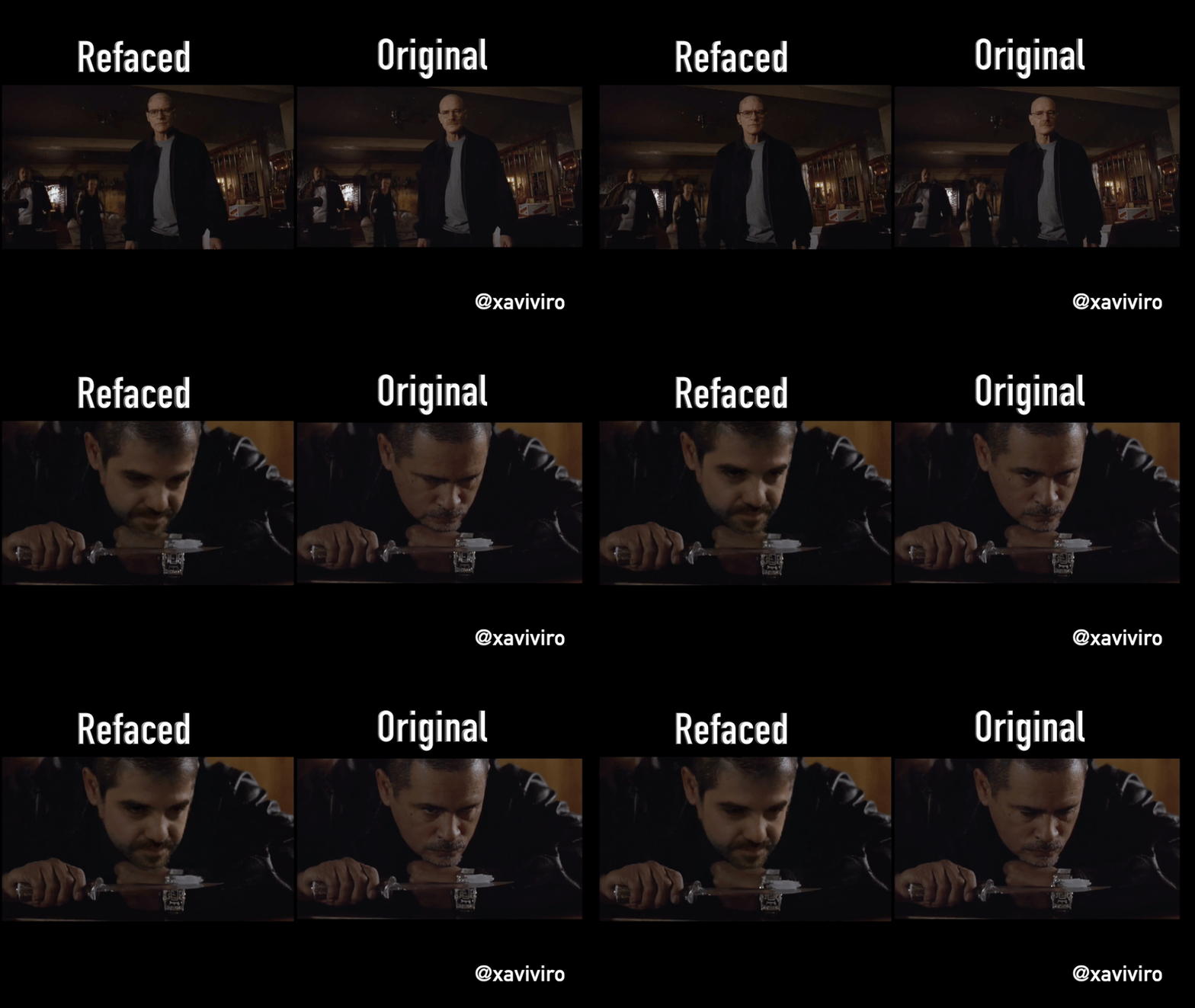
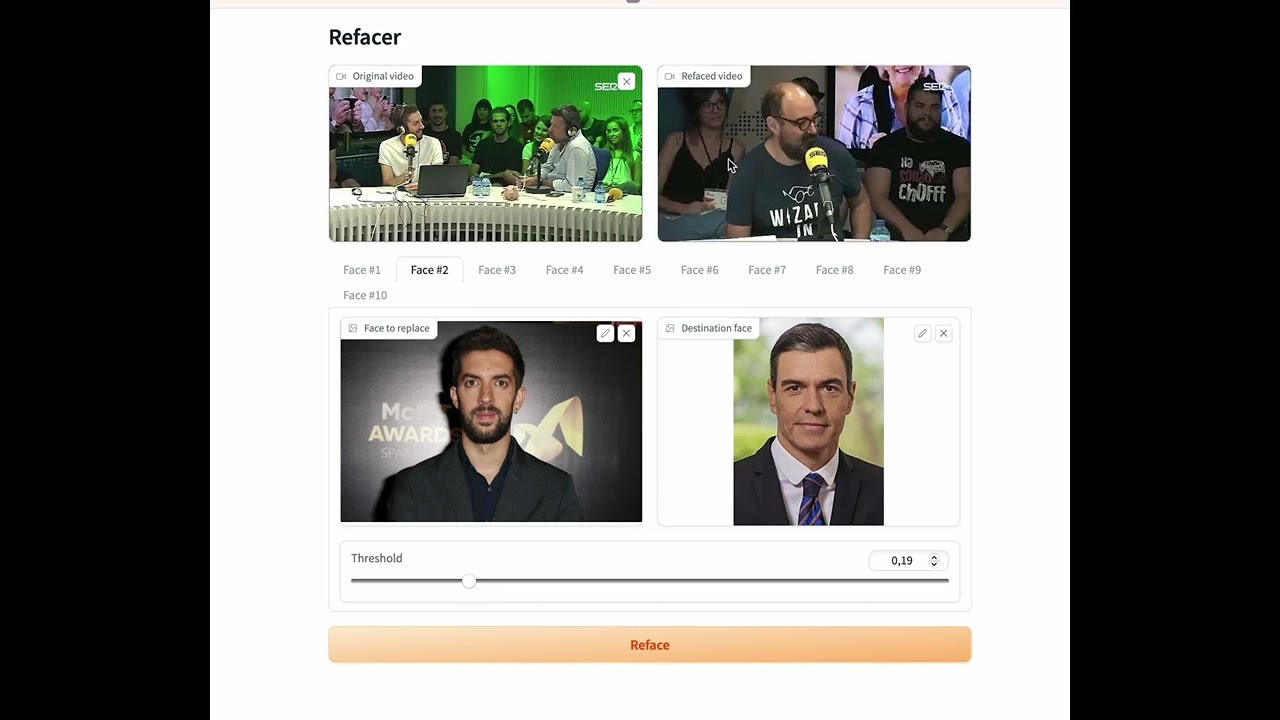
Refacer, a simple tool that allows you to create deepfakes with multiple faces with just one click! This project was inspired by Roop and is powered by the excellent Insightface. Refacer requires no training - just one photo and you're ready to go.
:warning: Please, before using the code from this repository, make sure to read the disclaimer.
Demonstration
System Compatibility
Refacer has been thoroughly tested on the following operating systems:
Operating System
CPU Support
GPU Support
MacOSX
✅
:warning:
Windows
✅
✅
Linux
✅
✅
The application is compatible with both CPU and GPU (Nvidia CUDA) environments, and MacOSX(CoreML)
:warning: Please note, we do not recommend using onnxruntime-silicon on MacOSX due to an apparent issue with memory management. If you manage to compile onnxruntime for Silicon, the program is prepared to use CoreML.
Prerequisites
Ensure that you have ffmpeg installed and correctly configured. There are many guides available on the internet to help with this. Here are a few (note: I did not create these guides):
Refacer has been tested and is known to work with Python 3.10.9, but it is likely to work with other Python versions as well. It is recommended to use a virtual environment for setting up and running the project to avoid potential conflicts with other Python packages you may have installed.
Follow these steps to install Refacer:
Clone the repository:
git clone https://github.com/xaviviro/refacer.git
cd refacer
Download the Insightface model:
You can manually download the model created by Insightface from this link and add it to the project folder. Alternatively, if you have wget installed, you can use the following command:
For CPU (compatible with Windows, MacOSX, and Linux):
pip install -r requirements.txt
For GPU (compatible with Windows and Linux only, requires a NVIDIA GPU with CUDA and its libraries):
pip install -r requirements-GPU.txt
For CoreML (compatible with MacOSX, requires Silicon architecture):
pip install -r requirements-COREML.txt
For more information on installing the CUDA necessary to use onnxruntime-gpu, please refer directly to the official ONNX Runtime repository.
For more details on using the Insightface model, you can refer to their example.
Usage
Once you have successfully installed Refacer and its dependencies, you can run the application using the following command:
python app.py
Then, open your web browser and navigate to the following address:
http://127.0.0.1:7680
Questions?
If you have any questions or issues, feel free to open an issue or submit a pull request.
Recognition Module
The recognition folder in this repository is derived from Insightface's GitHub repository. You can find the original source code here: Insightface Recognition Source Code
This module is used for recognizing and handling face data within the Refacer application, enabling its powerful deepfake capabilities. We are grateful to Insightface for their work and for making their code available.
Disclaimer
:warning: This software is provided "as is", without warranty of any kind, express or implied, including but not limited to the warranties of merchantability, fitness for a particular purpose and noninfringement. In no event shall the authors or copyright holders be liable for any claim, damages or other liability, whether in an action of contract, tort or otherwise, arising from, out of or in connection with the software or the use or other dealings in the software.
:warning: This software is intended for educational and research purposes only. It is not intended for use in any malicious activities. The author of this software does not condone or support the use of this software for any harmful actions, including but not limited to identity theft, invasion of privacy, or defamation. Any use of this software for such purposes is strictly prohibited.
:warning: You may only use this software with images for which you have the right to use and the necessary permissions. Any use of images without the proper rights and permissions is strictly prohibited.
:warning: The author of this software is not responsible for any misuse of the software or for any violation of rights and privacy resulting from such misuse.
:warning: To prevent misuse, the software contains an integrated protective mechanism that prevents it from working with illegal or similar types of media.
:warning: By using this software, you agree to abide by all applicable laws, to respect the rights and privacy of others, and to use the software responsibly and ethically.