RunVSAgent
English | 简体中文


Run VSCode-based Coding Agents in Other IDE platforms
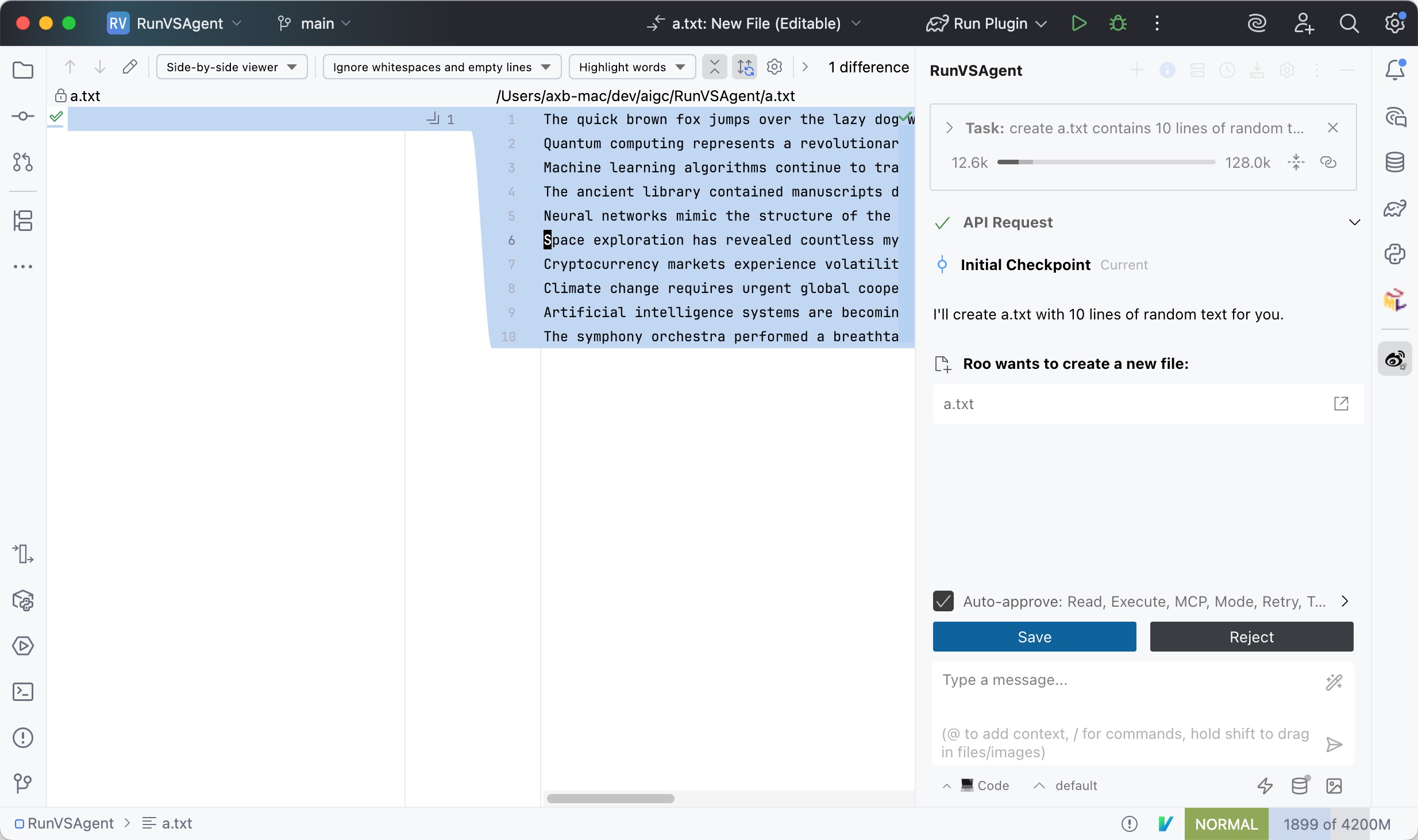
RunVSAgent is an innovative cross-platform development tool that enables developers to run VSCode-based coding agents and extensions within JetBrains IDEs (IntelliJ IDEA, WebStorm, PyCharm, etc.) or other IDE platforms.
📸 Screenshot
🚀 Core Features
- VSCode Agent Compatibility: Seamlessly run VSCode-based coding agents in JetBrains IDEs
- Cross-IDE Development: Unified agent experience across different IDE platforms
🤖 Supported Agents
- Roo Code: Advanced AI-powered coding assistant with intelligent code generation and refactoring capabilities
- Cline: Autonomous coding agent right in your IDE, capable of creating/editing files, executing commands, using the browser, and more with your permission every step of the way.
- Kilo Code: Open-source VS Code AI agent
🔧 Supported IDEs
Jetbrains IDEs
RunVSAgent currently supports the following JetBrains IDE series:
- IntelliJ IDEA (Ultimate & Community)
- WebStorm - JavaScript and TypeScript development
- PyCharm (Professional & Community) - Python development
- PhpStorm - PHP development
- RubyMine - Ruby development
- CLion - C/C++ development
- GoLand - Go development
- DataGrip - Database development
- Rider - .NET development
- Android Studio - Android development
Note: Requires JetBrains IDE version 2023.1 or later for optimal compatibility.
🏗️ Architecture
graph TB
    subgraph "JetBrains IDE"
        A[JetBrains Plugin
Kotlin]
        B[UI Integration]
        C[Editor Bridge]
    end

    subgraph "Extension Host"
        D[Node.js Runtime]
        E[VSCode API Layer]
        F[Agent Manager]
    end

    subgraph "VSCode Agents"
        G[Coding Agent]
    end

    A <-->|RPC Communication| D
    B --> A
    C --> A

    E --> D
    F --> D

    G --> E
Architecture Components:
- JetBrains Plugin: Kotlin-based IDE plugin for JetBrains IDE integration
- Extension Host: Node.js runtime environment providing VSCode API compatibility layer
- RPC Communication: High-performance inter-process communication for real-time data exchange
- VSCode Agents: Various coding agents and extensions developed for the VSCode platform
📦 Installation
Download from JetBrains Marketplace (Recommended)
Recommended Method: We recommend downloading and installing the plugin from JetBrains Marketplace first, as this is the most convenient and secure installation method.
-
Online Installation:
- Open your JetBrains IDE (IntelliJ IDEA, WebStorm, PyCharm, etc.)
- Go to
Settings/Preferences→Plugins - Search for "RunVSAgent" in the
Marketplacetab - Click the
Installbutton - Restart your IDE when prompted
-
Verify Installation: After restart, you should see the RunVSAgent plugin in your IDE's plugin list
Download from GitHub Releases
You can download the pre-built plugin from our GitHub releases page:
-
Download Plugin: Visit the GitHub Releases page and download the latest plugin file (
.zipformat) -
Install in JetBrains IDE:
- Open your JetBrains IDE (IntelliJ IDEA, WebStorm, PyCharm, etc.)
- Go to
Settings/Preferences→Plugins - Click the gear icon ⚙️ and select
Install Plugin from Disk... - Select the downloaded
.zipfile - Restart your IDE when prompted
-
Verify Installation: After restart, you should see the RunVSAgent plugin in your IDE's plugin list
Build from Source
Prerequisites
- Node.js 18.0+
- JetBrains IDE 2023.1+
- Git
- JDK 17+
Build Steps
# 1. Clone the repository
git clone https://github.com/your-org/RunVSAgent.git
cd RunVSAgent

# 2. Setup development environment
./scripts/setup.sh

# 3. Build the project
./scripts/build.sh

# 4. Install plugin
# Plugin file located at: jetbrains_plugin/build/distributions/
# In IDE: Settings → Plugins → Install Plugin from Disk
Development Mode
# Start extension host in development mode
cd extension_host
npm install
npm run dev

# Run JetBrains plugin in development mode
cd jetbrains_plugin
./gradlew runIde
👥 Developer Information
Project Structure
RunVSAgent/
├── extension_host/          # Node.js Extension Host
│   ├── src/                # TypeScript source code
│   │   ├── main.ts         # Main entry point
│   │   ├── extensionManager.ts  # Extension lifecycle management
│   │   ├── rpcManager.ts   # RPC communication layer
│   │   └── webViewManager.ts    # WebView support
│   └── package.json        # Node.js dependencies
├── jetbrains_plugin/       # JetBrains Plugin
│   ├── src/main/kotlin/    # Kotlin source code
│   │   └── com/sina/weibo/agent/
│   │       ├── core/       # Core plugin functionality
│   │       ├── actions/    # IDE actions and commands
│   │       ├── editor/     # Editor integration
│   │       └── webview/    # WebView support
│   └── build.gradle.kts    # Gradle build configuration
└── scripts/                # Build and utility scripts
Technology Stack
- Extension Host: Node.js 18+, TypeScript 5.0+
- JetBrains Plugin: Kotlin 1.8+, IntelliJ Platform 2023.1+
- Communication: RPC over Unix Domain Sockets/Named Pipes
- Build Tools: npm/pnpm, Gradle, Shell scripts
Known Issues
For a list of known issues and common problems, please see Known Issues.
Contributing
- Fork the repository
- Create a feature branch:
git checkout -b feature/your-feature - Make your changes and add tests
- Run tests:
./scripts/test.sh - Submit a pull request
👥 Contributors
We thank all the contributors who have helped make this project better:
🌟 Core Contributors
🚀 Contributors
License
This project is licensed under the Apache License 2.0. See LICENSE for details.
Maintainers
- Organization: WeCode-AI Team, Weibo Inc.
- Contact: GitHub Issues
- Website: https://weibo.com
Star History
Made with ❤️ by WeCode-AI Team