Everything ChatGPT
A project by @tercmd (on Twitter)
Explore what happens under the hood with the ChatGPT web app. And some speculation, of course. Contribute if you have something interesting related to ChatGPT.
The repo no longer contains a Table of Contents because GitHub already shows this.
Fonts (fonts.txt)
Warning All fonts in the previous list are no longer accessible at the
https://chat.openai.com/fonts/[font]endpoint. The new fonts.txt file assumes the prefix of the URLs to behttps://cdn.openai.com/common/fonts/
This is a non exhaustive list of fonts that come from cdn.openai.com:
- soehne-buch.woff2
- soehne-halbfett.woff2
- soehne-mono-buch.woff2
- soehne-mono-halbfett.woff2
- soehne-kraftig.woff2
- KaTeX_Main-Regular.woff2 (+ Main-Bold, Main-Italic, Main-BoldItalic)
- KaTeX_Math-Italic.woff2 (+ Math-BoldItalic)
- KaTeX_Size2-Regular.woff2 (+ Size1, Size3, Size4)
- KaTeX_Caligraphic-Regular.woff2 (+ Caligraphic-Bold)
Earlier list of fonts that are no longer accessible:
Signifier-Regular.otfSohne-Buch.otfSohne-Halbfett.otfSohneMono-Buch.otfSohneMono-Halbfett.otfKaTeX_Caligraphic-Bold.woff (Caligraphic-Regular for Regular font)KaTeX_Fraktur-Bold.woff (Fraktur-Regular for Regular font)KaTeX_Main-Bold.woff (BoldItalic, Italic, Regular for font weights you can probably guess)KaTeX_Math-Bold.woff (BoldItalic, Italic, Regular for font weights you can probably guess)KaTeX_SansSerif-Bold.woff (Italic, Regular for font weights you can probably guess)KaTeX_Script-Regular.woffKaTeX_Size1-Regular.woff (Size1, Size2, Size3, Size4)KaTeX_Typewriter-Regular.woff
Application
ChatGPT is a NextJS application. Server information cannot be clearly found as the entirety of chat.openai.com is routed through Cloudflare. Sentry Analytics are requested for the Thumbs Up/Thumbs Down feedback the user selects for a message periodically. Statsig is attempted to be loaded but CORS blocks it due to the Same Origin Policy (actually an effect of uBlock Origin).
Data
Session data
A request can be made to /api/auth/session (without the Authorization header) to access data like the following:
user: (Object)
|__ id: "user-[redacted]"
|__ name: "[redacted]@[redacted].com"
|__ email: "[redacted]@[redacted].com"
|__ image: "https://s.gravatar.com/avatar/[MD5 hash of account email address]?s=480&r=pg&d=https%3A%2F%2Fcdn.auth0.com%2Favatars%2Fte.png"
|__ picture: "https://s.gravatar.com/avatar/[MD5 hash of account email address]?s=480&r=pg&d=https%3A%2F%2Fcdn.auth0.com%2Favatars%2Fte.png"
|__ idp: "auth0"
|__ iat: 1690111234
|__ mfa: [redacted]
|__ groups: (Array)
|__ intercom_hash: "[redacted]"
expires: "2023-08-01T23:45:12.345Z"
accessToken: "ey..[redacted].."
authProvider: "auth0"
User data
This requires an access token passed through the Authorization header, so this cannot be accessed using your browser directly, but here's what we have when we make a request to /backend-api/accounts/check/v4-2023-04-27 (that URL's gonna be a regular pain to update):
accounts: (Object)
|__ default: (Object)
|____ account: (Object)
|______ account_user_role: "account-owner"
|______ account_user_id: "92[redacted]40"
|______ processor: (Object)
|________ a001: (Object)
|__________ has_customer_object: false
|________ b001: (Object)
|__________ has_transaction_history: false
|______ account_id: "34[redacted]71"
|______ is_most_recent_expired_subscription_gratis: false
|______ has_previously_paid_subscription: false
|______ name: null
|______ structure: "personal"
|____ features: (Array)
|______ "log_statsig_events"
|______ "log_intercom_events"
|______ "new_plugin_oauth_endpoint"
|______ "arkose_enabled"
|______ "infinite_scroll_history"
|______ "model_switcher_upsell"
|______ "shareable_links"
|______ "layout_may_2023"
|______ "dfw_message_feedback"
|______ "ios_disable_citation_menu"
|______ "dfw_inline_message_regen_comparison"
|____ entitlement: (Object)
|______ subscription_id: null
|______ has_active_subscription: false
|______ subscription_plan: "chatgptfreeplan"
|______ expires_at: null
|____ last_active_subscription: (Object)
|______ subscription_id: null
|______ purchase_origin_platform: "chatgpt_not_purchased"
|______ will_renew: false
The returned data is different if you use ChatGPT Plus.
User data (using chat.json [chatId].json)
When we make a request to /_next/data/[build ID]/c/[conversation ID].json?chatId=[conversation ID] (can be done in the browser, cannot be done without authentication), we get a response like this:
pageProps:
|__ user (Object):
|____ id: user-[redacted]
|____ name: [redacted]@[redacted].com
|____ email: [redacted]@[redacted].com
|____ image: https://s.gravatar.com/avatar/8c[redacted in case of possible unique identifier]c7?s=480&r=pg&d=https%3A%2F%2Fcdn.auth0.com%2Favatars%2F[first two letters of email address].png
|____ picture: https://s.gravatar.com/avatar/8c[redacted in case of possible unique identifier]c7?s=480&r=pg&d=https%3A%2F%2Fcdn.auth0.com%2Favatars%2F[first two letters of email address].png
|____ groups: []
|__ serviceStatus: {}
|__ userCountry: [redacted two letter country code]
|__ geoOk: false
|__ isUserInCanPayGroup: true
|__ __N_SSP: true
This is the some of the same data (excluding accessToken and expires, both relevant to an access token) you get using the method in Session data except you also get info about the country the user is located in and whether ChatGPT Plus is available in their location.
EDIT: When ChatGPT returns a message like "We're experiencing exceptionally high demand. Please hang tight as we work on scaling our systems.", serviceStatus looks like this:
type: warning
message: We're experiencing exceptionally high demand. Please hang tight as we work on scaling our systems.
oof: true
I didn't make up the oof variable, that is actually part of the response 😂
Model data
This section has been corrected as per issue #8 created by @0xdevalias (on GitHub).
What model does ChatGPT use? Well, just query /backend-api/models!
models: (Array)
|__ (Object)
|____ slug: "text-davinci-002-render-sha"
|____ max_tokens: 8191
|____ title: "Default (GPT-3.5)"
|____ description: "Our fastest model, great for most everyday tasks."
|____ tags: (Array)
|______ "gpt3.5"
|____ capabilities: (Object)
|____ product_features: (Object)
 categories: (Array)
|__ (Object)
|____ category: "gpt_3.5"
|____ human_category_name: "GPT-3.5"
|____ subscription_level: "free"
|____ default_model: "text-davinci-002-render-sha"
|____ browsing_model: "text-davinci-002-render-sha-browsing"
|____ code_interpreter_model: "text-davinci-002-render-sha-code-interpreter"
|____ plugins_model: "text-davinci-002-render-sha-plugins"
(There are more models if you use ChatGPT Plus, as shown in issue #8, but this is what a Free user would see.)
Beta Features Settings
Thanks to @0xdevalias (on GitHub) for creating issue #7 about this feature.
On page load (as a Plus user), a request is made to /backend-api/settings/beta_features. This returns a response similar to this:
browsing: false
chat_preferences: true
code_interpreter: true
plugins: true
The browsing key seems to refer to "Browse with Bing" (a feature disabled from public access currently, likely why it's set to false in the above data).
The chat_preferences key refers to Custom Instructions, a new feature allowing users to set custom details persistent across chats.
The code_interpreter key refers to the Code Interpreter feature which allows GPT to run code in a Python sandbox.
The plugins key refers to ChatGPT Plugins.
Disabling/Enabling "Chat History & Training"
When you click your name/email address in the bottom-left corner of the screen (on desktop) > Settings > Show (next to Data Controls) > toggle next to Chat History and Training, the following happens:
First, the list of conversations is requested.
Then we make a request to the same path as Model data, except a query parameter is added to the URL ?history_and_training_disabled=true or ?history_and_training_disabled=false depending on whether the setting is disabled or enabled respectively.
Then, we request /_next/data/[build ID]/index.json (with the same data as [chatId].json).
Data Export
When you use the "Export data" feature to export your data, a POST request is made to /backend-api/accounts/data_export with no request body and the response of status: "queued".
As the name suggests, a data export is sent by email.
The data export is a .zip file containing user.json, conversations.json, message_feedback.json, model_comparisons.json, chat.html.
The data in user.json looks like this:
{"id": "user-[redacted]", "email": "[redacted]@[redacted].com", "chatgpt_plus_user": false, "phone_number": "+[redacted]"}
Sample data for model_comparisons.json is in sample/model_comparisons.json
Sample data for message_feedback.json:
[{"message_id": "[redacted]", "conversation_id": "[conversationidwithoutdashes]", "user_id": "user-[redacted]", "rating": "thumbsUp", "content": "{\"text\": \"This is a test.\"}"}]
Sample data for conversations.json is in sample/conversations.json
chat.html is a page that dynamically (using client-side JS) displays entire chat history for every conversation saved using conversation data (stored in the file) similar to that from conversations.json. You can find a sample in sample/chat.html
Conversation
Conversation History
Conversation history can be accessed (again, requires an access token, which seems to be the Authorization header) at /backend-api/conversations?offset=0&limit=28 (the web interface limits it to 28 chats) which returns something like this:
items: []
limit: 28
offset: 0
total: 0
It doesn't work because ChatGPT is having some issues at the time of writing:
"Not seeing what you expected here? Don't worry, your conversation data is preserved! Check back soon."
But this is probably what a person new to ChatGPT sees.
EDIT: If you log out and log back in, history works just fine. So, here's what I see
items (array)
|__ (each conversation is an object)
|____ id: [redacted conversation ID]
|____ title: [conversation title]
|____ create_time: 2023-03-09THH:MM:SS.MILLIS
|__...
total: [number of conversations] (can be greater than 28)
limit: 28
offset: 0 (can be set to a higher number and it returns the conversations after that index, starting from 0)
After 28 conversations listed, the ChatGPT UI shows a Show more button which sends a request with offset=28
Getting the Conversation ID
Speaking of ChatGPT conversation history not being available, we can get the Conversation ID pretty easily (to someone who is familiar with DevTools, that is)
Why? Because ChatGPT forces you into a /chat / path for a new conversation, creates a conversation, BUT DOESN'T CHANGE THE URL. This is also helpful when chat history isn't available.
- We get the Conversation ID using DevTools (this requires a message to be sent)

- Then, we visit
https://chat.openai.com/chat/https://chat.openai.com/c/.
Loading a Past Conversation
When the user clicks on a past conversation, a request is made (requiring an access token, likely the cookie with other factors to ensure genuine requests an Authorization header) to /backend-api/conversation/ with a response like this:
title:
create_time: EPOCHEPOCH.MILLIS
mapping (Object)
|__  (Array):
|____ id:
|____ message (Object):
|______ id:
|______ author (Object):
|________ role: system (First message) | user | assistant
|________ metadata: (Empty object)
|______ create_time: EPOCHEPOCH.MILLIS
|______ content (Object):
|________ content_type: text
|________ parts: [""]
|______ end_turn: true (system) | false
|______ weight: 1.0
|______ metadata: {}
|______ recipient: all
|____ parent:
|____ children (Array):
The process of asking ChatGPT a question
This section has been corrected as per issue #4 created by @Snarik (on GitHub).
Let's say I ask ChatGPT a question "What is ChatGPT?". First, we make a POST request to /backend-api/conversation with a request body like this:
action: next
messages (Array):
|__ (Object):
|____ author (Object):
|______ role: user
|____ content (Object):
|______ content_type: text
|______ parts (Array):
|________ What is ChatGPT?
|__ id: 0c[redacted]91
|__ role: user
model: text-davinci-002-render-sha
parent_message_id: a0[redacted]7f
This responds with an EventStream which ends with a [DONE] signal. You can view a sample response in sample/conversation-event-stream.txt.
Then we get a list of past conversations that includes one "New chat".
Then we make a request to /backend-api/moderations with a request body like this:
conversation_id: 05[redacted]2d
input:	What is ChatGPT?
message_id: 0c[redacted]91
model: text-moderation-playground
That returns a response like this:
flagged:	false
blocked:	false
moderation_id	modr-6t[redacted]Bk
Then we make a request to /backend-api/conversation/gen_title/ with the request body like this:
message_id: c8[redacted]0e
model: text-davinci-002-render-sha
That gets a response like this:
title:
Then we make another request to /backend-api/moderations with a request body that includes the AI response (marked as ``) looking like this:
input: \nWhat is ChatGPT?\n\n
model: text-moderation-playground
conversation_id: 05[redacted]2d
message_id: c8[redacted]0e
That gets a response in the exact same format as the previous request made to this path.
Then we finally get a list of past conversations including the proper title of the chat that appears on the sidebar.
(Soft)Deleting a conversation
When you click Delete on a conversation, a PATCH request is made to /backend-api/conversation/05[redacted]2d with the body is_visible: false and gets a response of success: true back. This implies that a conversation is being soft-deleted, not deleted on their systems.
Then (not sure why), we request /_next/data/[build ID]/index.json (with the same data as [chatId].json).
After that, we get the list of conversations that appear on the sidebar.
Can you revive a conversation?
I had a question after the above section - can you revive a conversation by setting the request body to is_visible: true? The answer is nope, you can't. This just returns a 404 with the response detail: Can't load conversation 94[redacted]9b. But if you don't get the list of conversations again, you can still access the conversations. Although, trying to get a response from ChatGPT, you get a Conversation not found error.
Clearing Conversations
I was a bit unsure if I should do this. But I looked through and did it anyway. (The below is almost a one-to-one copy of (Soft)Deleting a conversation, with minor changes)
When you click Delete on a conversation, a PATCH request is made to /backend-api/conversations (conversations rather than conversation/05[redacted]2d) with the body is_visible: false and gets a response of success: true back. This implies that conversations are being soft-deleted, not deleted on their systems.
Then (not sure why), we request /_next/data/[build ID]/index.json (with the same data as [chatId].json).~~
After that, we get the list of conversations that appear on the sidebar.
Something funny: If ChatGPT history is temporarily unavailable (returning an empty response), the app shows a message. But if your ChatGPT conversation history is blank anyway, you just see a message that history is temporarily unavailable.
Leaving Feedback on Messages (Thumbs Up/Thumbs Down)
When you click the thumbs up/thumbs down button on a message, a POST request is made to /backend-api/conversation/message_feedback with the request body like this:
conversation_id: 94[redacted]9b
message_id: 96[redacted]b7
rating: thumbsUp | thumbsDown
That receives a response like this:
message_id: 96[redacted]b7
conversation_id: 94[redacted]9b
user_id: user-[redacted]
rating: thumbsUp | thumbsDown
content: {}
Then, when you type feedback and click submit, a request is made to the same path with a request body like this:
conversation_id: 94[redacted]9b
message_id: 96[redacted]b7
rating: thumbsUp
tags: [] (for thumbsDown, an array containing any or all of these: harmful, false, not-helpful)
text:
With a response similar to the one above, with only the content field different:
message_id: 96[redacted]b7
conversation_id: 94[redacted]9b
user_id: user-[redacted]
rating: thumbsUp
content: '{"text": ""}' |'{"text": "This is solely for testing purposes. You can safely ignore this feedback.", "tags": ["harmful", "false", "not-helpful"]}' (This is for a thumbsDown review)
Leaving Feedback (on Regenerated Responses)
When you regenerate a response, you get a feedback box like this:

The request body looks like this:
compare_step_start_time: 1679[redacted]
completion_comparison_rating: new (for Better) | original (for Worse) | same (for Same)
conversation_id: c7[redacted]f0
feedback_start_time: 1679[redacted]
feedback_version: inline_regen_feedback:a:1.0
frontend_submission_time: 1679[redacted]
new_completion_load_end_time: 1679[redacted]
new_completion_load_start_time: 1679[redacted]000
new_completion_placement: not-applicable
new_message_id: 7b[redacted]4a
original_message_id: eb[redacted]e2
rating: none
tags: []
text: ""
That returns an empty response.
Renaming Conversations
When we rename a conversation, a PATCH request is made to /backend-api/conversation/27[redacted]1d with the request body like {title: New Title} and the response {success:true}.
Then, we get the list of conversations that contains the new title.
Continuing a ChatGPT response
When we click Continue response, a POST request is made to /backend-api/conversation with a request body like this:
action: "continue"
conversation_id: "63[redacted]a8"
history_and_training_disabled: false
model: "text-davinci-002-render-sha"
parent_message_id: "af[redacted]67"
supports_modapi: true
timezone_offset_min: [minutes offset]
which returns an EventStream with lots of data like this:
data: {\"message\": {\"id\": \"ad[redacted]04\", \"author\": {\"role\": \"assistant\", \"name\": null, \"metadata\": {}}, \"create_time\": EPOCHEPOCH.MILLIS, \"update_time\": null, \"content\": {\"content_type\": \"text\", \"parts\": [\"\"]}, \"status\": \"in_progress\", \"end_turn\": null, \"weight\": 1.0, \"metadata\": {\"message_type\": \"next\", \"model_slug\": \"text-davinci-002-render-sha\"}, \"recipient\": \"all\"}, \"conversation_id\": \"84[redacted]25\", \"error\": null}
Sharing Conversations
When the share button next to the conversation is clicked, a modal appears which sends a POST request to /backend-api/share/create with a request body like this:
conversation_id: "5a[redacted]5e"
current_node_id: "1d[redacted]25"
is_anonymous: true | false (depending on whether "Share anonymously" or "Share with name" is chosen)
and a response like this:
share_id: "37[redacted]05"
share_url: "https://chat.openai.com/share/37[redacted]05"
title: ""
is_public: false
is_visible: true
is_anonymous: true
highlighted_message_id: null
current_node_id: "1d[redacted]25"
already_exists: false
moderation_state: {
|__has_been_moderated: false
|__has_been_blocked: false
|__has_been_accepted: false
|__has_been_auto_blocked: false
|__has_been_auto_moderated: false
}
When Copy link is clicked, a PATCH request is sent to /backend-api/share/[conversation_id] with a body like this (I selected "Share with name" which isn't reflected in the previous request):
highlighted_message_id: null
is_anonymous: false
is_public: true
is_visible: true
share_id: "37[redacted]05"
title: ""
Which receives a response like this:
moderation_state: {
  has_been_moderated: false
  has_been_blocked: false
  has_been_accepted: false
  has_been_auto_blocked: false
  has_been_auto_moderated: false
}
Visiting the URL returns pre-rendered HTML of the conversation, with stylesheets being added after.
Continuing a Shared Conversation
When clicking Continue conversation, a request is made to /_next/data/[build ID]/share/37[redacted]05/continue.json?shareParams=37[redacted]05&shareParams=continue with no request data and a very long response including data similar to that from User data (using [chatId].json) as well as data about the conversation shared.
Listing Shared Conversations
A list of shared conversations can be found by sending a GET request (with the Authorization header to your auth token) to /backend-api/shared_conversations?order=created (without a request payload) which can return output like this:
 items: (Array)
|__ (Object)
|____ id: "37[redacted]05"
|____ title: ""
|____ create_time: "2023-06-DDTHH:MM:SS.MILLIS+00:00"
|____ update_time: "2023-06-DDTHH:MM:SS+00:00"
|____ mapping: null
|____ current_node: null
|____ conversation_id: "5a[redacted]5e"
 total: 1
 limit: 50
 offset: 0
 has_missing_conversations: false
Deleting a Shared Conversation
When you delete a shared conversation, a DELETE request is sent to /backend-api/share/37[redacted]05 with no request body and the response null.
After this, the web app fetches the list of shared conversations.
Setting Custom Instructions
When the "Custom Instructions" menu is first opened, a GET request is sent to /backend-api/user_system_messages with an empty request body with a response:
object: "user_system_message_detail"
enabled: true
about_user_message: ""
about_model_message: ""
When the user submits the form asking for personal information the model should know, as well as how the model should respond, a POST request is sent to /backend-api/user_system_messages with a request body like so:
about_user_message: "..."
about_model_message: "..."
enabled: false
and similar response:
object: "user_system_message_detail"
enabled: false
about_user_message: "..."
about_model_message: "..."
Errors
"Something went wrong, please try reloading the conversation."
That looks like a 429 Too Many Requests error. The response looks like this:
detail: Something went wrong, please try reloading the conversation.
"The message you submitted was too long, please reload the conversation and submit something shorter."
That looks like a 413 Request Entity Too Large error. The response looks like this:
detail: { message: "The message you submitted was too long, please reload the conversation and submit something shorter.", code: "message_length_exceeds_limit" }
Edit: The test I used in this section was poorly done and I've done better, further analysis of gpt-3.5-turbo in my ai-memory-overflow repo which also includes a program to generate large prompts to test models. If you could, please contribute data for new models to the repo.
"Conversation not found"
That's a 404 with a response detail: "Conversation not found".
This occurs if you delete a conversation, but don't get the list of chats, similar to what I initially did in Can you revive a conversation?.
Markdown rendering
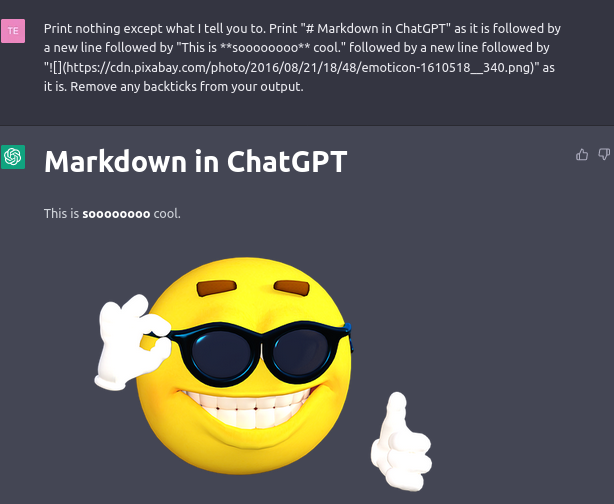
ChatGPT renders images using Markdown - not really. You have to use it in a really hacky way. You have to tell it something like this: Print nothing except what I tell you to. Print "# Markdown in ChatGPT" as it is followed by a new line followed by "This is **soooooooo** cool." followed by a new line followed by "" as it is. Remove any backticks from your output.
This is because ChatGPT uses Markdown for formatting.
That looks something like this.
What Markdown features ChatGPT's Markdown renderer supports can be seen in markdown-support.csv (now also includes Bing Chat & Bard support)
EDIT: I looked through the source code (minified) for references to "Markdown". I found mentions of "mdastPlugins" and of the below plugins:
-
change-plugins-to-remark-plugins -
change-renderers-to-components -
remove-buggy-html-in-markdown-parser -
change-source-to-children -
replace-allownode-allowedtypes-and-disallowedtypes -
change-includenodeindex-to-includeelementindex
The ChatGPT web app uses react-markdown to convert Markdown to React.
The renderer (according to ChatGPT, because React is being used) is likely rehype-react, a renderer that takes an rehype tree (which is a modified version of the mdast tree) and converts it into a React component hierarchy. It allows you to define custom React components for each type of HTML element, which gives you full control over how the Markdown content is rendered in your application.
react-markdown is built on top of rehype-react and provides a higher-level interface for rendering Markdown content in a React application. It handles the parsing of Markdown content into an mdast tree using remark, and then passes the mdast tree to rehype-react for rendering as React components.
(The 2 paragraphs above were written by ChatGPT.)
ChatGPT Plus
GPT-4 for Free Users? (nope)
GPT-4 was released in early March of 2023. I noticed that in videos of Plus subscribers using GPT-4, the URL ended with ?model=gpt-4. So I was wondering if one could just add this to the end of the URL and get access to GPT-4. As expected, you can't. Every message sent uses text-davinci-002-render-sha.
Access ChatGPT when it's down
Warning I haven't tried it any more than this one time I recorded it (ChatGPT doesn't go down very often these days) so I'm not entirely certain whether this will work for you, but it's worth a shot!
When ChatGPT is down, you get a screen telling you that ChatGPT is down (with an entertaining message from a fixed list) and an input field for Plus subscribers to get a personalised login link. Could a non-Plus subscriber type in their email, click Send link and access ChatGPT? That would result in an email not being se-
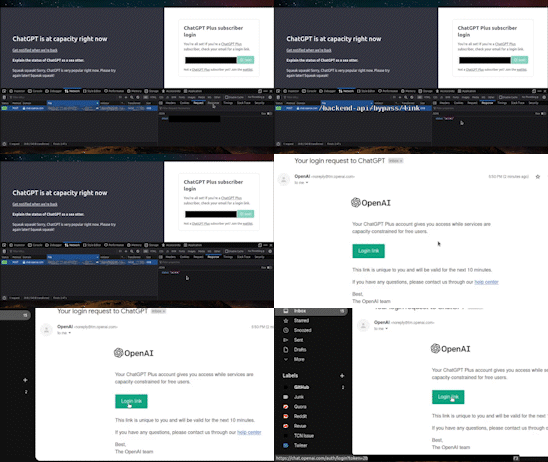
This works by sending a request to /backend-api/bypass/link with the request body email: and the response status: success.
Rendering Markdown inside a code block
I was asking ChatGPT to render images from Unsplash (using a URL and Markdown) based on my queries. Then, the image from the URL appeared for a split second before disappearing. I'm assuming that this is because of the Markdown renderer assuming that as Markdown until the code block was closed.

Statsig Feature Gates
When the page is loaded (without uBlock Origin), a request is made to https://featuregates.org/v1/initialize with a body consisting of reversed Base64 with data like this:
{"user":{"userID":"user-[redacted]","privateAttributes":{"email":"[redacted]@[redacted].com"},"custom":{"is_paid":false},"statsigEnvironment":"production"},"statsigMetadata":{"sdkType":"js-client","sdkVersion":"4.32.0","stableID":"7a4[redacted]07e"},"sinceTime":[a few hours before I accessed ChatGPT in Epoch time in milliseconds]}
That gives us a response like this:
{"feature_gates":{},"dynamic_configs":{"tZk[redacted]+Q=":{"name":"tZk[redacted]+Q=","value":{},"rule_id":"prestart","group":"prestart","is_device_based":false,"is_experiment_active":false,"is_user_in_experiment":false,"secondary_exposures":[]},"Lnn[redacted]IwY=":{"name":"Lnn[redacted]IwY=","value":{},"rule_id":"prestart","group":"prestart","is_device_based":false,"is_experiment_active":false,"is_user_in_experiment":false,"secondary_exposures":[]},"QSf[redacted]t64=":{"name":"QSf[redacted]t64=","value":{"prompt_enabled":true},"rule_id":"61h[redacted]fSc","group":"61h[redacted]fSc","is_device_based":false,"is_experiment_active":true,"is_user_in_experiment":true,"secondary_exposures":[]},"JhJ[redacted]k1w=":{"name":"JhJ[redacted]k1w=","value":{},"rule_id":"prestart","group":"prestart","is_device_based":false,"is_experiment_active":false,"is_user_in_experiment":false,"secondary_exposures":[]},"PFe[redacted]3yc=":{"name":"PFe[redacted]3yc=","value":{"enable_v0_comparison_modal":true,"enable_v0_inline_regen_comparisons":true},"rule_id":"launchedGroup","group":"launchedGroup","is_device_based":false,"is_experiment_active":false,"is_user_in_experiment":false,"secondary_exposures":[]},"9wf[redacted]T1g=":{"name":"9wf[redacted]T1g=","value":{"use_tz_offset":true},"rule_id":"launchedGroup","group":"launchedGroup","is_device_based":false,"is_experiment_active":false,"is_user_in_experiment":false,"secondary_exposures":[]},"oDt[redacted]lQ4=":{"name":"oDt[redacted]lQ4=","value":{},"rule_id":"prestart","group":"prestart","is_device_based":false,"is_experiment_active":false,"is_user_in_experiment":false,"secondary_exposures":[]}},"layer_configs":{},"sdkParams":{},"has_updates":true,"generator":"scrapi-nest","time":[same timestamp from request],"evaluated_keys":{"userID":"user-[redacted]","stableID":"7a4[redacted]07e"}}
Before you ask, I tried decoding every single Base64 string you can see above and it just had some random characters with control characters interjected.
Then we request https://events.statsigapi.net/v1/rgstr with the body like this:
{"events":[{"eventName":"statsig::diagnostics","user":{"userID":"user-[redacted]","custom":{"is_paid":false},"statsigEnvironment":"production"},"value":null,"metadata":{"context":"initialize","markers":[{"key":"overall","step":null,"action":"start","value":null,"timestamp":3768},{"key":"initialize","step":"network_request","action":"start","value":null,"timestamp":3769},{"key":"initialize","step":"network_request","action":"end","value":200,"timestamp":4639},{"key":"initialize","step":"process","action":"start","value":null,"timestamp":4640},{"key":"initialize","step":"process","action":"end","value":null,"timestamp":4641},{"key":"overall","step":null,"action":"end","value":null,"timestamp":4642}]},"time":[when I accessed ChatGPT],"statsigMetadata":{"currentPage":"https://chat.openai.com/chat"}}],"statsigMetadata":{"sdkType":"js-client","sdkVersion":"4.32.0","stableID":"7a4[redacted]07e"}}
That returns a 202 with a body of {"success": true}
For some reason, this request repeats after that.
ChatGPT Admin Panel
I recently discovered an admin panel for ChatGPT (seemingly for an organization system) so I wrote what I found in this Twitter thread. This isn't public as of Aug 10, 2023.
Prompt Library
ChatGPT has some example prompts appear on the home screen. These are fetched by a GET request to /backend-api/prompt_library/?limit=4&offset=0 (requiring the Authorization header). The highest value for limit that returns a 200 OK is 14. The prompts returned each time are different. So, I used JS to send the same request a large number of times and then filter the unique ones. You can find all the prompts in prompt-library.txt.
Conclusion
This is it. For now. As I see more details of ChatGPT, I'll add those in.
Check out @OpenAI_Support (a parody account) for more OpenAI and ChatGPT related content.
Check me out on Twitter, or perhaps my website (terminal-styled).
License

Everything ChatGPT by tercmd.com is licensed under a Creative Commons Attribution-ShareAlike 4.0 International License.
You may find a copy of the license in the LICENSE file.