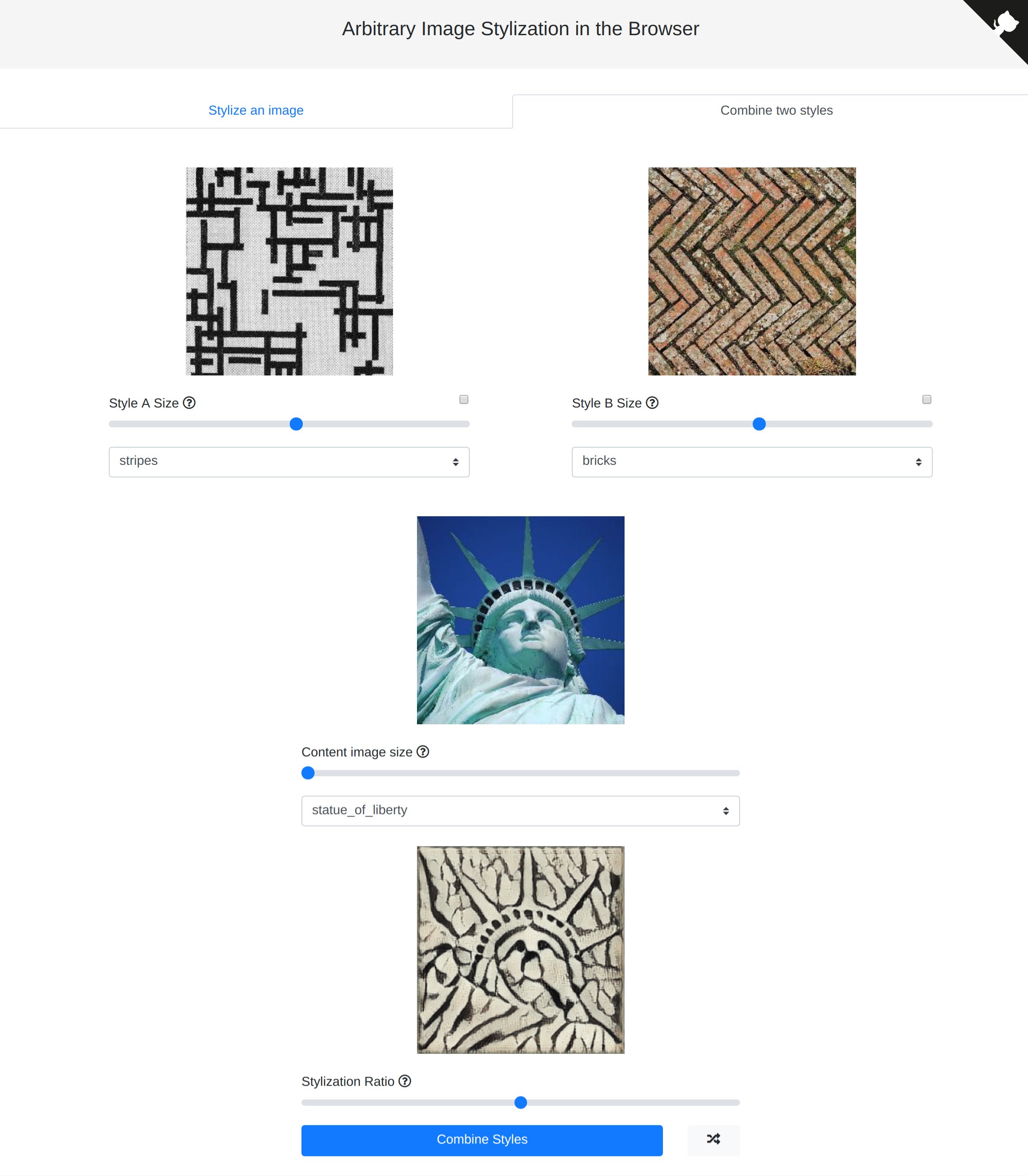
js This repository contains an implementation of arbitrary style transfer running fully inside the browser using TensorFlow. Demo website: Blog post with more details: Stylize an image Combine styles FAQ What is this? This is an implementation of an arbitrary style transfer algorithm running purely in the browser using TensorFlow. As with all neural style transfer algorithms, a neural network attempts to "draw" one picture, the Content (usually a photograph), in the style of another, the Style (usually a painting
). Although other browser implementations of style transfer exist, they are normally limited to a pre-selected handful of styles, due to the requirement that a separate neural network must be trained for each style image. Arbitrary style transfer works around this limitation by using a separate *style network* that learns to break down *any* image into a 100-dimensional vector representing its style. This style vector is then fed into another network, the *transformer network*, along with the content image
, to produce the final stylized image. I have written a blog post explaining this project in more detail. Your data and pictures here never leave your computer! In fact, this is one of the main advantages of running neural networks in your browser. Instead of sending us your data, we send *you* both the model *and* the code to run the model. The original paper uses an Inception-v3 model as the style network, which takes up ~36. 3MB when
ported to the browser as a FrozenModel. In order to make this model smaller, a MobileNet-v2 was used to distill the knowledge from the pretrained Inception-v3 style network. This resulted in a size reduction of just under 4x, from ~36. For the transformer network, the original paper uses a model using plain convolution layers. When ported to the browser, this model takes up 7. 9MB and is responsible for the majority of the calculations during stylization. In order
to make the transformer model more efficient, most of the plain convolution layers were replaced with depthwise separable convolutions. 4MB, while drastically improving the speed of stylization. This demo lets you use any combination of the models, defaulting to the MobileNet-v2 style network and the separable convolution transformer network. 6MB, while the separable convolution transformer network is ~2. Since these models work for any style, you only have to download them once! Since each style can be mapped to
a 100-dimensional style vector by the style network, we simply take a weighted average of the two to get a new style vector for the transformer network. This is also how we are able to control the strength of stylization. We take a weighted average of the style vectors of *both* content and style images and use it as input to the transformer network. Running locally for development This project uses Yarn for dependencies. To run it locally, you
must install Yarn and run the following command at the repository's root to get all the dependencies. Then, you can
This is an implementation of an arbitrary style transfer algorithm
running purely in the browser using TensorFlow.js. As with all neural
style transfer algorithms, a neural network attempts to "draw" one
picture, the Content (usually a photograph), in the style of another,
the Style (usually a painting).
Although other browser implementations
of style transfer exist,
they are normally limited to a pre-selected handful of styles, due to
the requirement that a separate neural network must be trained for each
style image.
Arbitrary style transfer works around this limitation by using a
separate style network that learns to break down any image into
a 100-dimensional vector representing its style. This style vector is
then fed into another network, the transformer network, along
with the content image, to produce the final stylized image.
I have written a blog post
explaining this project in more detail.
Is my data safe? Can you see my pictures?
Your data and pictures here never leave your computer! In fact,
this is one of the main advantages of running neural networks
in your browser. Instead of sending us your data, we send you
both the model and the code to run the model. These are then
run by your browser.
What are all these different models?
The original paper uses an Inception-v3 model
as the style network, which takes up ~36.3MB
when ported to the browser as a FrozenModel.
In order to make this model smaller, a MobileNet-v2 was
used to distill the knowledge from the pretrained Inception-v3
style network. This resulted in a size reduction of just under 4x,
from ~36.3MB to ~9.6MB, at the expense of some quality.
For the transformer network, the original paper uses
a model using plain convolution layers. When ported to
the browser, this model takes up 7.9MB and is responsible
for the majority of the calculations during stylization.
In order to make the transformer model more efficient, most of the
plain convolution layers were replaced with depthwise separable
convolutions. This reduced the model size to 2.4MB, while
drastically improving the speed of stylization.
This demo lets you use any combination of the models, defaulting
to the MobileNet-v2 style network and the separable convolution
transformer network.
How big are the models I'm downloading?
The distilled style network is ~9.6MB, while the separable convolution
transformer network is ~2.4MB, for a total of ~12MB.
Since these models work for any style, you only
have to download them once!
How does style combination work?
Since each style can be mapped to a 100-dimensional
style vector by the style network,
we simply take a weighted average of the two to get
a new style vector for the transformer network.
This is also how we are able to control the strength
of stylization. We take a weighted average of the style
vectors of both content and style images and use
it as input to the transformer network.
Google Colaboratory, with which I was able
to do all necessary training using a free(!) GPU.
As a final note, I'd love to hear from people interested
in making a suite of tools for artistically manipulating images, kind of like
Magenta Studio
but for images. Please reach out if you're planning to build/are
building one out!