Open-source email infrastructure for AI agents: secure inboxes, REST and MCP APIs, SMTP, human approval workflows, signed webhooks, and Python and TypeScript SDKs. Self-host with Docker and PostgreSQL.
Enable AI assistant clients like Cursor, Windsurf and Claude Desktop to control Unreal Engine through natural language using the Model Context Protocol (MCP).
Essential utilities for building production-ready AI applications with Vercel AI SDK. State management, debugging, structured streaming, intelligent agents, and caching.
[ACL 2026] OxyGent: Making Multi-Agent Systems Modular, Observable, and Evolvable via Oxy Abstraction https://arxiv.org/abs/2604.25602
关键参数与规格
关键参数与规格
参数
值
语言
JavaScript
类别
AI Engineering
子类别
Give agent tools
关键词
Agent-ready APIs, Coding, MCP, Tool use
星标数
2,090
分叉数
221
贡献者
6
创建日期
2026-06-16
更新日期
2026-10-15
1 天星标数
0
7 天星标数
7
排名
9,002
上次排名
9,051
排名变化
49
7 天星标排名
4,694
上次 7 天星标排名
4,714
7 天星标排名变化
20
总星标排名
6,128
上次总星标排名
6,122
总星标排名变化
-6
README 摘录
CodexPro Give ChatGPT local coding tools for repos you explicitly allow. What it is CodexPro is a local MCP server. It connects **your ChatGPT session** to **your machine** and **repos you allow**. ChatGPT can read, search, edit, review, verify, import attachments, and write handoff plans. It is not a hosted SaaS product, model proxy, quota bypass, account pool, or remote shell service. js 20+ A ChatGPT account that can create custom MCP plugins An HTTPS URL to your machine for
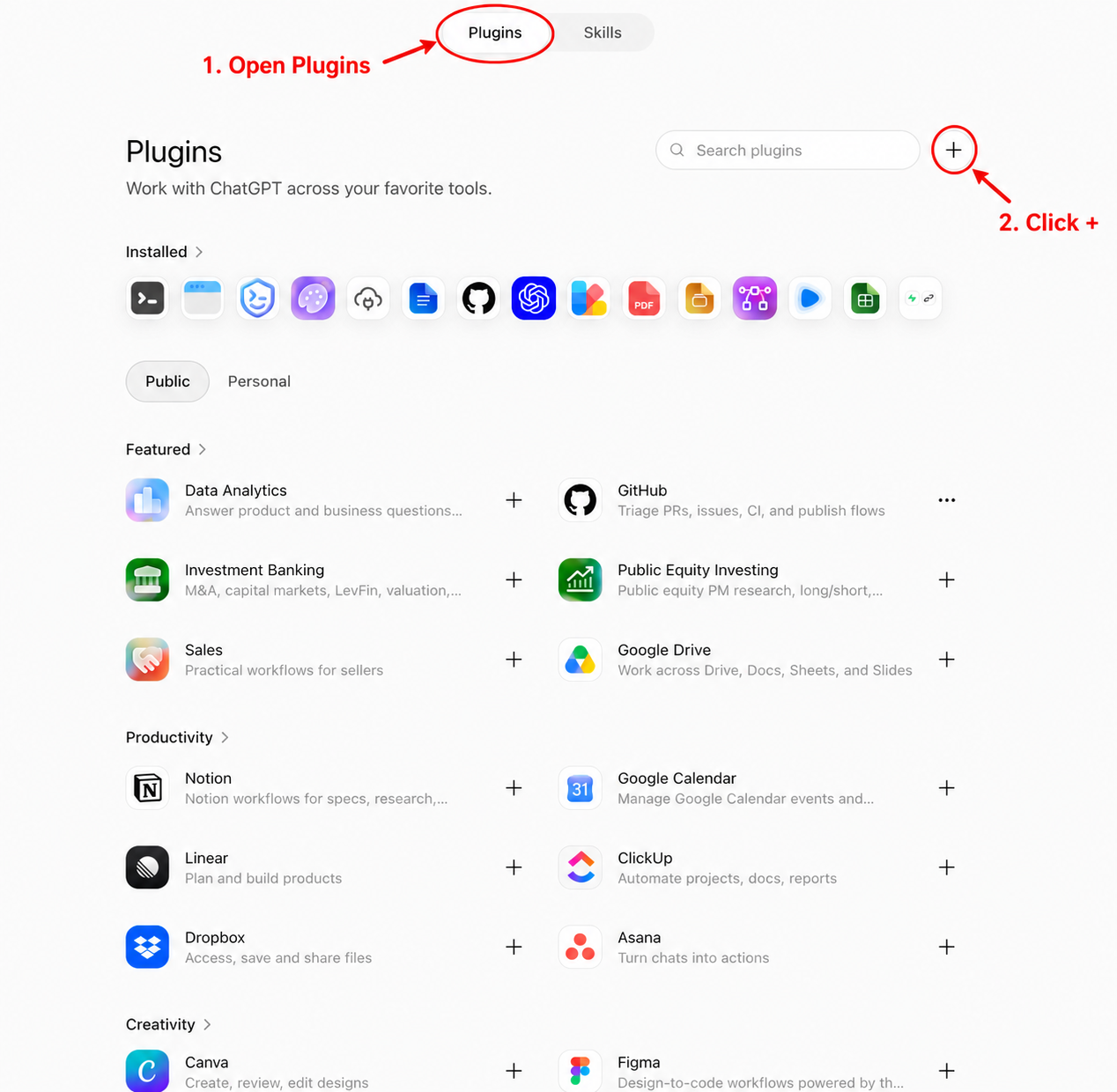
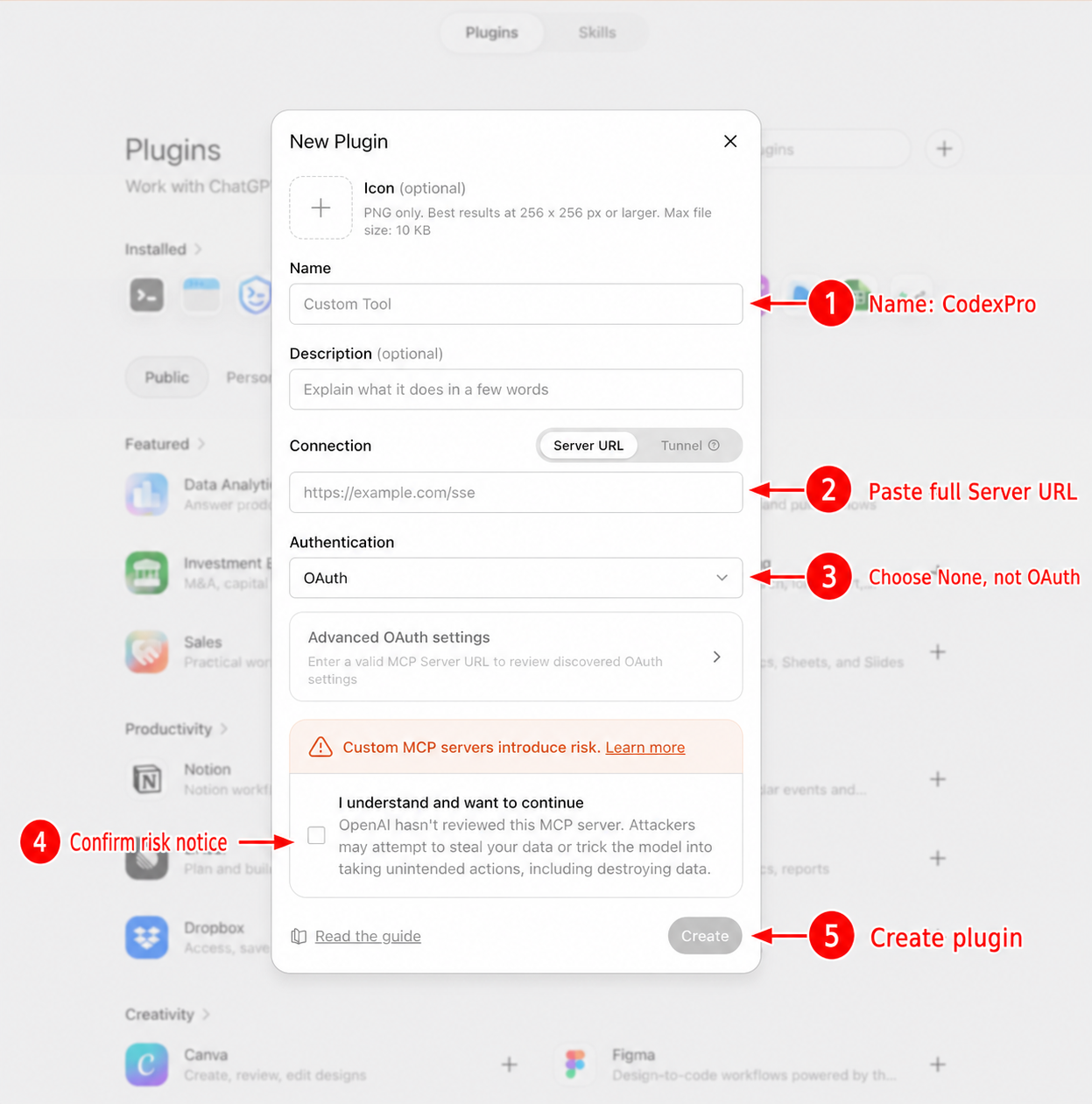
ChatGPT web (tunnel or Tailscale Funnel) Connect in ChatGPT 1. → turn **Developer mode** on (keep CSP enforcement on). → Plugins tab → **+** beside Search plugins. Connection: **Server URL** → paste the URL CodexPro copied. Authentication: **No Authentication / None** (change this if the form defaults to OAuth). CodexPro auth is the token already in that URL. What ChatGPT can do With workspace write mode (the normal agent setup): read, search, and inspect the repo with bounded code intelligence edit with , , or guarded import ChatGPT
attachments with run allowlisted checks with review diffs and likely impact with write plans under export a context bundle for chats that cannot call tools Built-in repository intelligence CodexPro does more than raw file search: maps languages, project types, entrypoints, areas, symbols, and internal relationships. supports targeted , , and intents as well as ordinary text and regex search. identifies affected areas, likely dependents, related tests, risk signals, and relevant verification commands. TypeScript/JavaScript, Python, Go, Rust, Swift, Java, C#, C
, and C++ declarations are recognized. Other languages retain safe inventory and lexical search. Analysis is local, bounded, and cached by a workspace fingerprint. It needs no model API key, language-server daemon, embedding service, or vector database. Coverage and inference strength are reported instead of presented as certainty. Product focus CodexPro is optimized for a narrow loop: connect ChatGPT to explicitly allowed local repositories, make a reviewable change, verify it, and preserve a handoff record. The project prioritizes: explicit workspace
boundaries and separate controls for reads, writes, commands, sessions, and handoffs useful code navigation without sending a repository to a separate indexing service cross-platform installation and release checks on supported Node. js versions compact, bounded tool results that remain usable in long ChatGPT sessions See the roadmap for the next reliability, code-navigation, and workflow improvements. Multiple projects One CodexPro process can allow more than one repo: Ask ChatGPT to on an allowed project. For two ChatGPT accounts or
hard isolation, run two CodexPro processes on different ports and Server URLs. Commands Useful modes: Opt-in tool cards: Public HTTPS options ChatGPT web needs HTTPS: Keep a stable token for stable hostnames: Prefer when the client supports headers. The query form is a personal compatibility fallback. Safety defaults Public tunnels require a CodexPro HTTP token (min 24 bytes) Writes stay hidden unless write mode is Safe bash is the default Blocked paths cover , keys, , build caches, and similar Attachment
import only accepts ChatGPT Apps SDK file objects from approved HTTPS hosts Read SECURITY. Development Publish only from the CodexPro
常见问题
记录了多少星标和分叉?
rebel0789/codexpro 有 2,090 个星标和 221 个分叉。
仓库排名是多少?
rebel0789/codexpro 排名第 9,002。
记录的语言和类别是什么?
rebel0789/codexpro 有 2,090 个星标,语言为 JavaScript,类别为 AI Engineering。
search supports targeted symbol, references, and impact intents as well as ordinary text and regex search.
show_changes identifies affected areas, likely dependents, related tests, risk signals, and relevant verification commands.
TypeScript/JavaScript, Python, Go, Rust, Swift, Java, C#, C, and C++ declarations are recognized. Other languages retain safe inventory and lexical search.
Analysis is local, bounded, and cached by a workspace fingerprint. It needs no model API key, language-server daemon, embedding service, or vector database. Coverage and inference strength are reported instead of presented as certainty.
Product focus
CodexPro is optimized for a narrow loop: connect ChatGPT to explicitly allowed local repositories, make a reviewable change, verify it, and preserve a handoff record. The project prioritizes:
explicit workspace boundaries and separate controls for reads, writes, commands, sessions, and handoffs
useful code navigation without sending a repository to a separate indexing service
cross-platform installation and release checks on supported Node.js versions
compact, bounded tool results that remain usable in long ChatGPT sessions
See the roadmap for the next reliability, code-navigation, and workflow improvements.
Multiple projects
One CodexPro process can allow more than one repo:
codexpro settings set --project ~/code/web --project ~/code/api
codexpro settings show
codexpro start
Ask ChatGPT to open_workspace on an allowed project. open_current_workspace returns to the launch repo.
For two ChatGPT accounts or hard isolation, run two CodexPro processes on different ports and Server URLs.