🧪 We're looking for beta testers for our virtual assistant widget. Contact us if you're interested in using it on your website.


Highlights • Overview • Benchmarks • Install • Getting Started • Kubernetes • Documentation • Tutorials • Contributing • Release Notes • Blog
What is it
⚡NBoost is a scalable, search-engine-boosting platform for developing and deploying state-of-the-art models to improve the relevance of search results.

Nboost leverages finetuned models to produce domain-specific neural search engines. The platform can also improve other downstream tasks requiring ranked input, such as question answering.
Contact us to request domain-specific models or leave feedback
Overview
The workflow of NBoost is relatively simple. Take the graphic above, and imagine that the server in this case is Elasticsearch.

In a conventional search request, the user sends a query to Elasticsearch and gets back the results.

In an NBoost search request, the user sends a query to the model. Then, the model asks for results from Elasticsearch and picks the best ones to return to the user.
Benchmarks
🔬 Note that we are evaluating models on differently constructed sets than they were trained on (MS Marco vs TREC-CAR), suggesting the generalizability of these models to many other real world search problems.
| Fine-tuned Models | Dependency | Eval Set | Search Boost[1] | Speed on GPU |
|---|---|---|---|---|
nboost/pt-tinybert-msmarco (default) |
bing queries | +45% (0.26 vs 0.18) | ~50ms/query [nboost/pt-bert-base-uncased-msmarco |
|
nboost/pt-biobert-base-msmarco |
biomed | +66% (0.17 vs 0.10) | ~300 ms/query[ |
Instructions for reproducing here](#footnotes).
[1] MRR compared to BM25, the default for Elasticsearch. Reranking top 50.
[2] https://github.com/nyu-dl/dl4marco-bert
To use one of these fine-tuned models with nboost, run nboost --model_dir bert-base-uncased-msmarco for example, and it will download and cache automatically.
Using pre-trained language understanding models, you can boost search relevance metrics by nearly 2x compared to just text search, with little to no extra configuration. While assessing performance, there is often a tradeoff between model accuracy and speed, so we benchmark both of these factors above. This leaderboard is a work in progress, and we intend on releasing more cutting edge models!
Install NBoost
There are two ways to get NBoost, either as a Docker image or as a PyPi package. For cloud users, we highly recommend using NBoost via Docker.
🚸 Depending on your model, you should install the respective Tensorflow or Pytorch dependencies. We package them below.
For installing NBoost, follow the table below.
| Dependency | 🐳 Docker | 📦 Pypi | 🐙 Kubernetes |
|---|---|---|---|
| Pytorch (recommended) | koursaros/nboost:latest-pt |
pip install nboost[pt] |
helm install nboost/nboost --set image.tag=latest-pt |
| Tensorflow | koursaros/nboost:latest-tf |
pip install nboost[tf] |
helm install nboost/nboost --set image.tag=latest-tf |
| All | koursaros/nboost:latest-all |
pip install nboost[all] |
helm install nboost/nboost --set image.tag=latest-all |
| - (for testing) | koursaros/nboost:latest-alpine |
pip install nboost |
helm install nboost/nboost --set image.tag=latest-alpine |
Any way you install it, if you end up reading the following message after $ nboost --help or $ docker run koursaros/nboost --help, then you are ready to go!

Getting Started
📡The Proxy

The Proxy is the core of NBoost. The proxy is essentially a wrapper to enable serving the model. It is able to understand incoming messages from specific search apis (i.e. Elasticsearch). When the proxy receives a message, it increases the amount of results the client is asking for so that the model can rerank a larger set and return the (hopefully) better results.
For instance, if a client asks for 10 results to do with the query "brown dogs" from Elasticsearch, then the proxy may increase the results request to 100 and filter down the best ten results for the client.
Setting up a Neural Proxy for Elasticsearch in 3 minutes
In this example we will set up a proxy to sit in between the client and Elasticsearch and boost the results!
Installing NBoost with tensorflow
If you want to run the example on a GPU, make sure you have Tensorflow 1.14-1.15, Pytorch or ONNX Runtime with CUDA to support the modeling functionality. However, if you want to just run it on a CPU, don't worry about it. For both cases, just run:
pip install nboost[pt]
Setting up an Elasticsearch Server
🔔 If you already have an Elasticsearch server, you can skip this step!
If you don't have Elasticsearch, not to worry! We recommend setting up a local Elasticsearch cluster using docker (providing you have Docker installed). First, get the ES image by running:
docker pull elasticsearch:7.4.2
Once you have the image, you can run an Elasticsearch server via:
docker run -d -p 9200:9200 -p 9300:9300 -e "discovery.type=single-node" elasticsearch:7.4.2
Deploying the proxy
Now we're ready to deploy our Neural Proxy! It is very simple to do this, run:
nboost                                  \
    --uhost localhost                   \
    --uport 9200                        \
    --search_route "//_search"   \
    --query_path url.query.q            \
    --topk_path url.query.size          \
    --default_topk 10                   \
    --choices_path body.hits.hits       \
    --cvalues_path _source.passage
📢 The
--uhostand--uportshould be the same as the Elasticsearch server above! Uhost and uport are short for upstream-host and upstream-port (referring to the upstream server).
If you get this message: Listening: :, then we're good to go!
Indexing some data
NBoost has a handy indexing tool built in (nboost-index). For demonstration purposes, will be indexing a set of passages about traveling and hotels through NBoost. You can add the index to your Elasticsearch server by running:
travel.csvcomes with NBoost
nboost-index --file travel.csv --index_name travel --delim , --id_col
Now let's test it out! Hit the Elasticsearch with:
curl "http://localhost:8000/travel/_search?pretty&q=passage:vegas&size=2"
If the Elasticsearch result has the nboost tag in it, congratulations it's working!

What just happened?
Let's check out the NBoost frontend. Go to your browser and visit localhost:8000/nboost.
If you don't have access to a browser, you can
curl http://localhost:8000/nboost/statusfor the same information.
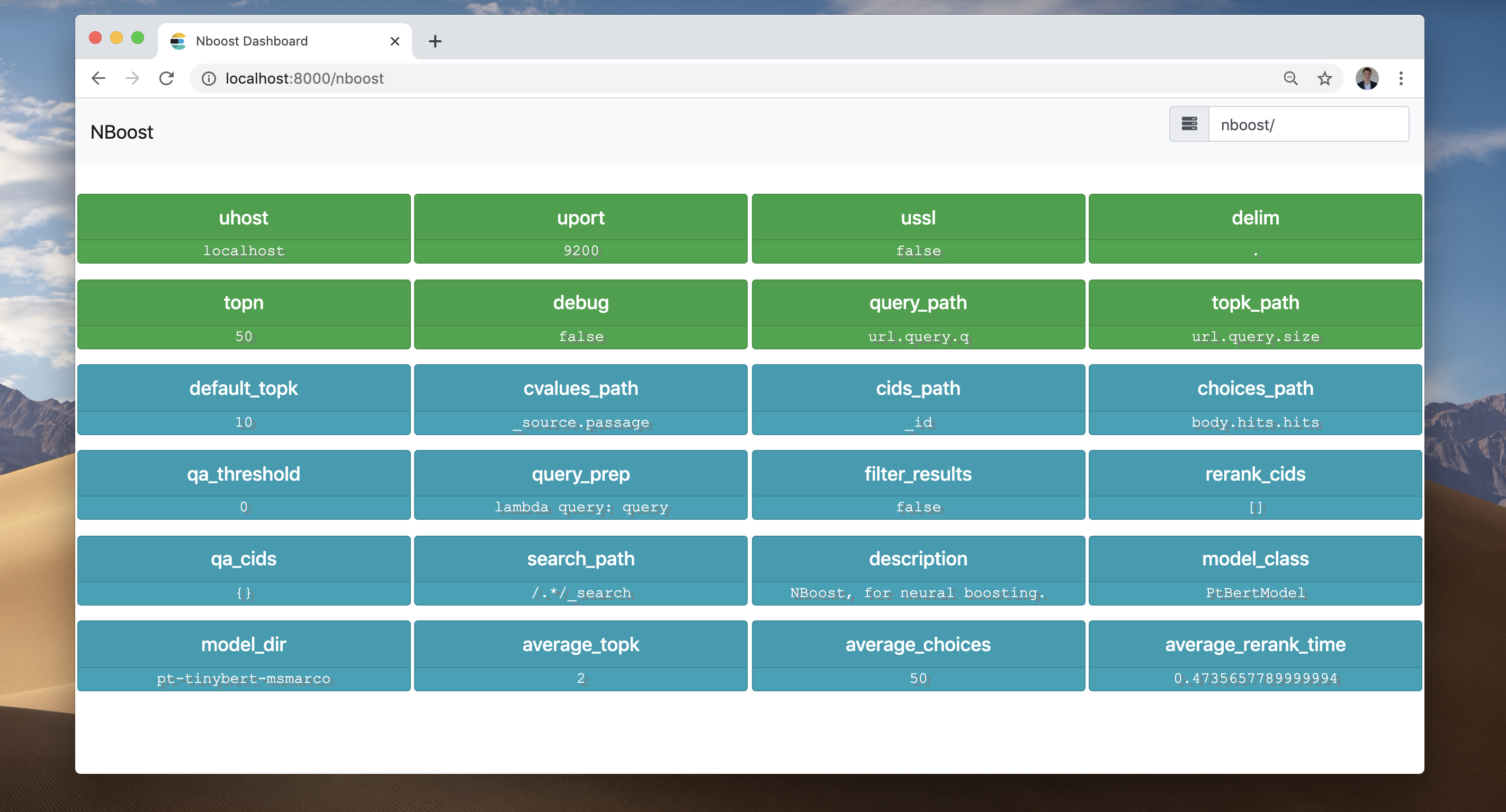
The frontend recorded everything that happened:
- NBoost got a request for 2 search results. (average_topk)
- NBoost connected to the server at
localhost:9200. - NBoost sent a request for 50 search results to the server. (topn)
- NBoost received 50 search results from the server. (average_choices)
- The model picked the best 2 search results and returned them to the client.
Elastic made easy
To increase the number of parallel proxies, simply increase --workers. For a more robust deployment approach, you can distribute the proxy via Kubernetes (see below).
Kubernetes

See also
For in-depth query DSL and other search API solutions (such as the Bing API), see the docs.
Deploying NBoost via Kubernetes
We can easily deploy NBoost in a Kubernetes cluster using Helm.
Add the NBoost Helm Repo
First we need to register the repo with your Kubernetes cluster.
helm repo add nboost https://raw.githubusercontent.com/koursaros-ai/nboost/master/charts/
helm repo update
Deploy some NBoost replicas
Let's try deploying four replicas:
helm install --name nboost --set replicaCount=4 nboost/nboost
All possible --set (values.yaml) options are listed below:
| Parameter | Description | Default |
|---|---|---|
replicaCount |
Number of replicas to deploy | 3 |
image.repository |
NBoost Image name | koursaros/nboost |
image.tag |
NBoost Image tag | latest-pt |
args.model |
Name of the model class | nil |
args.model_dir |
Name or directory of the finetuned model | pt-bert-base-uncased-msmarco |
args.qa |
Whether to use the qa plugin | False |
args.qa_model_dir |
Name or directory of the qa model | distilbert-base-uncased-distilled-squad |
args.model |
Name of the model class | nil |
args.host |
Hostname of the proxy | 0.0.0.0 |
args.port |
Port for the proxy to listen on | 8000 |
args.uhost |
Hostname of the upstream search api server | elasticsearch-master |
args.uport |
Port of the upstream server | 9200 |
args.data_dir |
Directory to cache model binary | nil |
args.max_seq_len |
Max combined token length | 64 |
args.bufsize |
Size of the http buffer in bytes | 2048 |
args.batch_size |
Batch size for running through rerank model | 4 |
args.multiplier |
Factor to increase results by | 5 |
args.workers |
Number of threads serving the proxy | 10 |
args.query_path |
Jsonpath in the request to find the query | nil |
args.topk_path |
Jsonpath to find the number of requested results | nil |
args.choices_path |
Jsonpath to find the array of choices to reorder | nil |
args.cvalues_path |
Jsonpath to find the str values of the choices | nil |
args.cids_path |
Jsonpath to find the ids of the choices | nil |
args.search_path |
The url path to tag for reranking via nboost | nil |
service.type |
Kubernetes Service type | LoadBalancer |
resources |
resource needs and limits to apply to the pod | {} |
nodeSelector |
Node labels for pod assignment | {} |
affinity |
Affinity settings for pod assignment | {} |
tolerations |
Toleration labels for pod assignment | [] |
image.pullPolicy |
Image pull policy | IfNotPresent |
imagePullSecrets |
Docker registry secret names as an array | [] (does not add image pull secrets to deployed pods) |
nameOverride |
String to override Chart.name | nil |
fullnameOverride |
String to override Chart.fullname | nil |
serviceAccount.create |
Specifies whether a service account is created | nil |
serviceAccount.name |
The name of the service account to use. If not set and create is true, a name is generated using the fullname template | nil |
serviceAccount.create |
Specifies whether a service account is created | nil |
podSecurityContext.fsGroup |
Group ID for the container | nil |
securityContext.runAsUser |
User ID for the container | 1001 |
ingress.enabled |
Enable ingress resource | false |
ingress.hostName |
Hostname to your installation | nil |
ingress.path |
Path within the url structure | [] |
ingress.tls |
enable ingress with tls | [] |
ingress.tls.secretName |
tls type secret to be used | chart-example-tls |
Documentation
The official NBoost documentation is hosted on nboost.readthedocs.io. It is automatically built, updated and archived on every new release.
Contributing
Contributions are greatly appreciated! You can make corrections or updates and commit them to NBoost. Here are the steps:
- Create a new branch, say
fix-nboost-typo-1 - Fix/improve the codebase
- Commit the changes. Note the commit message must follow the naming style, say
Fix/model-bert: improve the readability and move sections - Make a pull request. Note the pull request must follow the naming style. It can simply be one of your commit messages, just copy paste it, e.g.
Fix/model-bert: improve the readability and move sections - Submit your pull request and wait for all checks passed (usually 10 minutes)
- Coding style
- Commit and PR styles check
- All unit tests
- Request reviews from one of the developers from our core team.
- Merge!
More details can be found in the contributor guidelines.
Citing NBoost
If you use NBoost in an academic paper, we would love to be cited. Here are the two ways of citing NBoost:
-
\footnote{https://github.com/koursaros-ai/nboost} -
@misc{koursaros2019NBoost,
  title={NBoost: Neural Boosting Search Results},
  author={Thienes, Cole and Pertschuk, Jack},
  howpublished={\url{https://github.com/koursaros-ai/nboost}},
  year={2019}
}
License
If you have downloaded a copy of the NBoost binary or source code, please note that the NBoost binary and source code are both licensed under the Apache License, Version 2.0.
Koursaros AI is excited to bring this open source software to the community.
Copyright (C) 2019. All rights reserved.