ESP32 iPhone Agent
Let an AI model use a real iPhone with a $7 ESP32. Just the phone and the board: no computer, no jailbreak.
English · 简体中文
Demo video and updates: X @iamhenryyuan · YouTube demo


[!WARNING] Only follow the install steps in this README. Never run commands from issues or comments (for example a "quick install" one-liner such as PowerShell
iex(irm ...)); these are not from the maintainers.
New: the computer is gone. The board is now the AirPlay receiver and the mouse, and the agent runs in an iPhone app on the same phone. The original version (a Mac/Linux computer running UxPlay and a Python server) is kept as tag
v0.1.0and branchlegacy. See docs/legacy.md.
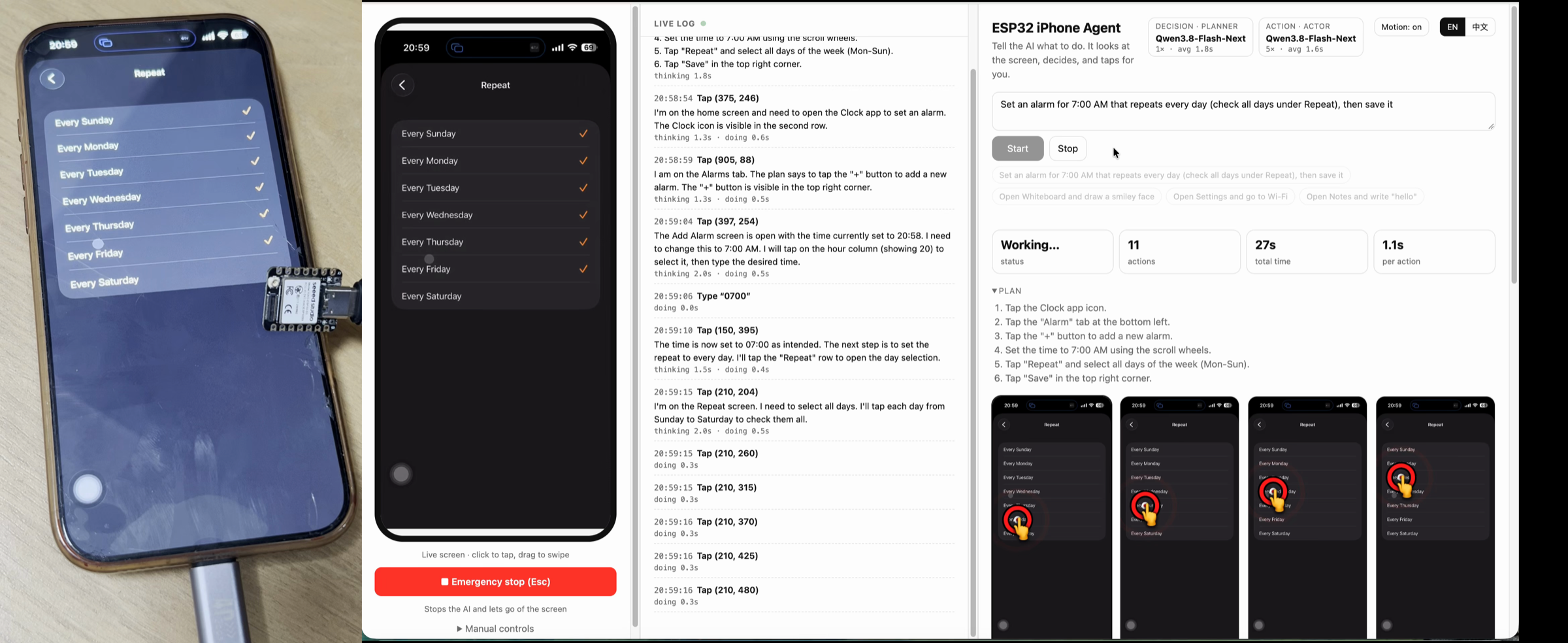
"Set an alarm for 8:00 AM that repeats every Monday and Tuesday, then save it": the agent leaves its own app, opens Clock, types the time into the wheel, ticks the days and saves. (Photo from v0.1.0; the task is the same.)
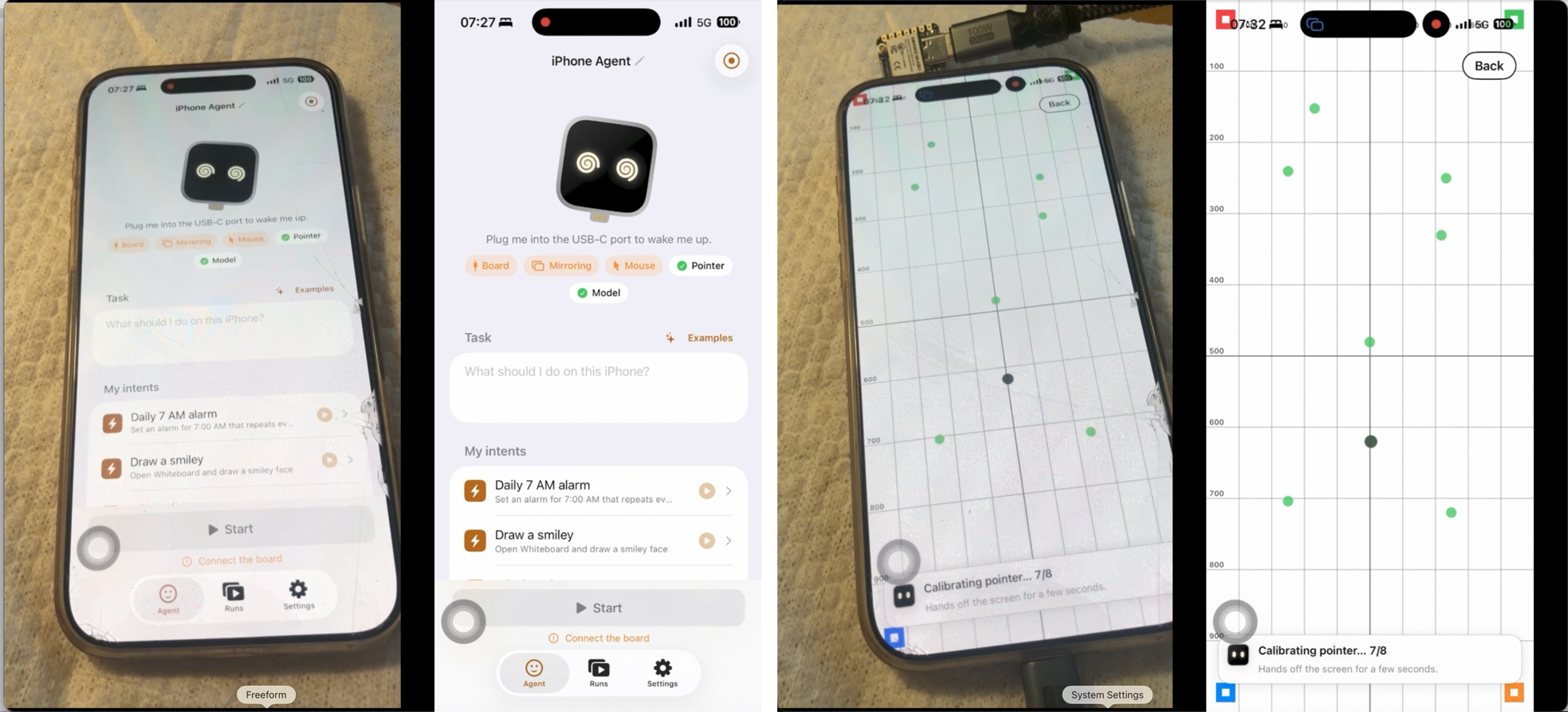
Left: the real phone. Right: what the agent sees through the board's AirPlay mirror. The second shot is the pointer calibration.
How it works
iPhone ──Screen Mirroring (Wi-Fi)──▶ ESP32-S3: AirPlay receiver ──BLE──▶ ESP32 Agent app (same iPhone)
   ▲                                    own hotspot, H.264 passthrough        decode → vision model → action
   └──────── USB HID mouse + keyboard ◀──────────── BLE commands ◀────────────────────┘
- Eyes — AirPlay to the board. The board opens its own Wi-Fi hotspot and appears in the phone's Screen Mirroring list as ESP32 Agent. It keeps the H.264 stream (no decoding on the board) and forwards it to the app over BLE. The phone keeps using cellular data for the model while it is on the board's hotspot.
- Hands — USB HID. The board is a standard USB mouse and keyboard. With AssistiveTouch on, the mouse moves an on-screen pointer, so a click is a tap and a drag is a swipe.
- Brain — the app. The app decodes the stream, sends screenshots to any OpenAI-compatible vision model, and runs a planner and an actor: tap, swipe, draw, type, press keys, go home, finish. It runs in the background while it works; the Dynamic Island shows what it is doing.
- Closing the loop. The pointer is relative, so the app tracks it and re-homes it in a corner; before precise taps it wiggles the pointer, finds it on screen and corrects the miss. After each action it waits for the screen to settle and tells the model whether anything changed. A lost board, hotspot or mirroring link pauses the run and resumes it from the same step.
- Review. Every run is kept on the phone: replay it step by step with the taps and swipes drawn on top.
Hardware
| Part | Notes |
|---|---|
| ESP32-S3 board | Tested with a Seeed Studio XIAO ESP32S3 (plain version, 8 MB PSRAM; not Sense, not Plus). About $7. Any ESP32-S3 with native USB on its USB-C port and PSRAM should work. |
| iPhone | iOS 18 or later, with cellular data (the Wi-Fi is taken by the board's hotspot). USB-C models plug in directly; Lightning models need a Lightning to USB Camera Adapter. The phone powers the board. |
| Vision model | Any OpenAI-compatible chat API that accepts images: a cloud API or your own server. |
| Mac with Xcode | Only to flash the board and build the app once. Not needed at run time. |
Quick start
1. Flash the board (plugged into the Mac)
Install arduino-cli, the ESP32 core 3.3.x and NimBLE-Arduino 2.5.x, then:
arduino-cli lib install "NimBLE-Arduino@2.5.1"
hardware/flash.sh            # optional: [serial port] [--debug]
Always build with flash.sh: it applies the BLE buffer sizes in hardware/hid_bridge/nimble_cfg.h.
2. Install the app
cp ios/Config/Local.xcconfig.example ios/Config/Local.xcconfig   # set DEVELOPMENT_TEAM and IA_BUNDLE_ID
open ios/IPhoneAgent.xcodeproj                                    # run the IPhoneAgent scheme on your iPhone
The project is generated with XcodeGen from ios/project.yml
(cd ios && xcodegen). A free Apple ID can sign it (re-sign every 7 days). The one-tap hotspot join needs the
Hotspot Configuration capability (a paid account); without it the app shows the hotspot password to join by hand.
3. Set up (once, in the app)
Plug the board into the iPhone and open ESP32 Agent. Setup walks through four steps and checks each one itself:
- Plug Me In — pair the board over Bluetooth.
- Let Me See the Screen — join the board's Wi-Fi, then Control Center → Screen Mirroring → ESP32 Agent.
- Let Me Use the Pointer — turn on AssistiveTouch; the app calibrates the pointer by itself.
- Give Me a Brain — enter your model endpoint and key (stored in the Keychain).
4. Give it a task
Type a goal (for example "Open Settings and go to Wi-Fi") and press Start. Stop it from the Dynamic Island, or come back to the app. Siri, Shortcuts, widgets and Control Center can run saved tasks.
Model and prompts
- Any OpenAI-compatible vision endpoint works (vLLM, SGLang, llama.cpp, Ollama, cloud APIs). The app lists the endpoint's models and picks one; you can override it, and set a separate planner and actor model.
- The prompts are plain text in
prompts/and bundled with the app: edit them, rebuild, done. - The project was developed with nvidia/Qwen3.8-Flash-Next-NVFP4 served on two DGX Sparks (TensorFold).
Project layout
ios/        the app (SwiftUI): BLE link, H.264 decode, agent, setup, replay, Live Activity, widgets; tests
prompts/    planner / actor prompts used by the app
hardware/   ESP32-S3 firmware (Arduino): BLE GATT, hotspot, AirPlay receiver, USB HID; flash script,
            host tests, Mac BLE test harness (hardware/tools)
docs/       BLE protocol, legacy version notes
server/     legacy v0.1.0 computer-side server; not used by this version (see server/README.md)
Debugging without the phone app: hardware/tools/board_test.py plays the app over BLE from a Mac
(hardware/tools/README.md). Board ↔ app protocol: docs/ble-protocol.md.
Roadmap
- [x] Drop the computer: the board mirrors and clicks, the app on the phone thinks
- [ ] Landscape apps (coordinates and calibration assume portrait)
- [ ] Non-ASCII text input (e.g. Chinese through the iOS pinyin keyboard)
- [ ] Faster steps: several actions per model call, pointer checks only when needed
- [ ] A curated list of models that work best with this setup, shown inside the iOS app (suggested by @asharthinks)
Limitations
- BLE carries about 300-500 kbps, so the screen is mirrored small (480×1040, ≤5 fps); each step takes a few seconds, most of it the model.
- iOS does not mirror some screens (passcode entry, Apple Pay, DRM video); the agent cannot see them. Mirroring stops when the phone locks.
- While the agent runs, the phone's Wi-Fi is the board's hotspot (no internet over it); the model is reached over cellular data.
- The app leaves itself with a private iOS API (
suspend); fine for a self-built app, to be replaced before the App Store. - Keyboard input is ASCII only. Landscape apps are not supported yet.
Responsible use
Only automate devices and accounts you own or are allowed to use, and respect the terms of the apps involved. The agent acts with your hands: watch it, and keep the stop button within reach.
Contributing
Issues and pull requests are welcome; see CONTRIBUTING.md. Security reports: SECURITY.md.
Related projects
| Project | Approach | Difference from this project |
|---|---|---|
| VersaiOS | UxPlay mirroring + ESP32-S3 Bluetooth mouse + vision model | Needs a computer; one tap per instruction |
| ja1chen/actell | Agent app on the iPhone via Apple's CoreDevice debug channel | Needs Developer Mode and a Developer Disk Image |
| AidenAI-IO/aiden-firmware | HDMI capture + USB keyboard/mouse + multimodal model | Capture hardware; mainly Android |
| yoyicue/glassbox | PicoKVM HDMI capture + USB HID | macOS controller and PicoKVM |
| boboabw/phone-agent | ESP32-S3 Bluetooth HID + AssistiveTouch, agent as an iPhone app | Closest to this version; this one also brings the eyes (AirPlay on the board) |
| VKCOM/devicehub | ESP32 Bluetooth mouse for iOS device farms | Device-farm tooling, no AI agent |
WebDriverAgent/XCUITest-based tools such as mobile-mcp and Midscene need a Mac and code signing.
Acknowledgements
UxPlay (the AirPlay receiver the firmware's is ported from) · NimBLE-Arduino · Arduino ESP32 core and TinyUSB
License
MIT, except hardware/hid_bridge/src/airplay/ (ported from UxPlay), which is
GPL-3.0; the firmware binary that links it is therefore
distributed under GPL-3.0.