← 开源
jayleicn

animeGAN

A simple PyTorch Implementation of Generative Adversarial Networks, focusing on anime face drawing.

Model DevelopmentArchitectureJupyter Notebook
在 GitHub 打开
增长势头
+024 小时新增 Star0.0%
1.28k
Star
193
Fork
+1
本周
1
贡献者
创建于 2017-02-28 · 更新于 2026-10-14 · 今日第 10865 名
主要开发者
jayleicn

jayleicn/animeGAN 排名第 10,865,有 1,277 个星标。

同类别比较

jayleicn/animeGAN 排名第 10,865,此处有 8 个同类条目;gfo-project/Gradient-Free-Optimizers 排名第 10,864。

同类别比较
名称排名指标
pfnet/pfrl10,856
语言:
Python
星标数:
1,279
分叉数:
157
简介:
PFRL: a PyTorch-based deep reinforcement learning library
aiming-lab/Agent010,859
语言:
Python
星标数:
1,278
分叉数:
149
简介:
[ICML'26 & COLM'26] Agent0 Series: Self-Evolving Agents from Zero Data
SullyChen/Autopilot-TensorFlow10,863
语言:
Python
星标数:
1,277
分叉数:
432
简介:
A TensorFlow implementation of this Nvidia paper: https://arxiv.org/pdf/1604.07316.pdf with some changes
gfo-project/Gradient-Free-Optimizers10,864
语言:
Python
星标数:
1,277
分叉数:
95
简介:
Lightweight optimization with local, global, population-based and sequential techniques across mixed search spaces
kaiyinzhou/BERT-NER10,872
语言:
Python
星标数:
1,275
分叉数:
323
简介:
Use Google's BERT for named entity recognition (CoNLL-2003 as the dataset).
MilaNLProc/contextualized-topic-models10,874
语言:
Python
星标数:
1,274
分叉数:
155
简介:
A python package to run contextualized topic modeling. CTMs combine contextualized embeddings (e.g., BERT) with topic models to get coherent topics. Published at EACL and ACL 2021 (Bianchi et al.).
Linketic/CityGaussian10,876
语言:
Jupyter Notebook
星标数:
1,273
分叉数:
111
简介:
[ECCV`24&ICLR`25] CityGaussian Series for High-quality Large-Scale Scene Reconstruction with Gaussians
google-research/deduplicate-text-datasets10,877
语言:
Rust
星标数:
1,273
分叉数:
130
关键参数与规格
关键参数与规格
参数值
语言Jupyter Notebook
类别Model Development
子类别Architecture
关键词Image production
星标数1,277
分叉数193
贡献者1
创建日期2017-02-28
更新日期2026-10-14
1 天星标数0
7 天星标数1
排名10,865
上次排名10,836
排名变化-29
7 天星标排名9,984
上次 7 天星标排名10,032
7 天星标排名变化48
总星标排名9,218
上次总星标排名9,208
总星标排名变化-10
国家USA
README 摘录

AnimeGAN A simple PyTorch Implementation of Generative Adversarial Networks, focusing on anime face drawing. Randomly Generated Images The images are generated from a DCGAN model trained on 143,000 anime character faces for 100 epochs. Image Interpolation Manipulating latent codes, enables the transition from images in the first row to the last row. Original Images The images are not clean, some outliers can be observed, which degrades the quality of the generated images. Usage To run the experiment, The pretrained

model for DCGAN are also in this repo, play it inside the jupyter notebook. anime-faces Dataset Anime-style images of 126 tags are collected from danbooru. The images are then processed by a anime face detector python-animeface. The resulting dataset contains ~143,000 anime faces. Note that some of the tags may no longer meaningful after cropping, i. the cropped face images under 'uniform' tag may not contain visible parts of uniforms. How to construct the dataset from

scratch ? Prequisites: gallery-dl, python-animeface 1. Extract faces from the downloaded images I've cleaned the original dataset, the new version of the dataset has 115085 images in 126 tags. You can access the images from: GitHub: BaiduYun: Non-commercial use please. DCGAN generally works well, simply add fully-connected layers causes problems. In my cases, more layers for G yields better images, in the sense that G should be more powerful than D. Add noise to D's inputs and

labels helps stablize training. Use differnet input and generate resolution (64x64 vs 96x96), there seems no obvious difference during training, the generated images are also very similar. Binray Noise as G's input amazingly works, but the images are not as good as those with Gussian Noise, idea credit to @cwhy ['Binary Noise' here I mean a sequence of {-1,1} generated by bernoulli distribution at p=0. 5 ] I did not carefully verify them, if you are looking for some

general GAN tips, see @soumith's ganhacks Others 1. This project is heavily influenced by chainer-DCGAN and IllustrationGAN, the codes are mostly borrowed from PyTorch DCGAN example, thanks the authors for the clean codes. This is a toy project for me to learn PyTorch and GANs, most importantly, for fun!

常见问题

记录了多少星标和分叉?

jayleicn/animeGAN 有 1,277 个星标和 193 个分叉。

仓库排名是多少?

jayleicn/animeGAN 排名第 10,865。

记录的语言和类别是什么?

jayleicn/animeGAN 有 1,277 个星标,语言为 Jupyter Notebook,类别为 Model Development。

哪个仓库排名最接近?

jayleicn/animeGAN 与 gfo-project/Gradient-Free-Optimizers 比较,后者排名第 10,864,有 1,277 个星标。

README

AnimeGAN

A simple PyTorch Implementation of Generative Adversarial Networks, focusing on anime face drawing.

Randomly Generated Images

The images are generated from a DCGAN model trained on 143,000 anime character faces for 100 epochs.
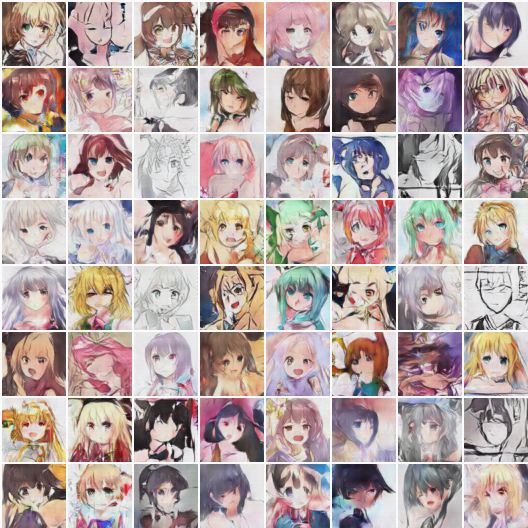
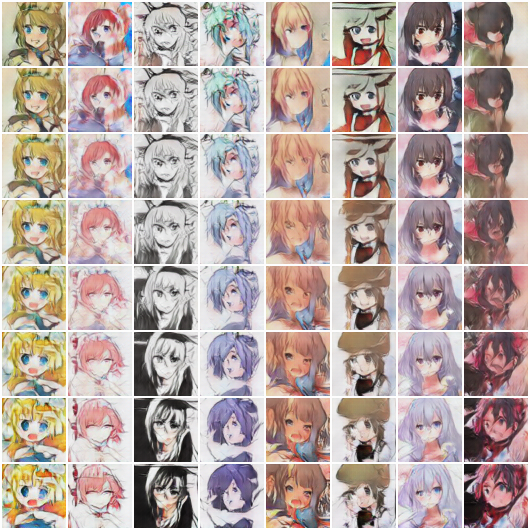
Image Interpolation

Manipulating latent codes, enables the transition from images in the first row to the last row.
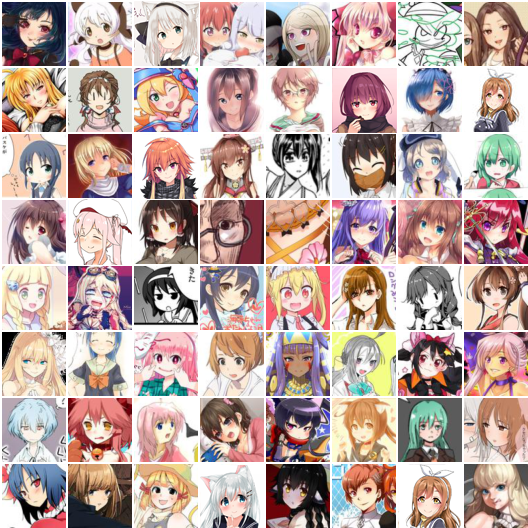
Original Images

The images are not clean, some outliers can be observed, which degrades the quality of the generated images.
Usage

To run the experiment,

$ python main.py --dataRoot path_to_dataset/ 

The pretrained model for DCGAN are also in this repo, play it inside the jupyter notebook.

anime-faces Dataset

Anime-style images of 126 tags are collected from danbooru.donmai.us using the crawler tool gallery-dl. The images are then processed by a anime face detector python-animeface. The resulting dataset contains ~143,000 anime faces. Note that some of the tags may no longer meaningful after cropping, i.e. the cropped face images under 'uniform' tag may not contain visible parts of uniforms.

How to construct the dataset from scratch ?

Prequisites: gallery-dl, python-animeface

  1. Download anime-style images

    # download 1000 images under the tag "misaka_mikoto"
    gallery-dl --images 1000 "https://danbooru.donmai.us/posts?tags=misaka_mikoto"
    
    # in a multi-processing manner
    cat tags.txt | \
    xargs -n 1 -P 12 -I 'tag' \ 
    bash -c ' gallery-dl --images 1000 "https://danbooru.donmai.us/posts?tags=$tag" '
    
  2. Extract faces from the downloaded images

    import animeface
    from PIL import Image
    
    im = Image.open('images/anime_image_misaka_mikoto.png')
    faces = animeface.detect(im)
    x,y,w,h = faces[0].face.pos
    im = im.crop((x,y,x+w,y+h))
    im.show() # display
    

I've cleaned the original dataset, the new version of the dataset has 115085 images in 126 tags. You can access the images from:

Non-commercial use please.

Things I've learned

  1. GANs are really hard to train.
  2. DCGAN generally works well, simply add fully-connected layers causes problems.
  3. In my cases, more layers for G yields better images, in the sense that G should be more powerful than D.
  4. Add noise to D's inputs and labels helps stablize training.
  5. Use differnet input and generate resolution (64x64 vs 96x96), there seems no obvious difference during training, the generated images are also very similar.
  6. Binray Noise as G's input amazingly works, but the images are not as good as those with Gussian Noise, idea credit to @cwhy ['Binary Noise' here I mean a sequence of {-1,1} generated by bernoulli distribution at p=0.5 ]

I did not carefully verify them, if you are looking for some general GAN tips, see @soumith's ganhacks

Others

  1. This project is heavily influenced by chainer-DCGAN and IllustrationGAN, the codes are mostly borrowed from PyTorch DCGAN example, thanks the authors for the clean codes.
  2. Dependencies: pytorch, torchvision
  3. This is a toy project for me to learn PyTorch and GANs, most importantly, for fun! :) Any feedback is welcome.

@jayleicn

排名相邻
同类项目