ChatGPT MD
Your AI writing companion, living inside Obsidian.
Chat with AI directly in your notes. Reference your other notes with [[wiki links]]. Keep everything in your vault—where it belongs.
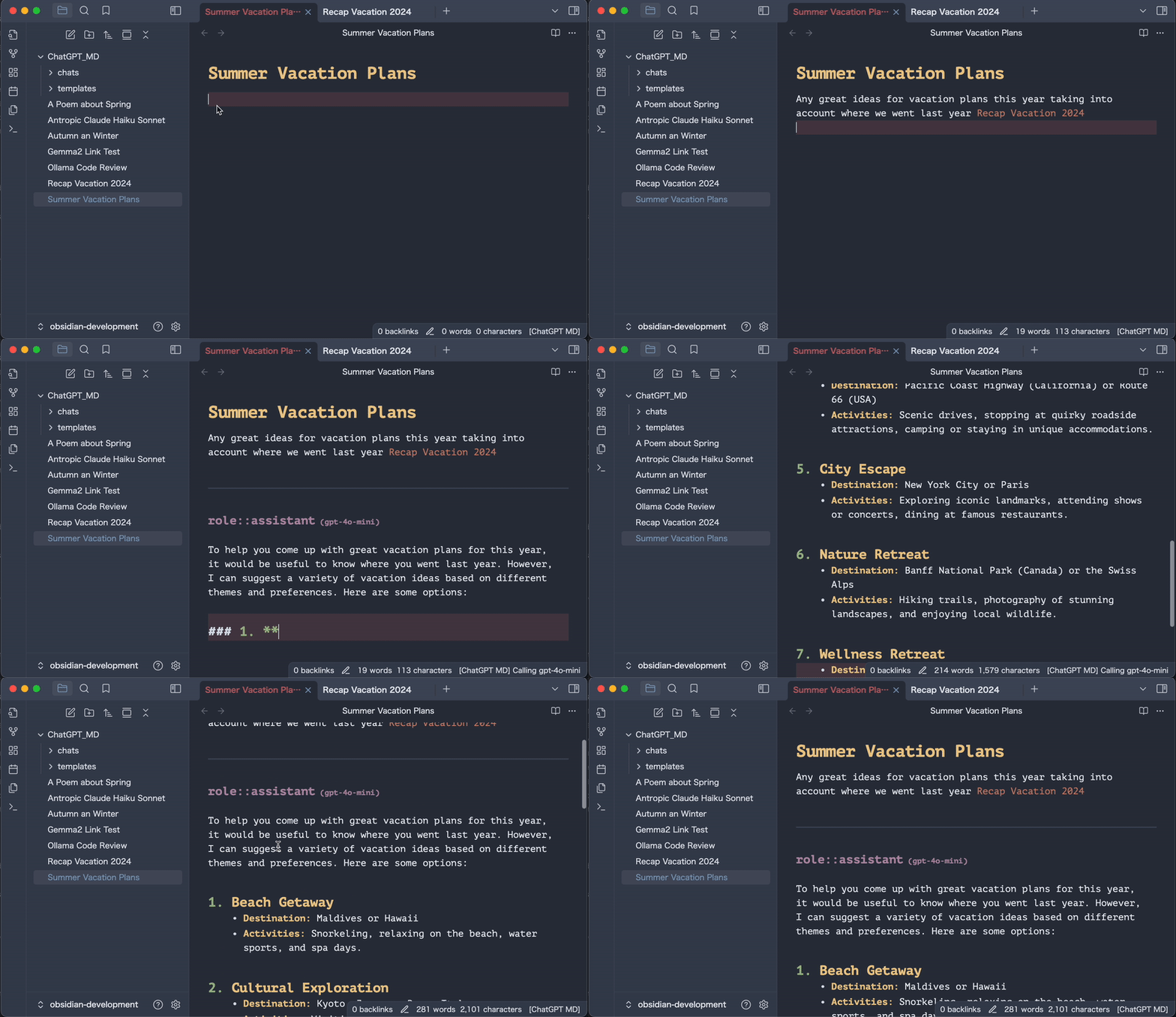
✨ What's New
Official Obsidian Guidelines (v3.3) — Cleaner theming, sentence-case UI, honest compatibility requirements, and a bundle that plays by Obsidian's official rules.
Provider Reliability (v3.2) — Updated provider integrations, safer tool calling, and more reliable model selection and streaming across cloud and local providers.
Agents (v3.1) — Create AI personas like a writing coach, code reviewer, or brainstorming partner. Apply them to any note instantly.
Tool Calling (v3.0) — Let AI search your vault, read your notes, and browse the web. You approve everything. Your data, your control.
🚀 Get Started in 30 Seconds
Requirements: Obsidian 1.11.4 or newer (needed for secure key storage) and an API key from any supported provider — or a free, private local setup via Ollama/LM Studio.
- Install — Settings → Community Plugins → Browse → Search "ChatGPT MD"
- Add API key — Settings → ChatGPT MD → Paste your key (OpenAI, Anthropic, or OpenRouter)
- Chat — Press
Cmd+P→ Type "ChatGPT MD: Chat"
That's it. You're now chatting with AI in your notes.
💡 Set a hotkey and thank me later: Settings → Hotkeys → Search "ChatGPT MD: Chat" → Press Cmd+J
💰 Free & Private AI
Don't want API costs? Don't want your notes leaving your computer?
Ollama and LM Studio run AI locally on your machine. Completely free. Completely private.
Ollama (Recommended)
# Install from ollama.ai, then:
ollama pull llama3.2    # Download a model
ollama list               # See what you have
In your note:
---
model: ollama@llama3.2
---
LM Studio
- Download from lmstudio.ai
- Load a model in the app
- Start the Local Server
- Use
model: lmstudio@your-model
🎯 What You Can Do
Chat About Anything
Write a question, get an answer. Simple.
user:: What makes a good daily note?

assistant:: Great daily notes are:
- **Specific** — "Had coffee with Sarah" not "Met a friend"
- **Actionable** — Include next steps or open questions
- **Connected** — Link to related ideas and people
Reference Your Other Notes
This is where it gets magical. Use [[wiki links]] and AI reads those notes too:
user:: Based on my [[Meeting Notes]] and [[Project Ideas]],
what should I focus on this week?
AI reads your linked notes and gives you a contextual answer. No more copy-pasting context.
Create AI Agents
Make AI personas for different tasks:
# agents/WritingCoach.md
---
model: openai@gpt-4.1-mini
temperature: 0.8
---
You are a supportive writing coach. Help the user:
- Clarify their ideas with questions
- Suggest improvements without being harsh
- Celebrate their progress
Apply with "Choose Agent" command. Switch between agents instantly.
Let AI Search Your Vault
Enable in Settings → Tool Calling. Then:
user:: What have I written about machine learning?
AI: "I'd like to search your vault." You: Approve ✓ AI: "Found 5 notes. Here's what you've written..." You: Select what to share ✓
You're always in control. AI only sees what you approve.
🔌 AI Providers
| Provider | Why Use It | Cost |
|---|---|---|
| OpenAI | Reliable, GPT-4 | Pay per use |
| Anthropic | Claude, great for long docs | Pay per use |
| Gemini | Google's models | Pay per use |
| OpenRouter | Access to ALL models | Pay per use |
| Z.AI | GLM models | Pay per use |
| Ollama | Local, private | Free |
| LM Studio | Local, private | Free |
Model prefix examples:
- OpenAI:
openai@gpt-4.1-mini(unprefixed OpenAI model IDs also work) - Anthropic:
anthropic@claude-sonnet-4-20250514 - Gemini:
gemini@gemini-2.5-flash-lite - OpenRouter:
openrouter@openai/gpt-4.1-mini - Local:
ollama@llama3.2orlmstudio@model-name
OpenAI search-preview models such as openai@gpt-4o-mini-search-preview are supported through OpenAI's chat-completions endpoint.
⚙️ Commands
| Command | What It Does |
|---|---|
| Chat | The main event. Send message, get AI response |
| Select Model | Switch between models/providers |
| Choose Agent | Apply an AI persona to current note |
| Create Agent | Make a new agent (manual or AI-generated) |
| Infer Title | Auto-generate title from conversation |
| Clear Chat | Start fresh, keep settings |
| Stop Streaming | Cancel a long response |
⚙️ Settings
In Your Notes (Frontmatter)
---
model: openai@gpt-4.1-mini # Which AI to use
temperature: 0.7         # Creativity (0-2)
max_tokens: 4096         # Response length
system_commands:        # Give AI a role
  - You are a helpful assistant
agent: WritingCoach      # Apply an agent by name
---
Global Defaults (Settings → ChatGPT MD)
- API Keys — One secure Obsidian credential per cloud provider (with legacy text fields on older Obsidian versions)
- Default Model — Which AI to use by default
- Folders — Where to save chats, templates, agents
- Stream Mode — See responses appear word by word
Priority: Note settings beat Agent settings beat Global settings beat default chat frontmatter/provider defaults
❓ Common Questions
Q: How do I actually use this?
A: Open any note. Write something. Press Cmd+P, type "chat", hit Enter. Watch AI respond in your note.
Q: Can I use my existing notes?
A: Yes! Just add a frontmatter block at the top with your settings, then use [[wiki links]] to reference other notes.
Q: Which local model should I use?
A: llama3.2 is great for general use. deepseek-r1:7b for reasoning. Try a few and see what works for you.
Q: Is my data private?
A: With OpenAI/Anthropic, your messages go to their servers. With Ollama/LM Studio, everything stays on your computer. Your choice.
Q: What's an "agent"?
A: A reusable AI persona. Like having different experts on call—writing coach for drafts, code reviewer for programming, researcher for learning.
🔒 Privacy
With cloud providers (OpenAI, Anthropic, etc.):
- Your messages are sent to their servers
- They may use messages to improve services (check their policies)
With local AI (Ollama, LM Studio):
- Everything stays on your computer
- No internet required
- Completely private
Credentials:
- When both Obsidian SecretStorage and its native secret control are available, provider and web-search keys are stored as vault-local Obsidian credentials; plugin data contains only opaque references.
- Existing plaintext keys migrate automatically on plugin load. Failed migrations retain a usable plaintext key and retry on the next load or settings-tab opening.
- If a valid secure credential and plaintext copy coexist, settings explains the risk and offers an explicit Delete insecure copy action. The copy is retained if saving fails.
- Replacing or clearing a selection removes only this plugin's reference. Old credentials remain available for management in Obsidian.
- Older or partially capable Obsidian versions keep the legacy plaintext controls and behavior. After migrating and then downgrading, re-enter keys because secure references are never sent as credentials.
Always:
- Chat messages and automatically expanded
[[linked notes]]are sent to the selected provider - AI tools require approval before execution, and vault/web search results must be selected before sharing
- Custom web-search endpoints receive your query and any configured bearer credential
- No tracking from this plugin
See SECURITY.md for vulnerability reporting and the full data model.
🛠️ For Developers
git clone https://github.com/bramses/chatgpt-md.git
cd chatgpt-md
npm install
npm run dev
Project structure:
src/
├── Commands/     # User actions
├── Services/     # AI providers, adapters, tools
├── Views/        # UI, modals
├── Utilities/    # Pure functions (tested)
└── core/         # Dependency injection
Contributions welcome! Fork → Branch → PR.
🧪 Beta Testing
Want the latest features? Use BRAT:
- Install BRAT plugin
- Add
bramses/chatgpt-mdas beta plugin - Select "latest version"
Test beta versions in a separate vault.
👋 About
Bram Adams made this. He writes at bramadams.dev and builds Your Commonbase.
Deniz Okcu keeps it running. Say hi on Bluesky.
Happy note-taking! 📝