FastMOT


News
- (2021.8.17) Support multi-class tracking
- (2021.7.4) Support yolov4-p5 and yolov4-p6
- (2021.2.13) Support Scaled-YOLOv4 (i.e. yolov4-csp/yolov4x-mish/yolov4-csp-swish)
- (2021.1.3) Add DIoU-NMS for postprocessing
- (2020.11.28) Docker container provided for x86 Ubuntu
Description
FastMOT is a custom multiple object tracker that implements:
- YOLO detector
- SSD detector
- Deep SORT + OSNet ReID
- KLT tracker
- Camera motion compensation
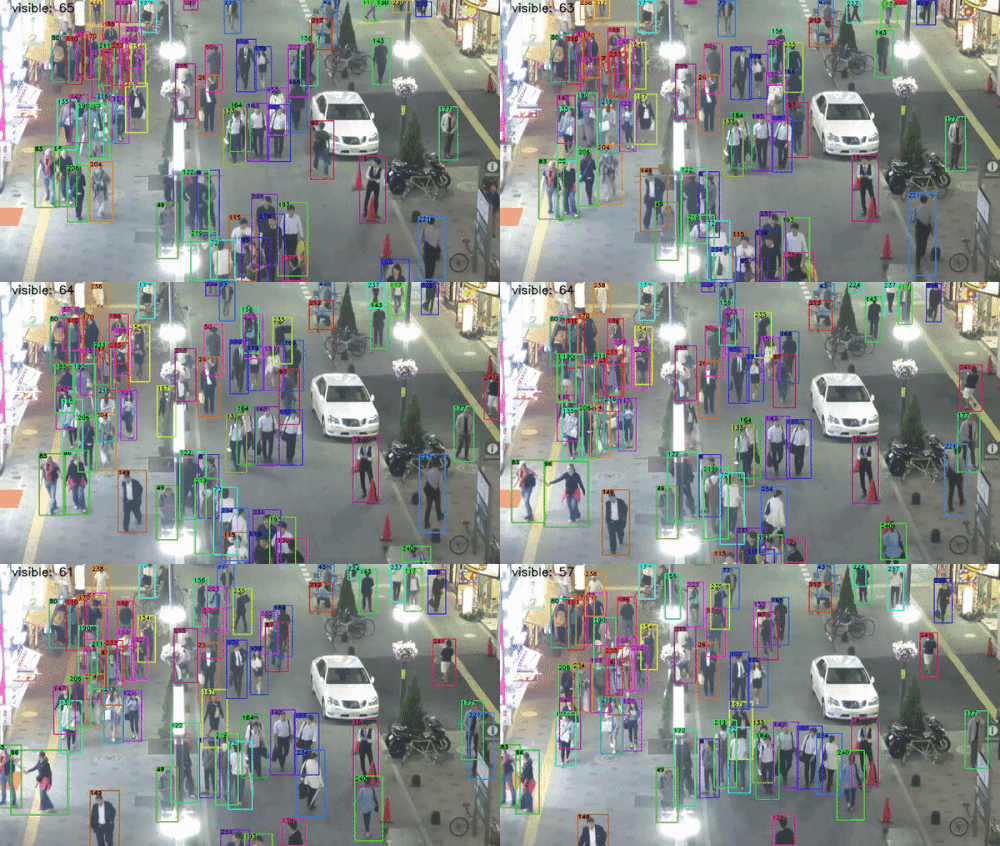
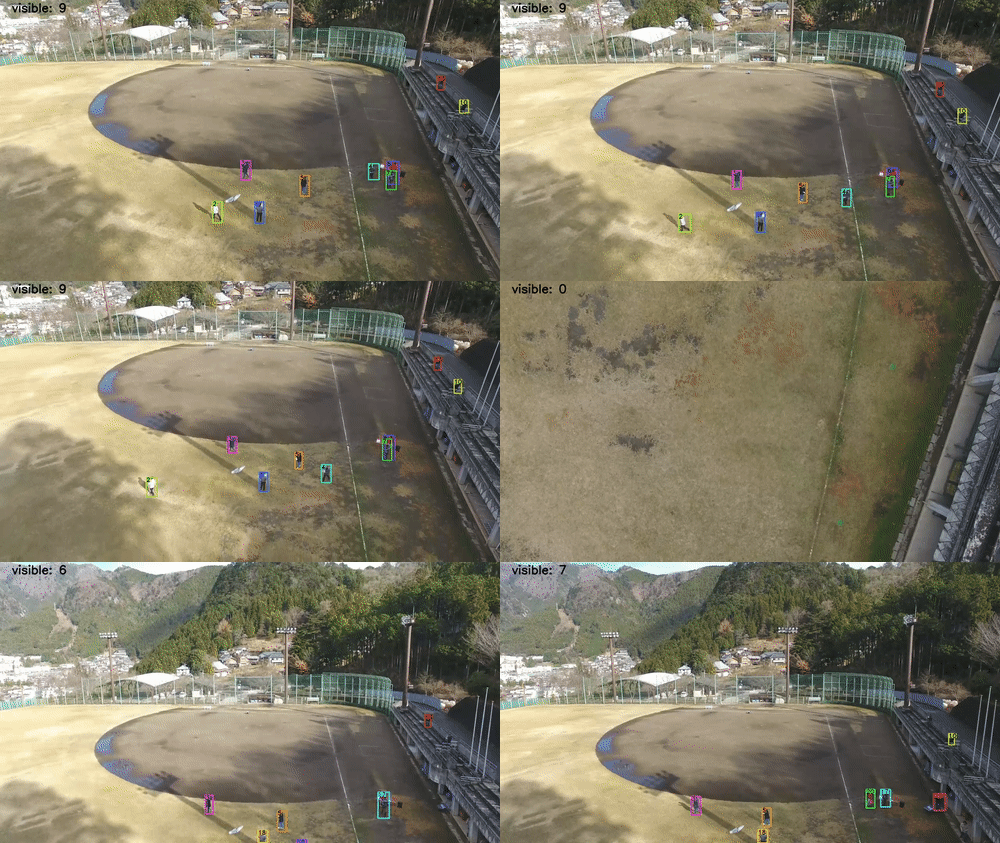
Two-stage trackers like Deep SORT run detection and feature extraction sequentially, which often becomes a bottleneck. FastMOT significantly speeds up the entire system to run in real-time even on Jetson. Motion compensation improves tracking for scenes with moving camera, where Deep SORT and FairMOT fail.
To achieve faster processing, FastMOT only runs the detector and feature extractor every N frames, while KLT fills in the gaps efficiently. FastMOT also re-identifies objects that moved out of frame to keep the same IDs.
YOLOv4 was trained on CrowdHuman (82% mAP@0.5) and SSD's are pretrained COCO models from TensorFlow. Both detection and feature extraction use the TensorRT backend and perform asynchronous inference. In addition, most algorithms, including KLT, Kalman filter, and data association, are optimized using Numba.
Performance
Results on MOT20 train set
| Detector Skip | MOTA | IDF1 | HOTA | MOTP | MT | ML |
|---|---|---|---|---|---|---|
| N = 1 | 66.8% | 56.4% | 45.0% | 79.3% | 912 | 274 |
| N = 5 | 65.1% | 57.1% | 44.3% | 77.9% | 860 | 317 |
FPS on MOT17 sequences
| Sequence | Density | FPS |
|---|---|---|
| MOT17-13 | 5 - 30 | 42 |
| MOT17-04 | 30 - 50 | 26 |
| MOT17-03 | 50 - 80 | 18 |
Performance is evaluated with YOLOv4 using TrackEval. Note that neither YOLOv4 nor OSNet was trained or finetuned on the MOT20 dataset, so train set results should generalize well. FPS results are obtained on Jetson Xavier NX (20W 2core mode).
FastMOT has MOTA scores close to state-of-the-art trackers from the MOT Challenge. Increasing N shows small impact on MOTA. Tracking speed can reach up to 42 FPS depending on the number of objects. Lighter models (e.g. YOLOv4-tiny) are recommended for a more constrained device like Jetson Nano. FPS is expected to be in the range of 50 - 150 on desktop CPU/GPU.
Requirements
- CUDA >= 10
- cuDNN >= 7
- TensorRT >= 7
- OpenCV >= 3.3
- Numpy >= 1.17
- Scipy >= 1.5
- Numba == 0.48
- CuPy == 9.2
- TensorFlow < 2.0 (for SSD support)
Install for x86 Ubuntu
Make sure to have nvidia-docker installed. The image requires NVIDIA Driver version >= 450 for Ubuntu 18.04 and >= 465.19.01 for Ubuntu 20.04. Build and run the docker image:
# Add --build-arg TRT_IMAGE_VERSION=21.05 for Ubuntu 20.04
# Add --build-arg CUPY_NVCC_GENERATE_CODE=... to speed up build for your GPU, e.g. "arch=compute_75,code=sm_75"
docker build -t fastmot:latest .

# Run xhost local:root first if you cannot visualize inside the container
docker run --gpus all --rm -it -v $(pwd):/usr/src/app/FastMOT -v /tmp/.X11-unix:/tmp/.X11-unix -e DISPLAY=unix$DISPLAY -e TZ=$(cat /etc/timezone) fastmot:latest
Install for Jetson Nano/TX2/Xavier NX/Xavier
Make sure to have JetPack >= 4.4 installed and run the script:
./scripts/install_jetson.sh
Download models
Pretrained OSNet, SSD, and my YOLOv4 ONNX model are included.
./scripts/download_models.sh
Build YOLOv4 TensorRT plugin
cd fastmot/plugins
make
Download VOC dataset for INT8 calibration
Only required for SSD (not supported on Ubuntu 20.04)
./scripts/download_data.sh
Usage
python3 app.py --input-uri ... --mot
- Image sequence:
--input-uri %06d.jpg - Video file:
--input-uri file.mp4 - USB webcam:
--input-uri /dev/video0 - MIPI CSI camera:
--input-uri csi://0 - RTSP stream:
--input-uri rtsp://:@:/ - HTTP stream:
--input-uri http://:@:/
Use --show to visualize, --output-uri to save output, and --txt for MOT compliant results.
Show help message for all options:
python3 app.py -h
Note that the first run will be slow due to Numba compilation. To use the FFMPEG backend on x86, set WITH_GSTREAMER = False here
More options can be configured in cfg/mot.json
- Set
resolutionandframe_ratethat corresponds to the source data or camera configuration (optional). They are required for image sequence, camera sources, and saving txt results. List all configurations for a USB/CSI camera:v4l2-ctl -d /dev/video0 --list-formats-ext - To swap network, modify
modelunder a detector. For example, you can choose fromSSDInceptionV2,SSDMobileNetV1, orSSDMobileNetV2for SSD. - If more accuracy is desired and FPS is not an issue, lower
detector_frame_skip. Similarly, raisedetector_frame_skipto speed up tracking at the cost of accuracy. You may also want to changemax_agesuch thatmax_age×detector_frame_skip≈ 30 - Modify
visualizer_cfgto toggle drawing options. - All parameters are documented in the API.
Track custom classes
FastMOT can be easily extended to a custom class (e.g. vehicle). You need to train both YOLO and a ReID network on your object class. Check Darknet for training YOLO and fast-reid for training ReID. After training, convert weights to ONNX format. The TensorRT plugin adapted from tensorrt_demos is only compatible with Darknet.
FastMOT also supports multi-class tracking. It is recommended to train a ReID network for each class to extract features separately.
Convert YOLO to ONNX
- Install ONNX version 1.4.1 (not the latest version)
pip3 install onnx==1.4.1 - Convert using your custom cfg and weights
./scripts/yolo2onnx.py --config yolov4.cfg --weights yolov4.weights
Add custom YOLOv3/v4
- Subclass
fastmot.models.YOLOlike here: https://github.com/GeekAlexis/FastMOT/blob/32c217a7d289f15a3bb0c1820982df947c82a650/fastmot/models/yolo.py#L100-L109
Note anchors may not follow the same order in the Darknet cfg file. You need to mask out the anchors for each yolo layer using the indices inENGINE_PATH : Path Path to TensorRT engine. If not found, TensorRT engine will be converted from the ONNX model at runtime and cached for later use. MODEL_PATH : Path Path to ONNX model. NUM_CLASSES : int Total number of trained classes. LETTERBOX : bool Keep aspect ratio when resizing. NEW_COORDS : bool new_coords Darknet parameter for each yolo layer. INPUT_SHAPE : tuple Input size in the format `(channel, height, width)`. LAYER_FACTORS : List[int] Scale factors with respect to the input size for each yolo layer. SCALES : List[float] scale_x_y Darknet parameter for each yolo layer. ANCHORS : List[List[int]] Anchors grouped by each yolo layer.maskin Darknet cfg. Unlike YOLOv4, the anchors are usually in reverse for YOLOv3 and YOLOv3/v4-tiny - Set class labels to your object classes with
fastmot.models.set_label_map - Modify cfg/mot.json: set
modelinyolo_detector_cfgto the added Python class name and setclass_idsof interest. You may want to play withconf_threshbased on model performance
Add custom ReID
- Subclass
fastmot.models.ReIDlike here: https://github.com/GeekAlexis/FastMOT/blob/32c217a7d289f15a3bb0c1820982df947c82a650/fastmot/models/reid.py#L50-L55ENGINE_PATH : Path Path to TensorRT engine. If not found, TensorRT engine will be converted from the ONNX model at runtime and cached for later use. MODEL_PATH : Path Path to ONNX model. INPUT_SHAPE : tuple Input size in the format `(channel, height, width)`. OUTPUT_LAYOUT : int Feature dimension output by the model. METRIC : {'euclidean', 'cosine'} Distance metric used to match features. - Modify cfg/mot.json: set
modelinfeature_extractor_cfgsto the added Python class name. For more than one class, add more feature extractor configurations to the listfeature_extractor_cfgs. You may want to play withmax_assoc_costandmax_reid_costbased on model performance
Citation
If you find this repo useful in your project or research, please star and consider citing it:
@software{yukai_yang_2020_4294717,
 author       = {Yukai Yang},
 title        = {{FastMOT: High-Performance Multiple Object Tracking Based on Deep SORT and KLT}},
 month        = nov,
 year         = 2020,
 publisher    = {Zenodo},
 version      = {v1.0.0},
 doi          = {10.5281/zenodo.4294717},
 url          = {https://doi.org/10.5281/zenodo.4294717}
}