← 开源
AgibotTech

agibot_x1_infer

The inference module for AgiBot X1.

AI EngineeringMake agent see hear talkC++
在 GitHub 打开
增长势头
+124 小时新增 Star+0.1%
1.84k
Star
539
Fork
+1
本周
0
贡献者
创建于 2024-10-23 · 更新于 2026-10-16 · 今日第 5291 名

AgibotTech/agibot_x1_infer 排名第 5,291,有 1,837 个星标。

同类别比较

AgibotTech/agibot_x1_infer 排名第 5,291,此处有 8 个同类条目;abinthomasonline/repo2txt 排名第 5,290。

同类别比较
名称排名指标
Kosinkadink/ComfyUI-VideoHelperSuite5,265
语言:
Python
星标数:
1,879
分叉数:
388
简介:
Nodes related to video workflows
YouMind-OpenLab/nano-banana-pro-prompts-recommend-skill5,267
语言:
TypeScript
星标数:
1,878
分叉数:
201
Datus-ai/Datus-agent5,283
语言:
Python
星标数:
1,856
分叉数:
275
abinthomasonline/repo2txt5,290
语言:
TypeScript
星标数:
1,838
分叉数:
222
简介:
Web-based tool converts GitHub repository contents into a single formatted text file
google-labs-code/stitch-sdk5,295
语言:
TypeScript
星标数:
1,832
分叉数:
134
简介:
Generate UI screens from text prompts and extract their HTML and screenshots programmatically.
Core-Mate/OpenGUI5,299
语言:
HTML
星标数:
1,817
分叉数:
114
简介:
OpenGUI is an Android GUI agent framework for phone-use AI that can see, plan, and operate real mobile apps through the GUI.
Mcp-Brasil/mcp-brasil5,305
语言:
Python
星标数:
1,809
分叉数:
286
简介:
MCP Server para 70 APIs públicas brasileiras
solana-foundation/pay5,314
语言:
Rust
星标数:
1,792
分叉数:
617
简介:
CLI for Agentic payments (x402, MPP, AP2).
关键参数与规格
关键参数与规格
参数值
语言C++
类别AI Engineering
子类别Make agent see hear talk
关键词Embodied, Inference optimization, Robotics
星标数1,837
分叉数539
贡献者0
创建日期2024-10-23
更新日期2026-10-16
1 天星标数1
7 天星标数1
排名5,291
上次排名9,437
排名变化4,146
7 天星标排名9,597
上次 7 天星标排名12,337
7 天星标排名变化2,740
总星标排名6,821
上次总星标排名6,818
总星标排名变化-3
国家China
README 摘录

Readme English | 中文 Introduction AgiBot X1 is a modular humanoid robot with high dof developed and open-sourced by AgiBot. It is built upon AgiBot's open-source framework AimRT as middleware and using reinforcement learning for locomotion control. This project is about the accompanying software for AgiBot X1, including multiple functional modules such as model inference, platform driver, and software simulation. For detailed tutorials on framework, please visit the AimRT official website. Software Architecture Diagram For detailed annotations of

modules, please refer to the Development Guide. Directory Structure Running Instructions Preparation for Launch Install GCC-13. Install and configure the environment variables. For detailed instructions, visit the ROS2 official website. Install dependencies for the simulation environment. Install the Linux realtime kernel patch if real-robot debugging is needed. *It will be very slow or even fail to download AimRT's numerous dependencies from default sources. Therefore, we provide environment variables for the download based on the Gitee source in . Simply

source before running and add environment variable parameters for the Gitee source. * After completing the above steps, execute the following commands in the terminal: Launch Simulation Before starting, it is necessary to connect the handle receiver. Launch on Real Robot Export your library path first, **just need to execute once**. Joystick Control For specific control instructions, please refer to the Joystick Control Module. License Agreement The code provided in this project runs on the AimRT framework. This is research code

subject to frequent changes, and cannot apply to all specific purposes. The source code is released under the MULAN license agreement. Usage Instructions If you have any questions or issues with this repository, please use the . Please do not contact us via email as we may not be able to respond. If you would like to contribute code, simply fork the repository (or if you are a collaborator, create a branch), make your changes, and submit a pull request to

us.

常见问题

记录了多少星标和分叉?

AgibotTech/agibot_x1_infer 有 1,837 个星标和 539 个分叉。

仓库排名是多少?

AgibotTech/agibot_x1_infer 排名第 5,291。

记录的语言和类别是什么?

AgibotTech/agibot_x1_infer 有 1,837 个星标,语言为 C++,类别为 AI Engineering。

哪个仓库排名最接近?

AgibotTech/agibot_x1_infer 与 abinthomasonline/repo2txt 比较,后者排名第 5,290,有 1,838 个星标。

README

Readme

English | 中文

Introduction

AgiBot X1 is a modular humanoid robot with high dof developed and open-sourced by AgiBot. It is built upon AgiBot's open-source framework AimRT as middleware and using reinforcement learning for locomotion control.

This project is about the accompanying software for AgiBot X1, including multiple functional modules such as model inference, platform driver, and software simulation.

For detailed tutorials on AimRT framework, please visit the AimRT official website.
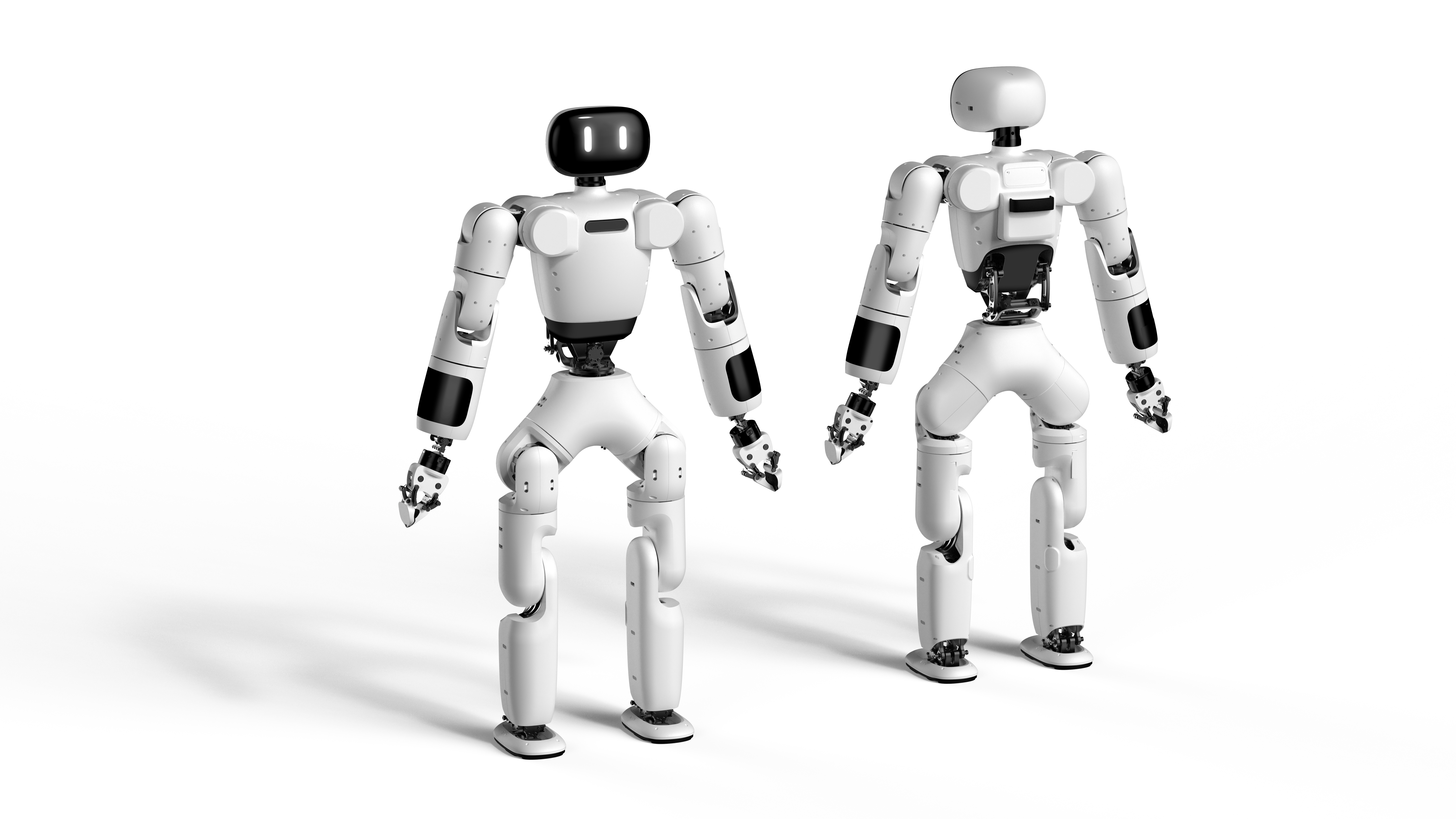
Software Architecture Diagram
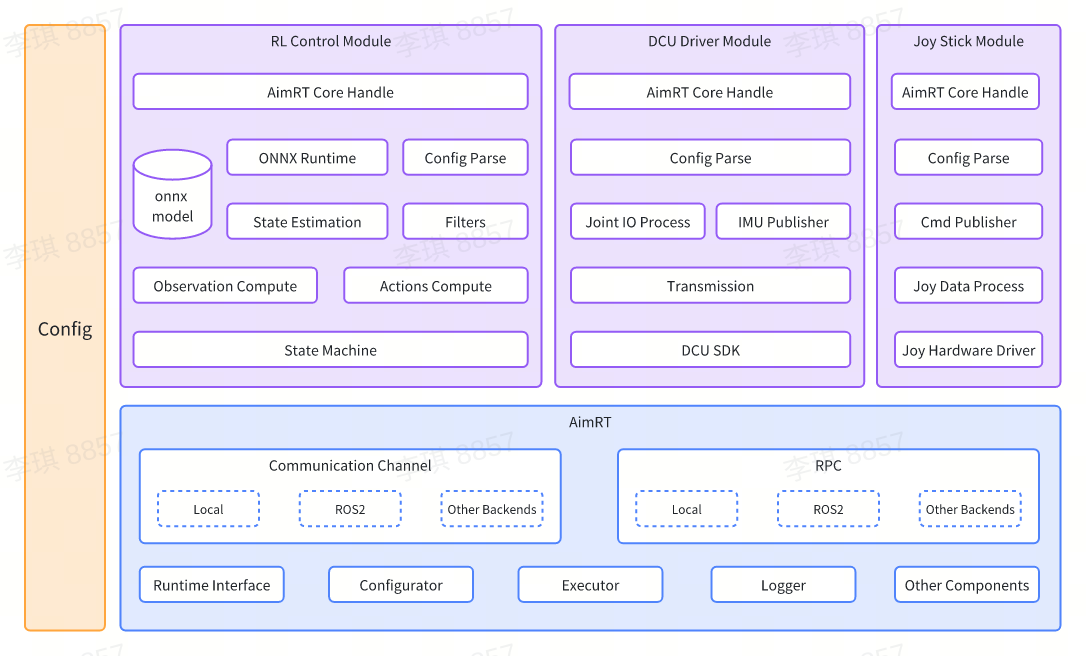
For detailed annotations of modules, please refer to the Development Guide.

Directory Structure

.
├── build.sh              # Build scripts
├── cmake                 # CMake scripts for build dependencies
│   ├── GetAimRT.cmake
│   ├── GetGTest.cmake
│   └── NamespaceTool.cmake
├── CMakeLists.txt        # Top-level CMakeLists.txt
├── format.sh             # Formatting scripts
├── README.md             # README document
├── doc                   # Development guide directory
├── src                   # Source code directory
│   ├── CMakeLists.txt    # CMakeLists.txt for the source code directory
│   ├── assistant         # ROS2 simulation and example project directory
│   ├── install           # Configuration script directory
│   ├── module            # Module directory
│   ├── pkg               # Deployment directory
│   └── protocols         # Protocol directory
└── test.sh               # Testing scripts

Running Instructions

Preparation for Launch

sudo apt update
sudo apt install -y build-essential cmake git libprotobuf-dev protobuf-compiler

git clone --recursive https://github.com/microsoft/onnxruntime

cd onnxruntime
./build.sh --config Release --build_shared_lib --parallel

cd build/Linux/Release/
sudo make install
  • Install ROS2 Humble and configure the environment variables. For detailed instructions, visit the ROS2 official website.

  • Install dependencies for the simulation environment.

sudo apt install jstest-gtk libglfw3-dev libdart-external-lodepng-dev

It will be very slow or even fail to download AimRT's numerous dependencies from default sources. Therefore, we provide environment variables DOWNLOAD_FLAGS for the download based on the Gitee source in url_gitee.bashrc. Simply source url_gitee.bashrc before running build.sh and add environment variable parameters for the Gitee source.

After completing the above steps, execute the following commands in the terminal:

source /opt/ros/humble/setup.bash
source url_gitee.bashrc

# Build
./build.sh $DOWNLOAD_FLAGS

# Test
./test.sh $DOWNLOAD_FLAGS

Launch Simulation

Before starting, it is necessary to connect the handle receiver.

cd build/
./run_sim.sh

Launch on Real Robot

Export your library path first, just need to execute once.

# Open "/etc/ld.so.conf" as root
sudo vi /etc/ld.so.conf

# Add this path to the end of "/etc/ld.so.conf"
/opt/ros/humble/lib
{YourProjectSource}/build/install/lib

# Refresh system env
sudo ldconfig

Ready to launch.

cd build/
./run.sh

Joystick Control

For specific control instructions, please refer to the Joystick Control Module.

License Agreement

The code provided in this project runs on the AimRT framework. This is research code subject to frequent changes, and cannot apply to all specific purposes. The source code is released under the MULAN license agreement.

Usage Instructions

If you have any questions or issues with this repository, please use the Issues.

Please do not contact us via email as we may not be able to respond. If you would like to contribute code, simply fork the repository (or if you are a collaborator, create a branch), make your changes, and submit a pull request to us.

排名相邻
同类项目