OpenAnt from Knostic is the leading open source LLM-based vulnerability discovery product, helping defenders proactively find verified security flaws while minimizing both false positives and false negatives. Stage 1 detects. Stage 2 attacks. What survives is real.
Design workspace for programmable 3D. Nova builds assets and worlds as editable, versioned programs: parametric, articulated and simulation-ready, compiled to CAD tools, 3D applications and robotics simulators.
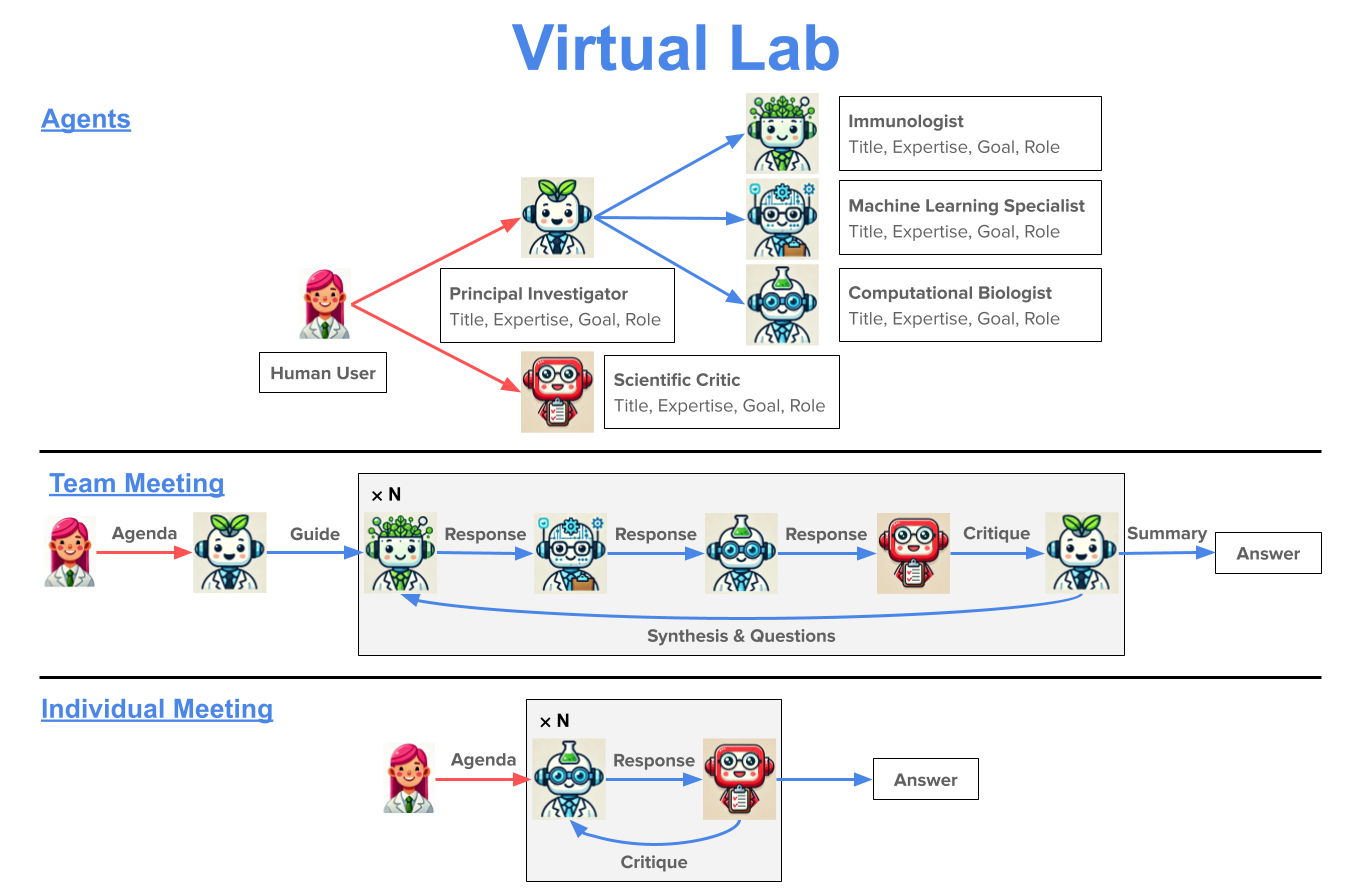
Virtual Lab The **Virtual Lab** is an AI-human collaboration for science research. In the Virtual Lab, a human researcher works with a team of large language model (LLM) **agents** to perform scientific research. Interaction between the human researcher and the LLM agents occurs via a series of **team meetings**, where all the LLM agents discuss a scientific agenda posed by the human researcher, and **individual meetings**, where the human researcher interacts with a single LLM agent to solve a
particular scientific task. Please see our paper The Virtual Lab of AI agents designs new SARS-CoV-2 nanobodies for more details on the Virtual Lab and an application to nanobody design for SARS-CoV-2. If you use the Virtual Lab, please cite our work as follows: Swanson, K. The Virtual Lab of AI agents designs new SARS-CoV-2 nanobodies. Virtual Lab for nanobody design As a real-world demonstration, we applied the Virtual Lab to design nanobodies
for one of the latest variants of SARS-CoV-2 (see nanobody_design). The Virtual Lab built a computational pipeline consisting of ESM, AlphaFold-Multimer, and Rosetta and used it to design 92 nanobodies that were experimentally validated. Please see the notebook nanobody_design/run_nanobody_design. ipynb for an example of how to use the Virtual Lab to create agents and run team and individual meetings. Installation The Virtual Lab can be installed using pip or by cloning the
repo and installing the required packages. Installation should only take a couple of minutes. Optionally, first create a conda environment. The Virtual Lab can be installed via pip. To install the latest version of the Virtual Lab locally, clone the repo and then install the package. OpenAI API Key The Virtual Lab currently uses GPT-5. Save your OpenAI API key as the environment variable .
Frequently asked questions
How many stars and forks are recorded?
zou-group/virtual-lab has 752 stars and 194 forks.
What is the repository rank?
zou-group/virtual-lab is ranked 4,139.
What language and category are recorded?
zou-group/virtual-lab has 752 stars, uses Jupyter Notebook and belongs to Applications.
Which repository is closest in rank?
zou-group/virtual-lab is compared with asaotomo/FofaMap, ranked 4,141 with 747 stars.
README
Virtual Lab
The Virtual Lab is an AI-human collaboration for science research. In the Virtual Lab, a human researcher works with a team of large language model (LLM) agents to perform scientific research. Interaction between the human researcher and the LLM agents occurs via a series of team meetings, where all the LLM agents discuss a scientific agenda posed by the human researcher, and individual meetings, where the human researcher interacts with a single LLM agent to solve a particular scientific task.
As a real-world demonstration, we applied the Virtual Lab to design nanobodies for one of the latest variants of SARS-CoV-2 (see nanobody_design). The Virtual Lab built a computational pipeline consisting of ESM, AlphaFold-Multimer, and Rosetta and used it to design 92 nanobodies that were experimentally validated.
Please see the notebook nanobody_design/run_nanobody_design.ipynb for an example of how to use the Virtual Lab to create agents and run team and individual meetings.
Installation
The Virtual Lab can be installed using pip or by cloning the repo and installing the required packages. Installation should only take a couple of minutes.
To install the latest version of the Virtual Lab locally, clone the repo and then install the package.
git clone https://github.com/zou-group/virtual_lab.git
cd virtual_lab
pip install -e .
OpenAI API Key
The Virtual Lab currently uses GPT-5.2 from OpenAI by default. Save your OpenAI API key as the environment variable OPENAI_API_KEY. For example, add export OPENAI_API_KEY= to your .bashrc or .bash_profile.