Interactive, editable docs designed for coding agents.
Key parameters and specifications
Key parameters and specifications
Parameter
Value
Language
JavaScript
Category
Applications
Subcategory
Content creation
Stars
1,669
Forks
73
Contributors
6
Created date
2023-05-12
Updated date
2026-10-13
Stars in 1 day
0
Stars in 7 days
-1
Rank
9,735
Previous rank
9,774
Rank change
39
7-day stars rank
17,058
Previous 7-day stars rank
17,057
7-day stars rank change
-1
Total stars rank
7,412
Previous total stars rank
7,404
Total stars rank change
-8
Country
USA
README summary
Opendream: A Web UI For the Rest of Us 💭 🎨 Opendream brings much needed and familiar features, such as layering, non-destructive editing, portability, and easy-to-write extensions, to your Stable Diffusion workflows. *Prerequisites*: Make sure you have Node installed. Navigate to this project within your terminal and run . After ~30 seconds, both the frontend and backend of the Opendream system should be up and running. Features Diffusion models have emerged as powerful tools in the world of image generation
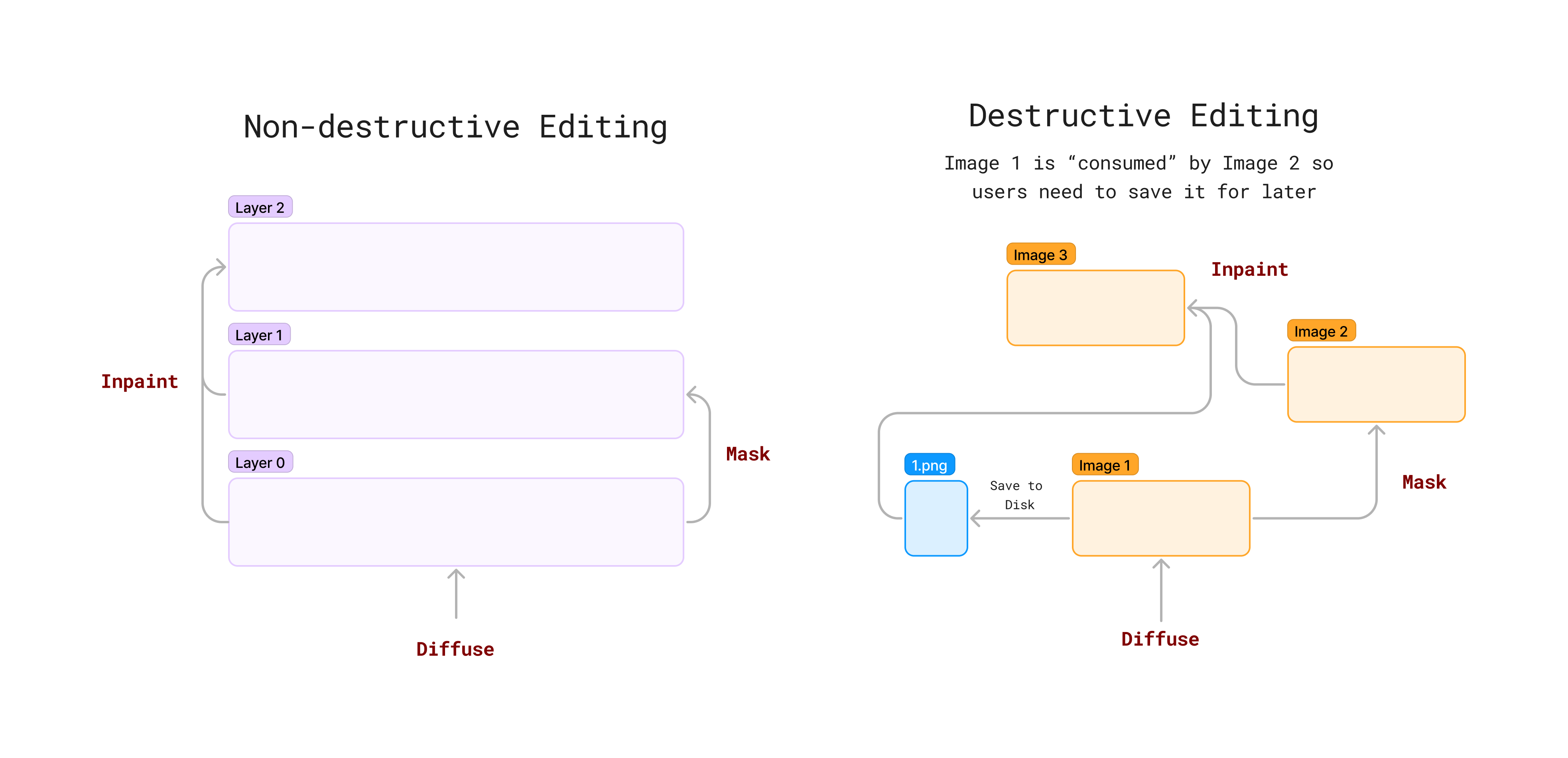
and manipulation. While they offer significant benefits, these models are often considered black boxes due to their inherent complexity. The current diffusion image generation ecosystem is defined by tools that allow one-off image manipulation tasks to control these models - text2img, in-painting, pix2pix, among others. For example, popular interfaces like Automatic1111, Midjourney, and Stability. AI's DreamStudio only support destructive editing: each edit "consumes" the previous image. This means users cannot easily build off of previous images or run multiple
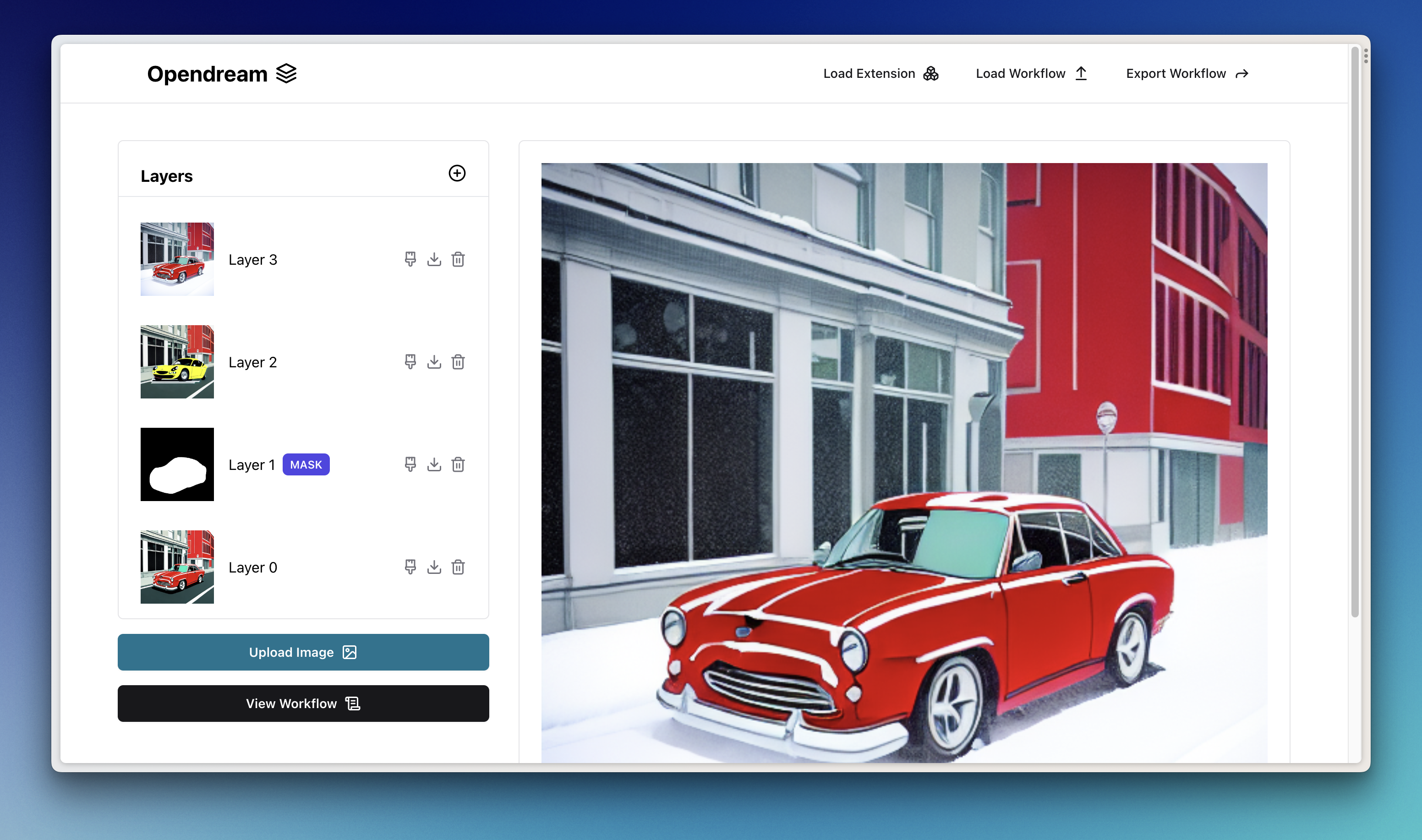
experiments on the same image, limiting their options for creative exploration. Layering and Non-destructive Editing Non-destructive editing is a method of image manipulation that preserves the original image data while allowing users to make adjustments and modifications without overwriting previous work. This approach facilitates experimentation and provides more control over the editing process by using layers and masks. When you delete a layer, all layers after it also get deleted. This guarantees that all layers currently on the
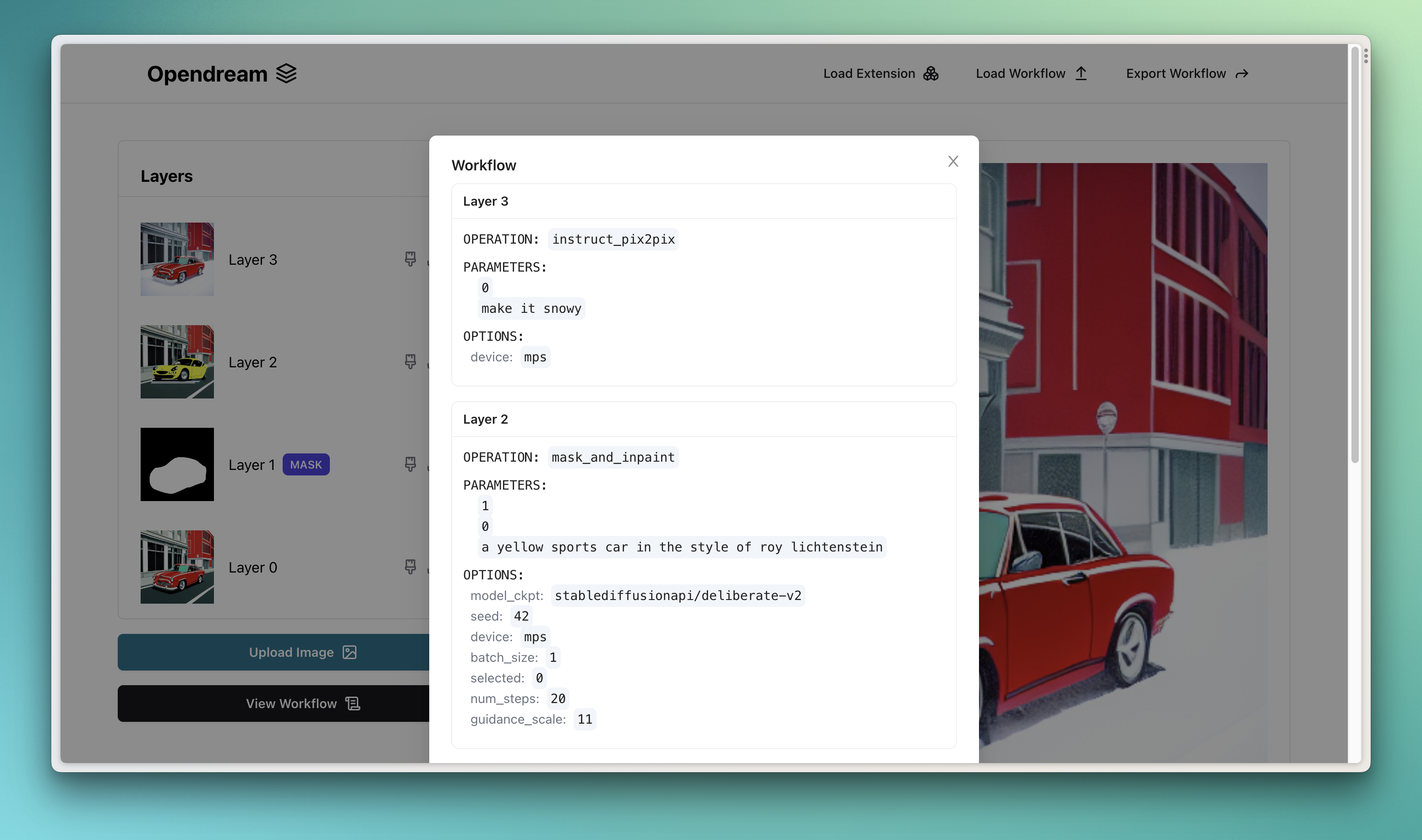
canvas are a product of other existing layers. This also allows one to deterministically "replay" a workflow. Like Photoshop, Opendream supports non-destructive editing out of the box. Learn more about the principles of non-destructive editing in Photoshop here. Save and Share Workflows Users can also save their current workflows into a portable file format that can be opened up at a later time or shared with collaborators. In this context, a "state" is just a JSON file describing
all of the current layers and how they were created. Support Simple to Write, Easy to Install Extensions As the open-source ecosystem flourishes around these models and tools, extensibility has also become a major concern. While Automatic1111 does offer extensions, they are often difficult to program, use, and install. It is far from being as full-featured as an application like Adobe Photoshop. As new features for Stable Diffusion, like ControlNet, are released, users should be able to seamlessly
integrate them into their artistic workflows with minimal overload and time. Opendream makes writing and using new diffusion features as simple as writing a Python function. Extensions From the get-go, Opendream supports two key primitive operations baked into the core system: and . In this repository, extensions for , , , and (Segment Anything) are provided. Any image manipulation logic can be easily written as an extension. With extensions, you can also decide how certain operations work. For example, you can override the
operation to use OpenAI's DALL-E instead or call a serverless endpoint on a service like AWS or Replicate. Loading
Frequently asked questions
How many stars and forks are recorded?
varunshenoy/opendream has 1,669 stars and 73 forks.
What is the repository rank?
varunshenoy/opendream is ranked 9,735.
What language and category are recorded?
varunshenoy/opendream has 1,669 stars, uses JavaScript and belongs to Applications.
Which repository is closest in rank?
varunshenoy/opendream is compared with victordibia/handtracking, ranked 9,727 with 1,673 stars.
README
Opendream: A Web UI For the Rest of Us 💭 🎨
Opendream brings much needed and familiar features, such as layering, non-destructive editing, portability, and easy-to-write extensions, to your Stable Diffusion workflows. Check out our demo video.
Getting started
Prerequisites: Make sure you have Node installed. You can download it here.
Clone this repository.
Navigate to this project within your terminal and run sh ./run_opendream.sh. After ~30 seconds, both the frontend and backend of the Opendream system should be up and running.
Features
Diffusion models have emerged as powerful tools in the world of image generation and manipulation. While they offer significant benefits, these models are often considered black boxes due to their inherent complexity. The current diffusion image generation ecosystem is defined by tools that allow one-off image manipulation tasks to control these models - text2img, in-painting, pix2pix, among others.
For example, popular interfaces like Automatic1111, Midjourney, and Stability.AI's DreamStudio only support destructive editing: each edit "consumes" the previous image. This means users cannot easily build off of previous images or run multiple experiments on the same image, limiting their options for creative exploration.
Layering and Non-destructive Editing
Non-destructive editing is a method of image manipulation that preserves the original image data while allowing users to make adjustments and modifications without overwriting previous work. This approach facilitates experimentation and provides more control over the editing process by using layers and masks. When you delete a layer, all layers after it also get deleted. This guarantees that all layers currently on the canvas are a product of other existing layers. This also allows one to deterministically "replay" a workflow.
Like Photoshop, Opendream supports non-destructive editing out of the box. Learn more about the principles of non-destructive editing in Photoshop here.
Save and Share Workflows
Users can also save their current workflows into a portable file format that can be opened up at a later time or shared with collaborators. In this context, a "state" is just a JSON file describing all of the current layers and how they were created.
Support Simple to Write, Easy to Install Extensions
As the open-source ecosystem flourishes around these models and tools, extensibility has also become a major concern. While Automatic1111 does offer extensions, they are often difficult to program, use, and install. It is far from being as full-featured as an application like Adobe Photoshop.
As new features for Stable Diffusion, like ControlNet, are released, users should be able to seamlessly integrate them into their artistic workflows with minimal overload and time.
Opendream makes writing and using new diffusion features as simple as writing a Python function. Keep reading to learn how.
Extensions
From the get-go, Opendream supports two key primitive operations baked into the core system: dream and mask_and_inpaint. In this repository, extensions for instruct_pix2pix, controlnet_canny, controlnet_openpose, and sam (Segment Anything) are provided.
Any image manipulation logic can be easily written as an extension. With extensions, you can also decide how certain operations work. For example, you can override the dream operation to use OpenAI's DALL-E instead or call a serverless endpoint on a service like AWS or Replicate. Here's an example using Baseten.
Loading an Existing Extension
There are two ways to load extensions.
Install a pre-written one through the Web UI.
(Manual) Download a valid extension file (or write one yourself!) and add it to the opendream/extensions folder. Instructions for writing your own extension are below.
Here is a sampling of currently supported extensions. You can use the links to install any given extension through the Web UI.
Note that extensions may have their own requirements you would need to include in the requirements.txt file. For example, you would need to add openai if you want to use the DALL-E extension.
Feel free to make a PR if you create a useful extension!
Writing Your Own Extension
Users can write their own extensions as follows:
Create a new Python file in the opendream/extensions folder.
Write a method with type hints and a @opendream.define_op decorator. This decorator registers this method with the Opendream backend.
The method has a few requirements:
Parameters must have type hints. These enable the backend to generate a schema for the input which is parsed into form components on the frontend. Valid types include: str, int, float, Layer, MaskLayer, or ImageLayer.
The only valid return types are a Layer or a list of Layer objects.
Contributions and Licensing
Opendream was built by Varun Shenoy, Eric Lou, Shashank Rammoorthy, and Rahul Shiv as a part of Stanford's CS 348K.
Feel free to provide any contributions you deem necessary or useful. This project is licensed under the MIT License.