← Open Source
kwea123

VTuber_Unity

Use Unity 3D character and Python deep learning algorithms to stream as a VTuber.

ApplicationsContent creationPython
Open on GitHub
Momentum
+0stars in 24 hours0.0%
808
Stars
106
Forks
+0
This week
1
Contributors
Created 2019-10-14 · Updated 2026-09-08 · #13611 today
Top developers

kwea123/VTuber_Unity is ranked 13,611 with 808 stars.

Same-category comparison

kwea123/VTuber_Unity is ranked 13,611 among these 8 peers; risa-labs-inc/BossConsole is ranked 13,602.

Same-category comparison
NameRankMetrics
BandarLabs/gitpodcast13,577
Language:
TypeScript
Stars:
811
Forks:
91
Description:
Convert any git repository into an engaging podcast.
ZHO-ZHO-ZHO/ComfyUI-PhotoMaker-ZHO13,579
Language:
Python
Stars:
811
Forks:
40
Description:
Unofficial implementation of PhotoMaker for ComfyUI.
jthack/ffufai13,592
Language:
Python
Stars:
810
Forks:
93
Description:
AI-powered ffuf wrapper.
risa-labs-inc/BossConsole13,602
Language:
Kotlin
Stars:
809
Forks:
164
Description:
Open-source, multi-platform harness for AI agents - a native, multi-threaded operator's console (JVM, not Electron) to run Claude Code, Codex, Gemini or OpenCode with a real browser, terminal, editor, secrets & 200+ MCP tools. Built for enterprises, science & research.
Iamshankhadeep/ccseva13,622
Language:
TypeScript
Stars:
806
Forks:
40
Description:
A beautiful macOS menu bar app for tracking your Claude Code usage in real-time.
sstklen/trump-code13,628
Language:
Python
Stars:
806
Forks:
104
ObservedObserver/chatgpt-i18n13,634
Language:
TypeScript
Stars:
805
Forks:
98
Description:
Localize your websites with AI assistance.
nirbar1985/ai-travel-agent13,652
Language:
Python
Stars:
804
Forks:
165
Description:
AI Travel Agent.
Key parameters and specifications
ParameterValue
LanguagePython
CategoryApplications
SubcategoryContent creation
Keywords3D, Video production
Stars808
Forks106
Contributors1
Created date2019-10-14
Updated date2026-09-08
Stars in 1 day0
Stars in 7 days0
Rank13,611
Previous rank13,505
Rank change-106
7-day stars rank14,029
Previous 7-day stars rank14,047
7-day stars rank change18
Total stars rank13,246
Previous total stars rank13,220
Total stars rank change-26
CountryTaiwan
README summary

VTuber_Unity 2021/9/1: Due to massive bugs and the fast-moving virtual character technology, I decide to archive this repository (no updates anymore). Nowadays you can basically find many public tools on the internet, even for mobile platforms. This repository doesn't work as well as those tools, but can still serve as a tool if you want to integrate your character in Unity and custom it (e. Use Unity 3D character and Python deep learning algorithms to stream

as a VTuber! This is part of the OpenVTuberProject, which provides many toolkits for becoming a VTuber. 04 may also work) or Windows 10 64bits or MacOS (Optional but recommended) An NVIDIA GPU (tested with CUDA 9. 1, but may also work with other versions) Software Python3. x (installation via Anaconda is recommended; **mandatory for Windows users**) (Optional) It is recommended to use conda environments. Python libraries Ubuntu: Windows: Optional OBS Studio if you want to embed the virtual character

into your videos. Unity Editor if you want to customize the virtual character. Example usage Here we assume that you have installed the requirements and activated the virtual environment you are using. Model download You need to download the models here, extract and put into . If you don't use , you can omit this step as the script will automatically download them for you. (add if you have CPU only) You should see the following: Left: CPU model. Synchronize with the

virtual character 1. Download and launch the binaries here depending on your OS to launch the unity window featuring the virtual character (unity-chan here). **Important: Ensure that only one window is opened at a time! After the vitual character shows up, run to synchronize your face features with the virtual character. (add to see your face and if you have CPU only as step 1. ) You should see the following: Left: CPU model. Functionalities details In this section, I

will describe the functionalities implemented and a little about the technology behind. Head pose estimation Using head-pose-estimation and face-alignment, deep learning methods are applied to do the following: face detection and facial landmark detection. A face bounding box and the 68-point facial landmark is detected, then a PnP algorithm is used to obtain the head pose (the rotation of the face). Finally, kalman filters are applied to the pose to make it smoother. The character's head

pose is synchronized. As for the visualization, the white bounding box is the detected face, on top of which 68 green face landmarks are plotted. The head pose is represented by the green frustum and the axes in front of the nose. Gaze estimation Using GazeTracking, The eyes are first extracted using the landmarks enclosing the eyes. Then the eye images are converted to grayscale, and a pixel intensity threshold is applied to detect the iris (the black part of

the eye). Finally, the center of the iris is computed as the center of the black area. The character's gaze

Frequently asked questions

How many stars and forks are recorded?

kwea123/VTuber_Unity has 808 stars and 106 forks.

What is the repository rank?

kwea123/VTuber_Unity is ranked 13,611.

What language and category are recorded?

kwea123/VTuber_Unity has 808 stars, uses Python and belongs to Applications.

Which repository is closest in rank?

kwea123/VTuber_Unity is compared with risa-labs-inc/BossConsole, ranked 13,602 with 809 stars.

README

VTuber_Unity

2021/9/1: Due to massive bugs and the fast-moving virtual character technology, I decide to archive this repository (no updates anymore). Nowadays you can basically find many public tools on the internet, even for mobile platforms. This repository doesn't work as well as those tools, but can still serve as a tool if you want to integrate your character in Unity and custom it (e.g. play around with Unity objects).

Use Unity 3D character and Python deep learning algorithms to stream as a VTuber!

This is part of the OpenVTuberProject, which provides many toolkits for becoming a VTuber.

Youtube Playlist (Chinese) (Covers videos 1-4):


Credits

First of all, I'd like to give credits to the following projects that I borrow code from:

Project LICENSE
head-pose-estimation LICENSE
face-alignment LICENSE
GazeTracking LICENSE

And the virtual character unity-chan © UTJ/UCL.

Installation

Hardware

  • OS: Ubuntu 16.04 (18.04 may also work) or Windows 10 64bits or MacOS
  • (Optional but recommended) An NVIDIA GPU (tested with CUDA 9.0, 10.0 and 10.1, but may also work with other versions)

Software

  • Python3.x (installation via Anaconda is recommended; mandatory for Windows users)

    • (Optional) It is recommended to use conda environments. Run conda create -n vtuber python=3.6. Activate it by conda activate vtuber.
  • Python libraries

    • Ubuntu:
      • Install the requirements by pip install -r requirements_(cpu or gpu).txt
      • If you have CUDA 10.1, pip install onnxruntime-gpu to get faster inference speed using onnx model.
    • Windows:
      • CPU:
        • pip install -r requirements_cpu.txt
        • if dlib cannot be properly installed, follow here.
      • GPU:
        • Install pytorch using conda. Example: conda install pytorch==1.2.0 torchvision==0.4.0 cudatoolkit=10.0 -c pytorch
        • Install other dependencies by pip install -r requirements_gpu.txt.
        • If you have CUDA 10, pip install onnxruntime-gpu to get faster inference speed using onnx model.
  • Optional

Example usage

Here we assume that you have installed the requirements and activated the virtual environment you are using.

0. Model download

You need to download the models here, extract and put into face_alignment/ckpts.

If you don't use onnxruntime, you can omit this step as the script will automatically download them for you.

1. Face detection test

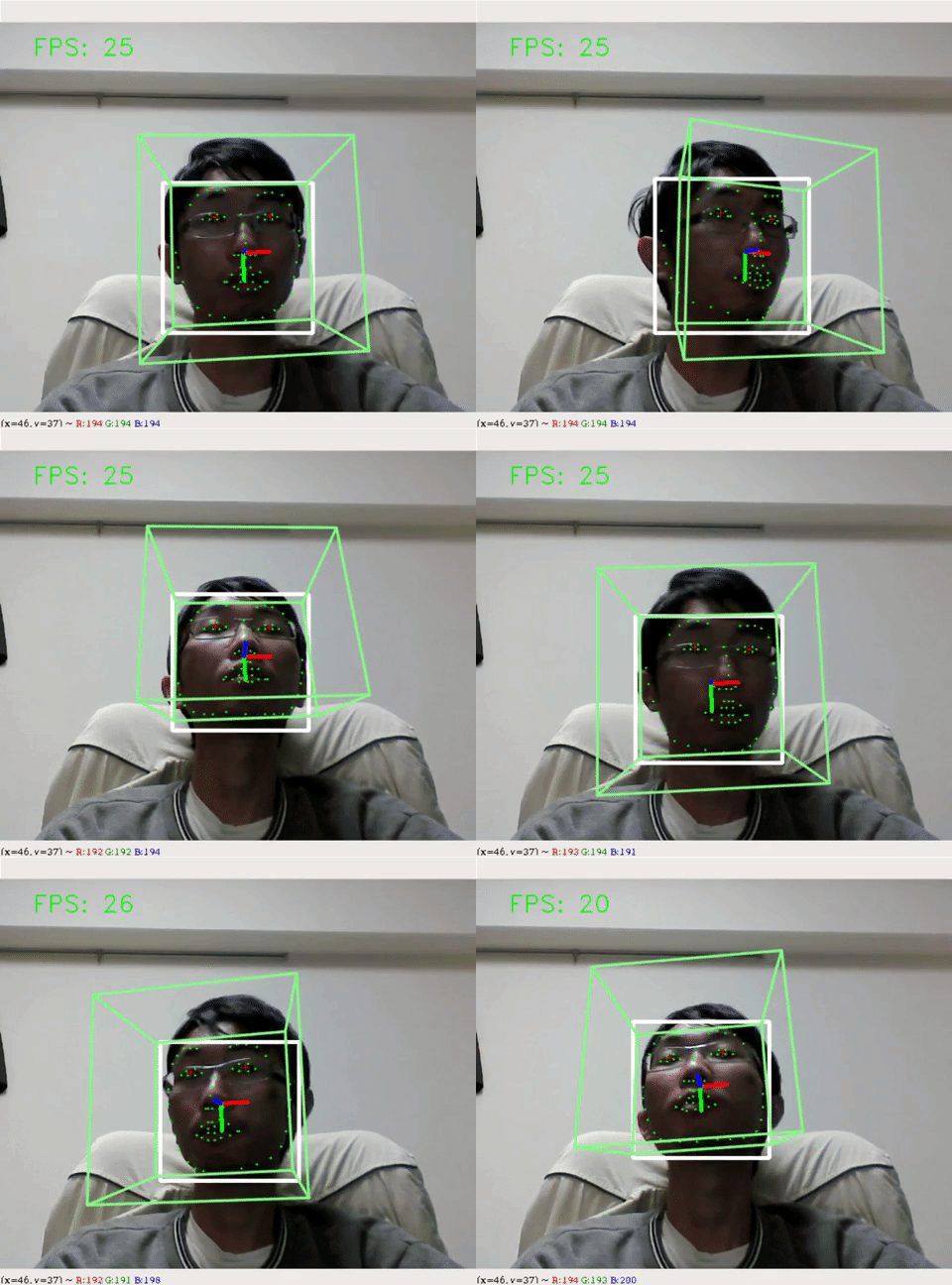
Run python demo.py --debug. (add --cpu if you have CPU only)

You should see the following:
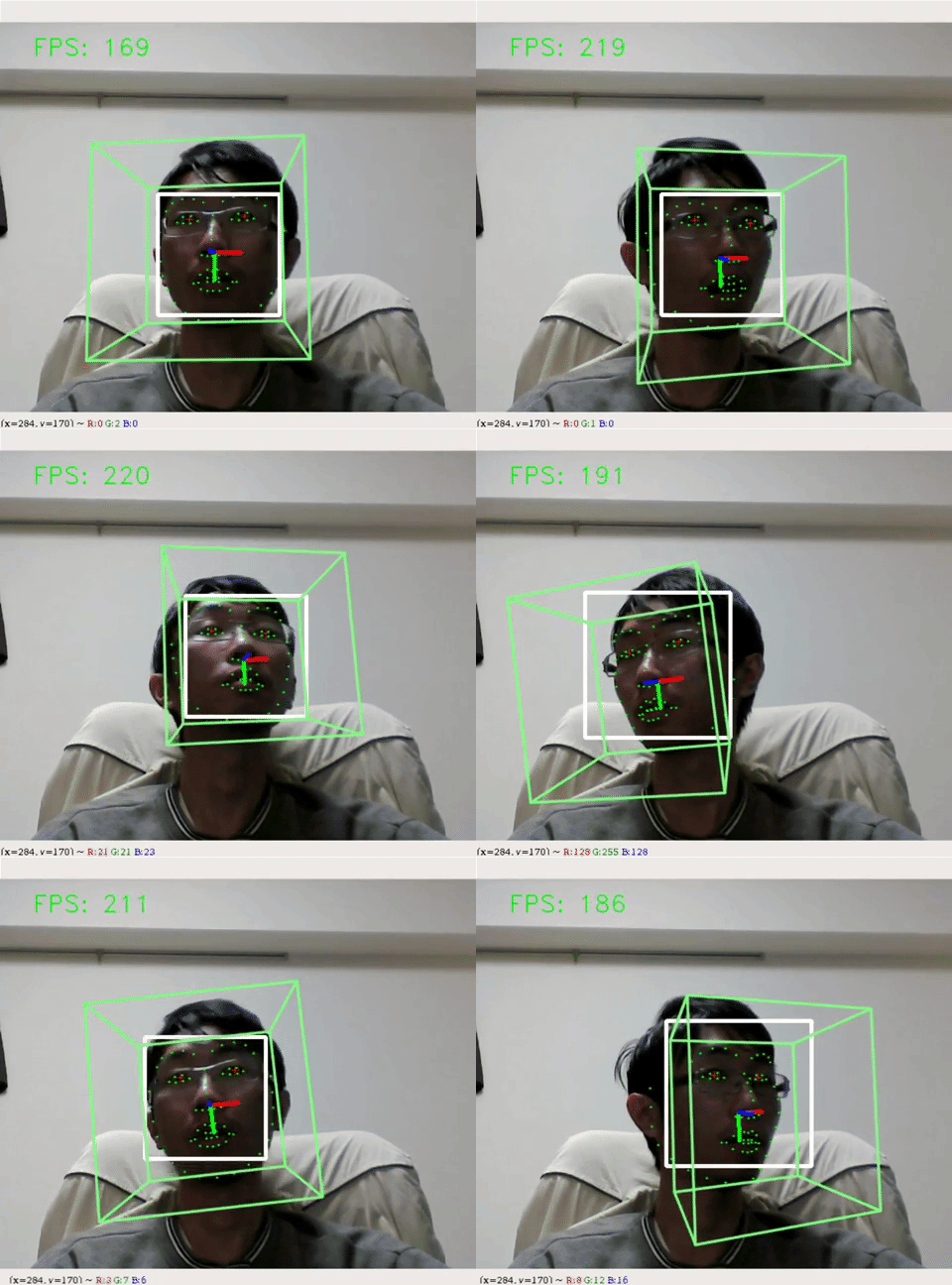
Left: CPU model. Right: GPU model run on a GTX1080Ti.

2. Synchronize with the virtual character

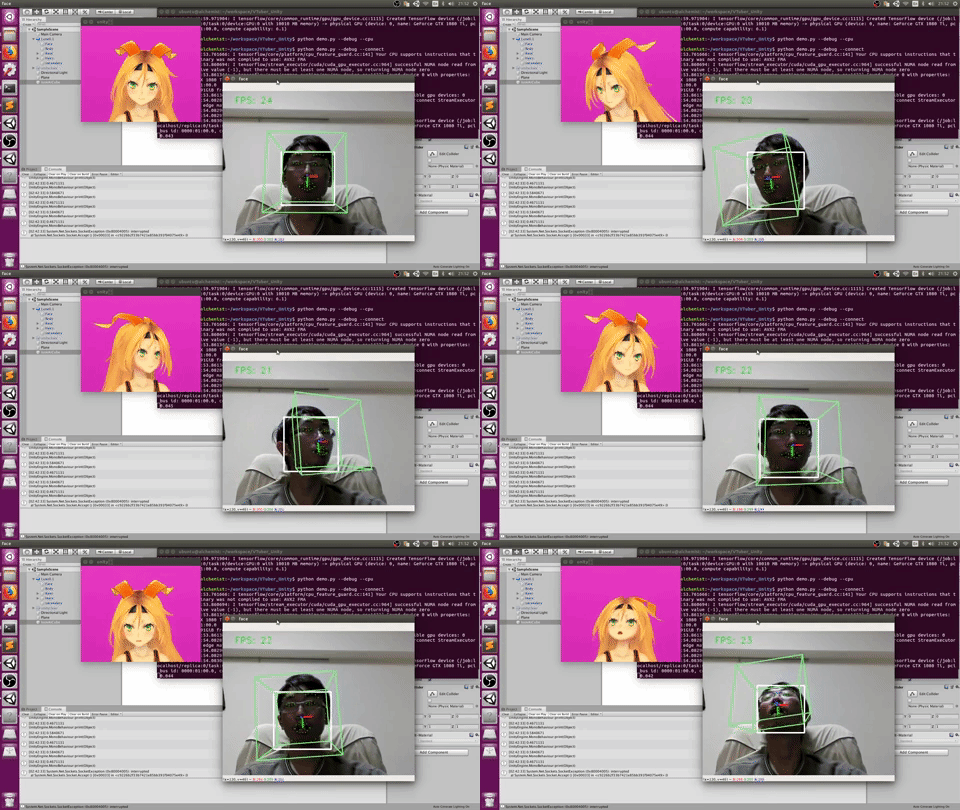
  1. Download and launch the binaries here depending on your OS to launch the unity window featuring the virtual character (unity-chan here). Important: Ensure that only one window is opened at a time!
  2. After the vitual character shows up, run python demo.py --connect to synchronize your face features with the virtual character. (add --debug to see your face and --cpu if you have CPU only as step 1.)

You should see the following:
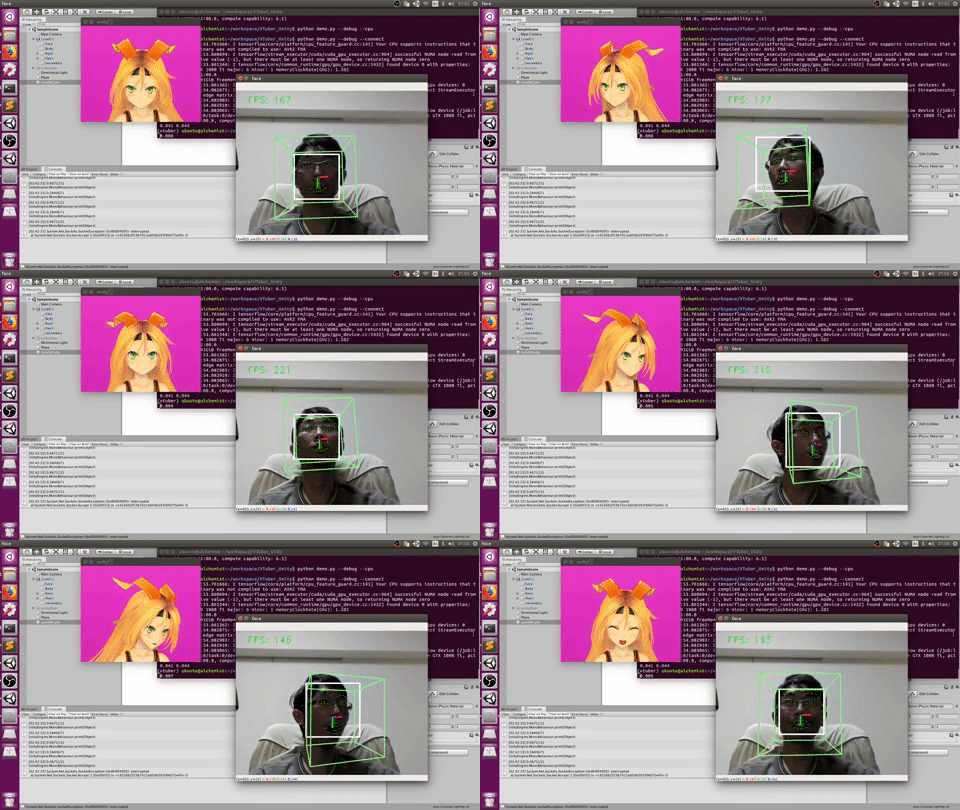
Left: CPU model. Right: GPU model run on a GTX1080Ti.

Enjoy your VTuber life!

Functionalities details

In this section, I will describe the functionalities implemented and a little about the technology behind.

Head pose estimation

Using head-pose-estimation and face-alignment, deep learning methods are applied to do the following: face detection and facial landmark detection. A face bounding box and the 68-point facial landmark is detected, then a PnP algorithm is used to obtain the head pose (the rotation of the face). Finally, kalman filters are applied to the pose to make it smoother.

The character's head pose is synchronized.

As for the visualization, the white bounding box is the detected face, on top of which 68 green face landmarks are plotted. The head pose is represented by the green frustum and the axes in front of the nose.

Gaze estimation

Using GazeTracking, The eyes are first extracted using the landmarks enclosing the eyes. Then the eye images are converted to grayscale, and a pixel intensity threshold is applied to detect the iris (the black part of the eye). Finally, the center of the iris is computed as the center of the black area.

The character's gaze is not synchronized. (Since I didn't find a way to move unity-chan's eyes)

As for the visualization, the red crosses indicate the iris.

Miscellaneous

  1. Estimate eye aspect ratio: The eye aspect ratio can be used to detect blinking, but currently I just use auto blinking since this estimation is not so accurate.

  2. Estimate mouth aspect ratio: I use this number to synchronize with the character's mouth.

  3. The mouth distance is used to detect smile and synchronize with the character.

Unity Project

If you want to customize the virtual character, you can find the unity project in release.

License

MIT License

Nearby in the ranking
Similar items