"Passage of Time" Model Context Protocol (MCP) Server 🕐
An MCP server that gives language models temporal awareness and time calculation abilities. Teaching LLMs the significance of the passage of time through collaborative tool development.
📖 The Story
This project emerged from a philosophical question: "Can AI perceive the passage of time?" What started as an exploration of machine consciousness became a practical solution to a real problem - LLMs can't reliably calculate time differences.
Instead of publishing a paper about how "silly" these models are at mental math, we decided to do what we've done for ourselves: equip them with a calculator for time.
Through human-LLM collaboration, we discovered that with proper temporal tools, models can uncover surprising insights about conversation patterns, work rhythms, and the human experience of time.
Read the full story on Medium →
🚀 Quick Start
Prerequisites
- Python 3.12+
- pipenv (or pip)
- An MCP-compatible client (Claude.ai, Continue.dev, etc.)
Installation
- Clone the repository:
git clone https://github.com/jlumbroso/passage-of-time-mcp.git
cd passage-of-time-mcp
- Install dependencies:
pipenv install
# or with pip:
pip install fastmcp pytz
- Run the server:
pipenv run server
# or directly:
pipenv run python passage_of_time_mcp.py
The server will start on http://0.0.0.0:8000/sse.
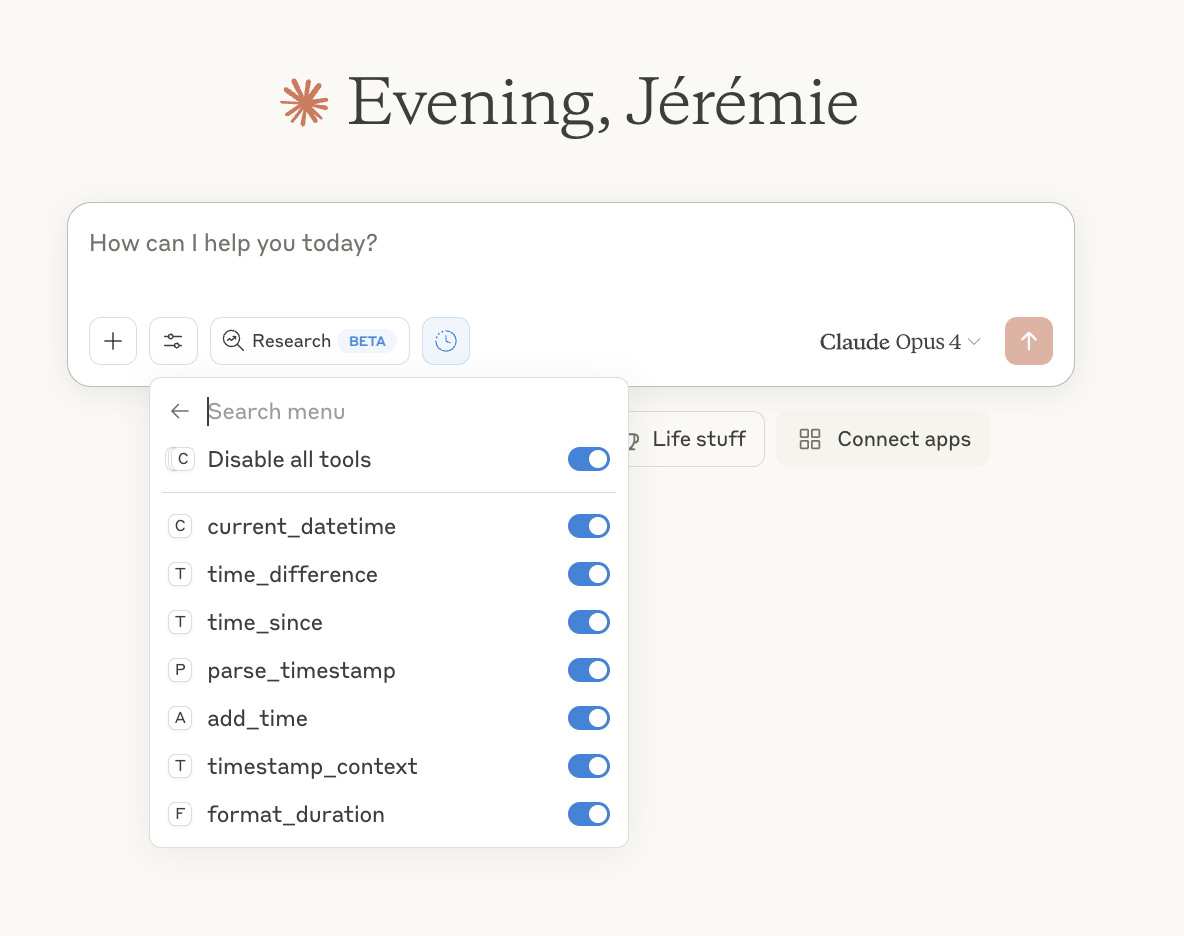
Connecting to Claude.ai
- In Claude.ai, go to Settings → Integrations
- Click "Add integration" and select "Custom"
- Enter the server URL (e.g.,
https://your-server.ngrok-free.app/sseif using ngrok, make sure to add/sseat the end) - Save and enable all the time-related tools
Note: For local development, you'll need to expose your server using ngrok or deploy it to a public URL.
🛠️ Available Tools
Core Functions
current_datetime(timezone="America/New_York")
Returns the current date and time. The foundation of temporal awareness.
Returns: "2024-01-15 14:30:45 EST"
time_difference(timestamp1, timestamp2, unit="auto")
Calculates the duration between two timestamps with human-readable output.
# Example response:
{
    "seconds": 11401,
    "formatted": "3 hours, 10 minutes, 1 second",
    "requested_unit": 3.17,  # if unit="hours"
    "is_negative": false
}
timestamp_context(timestamp)
Provides human context about a timestamp - is it weekend? Business hours? Dinner time?
# Example response:
{
    "time_of_day": "evening",
    "day_of_week": "Saturday",
    "is_weekend": true,
    "is_business_hours": false,
    "typical_activity": "leisure_time",
    "relative_day": "today"
}
time_since(timestamp)
Calculates how long ago something happened with contextual descriptions.
# Example response:
{
    "seconds": 7200,
    "formatted": "2 hours ago",
    "context": "earlier today"
}
parse_timestamp(timestamp)
Converts timestamps between different formats for maximum compatibility.
# Example response:
{
    "iso": "2024-01-15T14:30:45-05:00",
    "unix": "1705343445",
    "human": "January 15, 2024 at 2:30 PM EST",
    "day_of_week": "Monday"
}
add_time(timestamp, duration, unit)
Adds or subtracts time with natural language descriptions.
# Example response:
{
    "result": "2024-01-16 14:30:45",
    "iso": "2024-01-16T14:30:45-05:00",
    "description": "tomorrow at 2:30 PM"
}
format_duration(seconds, style="full")
Formats durations in various styles for different contexts.
# style="full": "2 hours, 30 minutes, 15 seconds"
# style="compact": "2h 30m 15s"
# style="minimal": "2:30:15"
💡 Example Conversations
Basic Time Awareness
Human: What time is it?
Claude: [calls current_datetime] It's currently 3:45 PM EST on Monday, January 15, 2024.
Conversation Rhythm Analysis
Human: Let's have a discussion about AI consciousness.
Claude: [calls current_datetime at start of each response]
[After several exchanges]
Human: What patterns do you notice in our conversation?
Claude: Looking at the timestamps, I notice you're taking 30 seconds to 2 minutes between responses, suggesting active engagement. The 3-minute pause before your question about implementation shows deeper consideration...
Understanding Work Context
Human: [at 11:45 PM] Can you help me debug this code?
Claude: [calls current_datetime, then timestamp_context]
I see it's late night on a weekday. Given that it's approaching midnight, let me help you efficiently so you can get some rest. Here's a focused debugging approach...
🏗️ Design Philosophy
This server embodies several key principles:
-
Cognitive Partnership: We treat LLMs as cognitive partners who need proper tools, not black boxes to be dressed up.
-
Collaborative Design: The tool suite emerged from asking Claude what they needed, not imposing our assumptions.
-
Human Context Matters: Time isn't just numbers - it's about understanding human rhythms, work patterns, and social contexts.
-
Practical Over Perfect: We provide the tools models actually need, tested through real conversations.
🔧 Configuration
Timezone Support
The server defaults to America/New_York but supports all standard timezone names:
UTCUS/PacificEurope/LondonAsia/Tokyo- etc.
Timestamp Formats
All timestamps must use one of these formats:
- Full:
YYYY-MM-DD HH:MM:SS(e.g., "2024-01-15 14:30:45") - Date only:
YYYY-MM-DD(e.g., "2024-01-15")
This strict formatting prevents ambiguity and ensures reliable calculations.
🚧 Known Issues & Future Work
Current Limitations
- The SSE transport is deprecated but currently most reliable
- Server requires public URL for web-based clients
- No persistent memory of past time calculations
Roadmap
- [ ] Migrate to modern
http-streamtransport - [ ] Add Docker support for easier deployment
- [ ] Create browser extension for local development
- [ ] Add configurable activity patterns per user
- [ ] Support for calendar integration
- [ ] Natural language time parsing ("next Tuesday", "in 3 hours")
🤝 Contributing
This project emerged from human-LLM collaboration and welcomes more of the same! Whether you're contributing solo or with AI assistance, we value:
- Practical additions - Tools that solve real temporal understanding problems
- Human context - Features that help models understand how humans experience time
- Clear documentation - Examples that show real-world usage
Development Setup
First, clone the repository:
git clone https://github.com/jlumbroso/passage-of-time-mcp.git
cd passage-of-time-mcp
Then, install dependencies (I am using pipenv because it simultaneously creates a virtual environment and installs package, but any pip-compatible tool will work):
# Install dev dependencies
pipenv install --dev

# Run tests
pipenv run test

# Run server
pipenv run server
This will start the server on http://0.0.0.0:8000/sse on your local computer. However, for web-based clients to connect to it, you will need to expose it to the internet using a service like ngrok.
Assuming you have ngrok installed, you can run ngrok http 8000 to expose the server to the internet, and then use the provided URL in your MCP client. By default, ngrok will provide the endpoint to use in the form of https://.ngrok-free.app/ in the Terminal:
❤️ ngrok? We're hiring https://ngrok.com/careers

Session Status                online
Account                       Jérémie Lumbroso (Plan: Free)
Update                        update available (version 3.23.1, Ctrl-U to update)
Version                       3.22.1
Region                        United States (us)
Latency                       31ms
Latency                       1575ms
Web Interface                 http://127.0.0.1:4040
Forwarding                    https://37f9-2607-f470-6-1001-243b-bc5c-df2e-762.ngrok-free.app ->

Connections                   ttl     opn     rt1     rt5     p50     p90
                              1756    0       0.01    0.03    5.32    61.51

HTTP Requests
-------------

00:06:44.030 EDT POST /messages/                202 Accepted
00:06:43.936 EDT POST /messages/                202 Accepted
00:06:43.514 EDT GET  /sse                      200 OK
00:06:43.682 EDT POST /messages/                202 Accepted
00:06:43.342 EDT POST /sse                      405 Method Not Allowed
In my case, I used https://37f9-2607-f470-6-1001-243b-bc5c-df2e-762.ngrok-free.app, but since we are using the "SSE" transport method, the endpoint will have /sse appended at the end, so the final URL will be https://37f9-2607-f470-6-1001-243b-bc5c-df2e-762.ngrok-free.app/sse.
Once this endpoint exists, you can add the MCP server as an integration to LLMs, such as Claude, following these instructions:
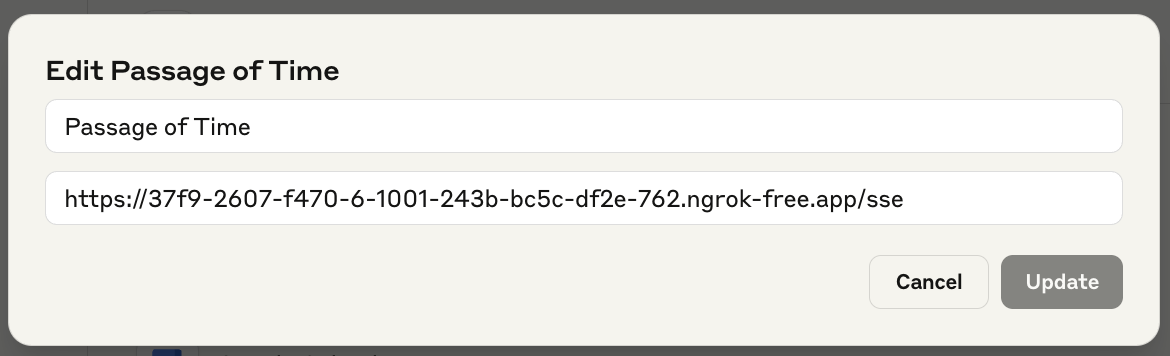
Once you've connected the MCP server to Claude.ai, you should start receiving queries locally:
$ pipenv run server
/Users/jlumbroso/.asdf/installs/python/3.12.4/lib/python3.12/asyncio/events.py:88: DeprecationWarning: The run_sse_async method is deprecated (as of 2.3.2). Use run_http_async for a modern (non-SSE) alternative, or create an SSE app with `fastmcp.server.http.create_sse_app` and run it directly.
  self._context.run(self._callback, *self._args)
[06/16/25 19:18:04] INFO     Starting MCP server 'Passage of Time' with transport 'sse' on http://0.0.0.0:8000/sse            server.py:1219
INFO:     Started server process [11373]
INFO:     Waiting for application startup.
INFO:     Application startup complete.
INFO:     Uvicorn running on http://0.0.0.0:8000 (Press CTRL+C to quit)
INFO:     34.162.142.92:0 - "POST /sse HTTP/1.1" 405 Method Not Allowed
INFO:     34.162.142.92:0 - "GET /sse HTTP/1.1" 200 OK
INFO:     34.162.142.92:0 - "POST /messages/?session_id=e21108cecbf646ffb7effe14dd856b3d HTTP/1.1" 202 Accepted
INFO:     34.162.142.92:0 - "POST /messages/?session_id=e21108cecbf646ffb7effe14dd856b3d HTTP/1.1" 202 Accepted
INFO:     34.162.142.92:0 - "POST /messages/?session_id=e21108cecbf646ffb7effe14dd856b3d HTTP/1.1" 202 Accepted
INFO:     34.162.142.92:0 - "POST /messages/?session_id=e21108cecbf646ffb7effe14dd856b3d HTTP/1.1" 202 Accepted
INFO:     34.162.142.92:0 - "POST /messages/?session_id=e21108cecbf646ffb7effe14dd856b3d HTTP/1.1" 202 Accepted
INFO:     34.162.142.92:0 - "POST /messages/?session_id=e21108cecbf646ffb7effe14dd856b3d HTTP/1.1" 202 Accepted
Eventually, you will want to deploy this MCP server to a cloud provider such as Render.com, so your LLM doesn't have to contend with the unreliable nature of your local machine.
📝 License
Mozilla Public License 2.0 - because good ideas should spread while staying open.
🙏 Acknowledgments
- Created through extended collaboration between Jérémie Lumbroso and Claude Opus 4.0 (Anthropic)
- Inspired by the question: "Can AI perceive the passage of time?"
- Built on FastMCP framework
- Special thanks to the Natural and Artificial Minds initiative at Princeton University
📚 Further Reading
- Teaching AI "The Significance of the Passage of Time" - Medium Article
- We Can't Understand AI Using our Existing Vocabulary - Been Kim et al.
- Model Context Protocol Documentation
"We're not just building better LLM tools. We're teaching curious cognitive systems about what it means to be human—one timestamp at a time."