← Open Source
braincrew-lab

langgraph-mcp-agents

LangGraph-powered ReAct agent with Model Context Protocol (MCP) integration. A Streamlit web interface for dynamically configuring, deploying, and interacting with AI agents capable of accessing various data sources and APIs through MCP tools.

AI EngineeringGive agent toolsBuild agent workflow (SDK)Python
Open on GitHub
Momentum
+0stars in 24 hours0.0%
718
Stars
226
Forks
+0
This week
2
Contributors
Created 2025-03-30 · Updated 2026-10-08 · #14599 today
Top developers
teddylee777zenoengine

braincrew-lab/langgraph-mcp-agents is ranked 14,599 with 718 stars.

Same-category comparison

braincrew-lab/langgraph-mcp-agents is ranked 14,599 among these 8 peers; CSML-by-Clevy/csml-engine is ranked 14,595.

Same-category comparison
NameRankMetrics
jlumbroso/passage-of-time-mcp14,590
Language:
Python
Stars:
719
Forks:
50
Description:
🤖🕰️ An MCP server that gives language models temporal awareness and time calculation abilities. Teaching AI the significance of the passage of time through collaborative tool development.
openai/openai-cli14,593
Language:
Go
Stars:
719
Forks:
75
Description:
Official CLI for the OpenAI API.
spencer-project/spencer_people_tracking14,594
Language:
C++
Stars:
719
Forks:
321
Description:
Multi-modal ROS-based people detection and tracking framework for mobile robots developed within the context of the EU FP7 project SPENCER.
CSML-by-Clevy/csml-engine14,595
Language:
Rust
Stars:
718
Forks:
63
Description:
CSML is an easy-to-use chatbot programming language and framework.
https-deeplearning-ai/agentic-ai-public14,603
Language:
Python
Stars:
718
Forks:
430
Description:
Research Agent service for the Agentic Workflow course.
rekog-labs/MCP-Nest14,607
Language:
TypeScript
Stars:
718
Forks:
124
Description:
A NestJS module to effortlessly create Model Context Protocol (MCP) servers for exposing AI tools, resources, and prompts.
HazAT/pi-interactive-subagents14,610
Language:
TypeScript
Stars:
717
Forks:
182
prompt-security/ps-fuzz14,619
Language:
Python
Stars:
717
Forks:
104
Description:
Make your GenAI Apps Safe & Secure :rocket: Test & harden your system prompt.
Key parameters and specifications
ParameterValue
LanguagePython
CategoryAI Engineering
SubcategoryGive agent tools, Build agent workflow (SDK)
KeywordsMCP
Stars718
Forks226
Contributors2
Created date2025-03-30
Updated date2026-10-08
Stars in 1 day0
Stars in 7 days0
Rank14,599
Previous rank14,449
Rank change-150
7-day stars rank14,562
Previous 7-day stars rank14,568
7-day stars rank change6
Total stars rank14,591
Previous total stars rank14,560
Total stars rank change-31
README summary

LangGraph Agents + MCP Project Overview is a toolkit provided by **LangChain AI** that enables AI agents to interact with external tools and data sources through the Model Context Protocol (MCP). This project provides a user-friendly interface for deploying ReAct agents that can access various data sources and APIs through MCP tools. Features **Streamlit Interface**: A user-friendly web interface for interacting with LangGraph with MCP tools **Tool Management**: Add, remove, and configure MCP tools through the UI (Smithery JSON

format supported). This is done dynamically without restarting the application **Streaming Responses**: View agent responses and tool calls in real-time **Conversation History**: Track and manage conversations with the agent MCP Architecture The Model Context Protocol (MCP) consists of three main components: 1. **MCP Host**: Programs seeking to access data through MCP, such as Claude Desktop, IDEs, or LangChain/LangGraph. **MCP Client**: A protocol client that maintains a 1:1 connection with the server, acting as an intermediary between the

host and server. **MCP Server**: A lightweight program that exposes specific functionalities through a standardized model context protocol, serving as the primary data source. Quick Start with Docker You can easily run this project using Docker without setting up a local Python environment. Requirements (Docker Desktop) Install Docker Desktop from the link below: Install Docker Desktop Run with Docker Compose 1. Create a file with your API keys in the project root directory. Enter your obtained API keys in the

file. : If you enter an Anthropic API key, you can use "claude-3-7-sonnet-latest", "claude-3-5-sonnet-latest", "claude-3-haiku-latest" models. : If you enter an OpenAI API key, you can use "gpt-4o", "gpt-4o-mini" models. : If you enter a LangSmith API key, you can use LangSmith tracing. When using the login feature, set to and enter and . If you don't want to use the login feature, set to . Select the Docker Compose file

that matches your system architecture. **AMD64/x86_64 Architecture (Intel/AMD Processors)** **ARM64 Architecture (Apple Silicon M1/M2/M3/M4)** 4. Access the application in your browser at (Note) If you need to modify ports or other settings, edit the docker-compose. Create a virtual environment and install dependencies using uv 3. Create a file with your API keys (copy from ) Enter your obtained API keys in the file. : If you enter an Anthropic API key, you can use "claude

-3-7-sonnet-latest", "claude-3-5-sonnet-latest", "claude-3-haiku-latest" models. : If you enter an OpenAI API key, you can use "gpt-4o", "gpt-4o-mini" models. : If you enter a LangSmith API key, you can use LangSmith tracing. (New) Use the login/logout feature When using the login feature, set to and enter and . If you don't want to use the login feature, set to . The application will run in the browser and display the main

interface. Use the sidebar to add and configure MCP tools Visit Smithery to find useful MCP servers. Click the COPY

Frequently asked questions

How many stars and forks are recorded?

braincrew-lab/langgraph-mcp-agents has 718 stars and 226 forks.

What is the repository rank?

braincrew-lab/langgraph-mcp-agents is ranked 14,599.

What language and category are recorded?

braincrew-lab/langgraph-mcp-agents has 718 stars, uses Python and belongs to AI Engineering.

Which repository is closest in rank?

braincrew-lab/langgraph-mcp-agents is compared with CSML-by-Clevy/csml-engine, ranked 14,595 with 718 stars.

README

LangGraph Agents + MCP

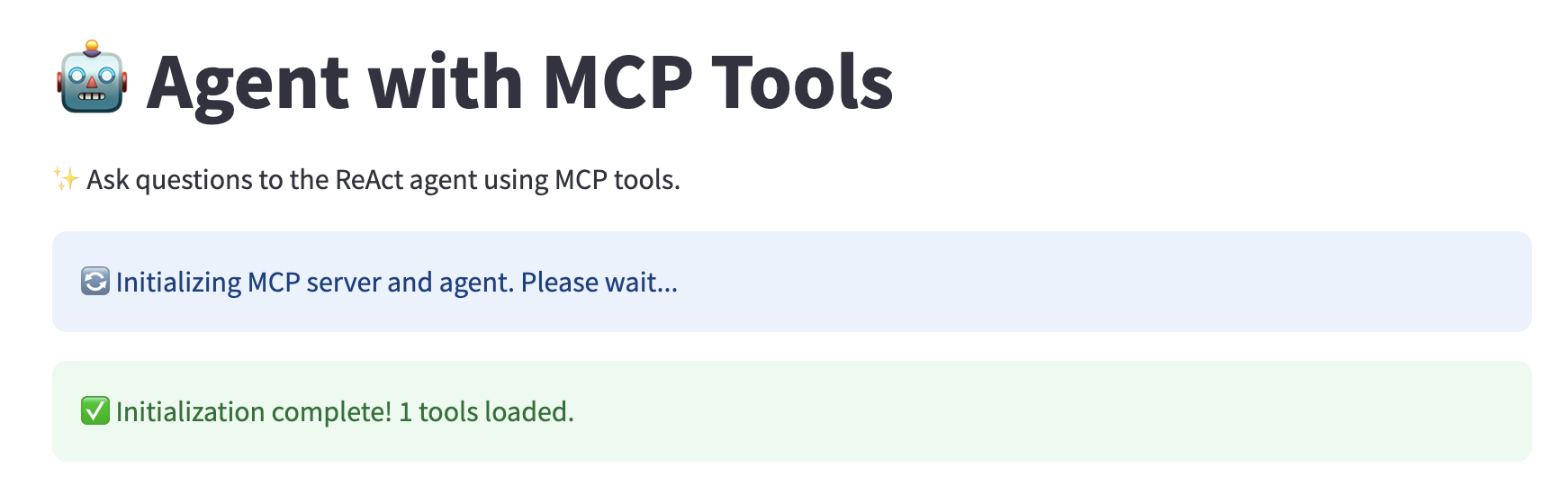
Project Overview
LangChain-MCP-Adapters is a toolkit provided by LangChain AI that enables AI agents to interact with external tools and data sources through the Model Context Protocol (MCP). This project provides a user-friendly interface for deploying ReAct agents that can access various data sources and APIs through MCP tools.

Features

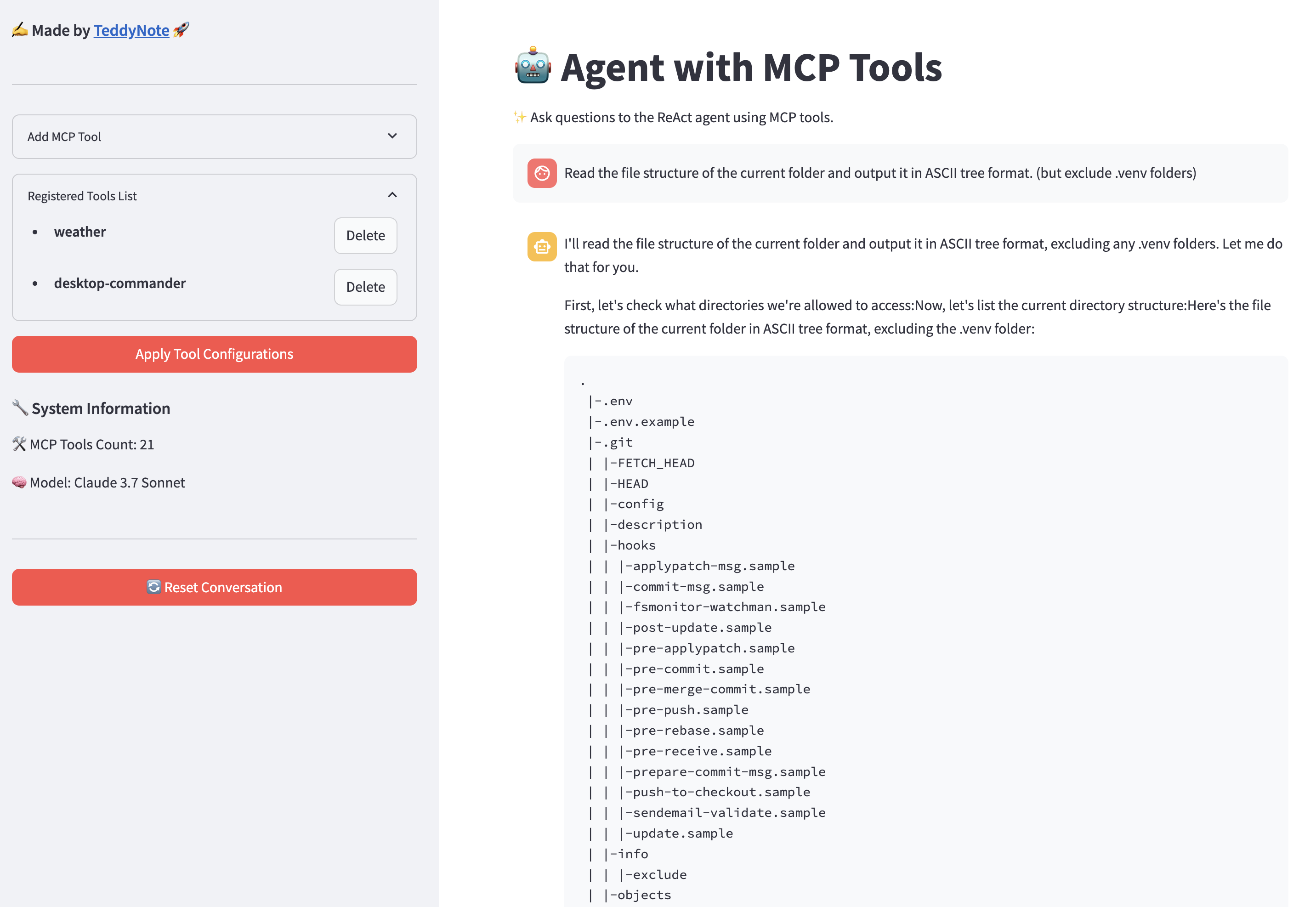
  • Streamlit Interface: A user-friendly web interface for interacting with LangGraph ReAct Agent with MCP tools
  • Tool Management: Add, remove, and configure MCP tools through the UI (Smithery JSON format supported). This is done dynamically without restarting the application
  • Streaming Responses: View agent responses and tool calls in real-time
  • Conversation History: Track and manage conversations with the agent

MCP Architecture

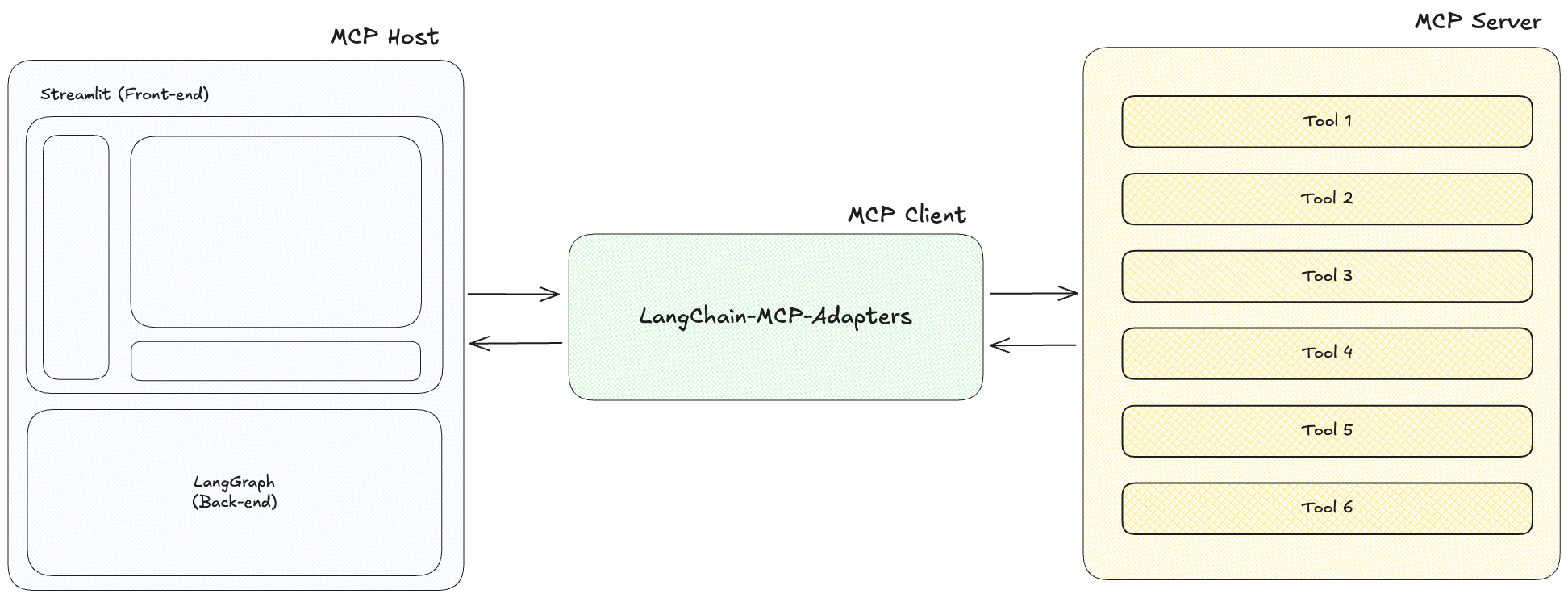
The Model Context Protocol (MCP) consists of three main components:

  1. MCP Host: Programs seeking to access data through MCP, such as Claude Desktop, IDEs, or LangChain/LangGraph.

  2. MCP Client: A protocol client that maintains a 1:1 connection with the server, acting as an intermediary between the host and server.

  3. MCP Server: A lightweight program that exposes specific functionalities through a standardized model context protocol, serving as the primary data source.

Quick Start with Docker

You can easily run this project using Docker without setting up a local Python environment.

Requirements (Docker Desktop)

Install Docker Desktop from the link below:

Run with Docker Compose

  1. Navigate to the dockers directory
cd dockers
  1. Create a .env file with your API keys in the project root directory.
cp .env.example .env

Enter your obtained API keys in the .env file.

(Note) Not all API keys are required. Only enter the ones you need.

  • ANTHROPIC_API_KEY: If you enter an Anthropic API key, you can use "claude-3-7-sonnet-latest", "claude-3-5-sonnet-latest", "claude-3-haiku-latest" models.
  • OPENAI_API_KEY: If you enter an OpenAI API key, you can use "gpt-4o", "gpt-4o-mini" models.
  • LANGSMITH_API_KEY: If you enter a LangSmith API key, you can use LangSmith tracing.
ANTHROPIC_API_KEY=your_anthropic_api_key
OPENAI_API_KEY=your_openai_api_key
LANGSMITH_API_KEY=your_langsmith_api_key
LANGSMITH_TRACING=true
LANGSMITH_ENDPOINT=https://api.smith.langchain.com
LANGSMITH_PROJECT=LangGraph-MCP-Agents

When using the login feature, set USE_LOGIN to true and enter USER_ID and USER_PASSWORD.

USE_LOGIN=true
USER_ID=admin
USER_PASSWORD=admin123

If you don't want to use the login feature, set USE_LOGIN to false.

USE_LOGIN=false
  1. Select the Docker Compose file that matches your system architecture.

AMD64/x86_64 Architecture (Intel/AMD Processors)

# Run container
docker compose -f docker-compose.yaml up -d

ARM64 Architecture (Apple Silicon M1/M2/M3/M4)

# Run container
docker compose -f docker-compose-mac.yaml up -d
  1. Access the application in your browser at http://localhost:8585

(Note)

  • If you need to modify ports or other settings, edit the docker-compose.yaml file before building.

Install Directly from Source Code

  1. Clone this repository
git clone https://github.com/teddynote-lab/langgraph-mcp-agents.git
cd langgraph-mcp-agents
  1. Create a virtual environment and install dependencies using uv
uv venv
uv pip install -r requirements.txt
source .venv/bin/activate  # For Windows: .venv\Scripts\activate
  1. Create a .env file with your API keys (copy from .env.example)
cp .env.example .env

Enter your obtained API keys in the .env file.

(Note) Not all API keys are required. Only enter the ones you need.

  • ANTHROPIC_API_KEY: If you enter an Anthropic API key, you can use "claude-3-7-sonnet-latest", "claude-3-5-sonnet-latest", "claude-3-haiku-latest" models.
  • OPENAI_API_KEY: If you enter an OpenAI API key, you can use "gpt-4o", "gpt-4o-mini" models.
  • LANGSMITH_API_KEY: If you enter a LangSmith API key, you can use LangSmith tracing.
ANTHROPIC_API_KEY=your_anthropic_api_key
OPENAI_API_KEY=your_openai_api_key
LANGSMITH_API_KEY=your_langsmith_api_key
LANGSMITH_TRACING=true
LANGSMITH_ENDPOINT=https://api.smith.langchain.com
LANGSMITH_PROJECT=LangGraph-MCP-Agents
  1. (New) Use the login/logout feature

When using the login feature, set USE_LOGIN to true and enter USER_ID and USER_PASSWORD.

USE_LOGIN=true
USER_ID=admin
USER_PASSWORD=admin123

If you don't want to use the login feature, set USE_LOGIN to false.

USE_LOGIN=false

Usage

  1. Start the Streamlit application.
streamlit run app.py
  1. The application will run in the browser and display the main interface.

  2. Use the sidebar to add and configure MCP tools

Visit Smithery to find useful MCP servers.

First, select the tool you want to use.

Click the COPY button in the JSON configuration on the right.
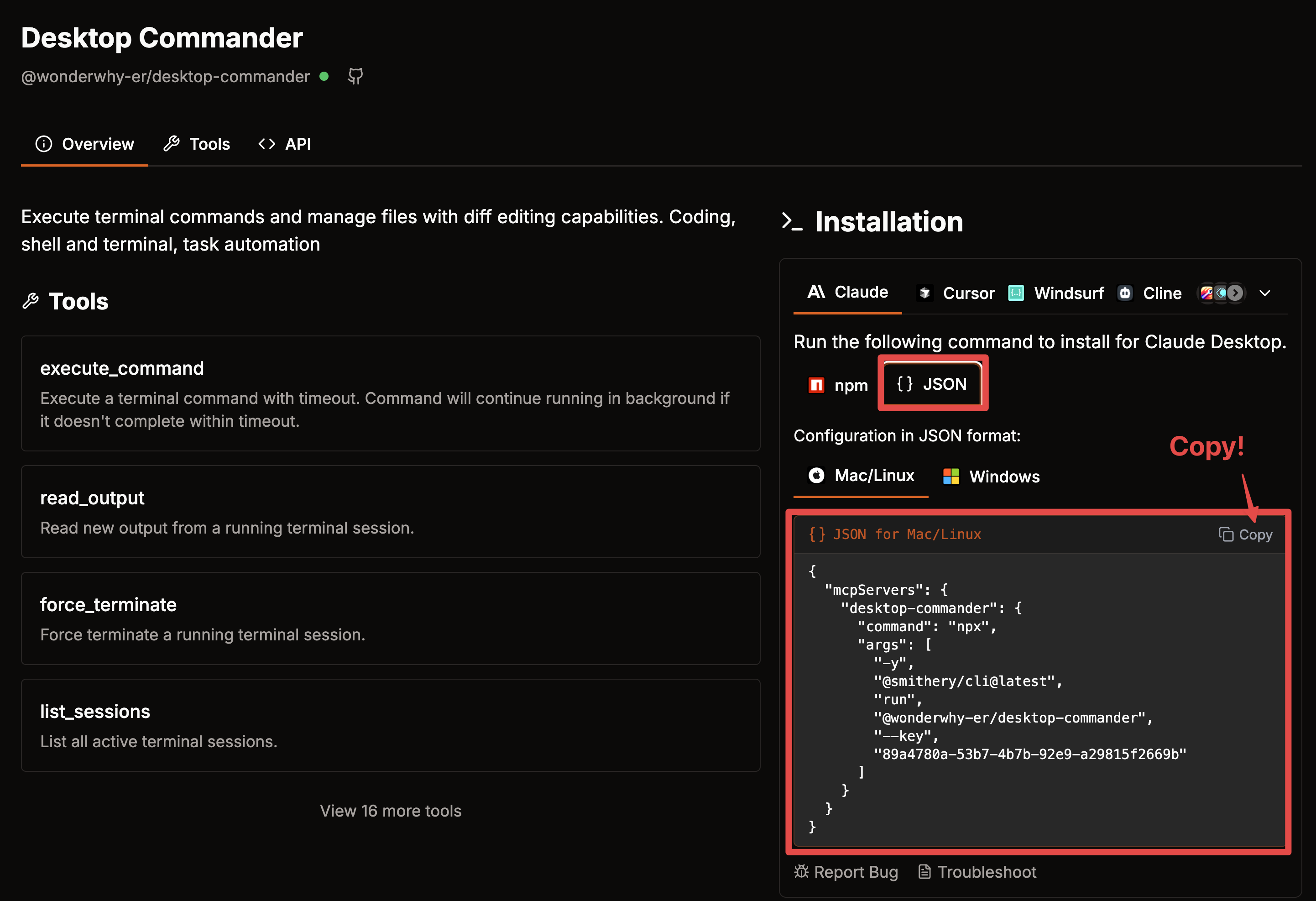
Paste the copied JSON string in the Tool JSON section.
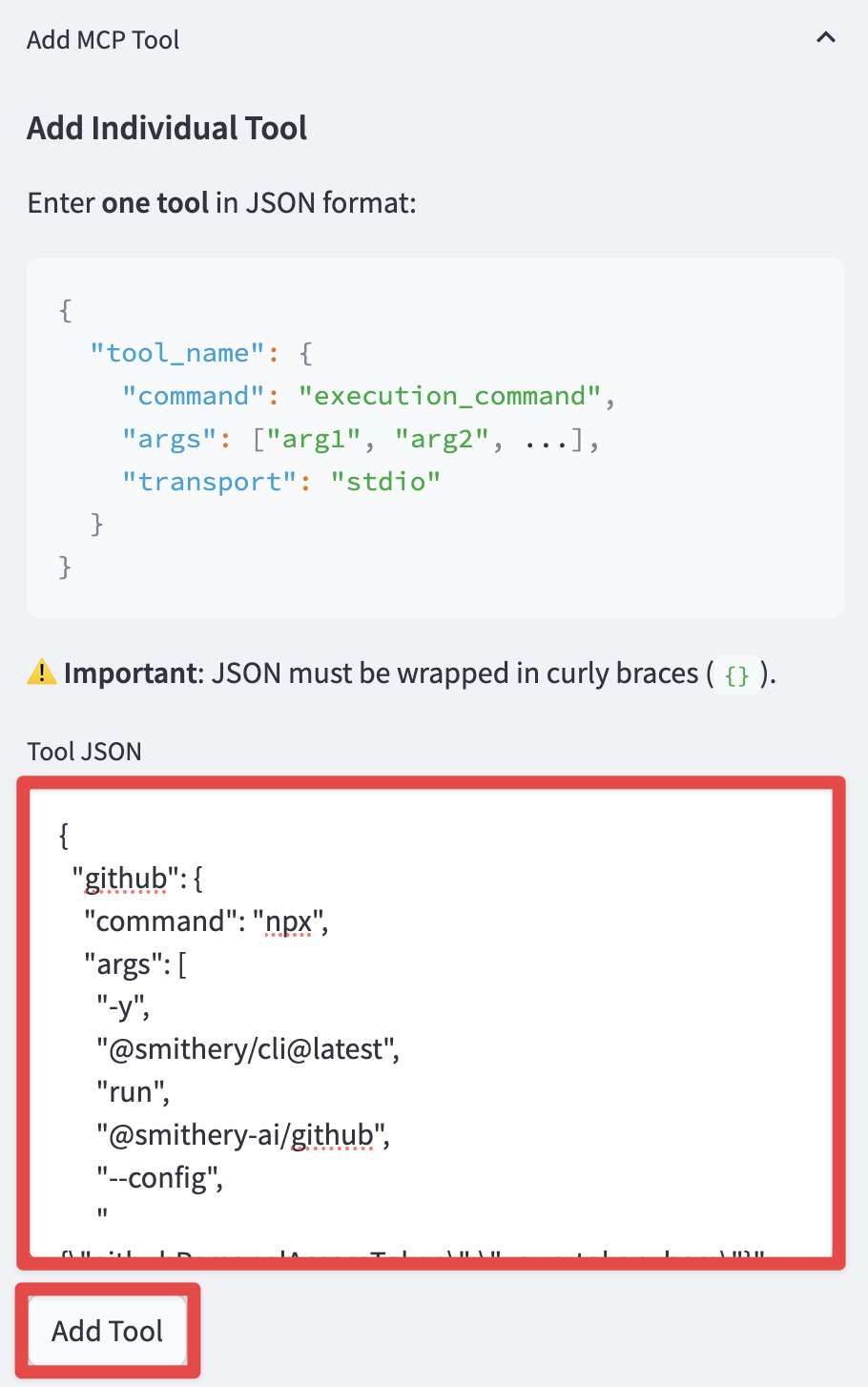
Click the Add Tool button to add it to the "Registered Tools List" section.

Finally, click the "Apply" button to apply the changes to initialize the agent with the new tools.

  1. Check the agent's status.

  1. Interact with the ReAct agent that utilizes the configured MCP tools by asking questions in the chat interface.

Hands-on Tutorial

For developers who want to learn more deeply about how MCP and LangGraph integration works, we provide a comprehensive Jupyter notebook tutorial:

This hands-on tutorial covers:

  1. MCP Client Setup - Learn how to configure and initialize the MultiServerMCPClient to connect to MCP servers
  2. Local MCP Server Integration - Connect to locally running MCP servers via SSE and Stdio methods
  3. RAG Integration - Access retriever tools using MCP for document retrieval capabilities
  4. Mixed Transport Methods - Combine different transport protocols (SSE and Stdio) in a single agent
  5. LangChain Tools + MCP - Integrate native LangChain tools alongside MCP tools

This tutorial provides practical examples with step-by-step explanations that help you understand how to build and integrate MCP tools into LangGraph agents.

License

MIT License

References

Nearby in the ranking
Similar items