TensorFlow Unreal Plugin


TensorFlow and Keras for Unreal Engine 5.8, from Blueprints and C++. You write the model in Python. The plugin runs it, trains it, feeds it inputs, render targets and audio, and returns results and events to Unreal.
2.0 is a full rewrite.
- Python runs out of process, in an embedded interpreter with a per-project virtual environment, through PythonCLI on top of CLISystem.
- A crash in TensorFlow never takes the editor down, and the GIL never touches the game thread.
- MachineLearningRemote, socket.io and UnrealEnginePython are gone.
- The Python API stays the same:
TFPluginAPIscripts keep working. See Migrating from 1.x.
Status: 2.0.0. Tested on Win64 in the editor and in packaged builds, and on Linux x86_64 in packaged builds.
PyTorch Alternative
If you find TensorFlow GPU support on Windows lacking or would like to use a more modern python ML library with unreal, consider using the PyTorch-Unreal plugin instead.
Setup
-
Put these three plugins in your project's
Plugins/:TensorFlow-Unreal- PythonCLI-Unreal
- CLISystem-Unreal
Release archives include all three, with the Python interpreter. From git, fetch the interpreter with PythonCLI's
Tools/FetchRuntime.ps1(orfetch_runtime.sh). -
Start the editor. In the background, PythonCLI creates
Intermediate/PythonCLI/venvand installs the TensorFlow profile into it:- The download is about 350 MB, once.
- Later starts skip setup.
- A rebuilt venv comes from uv's cache in seconds.
-
Add a TensorFlow component to an actor. Set Script Params > Script to your script, for example
my_modelforContent/Scripts/my_model.py, or a bundled example such asexamples/mnist_keras_cnn.
Environment profiles
Choose one in Project Settings > Plugins > TensorFlow > Profile:
| Profile | Installs | Use |
|---|---|---|
| TensorFlow (CPU), the default | tensorflow-cpu 2.21 |
Windows and Linux. Windows has had no native TensorFlow GPU build since 2.10. |
| TensorFlow (CUDA, Linux) | tensorflow[and-cuda] 2.21 |
Linux with an NVIDIA GPU (a few GB of CUDA wheels). |
| Keras on PyTorch (GPU on Windows) | keras 3 + torch (CUDA build) |
GPU on Windows: Keras 3 on the torch backend (KERAS_BACKEND=torch). |
| None | nothing | List your own packages in Python CLI > Requirements. |
- Your own packages: add them in Project Settings > Plugins > Python CLI > Requirements, or in
Content/Scripts/requirements.txt. - Long paths: keep the project path short or enable long paths on Windows; TensorFlow's files are deep.
- Log level: TensorFlow's C++ logging uses Profile's TensorFlow Log Level (
TF_CPP_MIN_LOG_LEVEL).
Packaging
Packaged games (Win64, Linux) take the interpreter, the scripts and, by default, the installed packages with them. PythonCLI installs the environment's packages for the target platform while packaging, so a Linux build packaged on Windows gets Linux wheels. The tensorflow-cpu profile adds about 1.2 GB to a Linux build and 1.3 GB to a Win64 build.
To keep TensorFlow out of the build, set Project Settings > Plugins > Python CLI > Packaged Env Mode to Install On First Run: the game then installs it on its first launch. See PythonCLI's packaging notes.
Python API
import unreal_bridge as ue
from unreal_bridge.ml import TFPluginAPI   # or MLPluginAPI: the same class, snake_case hooks

class Classifier(TFPluginAPI):
    def on_setup(self):                    # once, when the script starts: build or load the model
        import keras
        self.model = keras.saving.load_model(ue.content_path("Models", "mnist.keras"))

    def on_json_input(self, data):         # Send Json Input -> On Input Results
        return {"prediction": 3}

    def on_tensor_input(self, image):      # Send Tensor Input / Texture / Render Target: a numpy array
        scores = self.model(image[None], training=False)
        return {"prediction": int(scores.numpy().argmax())}

    def on_begin_training(self):           # Begin Training: runs on its own thread
        self.model.fit(x, y, epochs=5, callbacks=[ue.keras.StopOnRequest(self),    # Stop Training ends fit()
                                                  ue.keras.ProgressEvents(self)])   # -> On Training Progress
        self.call_event("Saved", {"path": "..."})                                   # -> On Custom Event
        return {"accuracy": 0.99}           # -> On Training Complete

def get_api():
    return Classifier.get_instance()
The API class:
- Hooks:
on_setup,on_json_input,on_float_array_input,on_tensor_input,on_begin_training,on_stop_training,on_save_modelandon_load_model. The camelCase forms from 1.x work too (onJsonInput,onBeginTraining, …). - Custom functions: any other method can be called with Call Custom Function.
- Stopping:
self.should_stop(orshouldStop) turns true on Stop Training, a script stop or reload, and EndPlay. - Events:
self.call_event(name, data)(orcallEvent) reaches On Custom Event.self.report_progress(data)reaches On Training Progress. - Concurrency: inputs are answered while training runs. Everything else for a script runs in order, on that script's own thread.
The rest of unreal_bridge (ue.log, ue.emit, @ue.on_stream, …) is in the PythonCLI README.
Blueprint API
TensorFlow component. It is a Python ML component, and runs in PythonCLI's shared Python process by default.
| Calls | |
|---|---|
| Send Json Input / Send String Input | on_json_input(data), or a named function; the result arrives in On Input Results |
| Send Tensor Input | a tensor (Make Tensor From Floats, Texture To Tensor, …) to on_tensor_input |
| Send Texture Input / Send Render Target Input | an image to on_tensor_input as a float32 (H, W, C) tensor (grayscale/RGB/RGBA, resize, invert, normalization) |
| Send Json Input Texture | 1.x: {"pixels": [grayscale], "size": {"x", "y"}} to on_json_input |
| Send Float Array Input | on_float_array_input(list); the result arrives in On Float Array Results |
| Call Custom Function | any method of the API object, with JSON arguments |
| Begin Training / Stop Training, Save Model / Load Model | |
| Send Json Input (Async), Send Tensor Input (Async), Call Custom Function (Async) | async nodes that return the result (or the error) instead of firing the events |
| Events | |
|---|---|
| On Setup Complete | on_setup finished |
| On Input Results (JsonResult, FunctionName), On Float Array Results | |
| On Training Started / Progress (Json) / Complete (JsonSummary, bStoppedEarly) | |
| On Custom Event (EventName, Data) | call_event |
| On Script Error (Message, Traceback) | load failures, exceptions in calls and training, crashes |
Properties:
- Train On Begin Play
- Stop Training On End Play
- Script Params: Script, Script Root and Args (
ue.args). - Use Shared Process: off gives the component its own process.
Reading results: use Get Json Number / String / Floats with a path such as "prediction", "scores.3" or "action.move".
Images:
- Texture To Tensor and Render Target To Tensor produce float32 tensors (H, W, C), or (C, H, W) when channels-first. Tensor To Texture goes the other way.
- The 1.x conversions are kept: To Float Array, To Grayscale Float Array, To Texture2D, Invert Float Array.
- Texture reading uses, in order:
- the editor's source image;
- a CPU copy (texture Availability: CPU);
- uncompressed platform data (Compression UserInterface2D or Grayscale).
- Render targets are read with a blocking call.
Streams: add a Python Render Target Stream next to the component, for every frame of a scene capture without stalls. Python Audio Stream does the same for audio and Python Observation Stream for gameplay data. See examples/camera_stream_classify.
TF Audio Capture (1.x): microphone capture as raw PCM bytes (On Audio Data, On Capture Finished, WAV helpers), now on Unreal's AudioCapture for every platform. New projects should use a Python Audio Stream.
Example map
Open /TensorFlow/Examples/MnistExample (Content Browser: Plugins > TensorFlow Content > Examples) and press Play.
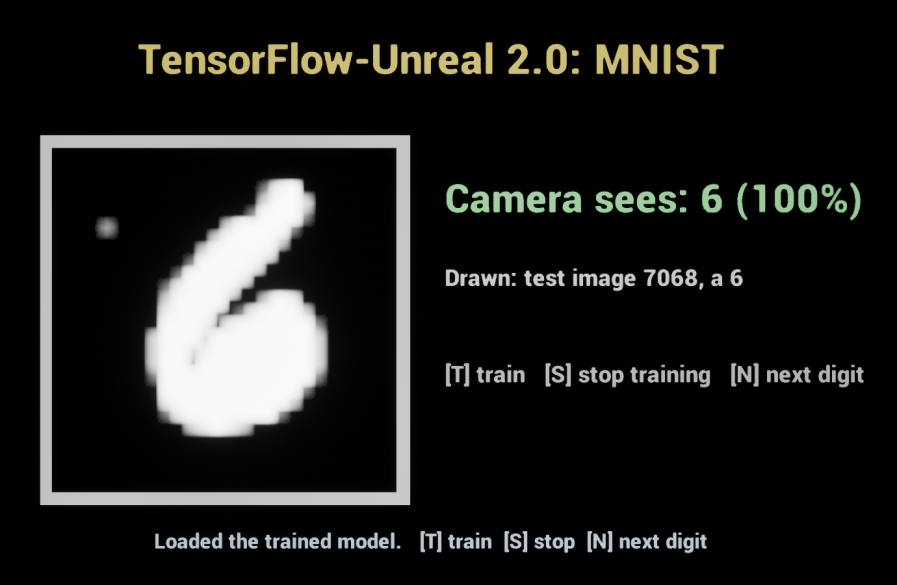
How it works:
BP_MnistExamplerunsexamples/mnist_demoon a TensorFlow component.- On the first play it trains a small CNN on MNIST (about 30 s on a CPU) with live status lines. It saves
Saved/TensorFlow/mnist.keras, and later plays load that model instead. - Every 3 seconds it asks Python for a test digit and draws it into a render target.
- A Python Render Target Stream next to the component streams that render target back to the script, and the model reads what the camera sees.
- Keys: T trains, S stops training, N shows the next digit.
Event graph: everything comes from events.
- On Custom Event (
Status,Digit,Prediction) drives the TextRender components and the canvas. - On Script Error shows Python errors.
- The keys call Begin Training, Stop Training and Call Custom Function.
Regenerating: the example content is generated by BlueprintOracle from Tools/Examples/mnist_example.json:
UnrealEditor-Cmd.exe .uproject -run=BlueprintOracle -migrate -spec=Plugins/TensorFlow-Unreal/Tools/Examples/mnist_example.json -commit -unattended -nullrhi -nopause
Examples
These are bundled in Content/Scripts/examples/ and resolve by name, for example Script = examples/mnist_keras_cnn:
| Script | |
|---|---|
add_example |
the smallest TF2 script: Send Json Input {"a": [1, 2], "b": [3, 4]} → {"c": [4, 6]} |
mnist_keras_cnn |
trains a Keras CNN on MNIST with progress events and early stop, then saves and loads Saved/TensorFlow/mnist.keras. Predicts tensors and 1.x JSON pixels. |
mnist_spawn_samples |
streams MNIST images to Unreal as events (Call Custom Function spawn_samples, or Begin Training until stopped) |
camera_stream_classify |
with a Python Render Target Stream named camera: classifies the digit the render target shows, as it streams |
mnist_demo |
the example map's script: mnist_keras_cnn plus display-ready Status / Digit / Prediction events and live classification of the camera stream |
The examples project has maps for 1.x.
Migrating from 1.x
The backend changed completely; there is no MachineLearningRemote, socket.io or UnrealEnginePython mode. What carries over:
- Python scripts:
TFPluginAPIsubclasses with camelCase hooks,getApi(),callEvent,shouldStop,import unreal_engine as ue(log,get_content_dir).from TFPluginAPI import TFPluginAPIstill works. Scripts using TF1 sessions and placeholders need porting to TF2 / Keras 3. - Script names: set Script Params > Script to your module name; the
.pyis optional. - Blueprints: the component is now C++ (
TensorFlowComponent).- A CoreRedirect maps the old Blueprint class, so references load, but its variables (Tensor Flow Module, Should Train On Begin Play) need setting again.
- The function names are the same: Begin Training, Stop Training, Send Json Input, Send Json Input Texture. The events are On Input Results, On Training Complete, and On Custom Event (1.x's On Event).
- Dependencies:
upymodule.jsonis gone. Use the environment profile, Python CLI Requirements, orContent/Scripts/requirements.txt. - Old code: the last 1.x commit is tagged
v1.6.0beta-legacy.
Tests
UnrealEditor-Cmd.exe .uproject -ExecCmds="Automation RunTests TensorFlow; Quit" -unattended -nullrhi -nopause
- The tests cover the profile, image conversions, the add example, and MNIST training, stop and prediction.
- Two tests need a real RHI (use
-RenderOffscreeninstead of-nullrhi):TensorFlow.Mnist.WithCameradraws a test digit into a render target, streams it, and checks the classification.TensorFlow.Examples.MnistMapplays the example map in PIE. It waits until the camera reads the digit the map drew, presses N, and saves a screenshot toSaved/Screenshots.
License
MIT; see LICENSE.