Bulleted Notes Book Summaries
Built With: Python 3.11.9
Introduction
This project creates bulleted notes summaries of books and other long texts, particularly epub and pdf which have ToC metadata available.
When the ebooks contain approrpiate metadata, we are able to easily automate the extraction of chapters from most books, and split them into ~2000 token chunks, with fallbacks in case we are unable to access a document outline.
Why 2000 tokens?
Same Task, More Tokens: the Impact of Input Length on the Reasoning Performance of Large Language Models (2024-02-19; Mosh Levy, Alon Jacoby, Yoav Goldberg) suggests that reasoning capacity drops off pretty sharply from 250 to 1000 tokens, starting to flatten out between 2000-3000 tokens.
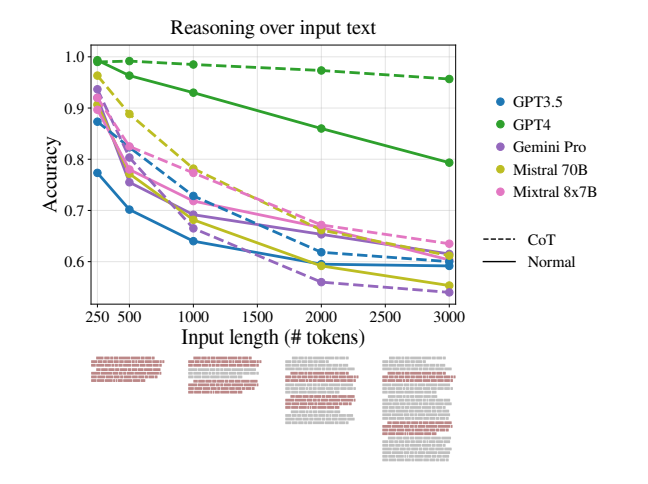
This corresponds my own experience while summarizing many long documents using local llm.
You can check the depreciated walkthroughs and rankings for more background on how I got here.
Comparison with RAG
Similar to Retrieval Augmented Generation (RAG), we split the document into many parts, so they fit into the context. The difference is that RAG systems try to determine what is the best chunk to ask their question to. Instead, we ask the same questions to every part of the document.
Its very important towards unlocking the full capabilities of LLM without relying on a multitude of 3rd party apps.
Contents
- Setup
- Usage
- Semi-Manual with Prototypes
- Models
- Check your Document Outline
- Disclaimer
- Inspiration
- Resources
Setup
Python Environment
Before starting, ensure you have Python 3.11.9 installed. If not, you can use conda or pyenv to manage Python versions:
Using conda:
- Install Anaconda from: https://www.anaconda.com/download/success
- Create a new environment:
conda create -n book_summary python=3.11.9 - Activate the environment:
conda activate book_summary
Using pyenv:
- Install pyenv: https://github.com/pyenv/pyenv#installation
- Install Python 3.11.9:
pyenv install 3.11.9 - Set local version:
pyenv local 3.11.9
Install Dependencies
pip install -r requirements.txt
Download Models
1. Download a copy of Mistral Instruct v0.2 Bulleted Notes Fine-Tune
ollama pull cognitivetech/obook_summary:q6_k
2. Download up a title model
a) Download a preconfigured model
ollama pull cognitivetech/obook_title:q4_k_m
For your convenience Mistral 7b 0.3 is packaged with the necessary message history for title creation.
or
b) Append this message history to the Modelfile of your choice
3. Download a general-purpose model
ollama pull gemma2
Update Config File _config.yaml
Ensure the defaults are set accordingly!
This is an area subject to change which may differ from the documentation. Make sure you have the models on your system as noted in
summary,general, andtitlein the current _config.yaml. I have to clean up this aspect of the code, but I'm still working on that.
defaults:
  prompt: bnotes
  summary: cognitivetech/obook_summary:q6_k # default model for summaries
  general: gemma2                           # default model for basic summary
  title: cognitivetech/obook_title:q4_k_m   # default model for title generation
prompts:
  bnotes: # Default Prompt
    prompt: Write comprehensive bulleted notes summarizing the provided text, with
      headings and terms in bold.
  research: # Also for use with summary model
    prompt: Does this text make any arguments? If so list them here.
  clean:  # The following prompts should be used with a general purpose model.
    prompt: Repeat back this text exactly, remove only garbage characters that do
      not contribute to the flow of text. Output only the main text content, condensed
      onto a single line. If you encounter any chapter boundaries or subheadings,
      start a new line beginning with its title.
  concise:
    prompt: Repeat the provided passage, with Concision.
  md:
    prompt: 'Print these notes in proper markdown format, with headings marked as
      bold with double asterisks and terms in bold also, and bullet points as `-`.
      Print the notes exactly, word-for-word, do not elaborate, do not add headings
      with #'
  sum: # basic
    prompt: Comprehensive bulleted notes with headings and terms in bold.
  teacher:
    prompt: 'Write a list of questions that can be answered by 3rd graders who are
      reading the provided text. Topics we like to focus on include: Main idea, supporting
      details, Point of view, Theme, Sequence, Elements of fiction (setting, characters,
      BME)'
  quotes:
    prompt: 'write a few dozen quotes inspired by the provided text'
title_generation:
  prompt: Write a title with fewer than 11 words to concisely describe this selection.
Usage
Convert E-book to chunked CSV or TXT
1. Use automated script to split your pdf or epub.
python3 book2text.py ebook-name.epub # or ebook-name.pdf (Epub is preferred)
This step produces two outputs:
out/ebook-name.csv(split by chapter or section)out/ebook-name_processed.csv(chunked)
or
2. Remove or escape all newlines within each chunk, so they may be placed line by line in a text file, with each line surrounded by double quotes.
*Note to be cautious of properly escaping or replacing double quotes from within each chunk.
Generate Summary
$``python3 sum.py --help
Usage: python sum.py [OPTIONS] input_file

Options:
-c, --csv        Process a CSV file. Expected columns: Title, Text
-t, --txt        Process a text file. Each line should be a separate text chunk.
-m, --model      Model name to use for generation (default from config)
-p, --prompt     Alias of the prompt to use from config (default from config)
-v, --verbose    Print markdown output additionally to terminal
--help           Show this help message and exit.

For CSV input:
- Ensure your CSV has 'Title' and 'Text' columns.

For Text input:
- Each line should be a chunk of text surrounded by double quote.

The output CSV will include:
- Title: Final title chosen or generated
- Gen: Boolean indicating if the title was generated
- Text: Original input text
- model_name: Generated output
- Time: Processing time in seconds
- Len: Length of the output
If you have your defaults set, then all you need is to specify which type of input, manual text, or automated csv.
python3 sum.py -c ebook-name_processed.csv
Semi-Manual with Prototypes
In this example, I've used a prototype split_pdf.py to split the pdf not only by chapter but subsections (producing ebook-name_extracted.csv), then manually process that output (using vscode) to place each chunk on a single line surrounded by double quotes.
Eventually that will be automated but provides challenges, which you will notice, that have prevented me from finishing that tool.
Split:
tools-prototype/split_pdf.py ebook-name.pdf # produces ebook-name_extracted.csv
Process:
python3 sum.py -t ebook-name_extracted.csv
This step generates two outputs:
ebook-name_extracted_processed_sum.md(rendered markdown)ebook-name_extracted_processed_sum.csv(csv with: input text, flattened md output, generation time, output length)
Models
Download from one of two sources:
Ollama
You can get any of them them right from ollama, template in all.
example: ollama pull obook_summary:q5_k_m
- obook_summary - On Ollama.com
latest• 7.7GB • Q_8q3_k_m• 3.5GBq4_k_m• 4.4GBq5_k_m• 5.1GBq6_k• 5.9GB (preferred)
- obook_title - On Ollama.com
latest• 7.7GB • Q_8q3_k_m• 3.5GBq4_k_m• 4.4GBq5_k_m• 5.1GBq6_k• 5.9GB (preferred)
HuggingFace
There is also complete weights, lora and ggguf on huggingface
- Mistral Instruct Bulleted Notes - Collection on HuggingFace
Check your eBook for Document Outline
Here you can see how to check whethere your eBook as the proper formatting, or not. With ePub it should fail gracefully.
* In some rare occasion, even with clickable toc the script will not find that.
Firefox
Brave
Disclaimer
You are responsible for verifying that the summary tool creates an accurate summary. There are a variety of issues which can interfere with a quality summary, and if you aren't paying attention may slip your notice.
1. References:
Personally, I don't trust references from my fine-tuned model without verifying them manually. Maybe this is solved in newer models, but during my testing phase I noticed some bad references with 7b models I was using. I never tested this out to see the quality of the app on references, my personal preference is to remove any long references sections before summarizing, and deal with those separate. I don't think this is a permenant blocker, just an area that I haven't fully dealt with or understood, yet.
2. Other:
There are a few other things to watch out for.
One of the reasons I keep the length of the input and output on CSV is that makes it easy to check when a summary is longer than the input, thats a red flag.
when the structure of the summary greatly deviates from the others, this can indicate issues with the summary. Some of these can be realated to special characters, or if the input is too long and the AI just doesn't grasp it all.
Inspiration
The inspiration for this app was my intention to manually summarize a dozen books so I could tie together psychological theory and practice which they discuss and make a cohesive argument based on that information.
I've already read the books a few times, but now I need easy access to the information within so that I can relate it to others in a cohesive fashion.
Originally, after working at it this project manually, for a week, I was only a few chapters into my first book, I could see this was going to take a loong time.
Over the next 6 months I began learning how to use LLM, discovering were the best for my task, with fine-tuning to deliver production quality consistency in the results.
Now with this tool, I'm able to review a lot more material more quickly. This is a content curation tool that empowers me to not only learn things but more readily share that knowledge, without having to spend ages that it takes to create quality content.
Moreover, it can be used to create custom datasets based on whatever source materials you throw at it.
Resources
- Summarizing Books OpenAI