TenacitOS — Mission Control
A real-time dashboard and control center for OpenClaw AI agent instances. Built with Next.js, React 19, and Tailwind CSS v4.
TenacitOS lives inside your OpenClaw workspace and reads its configuration, agents, sessions, memory, and logs directly from the host. No extra database or backend required — OpenClaw is the backend.
Features
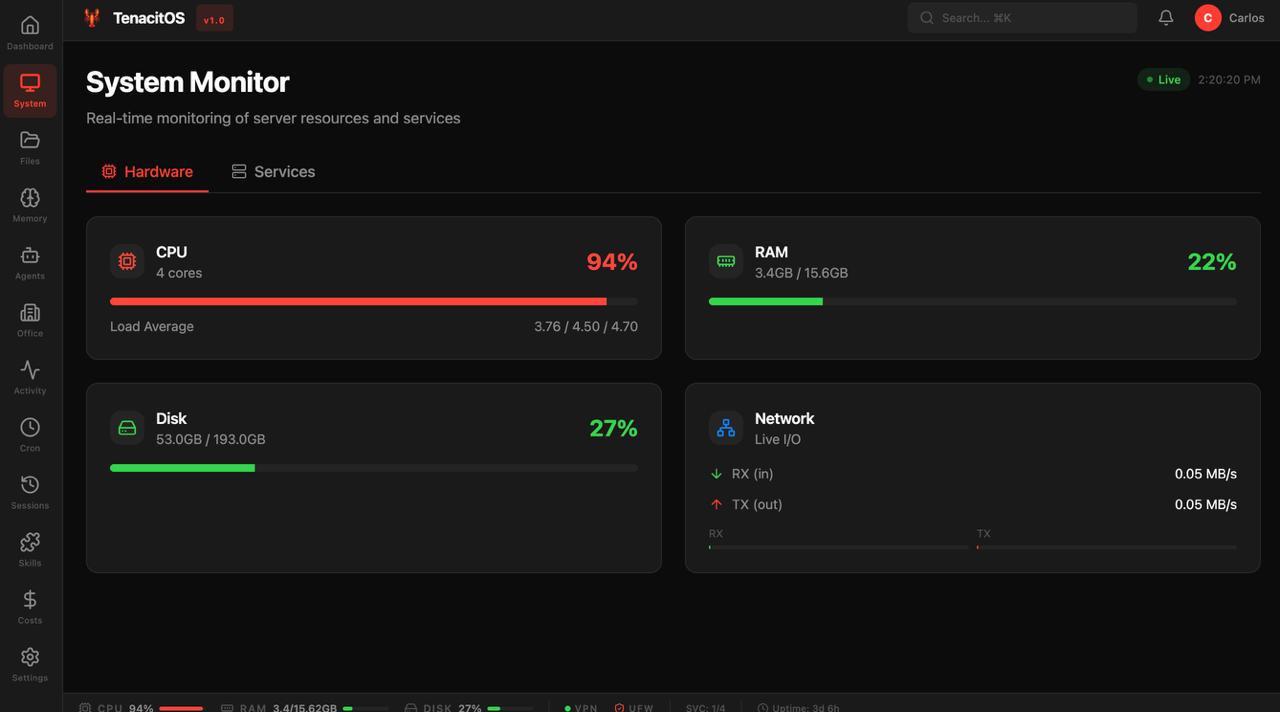
- 📊 System Monitor — Real-time VPS metrics (CPU, RAM, Disk, Network) + PM2/Docker status
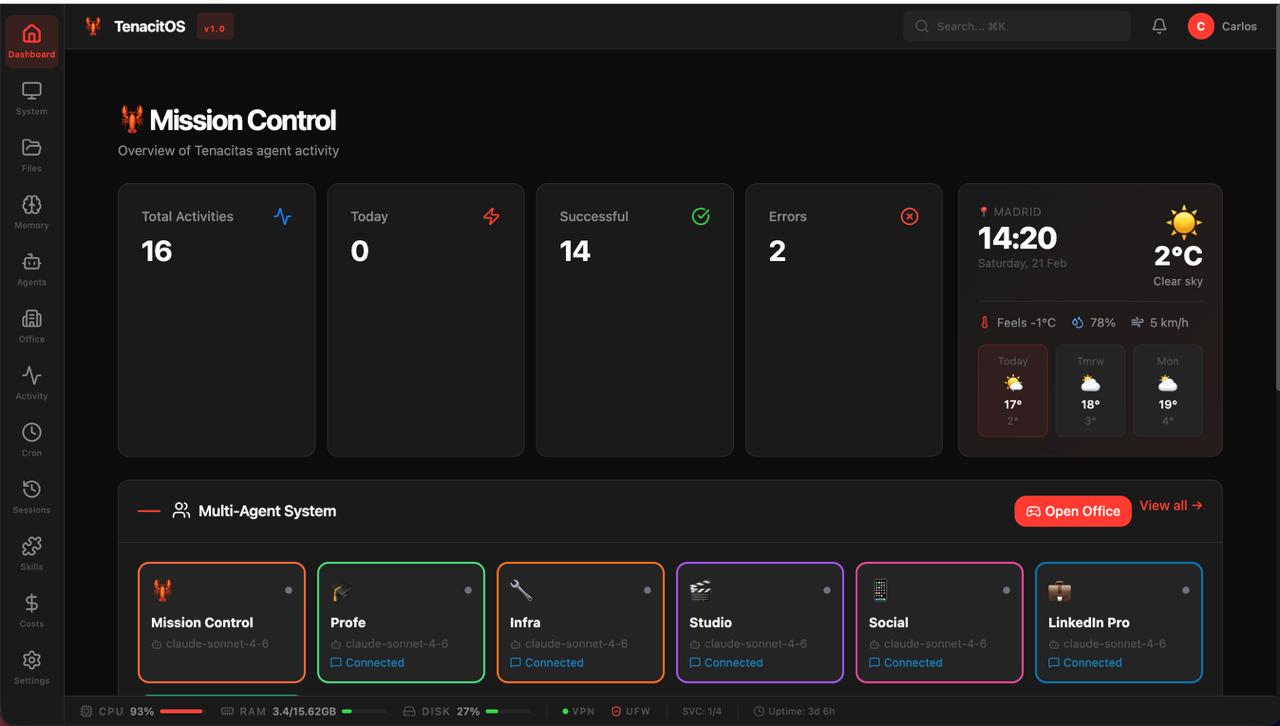
- 🤖 Agent Dashboard — All agents, their sessions, token usage, model, and activity status
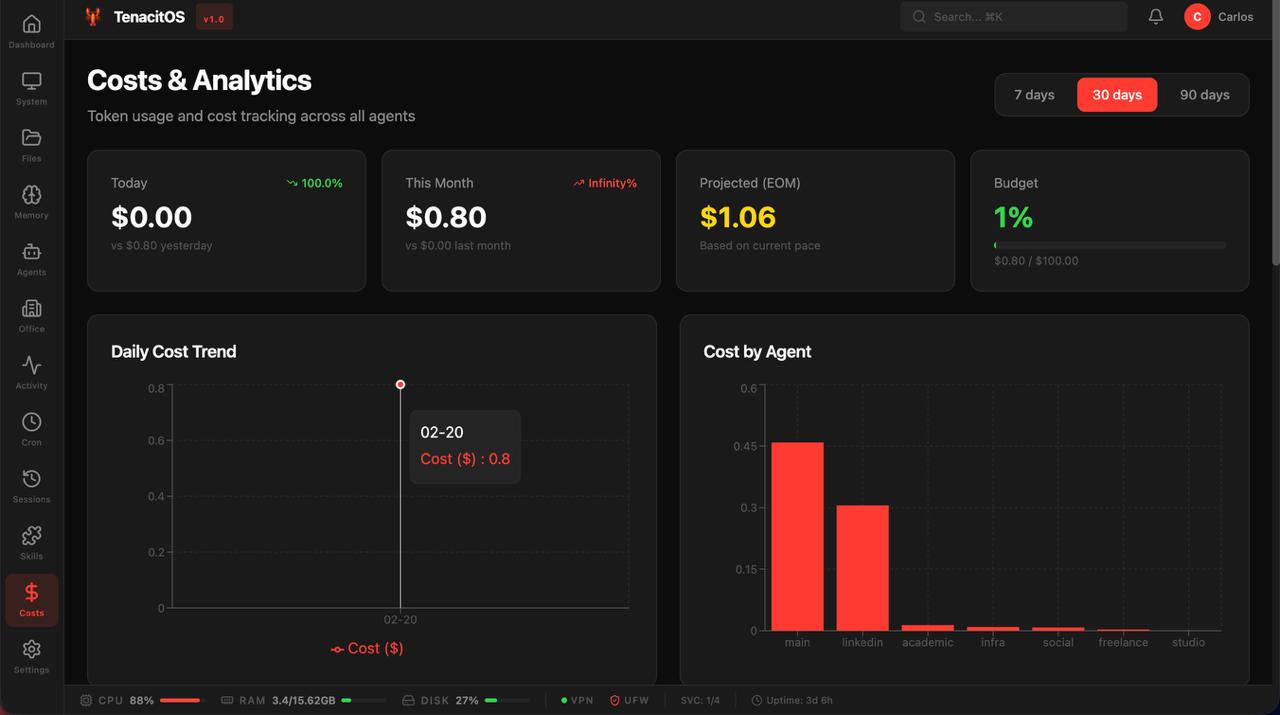
- 💰 Cost Tracking — Real cost analytics from OpenClaw sessions (SQLite)
- ⏰ Cron Manager — Visual cron manager with weekly timeline, run history, and manual triggers
- 📋 Activity Feed — Real-time log of agent actions with heatmap and charts
- 🧠 Memory Browser — Explore, search, and edit agent memory files
- 📁 File Browser — Navigate workspace files with preview and in-browser editing
- 🔎 Global Search — Full-text search across memory and workspace files
- 🔔 Notifications — Real-time notification center with unread badge
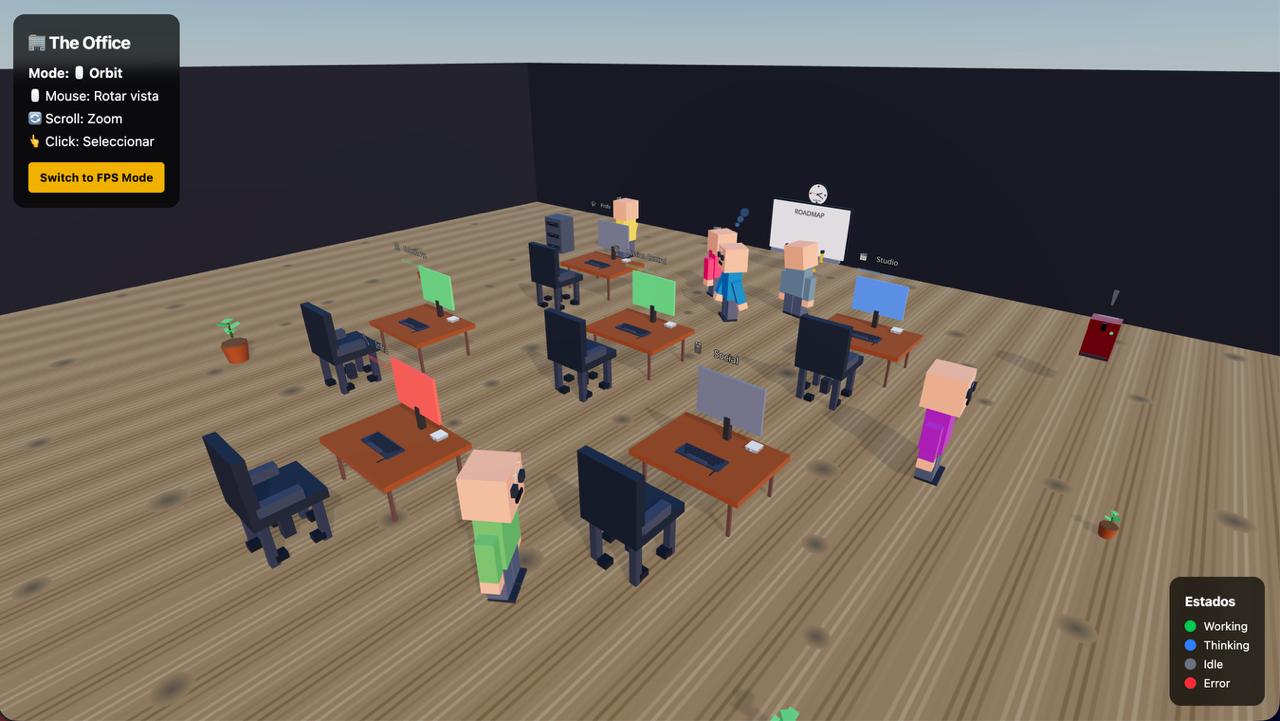
- 🏢 Office 3D — Interactive 3D office with one desk per agent (React Three Fiber)
- 📺 Terminal — Read-only terminal for safe status commands
- 🔐 Auth — Password-protected with rate limiting and secure cookie
Screenshots
Dashboard — activity overview, agent status, and weather widget
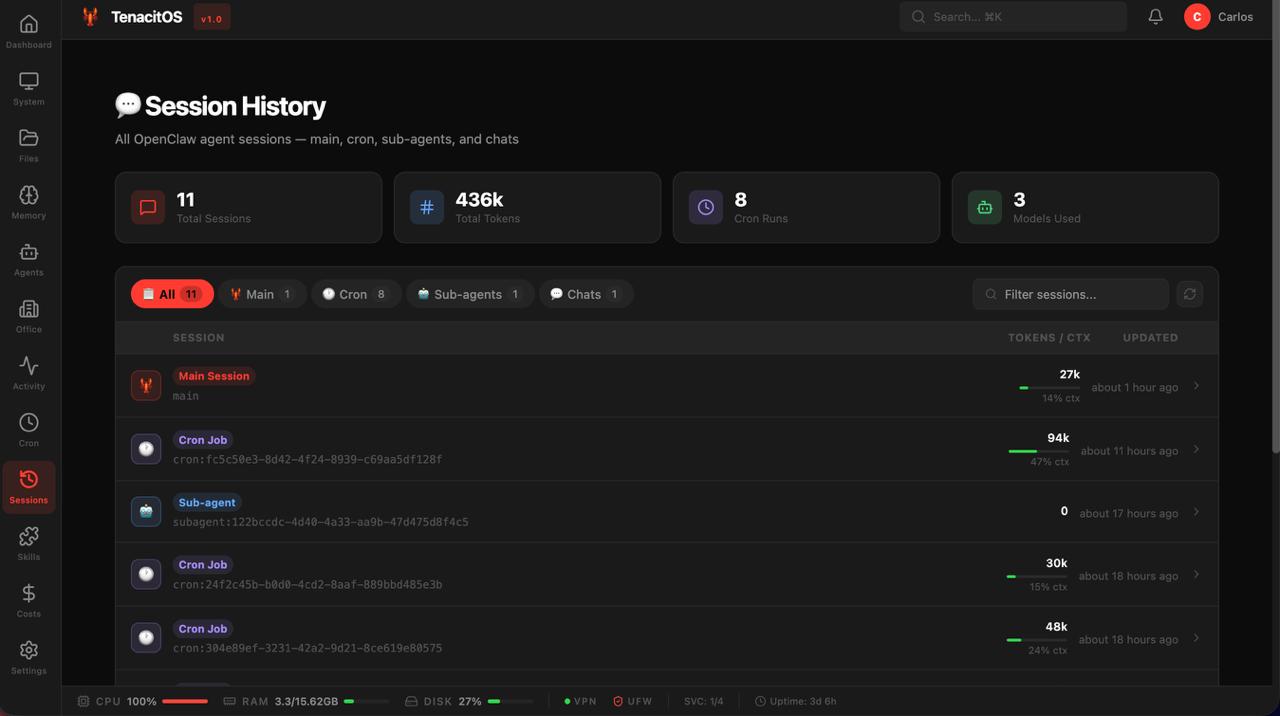
Session History — all OpenClaw sessions with token usage and context tracking
Costs & Analytics — daily cost trends and breakdown per agent
System Monitor — real-time CPU, RAM, Disk, and Network metrics
Office 3D — interactive 3D office with one voxel avatar per agent (React Three Fiber)
Requirements
- Node.js 18+ (tested with v22)
- OpenClaw installed and running on the same host
- PM2 or systemd (recommended for production)
- Caddy or another reverse proxy (for HTTPS in production)
How it works
TenacitOS reads directly from your OpenClaw installation:
/root/.openclaw/              ← OPENCLAW_DIR (configurable)
├── openclaw.json             ← agents list, channels, models config
├── workspace/                ← main agent workspace (MEMORY.md, SOUL.md, etc.)
├── workspace-studio/         ← sub-agent workspaces
├── workspace-infra/
├── ...
└── workspace/mission-control/ ← TenacitOS lives here
The app uses OPENCLAW_DIR to locate openclaw.json and all workspaces. No manual agent configuration needed — agents are auto-discovered from openclaw.json.
Installation
1. Clone into your OpenClaw workspace
cd /root/.openclaw/workspace   # or your OPENCLAW_DIR/workspace
git clone https://github.com/carlosazaustre/tenacitOS.git mission-control
cd mission-control
npm install
2. Configure environment
cp .env.example .env.local
Edit .env.local:
# --- Auth (required) ---
# Strong password to log in to the dashboard
ADMIN_PASSWORD=your-secure-password-here

# Random secret used to sign the auth cookie
# Generate with: openssl rand -base64 32
AUTH_SECRET=your-random-32-char-secret-here

# --- OpenClaw paths (optional — defaults work for standard installs) ---
# OPENCLAW_DIR=/root/.openclaw

# --- Branding (customize for your instance) ---
NEXT_PUBLIC_AGENT_NAME=Mission Control
NEXT_PUBLIC_AGENT_EMOJI=🤖
NEXT_PUBLIC_AGENT_DESCRIPTION=Your AI co-pilot, powered by OpenClaw
NEXT_PUBLIC_AGENT_LOCATION=             # e.g. "Madrid, Spain"
NEXT_PUBLIC_BIRTH_DATE=                 # ISO date, e.g. "2026-01-01"
NEXT_PUBLIC_AGENT_AVATAR=               # path to image in /public, e.g. "/avatar.jpg"

NEXT_PUBLIC_OWNER_USERNAME=your-username
NEXT_PUBLIC_OWNER_EMAIL=your-email@example.com
NEXT_PUBLIC_TWITTER_HANDLE=@username
NEXT_PUBLIC_COMPANY_NAME=MISSION CONTROL, INC.
NEXT_PUBLIC_APP_TITLE=Mission Control
Tip:
OPENCLAW_DIRdefaults to/root/.openclaw. If your OpenClaw is installed elsewhere, set this variable.
3. Initialize data files
cp data/cron-jobs.example.json data/cron-jobs.json
cp data/activities.example.json data/activities.json
cp data/notifications.example.json data/notifications.json
cp data/configured-skills.example.json data/configured-skills.json
cp data/tasks.example.json data/tasks.json
4. Generate secrets
# Auth secret
openssl rand -base64 32

# Password (or use a password manager)
openssl rand -base64 18
5. Run
# Development
npm run dev
# → http://localhost:3000

# Production build
npm run build
npm start
Login at http://localhost:3000 with the ADMIN_PASSWORD you set.
Production Deployment
PM2 (recommended)
npm run build

pm2 start npm --name "mission-control" -- start
pm2 save
pm2 startup   # enable auto-restart on reboot
systemd
Create /etc/systemd/system/mission-control.service:
[Unit]
Description=TenacitOS — OpenClaw Mission Control
After=network.target

[Service]
Type=simple
User=root
WorkingDirectory=/root/.openclaw/workspace/mission-control
ExecStart=/usr/bin/npm start
Restart=always
RestartSec=10
Environment=NODE_ENV=production

[Install]
WantedBy=multi-user.target
sudo systemctl daemon-reload
sudo systemctl enable mission-control
sudo systemctl start mission-control
Reverse proxy — Caddy (HTTPS)
mission-control.yourdomain.com {
    reverse_proxy localhost:3000
}
When behind HTTPS,
secure: trueis set automatically on the auth cookie.
Configuration
Agent branding
All personal data stays in .env.local (gitignored). The src/config/branding.ts file reads from env vars — never edit it directly with your personal data.
Agent discovery
Agents are auto-discovered from openclaw.json at startup. The /api/agents endpoint reads:
{
  "agents": {
    "list": [
      { "id": "main", "name": "...", "workspace": "...", "model": {...} },
      { "id": "studio", "name": "...", "workspace": "..." }
    ]
  }
}
Each agent can define its own visual appearance in openclaw.json:
{
  "id": "studio",
  "name": "My Studio Agent",
  "ui": {
    "emoji": "🎬",
    "color": "#E91E63"
  }
}
Office 3D — agent positions
The 3D office has default positions for up to 6 agents. To customize positions, names, and colors for your own agents, edit src/components/Office3D/agentsConfig.ts:
export const AGENTS: AgentConfig[] = [
  {
    id: "main",       // must match workspace ID
    name: "...",      // display name (can also come from API)
    emoji: "🤖",
    position: [0, 0, 0],
    color: "#FFCC00",
    role: "Main Agent",
  },
  // add your sub-agents here
];
3D Avatar models
To add custom 3D avatars (Ready Player Me GLB format), place them in public/models/:
public/models/
├── main.glb        ← main agent avatar
├── studio.glb      ← workspace-studio agent
└── infra.glb       ← workspace-infra agent
Filename must match the agent id. If no file is found, a colored sphere is shown as fallback.
See public/models/README.md for full instructions.
Cost tracking
Usage is collected from OpenClaw's SQLite databases via a script:
# Collect once
npx tsx scripts/collect-usage.ts

# Auto-collect every hour (adds a cron job)
./scripts/setup-cron.sh
See docs/COST-TRACKING.md for details.
Project Structure
mission-control/
├── src/
│   ├── app/
│   │   ├── (dashboard)/      # Dashboard pages (protected)
│   │   ├── api/              # API routes
│   │   ├── login/            # Login page
│   │   └── office/           # 3D office (unprotected route)
│   ├── components/
│   │   ├── TenacitOS/        # OS-style UI shell (topbar, dock, status bar)
│   │   └── Office3D/         # React Three Fiber 3D office
│   ├── config/
│   │   └── branding.ts       # Branding constants (reads from env vars)
│   └── lib/                  # Utilities (pricing, queries, activity logger...)
├── data/                     # JSON data files (gitignored — use .example versions)
├── docs/                     # Extended documentation
├── public/
│   └── models/               # GLB avatar models (add your own)
├── scripts/                  # Setup and data collection scripts
├── .env.example              # Environment variable template
└── middleware.ts             # Auth guard for all routes
Security
- All routes (including all
/api/*) require authentication — handled bysrc/middleware.ts /api/auth/loginand/api/healthare the only public endpoints- Login is rate-limited: 5 failed attempts → 15-minute lockout per IP
- Auth cookie is
httpOnly,sameSite: lax, andsecurein production - Terminal API uses a strict command allowlist —
env,curl,wget,node,pythonare blocked - Never commit
.env.local— it contains your credentials
Generate fresh secrets:
openssl rand -base64 32   # AUTH_SECRET
openssl rand -base64 18   # ADMIN_PASSWORD
Troubleshooting
"Gateway not reachable" / agent data missing
openclaw status
openclaw gateway start   # if not running
"Database not found" (cost tracking)
npx tsx scripts/collect-usage.ts
Build errors after pulling updates
rm -rf .next node_modules
npm install
npm run build
Scripts not executable
chmod +x scripts/*.sh
Tech Stack
| Layer | Tech |
|---|---|
| Framework | Next.js 15 (App Router) |
| UI | React 19 + Tailwind CSS v4 |
| 3D | React Three Fiber + Drei |
| Charts | Recharts |
| Icons | Lucide React |
| Database | SQLite (better-sqlite3) |
| Runtime | Node.js 22 |
Contributing
- Fork the repo
- Create a feature branch (
git checkout -b feat/my-feature) - Keep personal data out of commits — use
.env.localanddata/(both gitignored) - Write clear commit messages
- Open a PR
See CONTRIBUTING.md for more details.
License
MIT — see LICENSE
Links
- OpenClaw — the AI agent runtime this dashboard is built for
- OpenClaw Docs
- Discord Community
- GitHub Issues — bug reports and feature requests