← Open Source
autonomousvision

shape_as_points

[NeurIPS'21] Shape As Points: A Differentiable Poisson Solver.

Model DevelopmentArchitecturePython
Open on GitHub
Momentum
+0stars in 24 hours0.0%
643
Stars
52
Forks
+0
This week
0
Contributors
Created 2021-10-18 · Updated 2026-09-28 · #15616 today

autonomousvision/shape_as_points is ranked 15,616 with 643 stars.

Same-category comparison

autonomousvision/shape_as_points is ranked 15,616 among these 8 peers; aditya-vora/FCHD-Fully-Convolutional-Head-Detector is ranked 15,614.

Same-category comparison
NameRankMetrics
yinguobing/cnn-facial-landmark15,607
Language:
Python
Stars:
644
Forks:
177
Description:
Training code for facial landmark detection based on deep convolutional neural network.
JIA-Lab-research/Seg-Zero15,611
Language:
Python
Stars:
643
Forks:
31
Description:
Project Page For "Seg-Zero: Reasoning-Chain Guided Segmentation via Cognitive Reinforcement".
PlayVoice/lora-svc15,612
Language:
Python
Stars:
643
Forks:
79
Description:
singing voice change based on whisper, and lora for singing voice clone.
aditya-vora/FCHD-Fully-Convolutional-Head-Detector15,614
Language:
Python
Stars:
643
Forks:
180
Description:
Code for FCHD - A fast and accurate head detector.
open-gigaai/giga-datasets15,620
Language:
Python
Stars:
643
Forks:
76
Description:
GigaDatasets: A Unified and Lightweight Framework for Data Processing, Curation, and Visualization.
PaddlePaddle/Paddle3D15,627
Language:
Python
Stars:
642
Forks:
148
Description:
A 3D computer vision development toolkit based on PaddlePaddle. It supports point-cloud object detection, segmentation, and monocular 3D object detection models.
AnacletoLAB/grape15,636
Language:
Jupyter Notebook
Stars:
641
Forks:
39
Description:
🍇 GRAPE is a Rust/Python Graph Representation Learning library for Predictions and Evaluations.
BobLiu20/YOLOv3_PyTorch15,639
Language:
Python
Stars:
641
Forks:
186
Description:
Full implementation of YOLOv3 in PyTorch.
Key parameters and specifications
ParameterValue
LanguagePython
CategoryModel Development
SubcategoryArchitecture
Keywords3D
Stars643
Forks52
Contributors0
Created date2021-10-18
Updated date2026-09-28
Stars in 1 day0
Stars in 7 days0
Rank15,616
Previous rank15,428
Rank change-188
7-day stars rank15,086
Previous 7-day stars rank15,089
7-day stars rank change3
Total stars rank15,908
Previous total stars rank15,882
Total stars rank change-26
README summary

Shape As Points (SAP) **Paper** | **Project Page** | **Short Video (6 min)** | **Long Video (12 min)** This repository contains the implementation of the paper: Shape As Points: A Differentiable Poisson Solver Songyou Peng, Chiyu "Max" Jiang, Yiyi Liao, Michael Niemeyer, Marc Pollefeys and Andreas Geiger **NeurIPS 2021 (Oral)** If you find our code or paper useful, please consider citing Installation First you have to make sure that you have all dependencies in place. The simplest way to do so, is to

use anaconda. You can create an anaconda environment called using Next, you should install PyTorch3D (**>=0. 5**) yourself from the official instruction. And install PyTorch Scatter: Demo - Quick Start First, run the script to get the demo data: Optimization-based 3D Surface Reconstruction You can now quickly test our code on the data shown in the teaser. To this end, simply run: This script should create a folder where the output meshes and the optimized oriented point clouds under different

grid resolution are stored. To visualize the optimization process on the fly, you can set in . Learning-based 3D Surface Reconstruction You can also test SAP on another application where we can reconstruct from unoriented point clouds with either **large noises** or **outliers** with a learned network. For the point clouds with large noise as shown above, you can run: The results can been found at . As for the point clouds with outliers, you can run: You can find the

reconstrution on . Dataset We have different dataset for our optimization-based and learning-based settings. Dataset for Optimization-based Reconstruction Here we consider the following dataset: Thingi10K (synthetic) Surface Reconstruction Benchmark (SRB) (real scans) MPI Dynamic FAUST (real scans) Please cite the corresponding papers if you use the data. You can download the processed dataset (~200 MB) by running: Dataset for Learning-based Reconstruction We train and evaluate on ShapeNet. You can download the processed dataset (~220 GB) by running

: After, you should have the dataset in folder. Alternatively, you can also preprocess the dataset yourself. To this end, you can: first download the preprocessed dataset (73. 4 GB) by running the script from Occupancy Networks. check , modify the base path and run the code Usage for Optimization-based 3D Reconstruction For our optimization-based setting, you can consider running with a coarse-to-fine strategy: We start from a grid resolution of 32^3, and increase to 64^3

, 128^3 and finally 256^3. Alternatively, you can also run on a single resolution with: You might need to modify the accordingly. Usage for Learning-based 3D Reconstruction Mesh Generation To generate meshes using a trained model, use where you replace with the correct config file. Use a pre-trained model The easiest way is to use a pre-trained model. You can do this by using one of the config files with postfix . For example, for 3D reconstruction

from point clouds with outliers using our model with 7x offsets, you can simply run: The script will automatically download

Frequently asked questions

How many stars and forks are recorded?

autonomousvision/shape_as_points has 643 stars and 52 forks.

What is the repository rank?

autonomousvision/shape_as_points is ranked 15,616.

What language and category are recorded?

autonomousvision/shape_as_points has 643 stars, uses Python and belongs to Model Development.

Which repository is closest in rank?

autonomousvision/shape_as_points is compared with aditya-vora/FCHD-Fully-Convolutional-Head-Detector, ranked 15,614 with 643 stars.

README

Shape As Points (SAP)

Paper | Project Page | Short Video (6 min) | Long Video (12 min)
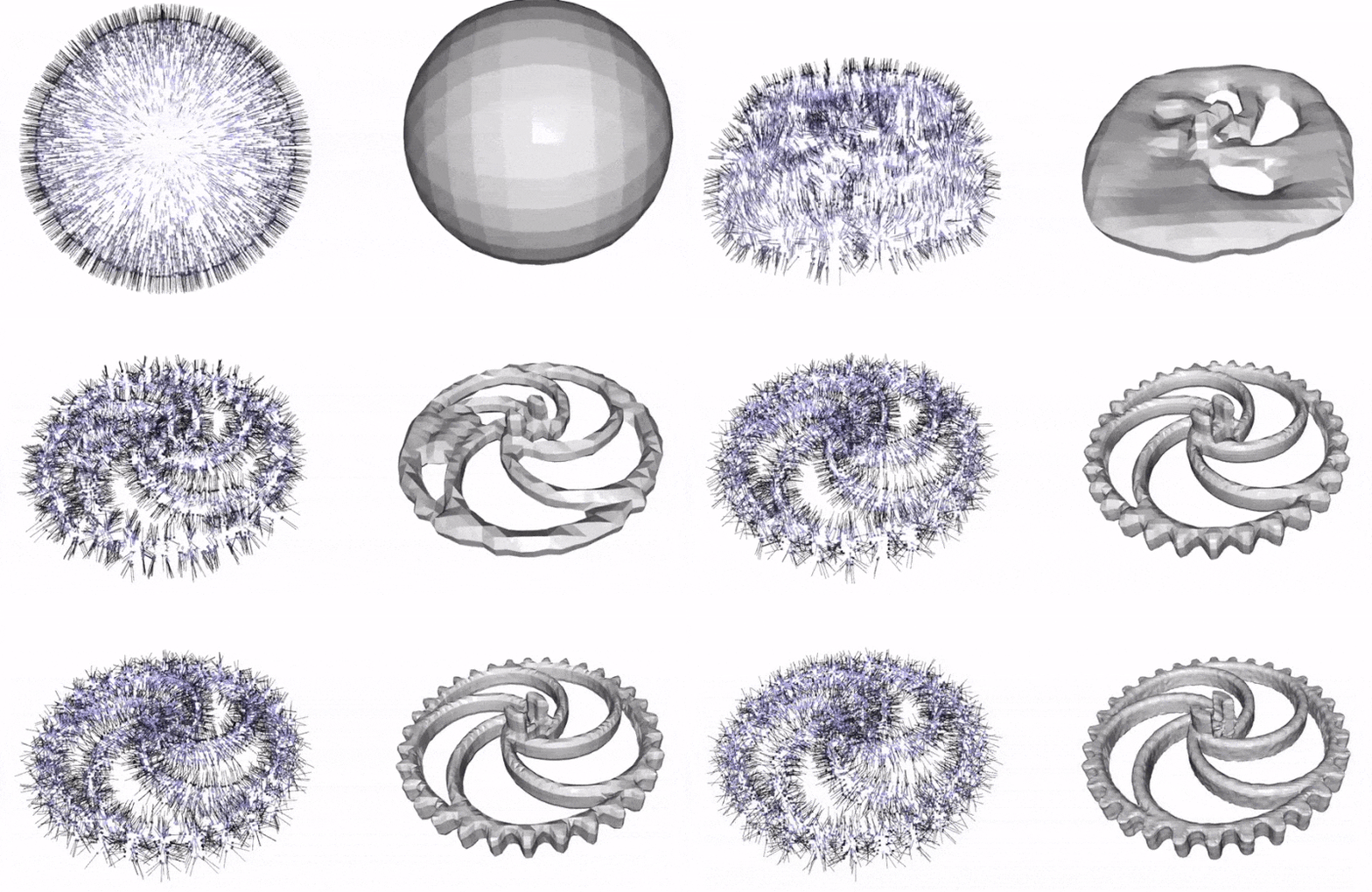
This repository contains the implementation of the paper:

Shape As Points: A Differentiable Poisson Solver
Songyou Peng, Chiyu "Max" Jiang, Yiyi Liao, Michael Niemeyer, Marc Pollefeys and Andreas Geiger
NeurIPS 2021 (Oral)

If you find our code or paper useful, please consider citing

@inproceedings{Peng2021SAP,
 author    = {Peng, Songyou and Jiang, Chiyu "Max" and Liao, Yiyi and Niemeyer, Michael and Pollefeys, Marc and Geiger, Andreas},
 title     = {Shape As Points: A Differentiable Poisson Solver},
 booktitle = {Advances in Neural Information Processing Systems (NeurIPS)},
 year      = {2021}}

Installation

First you have to make sure that you have all dependencies in place. The simplest way to do so, is to use anaconda.

You can create an anaconda environment called sap using

conda env create -f environment.yaml
conda activate sap

Next, you should install PyTorch3D (>=0.5) yourself from the official instruction.

And install PyTorch Scatter:

conda install pytorch-scatter -c pyg

Demo - Quick Start

First, run the script to get the demo data:

bash scripts/download_demo_data.sh

Optimization-based 3D Surface Reconstruction

You can now quickly test our code on the data shown in the teaser. To this end, simply run:

python optim_hierarchy.py configs/optim_based/teaser.yaml

This script should create a folder out/demo_optim where the output meshes and the optimized oriented point clouds under different grid resolution are stored.

To visualize the optimization process on the fly, you can set o3d_show: Frue in configs/optim_based/teaser.yaml.

Learning-based 3D Surface Reconstruction

You can also test SAP on another application where we can reconstruct from unoriented point clouds with either large noises or outliers with a learned network.
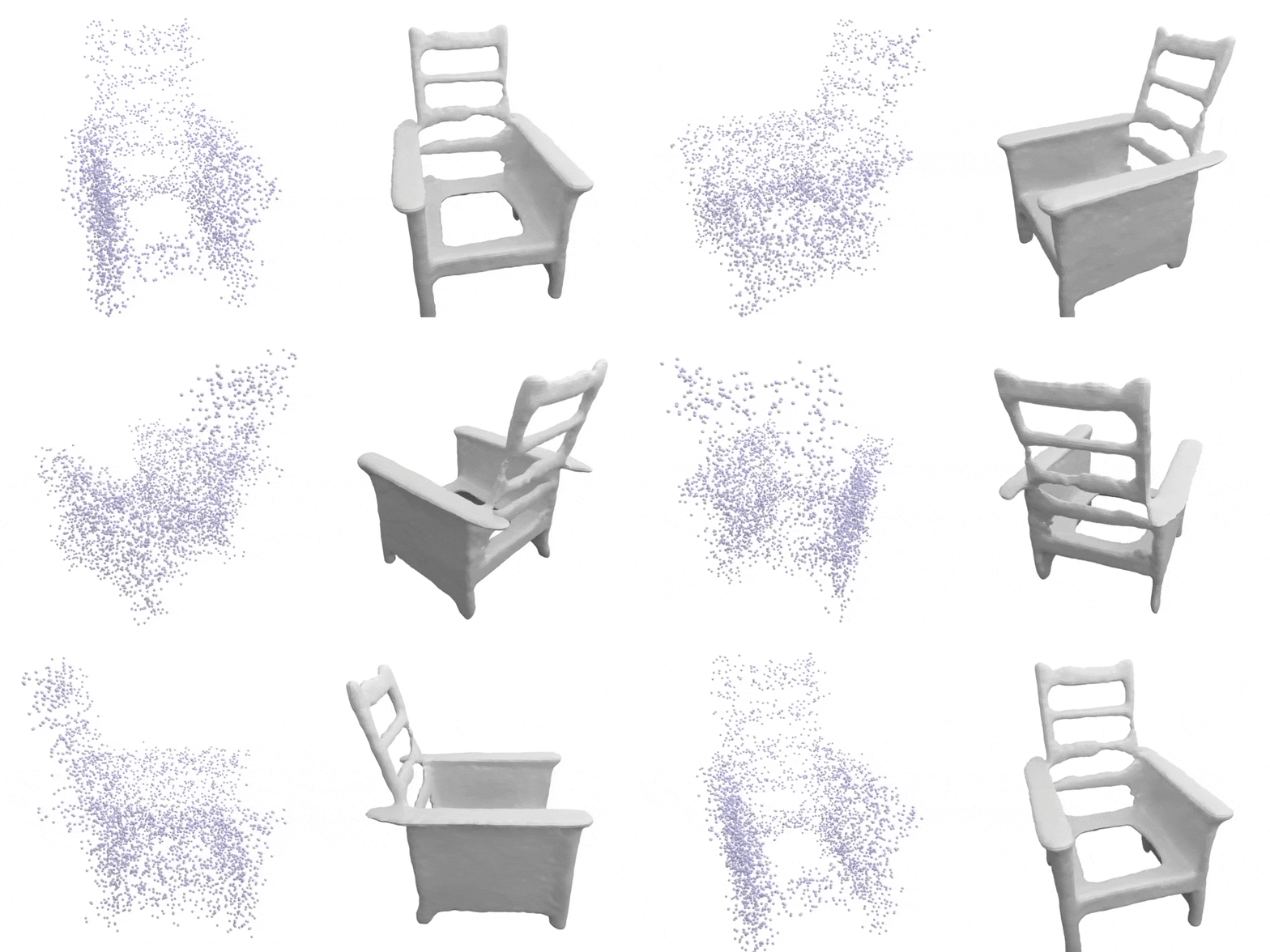
For the point clouds with large noise as shown above, you can run:

python generate.py configs/learning_based/demo_large_noise.yaml

The results can been found at out/demo_shapenet_large_noise/generation/vis.
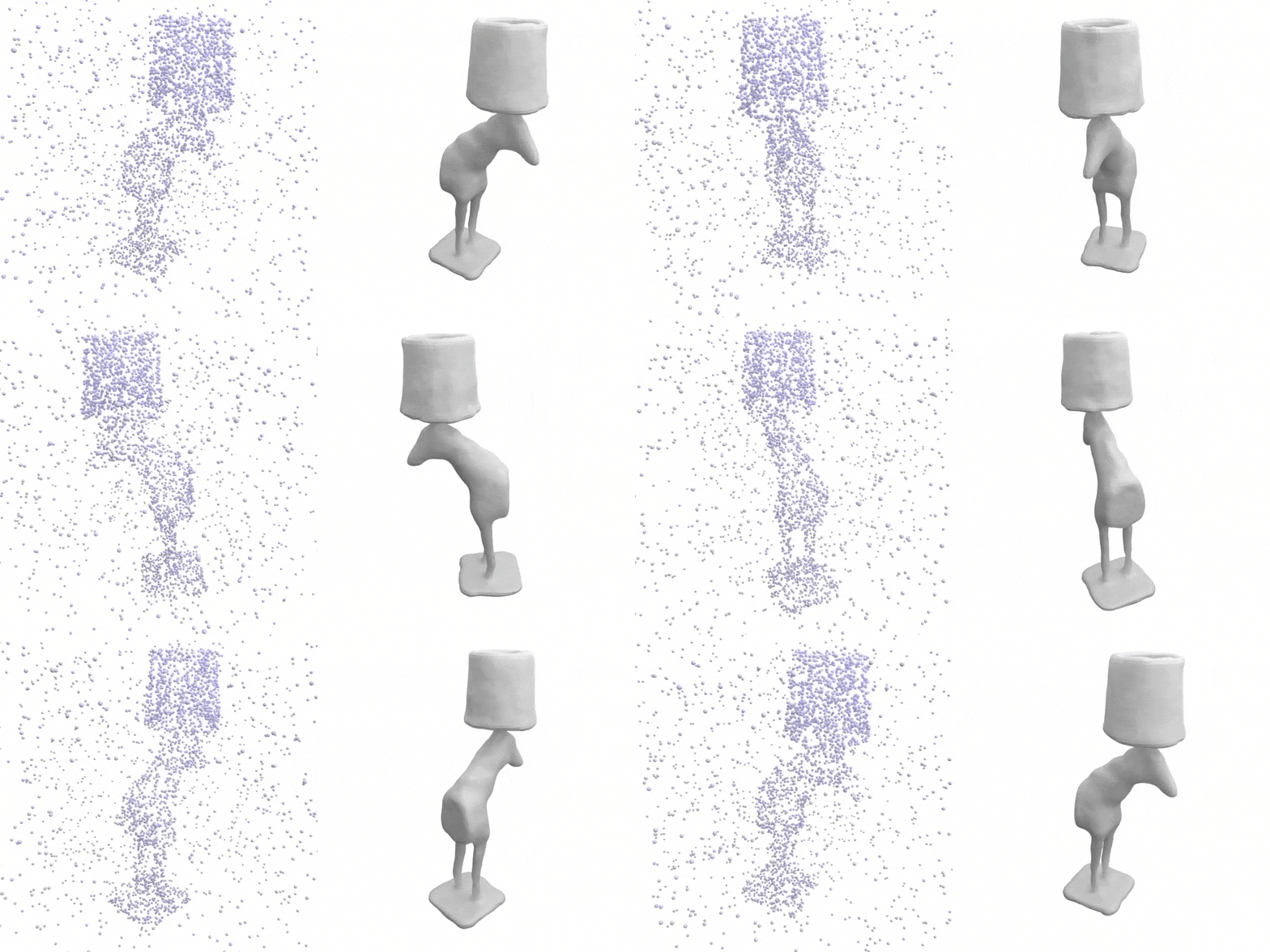
As for the point clouds with outliers, you can run:

python generate.py configs/learning_based/demo_outlier.yaml

You can find the reconstrution on out/demo_shapenet_outlier/generation/vis.

Dataset

We have different dataset for our optimization-based and learning-based settings.

Dataset for Optimization-based Reconstruction

Here we consider the following dataset:

Please cite the corresponding papers if you use the data.

You can download the processed dataset (~200 MB) by running:

bash scripts/download_optim_data.sh

Dataset for Learning-based Reconstruction

We train and evaluate on ShapeNet. You can download the processed dataset (~220 GB) by running:

bash scripts/download_shapenet.sh

After, you should have the dataset in data/shapenet_psr folder.

Alternatively, you can also preprocess the dataset yourself. To this end, you can:

Usage for Optimization-based 3D Reconstruction

For our optimization-based setting, you can consider running with a coarse-to-fine strategy:

python optim_hierarchy.py configs/optim_based/CONFIG.yaml

We start from a grid resolution of 32^3, and increase to 64^3, 128^3 and finally 256^3.

Alternatively, you can also run on a single resolution with:

python optim.py configs/optim_based/CONFIG.yaml

You might need to modify the CONFIG.yaml accordingly.

Usage for Learning-based 3D Reconstruction

Mesh Generation

To generate meshes using a trained model, use

python generate.py configs/learning_based/CONFIG.yaml

where you replace CONFIG.yaml with the correct config file.

Use a pre-trained model

The easiest way is to use a pre-trained model. You can do this by using one of the config files with postfix _pretrained.

For example, for 3D reconstruction from point clouds with outliers using our model with 7x offsets, you can simply run:

python generate.py configs/learning_based/outlier/ours_7x_pretrained.yaml

The script will automatically download the pretrained model and run the generation. You can find the outputs in the out/.../generation_pretrained folders.

Note config files are only for generation, not for training new models: when these configs are used for training, the model will be trained from scratch, but during inference our code will still use the pretrained model.

We provide the following pretrained models:

noise_small/ours.pt
noise_large/ours.pt
outlier/ours_1x.pt
outlier/ours_3x.pt
outlier/ours_5x.pt
outlier/ours_7x.pt
outlier/ours_3plane.pt

Evaluation

To evaluate a trained model, we provide the script eval_meshes.py. You can run it using:

python eval_meshes.py configs/learning_based/CONFIG.yaml

The script takes the meshes generated in the previous step and evaluates them using a standardized protocol. The output will be written to .pkl and .csv files in the corresponding generation folder that can be processed using pandas.

Training

Finally, to train a new network from scratch, simply run:

python train.py configs/learning_based/CONFIG.yaml

For available training options, please take a look at configs/default.yaml.

Nearby in the ranking
Similar items