PyGCL: A PyTorch Library for Graph Contrastive Learning.
Key parameters and specifications
Key parameters and specifications
Parameter
Value
Language
Python
Category
Model Development
Subcategory
Environments
Keywords
Biomedical, RL, Simulation
Stars
967
Forks
120
Contributors
1
Created date
2024-01-30
Updated date
2026-10-15
Stars in 1 day
0
Stars in 7 days
6
Rank
12,332
Previous rank
18,837
Rank change
6,505
7-day stars rank
5,200
Previous 7-day stars rank
4,504
7-day stars rank change
-696
Total stars rank
11,437
Previous total stars rank
11,422
Total stars rank change
-15
Country
USA
README summary
: fruit fly body model for MuJoCo physics is an anatomically-detailed body model of the fruit fly _Drosophila melanogaster_ for MuJoCo physics simulator and reinforcement learning applications. The fly model was developed in a collaborative effort by Google DeepMind and HHMI Janelia Research Campus. We envision our model as a platform for fruit fly biophysics simulations and for modeling neural control of sensorimotor behavior in an embodied context; see our accompanying publication. Getting Started The fruit fly body model lives
in this directory. To visualize it, you can drag-and-drop or to MuJoCo's viewer. Interacting with the fly via Python is as simple as: Also, this notebook shows examples of the flight, walking, and vision-guided flight RL task environments. To train the fly, try the distributed RL training script, which uses Ray to parallelize the DMPO agent training. Installation Follow these steps to install : Option 1: Installation from cloned local repo 1. Clone this repo and create a
new conda environment: can be installed in one of the three modes described next. Also, for installation in editable (developer) mode, use the commands as shown. For installation in regular, not editable, mode, drop the flag. **Core installation**: minimal installation for experimenting with the fly model in MuJoCo or prototyping task environments. ML dependencies such as Tensorflow and Acme are not included and policy rollouts and training are not automatically supported. **ML extension (optional)**: same as core installation, plus ML
dependencies (Tensorflow, Acme) to allow running policy networks, e. for inference or for training using third-party agents not included in this library. **Ray training extension (optional)**: same as core installation and ML extension, plus Ray to also enable distributed policy training in the fly task environments. Option 2: Installation from remote repo 1. Create a new conda environment: Proceed with installation in one of the three modes (described above): 2. **Ray training extension (optional)**: Additional configuring 1. You may
need to set MuJoCo rendering environment varibles, e. Also, for the ML and Ray extensions, may require an update, e. You may want to run to test the main components of the installation. Citing See our accompanying publication. Thank you for your interest in our fly model:)
Frequently asked questions
How many stars and forks are recorded?
TuragaLab/flybody has 967 stars and 120 forks.
What is the repository rank?
TuragaLab/flybody is ranked 12,332.
What language and category are recorded?
TuragaLab/flybody has 967 stars, uses Python and belongs to Model Development.
Which repository is closest in rank?
TuragaLab/flybody is compared with data-prep-kit/data-prep-kit, ranked 12,333 with 967 stars.
README
flybody: fruit fly body model for MuJoCo physics
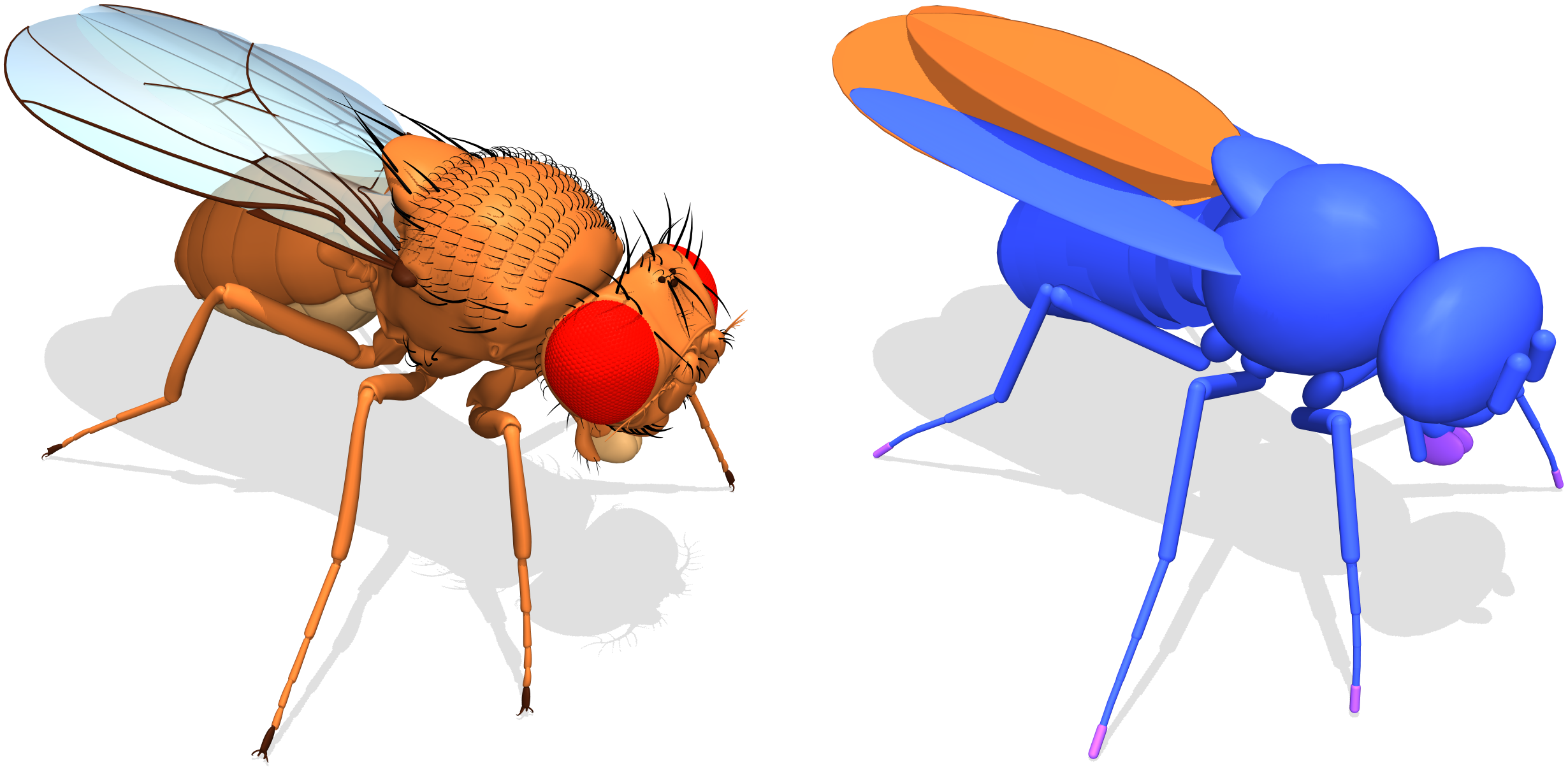
flybody is an anatomically-detailed body model of the fruit fly Drosophila melanogaster for MuJoCo physics simulator and reinforcement learning applications.
The fly model was developed in a collaborative effort by Google DeepMind and HHMI Janelia Research Campus.
We envision our model as a platform for fruit fly biophysics simulations and for modeling neural control of sensorimotor behavior in an embodied context; see our accompanying publication.
Getting Started
The fruit fly body model lives in this directory. To visualize it, you can drag-and-drop fruitfly.xml or floor.xml to MuJoCo's simulate viewer.
Interacting with the fly via Python is as simple as:
import numpy as np
import mediapy

from flybody.fly_envs import walk_imitation

# Create walking imitation environment.
env = walk_imitation()

# Run environment loop with random actions for a bit.
for _ in range(100):
   action = np.random.normal(size=59)  # 59 is the walking action dimension.
   timestep = env.step(action)

# Generate a pretty image.
pixels = env.physics.render(camera_id=1)
mediapy.show_image(pixels)
The quickest way to get started with flybody is to take a look at a tutorial notebook or .
Also, this notebook shows examples of the flight, walking, and vision-guided flight RL task environments.
flybody can be installed in one of the three modes described next. Also, for installation in editable (developer) mode, use the commands as shown. For installation in regular, not editable, mode, drop the -e flag.
Core installation: minimal installation for experimenting with the
fly model in MuJoCo or prototyping task environments. ML dependencies such as Tensorflow and Acme are not included and policy rollouts and training are not automatically supported.
pip install -e .
ML extension (optional): same as core installation, plus ML dependencies (Tensorflow, Acme) to allow running
policy networks, e.g. for inference or for training using third-party agents not included in this library.
pip install -e .[tf]
Ray training extension (optional): same as core installation and ML extension, plus Ray to also enable
distributed policy training in the fly task environments.
You may want to run pytest to test the main components of the flybody installation.
Citing flybody
See our accompanying publication. Thank you for your interest in our fly model:)
@article{flybody,
  title = {Whole-body physics simulation of fruit fly locomotion},
  author = {Roman Vaxenburg and Igor Siwanowicz and Josh Merel and Alice A Robie and
            Carmen Morrow and Guido Novati and Zinovia Stefanidi and Gert-Jan Both and
            Gwyneth M Card and Michael B Reiser and Matthew M Botvinick and
            Kristin M Branson and Yuval Tassa and Srinivas C Turaga},
  journal = {Nature},
  volume = {643},
  pages = {1312--1320},
  year = {2025},
  doi = {https://doi.org/10.1038/s41586-025-09029-4},
  url = {https://www.nature.com/articles/s41586-025-09029-4},
}


 .
.