
← Open Source
Superflows-AI

superflows

Open-source toolkit to build an AI copilot for SaaS products.

AI EngineeringBuild agent workflow (SDK)TypeScript
Open on GitHub
Momentum
+0stars in 24 hours0.0%
666
Stars
77
Forks
+2
This week
6
Contributors
Created 2023-06-16 · Updated 2026-10-14 · #15268 today
Top developers

Superflows-AI/superflows is ranked 15,268 with 666 stars.

Same-category comparison

Superflows-AI/superflows is ranked 15,268 among these 8 peers; sunnweiwei/RankGPT is ranked 15,264.

Same-category comparison
NameRankMetrics
Alibaba-NLP/ViDoRAG15,219
Language:
Python
Stars:
670
Forks:
51
Description:
[EMNLP 2025] ViDoRAG: Visual Document Retrieval-Augmented Generation via Dynamic Iterative Reasoning Agents.
henrydaum/second-brain15,223
Language:
Python
Stars:
670
Forks:
88
Description:
Second Brain is an agentic framework that acts as an operating system, using local file intelligence, workflow automation, and LLMs to complete tasks and communicate over multiple modalities and messaging platforms.
codag-megalith/codag-visualizer15,249
Language:
TypeScript
Stars:
668
Forks:
65
Description:
Visualize AI/LLM workflows in your codebase.
sunnweiwei/RankGPT15,264
Language:
Python
Stars:
667
Forks:
67
Description:
Is ChatGPT Good at Search. LLMs as Re-Ranking Agent [EMNLP 2023 Outstanding Paper Award].
SonarSource/sonarqube-mcp-server15,280
Language:
Java
Stars:
665
Forks:
103
Description:
Official SonarQube MCP Server for code quality and security in AI agents.
anasfik/openai15,281
Language:
Dart
Stars:
665
Forks:
231
Description:
The unofficial OpenAI SDK for Dart & Flutter. Full API coverage + OpenAI-compatible providers (Azure, DeepSeek, LM Studio, Ollama): Responses, Chat, Realtime, Videos, Batch, Fine-tuning.
jamesrochabrun/SwiftOpenAI15,285
Language:
Swift
Stars:
665
Forks:
130
Description:
The most complete open-source Swift package for interacting with OpenAI's public API.
moeru-ai/xsai15,288
Language:
TypeScript
Stars:
665
Forks:
62
Description:
🤖💬 AI SDK, extra small.
Key parameters and specifications
ParameterValue
LanguageTypeScript
CategoryAI Engineering
SubcategoryBuild agent workflow (SDK)
KeywordsSaaS-lite
Stars666
Forks77
Contributors6
Created date2023-06-16
Updated date2026-10-14
Stars in 1 day0
Stars in 7 days2
Rank15,268
Previous rank6,655
Rank change-8,613
7-day stars rank8,650
Previous 7-day stars rank8,708
7-day stars rank change58
Total stars rank15,452
Previous total stars rank15,424
Total stars rank change-28
README summary

Open Source alternative to OpenAI Assistants API 🎮 Demo · 🌐 Website · 📚 Docs · 💬 Slack · 🖥 React Components Superflows makes it easy to add an AI assistant to a software product. This lets users ask questions in natural language and the assistant makes calls to the software's API to answer them. a CRM user could ask: Have we closed any deals with publishing companies? Move her calls to the rest of the team - prioritise those who have had contact with the prospect before. A user

could ask their analytics assistant: Did the Google Ads campaign we ran last month have a positive ROI? Superflows will make API calls to answer these questions or complete tasks, and write code to analyse and plot data. **Check out a demo of Superflows in a CRM here. ** You can try out the cloud version for free **here** or self-host. Features [x] Calls API endpoints to complete tasks and answer questions for users [x] Writes code to analyse data

and create plots 📊 [x] Uses RAG (retrieval) to answer questions on static knowledge 📚 [x] Developer dashboard to configure and test your AI assistant 🎛️ [x] Stateful streaming API 🏞️ [x] UI components (React components here) 🖥️ [x] Upload API specifications for fast set up 💨 [x] Asks for user confirmation before taking potentially damaging actions ✅ [x] Track usage in dashboard 📊 [x] Multi-LLM support (Finetuned GPT-3. ) 🌍 [x] Collects user feedback on AI replies for fine-tuning 👍 [x] Self-hosting, including with fully open

source model. ** 🏠 Setup Setting up an AI Assistant in Superflows Cloud is simple: 1. Integrate into your product in 1 line of code Dashboard Superflows has a developer dashboard where you can configure, evaluate and debug your AI assistant before putting it into production. You can interact with your assistant on the 'Playground' . 'Developer mode' shows you under the hood of what the assistant is thinking and planning. 'Mock API responses' enables you to check the behaviour of the assistant

without connecting it to an API. The 'Actions' page lets you control which API endpoints your assistant can call to answer user queries in a simple dashboard. These endpoints can easily be uploaded via an Open API Specification, or entered manually. UI Components Superflows comes with out-of-the-box React UI components. These components let you integrate Superflows into your product in 1 line of code (integration guide). API The API specification can be found in the docs. Support

/ talk with founders Schedule Demo 👋 Slack Community 💭 Our numbers 📞 +44 (755) 7101-159 / +44 (780) 580-6766 Our emails ✉️ henry@superflows. ai Self-hosting We haven't written a self-hosting guide for Superflows yet. If you're interested in self-hosting, please reach out to us on Slack or email. Setting up locally ### Local setup You need to be running a local version of Supabase to develop this project locally. Here are comprehensive instructions on using the Supabase CLI (note: if

you have used Supabase in other projects before, you may have to before running ) **If using ** The 2nd command should

Frequently asked questions

How many stars and forks are recorded?

Superflows-AI/superflows has 666 stars and 77 forks.

What is the repository rank?

Superflows-AI/superflows is ranked 15,268.

What language and category are recorded?

Superflows-AI/superflows has 666 stars, uses TypeScript and belongs to AI Engineering.

Which repository is closest in rank?

Superflows-AI/superflows is compared with sunnweiwei/RankGPT, ranked 15,264 with 667 stars.

README

Open Source alternative to OpenAI Assistants API

🎮 Demo · 🌐 Website · 📚 Docs · 💬 Slack · 🖥 React Components

Superflows makes it easy to add an AI assistant to a software product. This lets users ask questions in natural language and the assistant makes calls to the software's API to answer them.

E.g. a CRM user could ask:

Have we closed any deals with publishing companies? If so, who was involved in those deals?

or:

Eve is ill today. Move her calls to the rest of the team - prioritise those who have had contact with the prospect before.

A user could ask their analytics assistant:

Did the Google Ads campaign we ran last month have a positive ROI? How many conversions did it generate?

Superflows will make API calls to answer these questions or complete tasks, and write code to analyse and plot data.

Check out a demo of Superflows in a CRM here.

You can try out the cloud version for free here or self-host. You can learn more on the docs pages.

https://github.com/Superflows-AI/superflows/assets/33871096/b1b355d2-a851-4b11-aabb-3fd3ff375f5d

Features

  • [x] Calls API endpoints to complete tasks and answer questions for users
  • [x] Writes code to analyse data and create plots 📊
  • [x] Uses RAG (retrieval) to answer questions on static knowledge 📚
  • [x] Developer dashboard to configure and test your AI assistant 🎛️
  • [x] Stateful streaming API 🏞️
  • [x] UI components (React components here) 🖥️
  • [x] Upload API specifications for fast set up 💨
  • [x] Asks for user confirmation before taking potentially damaging actions ✅
  • [x] Track usage in dashboard 📊
  • [x] Multi-LLM support (Finetuned GPT-3.5, GPT-4, Mixtral, Llama2...) 🌍
  • [x] Collects user feedback on AI replies for fine-tuning 👍
  • [x] Self-hosting, including with fully open source model. Reach out if interested. 🏠

Setup

Setting up an AI Assistant in Superflows Cloud is simple:

  1. Upload your API specification
  2. Test in the playground
  3. Integrate into your product in 1 line of code

Dashboard

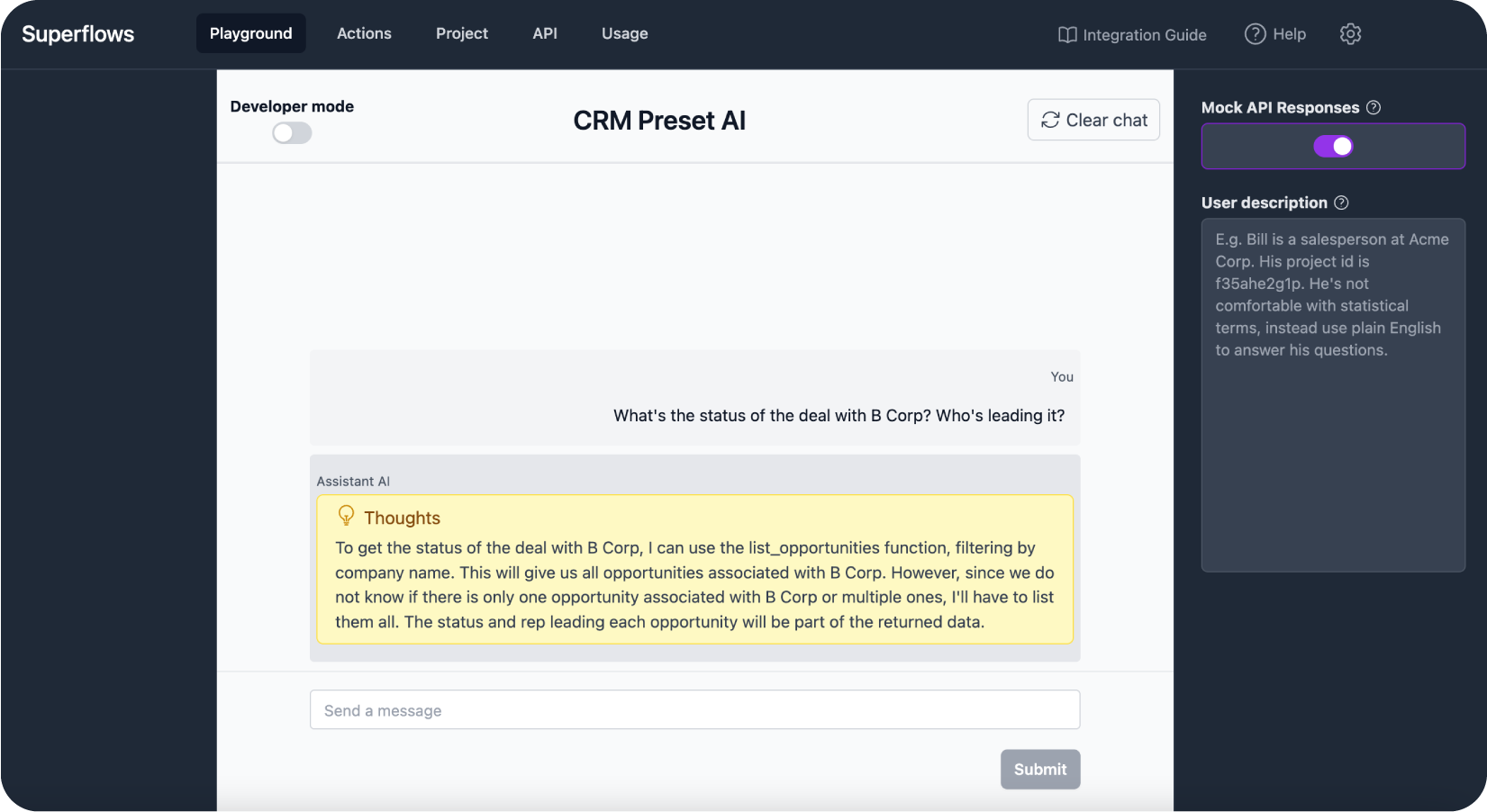
Superflows has a developer dashboard where you can configure, evaluate and debug your AI assistant before putting it into production.

You can interact with your assistant on the 'Playground'. 'Developer mode' shows you under the hood of what the assistant is thinking and planning. 'Mock API responses' enables you to check the behaviour of the assistant without connecting it to an API.
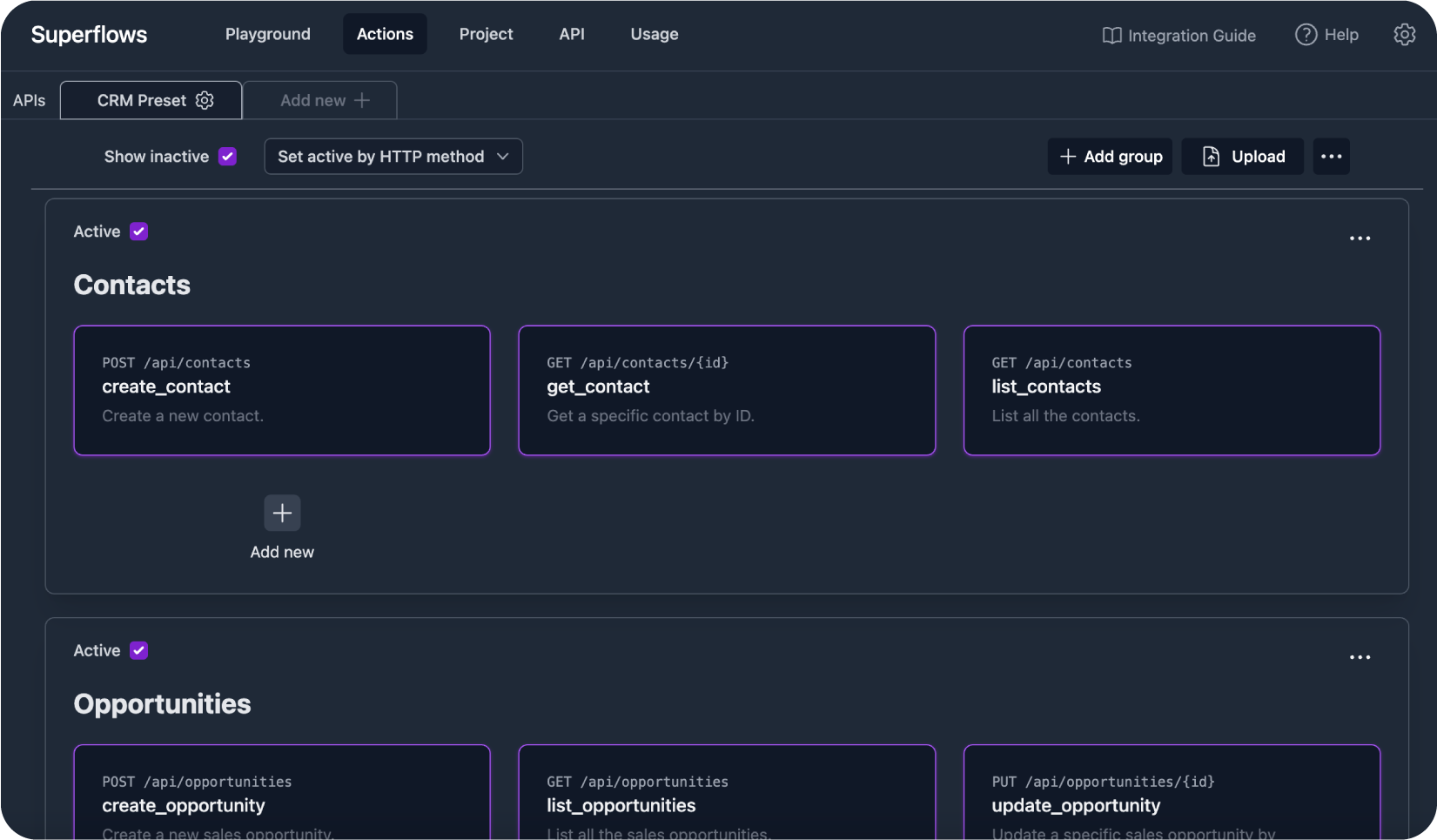
The 'Actions' page lets you control which API endpoints your assistant can call to answer user queries in a simple dashboard.

These endpoints can easily be uploaded via an Open API Specification, or entered manually.
UI Components

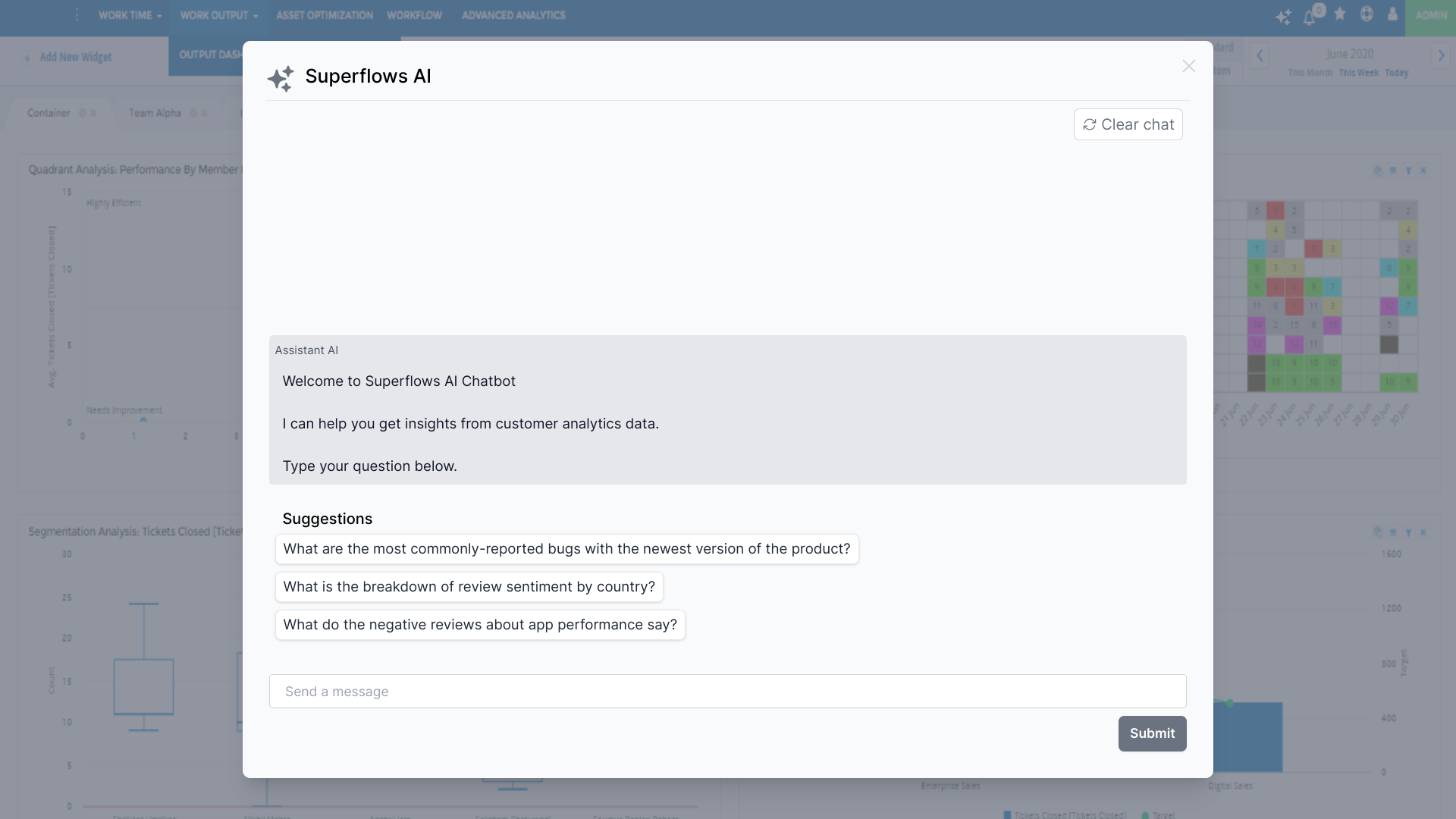
Superflows comes with out-of-the-box React UI components. These components let you integrate Superflows into your product in 1 line of code (integration guide).
API

The API specification can be found in the docs.

Support / talk with founders

Self-hosting

We haven't written a self-hosting guide for Superflows yet. If you're interested in self-hosting, please reach out to us on Slack or email.

Roadmap

Available here.

Setting up locally

  • Local setup

You need to be running a local version of Supabase to develop this project locally.

Here are comprehensive instructions on using the Supabase CLI

(note: if you have used Supabase in other projects before, you may have to supabase stop before running supabase start)

If using npm

npm i
npm install supabase --save-dev
npx supabase start

The 2nd command should give you an anon_api_key and a service_role key.

You'll need to enter these into the .env file. Check out .env.example for the format and variables required.

Once you fill in .env.example, rename it .env.

To run in development mode:

make run

(Alternatively, if you don't have make, use npm run dev)

  • Docker Setup

Locate the init.sh file in the docker/development directory after cloning the project.

Prerequisites

  • Ensure that git is installed on your system. If it's not installed, the script will notify you.
  • Install docker and docker compose using the relevant installation guide for your operating system

Usage

If you are running on windows, preferably use the git bash cli or WSL, you might need sudo permissions

Make the Script Executable Before using the script for the first time, ensure it is executable then run it:

chmod +x init.sh
./init.sh

This script is designed to facilitate the process of setting up and managing the Superflows development environment with Supabase and also to setup the base environment configuration in your project. It ensures that the Supabase repository is either cloned or updated, and it also checks and manages the .env file, merging the existing .env.example files if necessary.

By default the script runs docker compose to run start the containers and build (where required)

Verify contents and set custom env

The script should have created the supabase folder and also a .env file.

  • Review the env variables and correct or change to suit your environment - the env should already contain sensible defaults (however)

  • Run the compose file (depending on what version of compose you have installed)

docker compose up -d build 

or

docker-compose up -d build
Nearby in the ranking
Similar items