| SkyChat is a Chatbot project based on Chinese GPT3 API. Like chatGPT, it can do human-machine chat, question and answer, and can also complete tasks such as Chinese-English or English-Chinese translation, content continuation, couplets, and Chinese ancient poems writing.
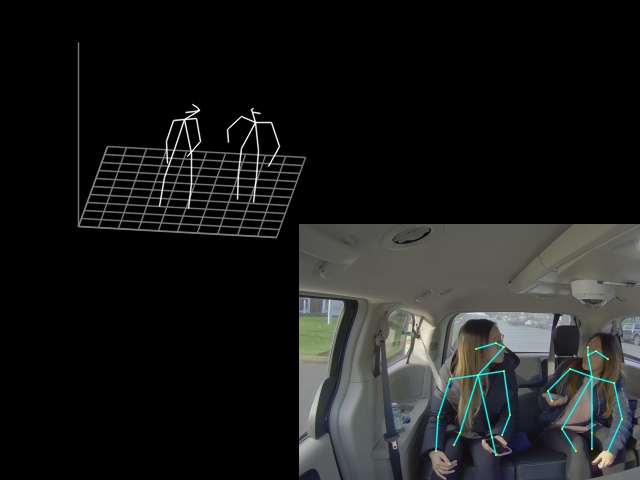
Real-time 3D Multi-person Pose Estimation Demo This repository contains 3D multi-person pose estimation demo in PyTorch. Intel OpenVINO™ backend can be used for fast inference on CPU. This demo is based on Lightweight OpenPose and Single-Shot Multi-Person 3D Pose Estimation From Monocular RGB papers. It detects 2D coordinates of up to 18 types of keypoints: ears, eyes, nose, neck, shoulders, elbows, wrists, hips, knees, and ankles, as well as their 3D coordinates. It was
trained on MS COCO and CMU Panoptic datasets and achieves 100 mm MPJPE (mean per joint position error) on CMU Panoptic subset. *This repository significantly overlaps with however contains just the necessary code for 3D human pose estimation demo. * The major part of this work was done by Mariia Ageeva, when she was the :top::rocket::fire: intern at Intel. Table of Contents Requirements Prerequisites Pre-trained model Running Inference with OpenVINO Inference with TensorRT Requirements Python 3. 10 (or
above) C++ Compiler (g++ or MSVC) OpenCV 4. 0 (or above) [Optional] Intel OpenVINO for fast inference on CPU. [Optional] NVIDIA TensorRT for fast inference on Jetson. Add build folder to : Pre-trained model Pre-trained model is available at Google Drive. Running To run the demo, pass path to the pre-trained checkpoint and camera id (or path to video file): Camera can capture scene under different view angles, so for correct scene visualization, please pass camera extrinsics and
focal length with and options correspondingly (extrinsics sample format can be found in data folder). In case no camera parameters provided, demo will use the default ones. Inference with OpenVINO To run with OpenVINO, it is necessary to convert checkpoint to OpenVINO format: 1. Convert to OpenVINO format: To run the demo with OpenVINO inference, pass option and specify device to infer on: Inference with TensorRT To run with TensorRT, it is necessary to install it properly. Please, follow the
official guide, these steps work for me: 1. Install cuDNN 8 (runtime library, then developer). Convert checkpoint to TensorRT format: TensorRT does not support dynamic network input size reshape. Make sure you have set proper network input height, width with and options during conversion (if not, there will be no detections). Default values work for a usual video with 16:9 aspect ratio (1280x720, 1920x1080). You can check the network input size with in the demo. py To run the
demo with TensorRT inference, pass option: I have observed ~10x network inference speedup on RTX 2060 (in comparison with default PyTorch 1.
Frequently asked questions
How many stars and forks are recorded?
Daniil-Osokin/lightweight-human-pose-estimation-3d-demo.pytorch has 688 stars and 137 forks.
What is the repository rank?
Daniil-Osokin/lightweight-human-pose-estimation-3d-demo.pytorch is ranked 14,979.
What language and category are recorded?
Daniil-Osokin/lightweight-human-pose-estimation-3d-demo.pytorch has 688 stars, uses Python and belongs to Applications.
Which repository is closest in rank?
Daniil-Osokin/lightweight-human-pose-estimation-3d-demo.pytorch is compared with wlzh/skills, ranked 14,978 with 689 stars.
README
Real-time 3D Multi-person Pose Estimation Demo
This repository contains 3D multi-person pose estimation demo in PyTorch. Intel OpenVINO™ backend can be used for fast inference on CPU. This demo is based on Lightweight OpenPose and Single-Shot Multi-Person 3D Pose Estimation From Monocular RGB papers. It detects 2D coordinates of up to 18 types of keypoints: ears, eyes, nose, neck, shoulders, elbows, wrists, hips, knees, and ankles, as well as their 3D coordinates. It was trained on MS COCO and CMU Panoptic datasets and achieves 100 mm MPJPE (mean per joint position error) on CMU Panoptic subset. This repository significantly overlaps with https://github.com/opencv/open_model_zoo/, however contains just the necessary code for 3D human pose estimation demo.
The major part of this work was done by Mariia Ageeva, when she was the :top::rocket::fire: intern at Intel.
Camera can capture scene under different view angles, so for correct scene visualization, please pass camera extrinsics and focal length with --extrinsics and --fx options correspondingly (extrinsics sample format can be found in data folder). In case no camera parameters provided, demo will use the default ones.
Inference with OpenVINO
To run with OpenVINO, it is necessary to convert checkpoint to OpenVINO format:
TensorRT does not support dynamic network input size reshape.
Make sure you have set proper network input height, width with --height and --width options during conversion (if not, there will be no detections).
Default values work for a usual video with 16:9 aspect ratio (1280x720, 1920x1080).
You can check the network input size with print(scaled_img.shape) in the demo.py
To run the demo with TensorRT inference, pass --use-tensorrt option: