← Open Source
AutoRally

autorally

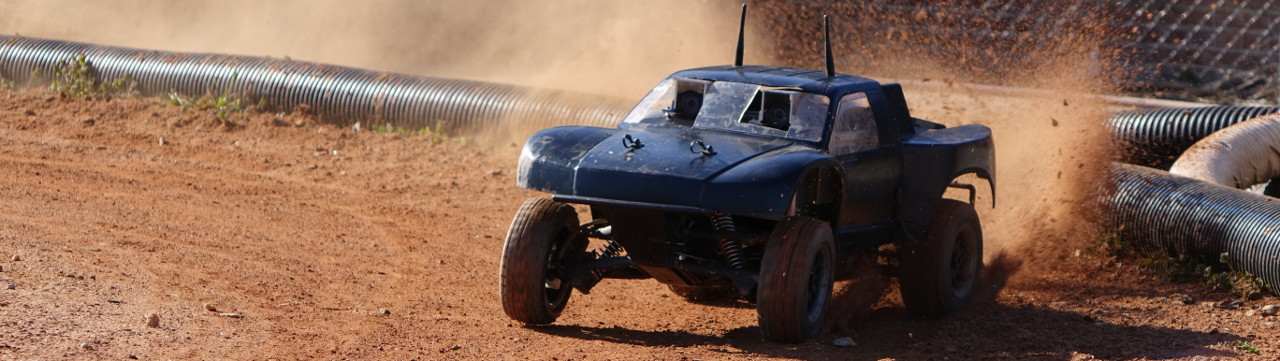
Software for the AutoRally platform.

Model DevelopmentEnvironmentsC++
Open on GitHub
Momentum
+0stars in 24 hours0.0%
791
Stars
234
Forks
+0
This week
22
Contributors
Created 2016-04-20 · Updated 2026-08-31 · #13781 today
Top developers

AutoRally/autorally is ranked 13,781 with 791 stars.

Same-category comparison

AutoRally/autorally is ranked 13,781 among these 8 peers; tkipf/keras-gcn is ranked 13,780.

Same-category comparison
NameRankMetrics
hardmaru/slimevolleygym13,763
Language:
Python
Stars:
793
Forks:
125
Description:
A simple OpenAI Gym environment for single and multi-agent reinforcement learning.
google/grain13,777
Language:
Python
Stars:
792
Forks:
89
Description:
Library for reading and processing ML training data.
markdregan/K-Nearest-Neighbors-with-Dynamic-Time-Warping13,778
Language:
Jupyter Notebook
Stars:
792
Forks:
210
Description:
Python implementation of KNN and DTW classification algorithm.
tkipf/keras-gcn13,780
Language:
Python
Stars:
792
Forks:
261
Description:
Keras implementation of Graph Convolutional Networks.
menloresearch/asimov-v013,789
Stars:
791
Forks:
97
Description:
v0 of Asimov, an open-source humanoid robot.
ntucllab/libact13,790
Language:
Python
Stars:
791
Forks:
172
Description:
Pool-based active learning in Python.
NeuroDiffGym/neurodiffeq13,795
Language:
Python
Stars:
790
Forks:
105
Description:
A library for solving differential equations using neural networks based on PyTorch, used by multiple research groups around the world, including at Harvard IACS.
ChihebTrabelsi/deep_complex_networks13,802
Language:
Python
Stars:
789
Forks:
284
Description:
Implementation related to the Deep Complex Networks.
Key parameters and specifications
ParameterValue
LanguageC++
CategoryModel Development
SubcategoryEnvironments
KeywordsAutonomous vehicles, Embodied, Robotics
Stars791
Forks234
Contributors22
Created date2016-04-20
Updated date2026-08-31
Stars in 1 day0
Stars in 7 days0
Rank13,781
Previous rank13,677
Rank change-104
7-day stars rank14,116
Previous 7-day stars rank14,137
7-day stars rank change21
Total stars rank13,476
Previous total stars rank13,459
Total stars rank change-17
CountryUSA
README summary

AutoRally Software for the AutoRally research platform. AutoRally Platform Website AutoRally Youtube Channel Research Pages AutoRally is associated with: * Contributing We welcome bug fixes, ehancements, new features, and feedback! Please submit pull requests to the devel branch that conform to the ROS C++ Style Guide. We use Gitflow, so master branch is reserved for releases. __Install required packages__ _Recommended Tools_ The following tools are useful, but not necessary for this project. feh cutecom cmake-curses-gui coriander synaptic arduino python

-termcolor 3. __Install MPPI Dependencies (only if you have a GPU and will run MPPI)__ 4. __Install gtsam__ Follow the gtsam Quick Start guide to clone and install the _develop_ branch of gtsam. Instead of , use: Once install is complete, make sure linux can see the shared library: 2. Clone or Fork Repositories Get the autorally repository in a catkin workspace. The suggested location is , but any valid catkin worskspace source folder will work. We suggest forking first if you

will be working with the code. To clone straight from the AutoRally repo: Also clone the IMU code into the same catkin workspace: 3. Install AutoRally ROS Dependencies Within the catkin workspace folder, run this command to install the packages this project depends on. Compilation & Running To compile and install run from the catkin workspace folder. Due to the additional requirement of ROS's distributed launch system, you must run before using any AutoRally components. See the wiki for more information

about how to set this system up for distributed launches on your vehicle platform. _Note:_ If you are unfamiliar with catkin, please know that you must run before ROS will be able to locate the autorally packages. Generate Documentation You can generate or update code documentation by running in . To view code documentation open in a web browser. Start the AutoRally Simulation to Test Configuration You can use a USB gamepad to drive the simulated platform around. On startup, the

message published by the node is **false**. Press any of the buttons by the right stick (normally labelled X, Y, A, B or square, triangle, X, circle) to toggle the published value. Verify runstop motion is enabled by looking at the paramter in the topic. If you aren't using a gamepad, you will have to configure another source of runstop information for the platform to move: Comment out line 93 of and configure rqt_publisher to publish a message to

topic of type at 1 Hz with set to and set to **true**. Autonomous Driving in Simulation At the end of this section the robot will be driving autonomously in simulation using controllers available in . Position the robot in the same spot as when the simulation starts and make sure runstop motion should is enabled (set to **true**). Start state estimator: In change and to **false**, then: Start waypoint follower: Start constant speed controller and tell it what speed to

drive: Configure a publisher on topic of type at rate 10 with value of 3 (you can adjust he value

Frequently asked questions

How many stars and forks are recorded?

AutoRally/autorally has 791 stars and 234 forks.

What is the repository rank?

AutoRally/autorally is ranked 13,781.

What language and category are recorded?

AutoRally/autorally has 791 stars, uses C++ and belongs to Model Development.

Which repository is closest in rank?

AutoRally/autorally is compared with tkipf/keras-gcn, ranked 13,780 with 792 stars.

README

AutoRally

Software for the AutoRally research platform.

AutoRally Platform Website

AutoRally Youtube Channel

Research Pages AutoRally is associated with:

Contributing

We welcome bug fixes, ehancements, new features, and feedback!

Please submit pull requests to the devel branch that conform to the ROS C++ Style Guide. We use Gitflow, so master branch is reserved for releases.

Setup Instructions

Contents

  1. Install Prerequisites
  2. Clone repository
  3. Install AutoRally ROS Dependencies
  4. Compilation/Running
  5. Generate Documentation
  6. Test Setup in Simulation

1. Install Prerequisites

  1. Install Ubuntu 14.04 64-bit

  2. Install required packages

    sudo apt-get install git doxygen openssh-server libusb-dev texinfo

    Recommended Tools

    The following tools are useful, but not necessary for this project.

    • feh
    • cutecom
    • cmake-curses-gui
    • coriander
    • synaptic
    • arduino
    • python-termcolor
  3. Install MPPI Dependencies (only if you have a GPU and will run MPPI)

    The core idea behind MPPI is to sample thousands of trajectories really fast. This is accomplished by implementing the sampling step on a GPU, for which you will need CUDA. We also use an external library to load python's numpy zip archives (.npz files) into C++.

  4. Install ros-indigo-desktop-full

  5. Install gtsam

    Follow the gtsam Quick Start guide to clone and install the develop branch of gtsam.

    Instead of cmake .., use:

    cmake -DGTSAM_INSTALL_GEOGRAPHICLIB=ON -DGTSAM_WITH_EIGEN_MKL=OFF ..

    Once install is complete, make sure linux can see the shared library:

    sudo ldconfig

2. Clone or Fork Repositories

Get the autorally repository in a catkin workspace. The suggested location is ~/catkin_ws/src/, but any valid catkin worskspace source folder will work. We suggest forking first if you will be working with the code.

To clone straight from the AutoRally repo:

git clone https://github.com/AutoRally/autorally.git

Also clone the IMU code into the same catkin workspace:

git clone https://github.com/AutoRally/imu_3dm_gx4.git

3. Install AutoRally ROS Dependencies

Within the catkin workspace folder, run this command to install the packages this project depends on.

rosdep install --from-path src --ignore-src -y

4. Compilation & Running

To compile and install run catkin_make from the catkin workspace folder.

Due to the additional requirement of ROS's distributed launch system, you must run

source src/autorally/autorally_util/setupEnvLocal.sh

before using any AutoRally components. See the wiki for more information about how to set this system up for distributed launches on your vehicle platform.

Note: If you are unfamiliar with catkin, please know that you must run source catkin_ws/devel/setup.sh before ROS will be able to locate the autorally packages. This line can be added to your ~/.bashrc file.

5. Generate Documentation

You can generate or update code documentation by running doxygen in autorally/.

To view code documentation open autorally/doc/html/index.html in a web browser.

6. Start the AutoRally Simulation to Test Configuration

roslaunch autorally_gazebo autoRallyTrackGazeboSim.launch

You can use a USB gamepad to drive the simulated platform around. On startup, the runstop message published by the joystick node is false. Press any of the buttons by the right stick (normally labelled X, Y, A, B or square, triangle, X, circle) to toggle the published value.

Verify runstop motion is enabled by looking at the runstopMotionEnabled paramter in the /chassisState topic.

If you aren't using a gamepad, you will have to configure another source of runstop information for the platform to move:

  • Comment out line 93 of autorally_gazebo/launch/autoRallyTrackGazeboSim.launch

  • rosrun rqt_publisher rqt_publisher

and configure rqt_publisher to publish a message to topic /runstop of type autorally_msgs/runstop at 1 Hz with sender set to rqt_publisher and motionEnabled set to true.

  • Verify that runstopMotionEnabled is true in /chassisState topic.

7. Autonomous Driving in Simulation

At the end of this section the robot will be driving autonomously in simulation using controllers available in autorally_control.

Position the robot in the same spot as when the simulation starts and make sure runstop motion should is enabled (set to true).

Start state estimator:

In autorally_core/launch/state_estimator.launch change InvertY and InvertZ to false, then:

rosparam set /gps_imu/FixedInitialPose true
roslaunch autorally_core state_estimator.launch

Start waypoint follower:

roslaunch autorally_control waypointFollower.launch

Start constant speed controller and tell it what speed to drive:

roslaunch autorally_control constantSpeedController.launch
rosrun rqt_publisher rqt_publisher

Configure a publisher on topic constantSpeedController/speedCommand of type std_msgs/Float64 at rate 10 with value of 3 (you can adjust he value once everything is running). The value is the target velocity in m/s, and as soon as you do this the platform should move if motion is enabled.

If the robot turns and hits the barrier it's probably because the state estimator has not converged, so its orientation estimate is incorrect. Just select the track barriers and move them up to allow the robot to continue driving, and the estimator should converge and the vehicle will return to within the barriers.

What's Next

More detailed explanations of the controllers and state estimator can be found on the wiki:

Controlling the AutoRally platform is a tutorial for how your own controller can control the AutoRally platform (in simulation or on hardware).

If you are configuring a physical AutoRally platform, the next step is to configure the compute box, all of the peripherals, and the launch system. Those instructions are found in the Platform Configuration Instructions.

Nearby in the ranking
Similar items