← 开源
zabirauf

AutoGPT.js

Auto-GPT on the browser

ApplicationsPersonalTypeScript
在 GitHub 打开
增长势头
+124 小时新增 Star+0.1%
1.02k
Star
173
Fork
+-2
本周
1
贡献者
创建于 2023-04-04 · 更新于 2026-10-15 · 今日第 5920 名
主要开发者
zabirauf

zabirauf/AutoGPT.js 排名第 5,920,有 1,022 个星标。

同类别比较

zabirauf/AutoGPT.js 排名第 5,920,此处有 8 个同类条目;vastxie/99AI 排名第 5,916。

同类别比较
名称排名指标
AFK-surf/open-agent5,907
语言:
TypeScript
星标数:
1,034
分叉数:
127
简介:
Open-source alternative to Claude Agent SDK, ChatGPT Agents, and Manus.
1ove9/antenna-forge5,910
语言:
Python
星标数:
1,033
分叉数:
169
简介:
AI-driven inverse antenna design with real NEC2 + openEMS in the loop. Try the live in-browser playground.
alchaincyf/fanbox5,913
语言:
JavaScript
星标数:
1,030
分叉数:
149
简介:
vibe coding 的驾驶舱:左边文件,右边/下边终端,中间看清每一次改动。 / The cockpit for vibe coding: browse files on the left, command agents on the right, watch every change in between.
vastxie/99AI5,916
语言:
Vue
星标数:
1,026
分叉数:
286
简介:
可商业化的 AI Web 平台,提供一站式人工智能服务解决方案。支持私有化部署,内置多用户管理,适合企业、团队或个人快速构建 AI 服务。
Prajwal100/Complete-Ecommerce-in-laravel-105,924
语言:
Blade
星标数:
1,019
分叉数:
564
简介:
Complete E-commerce Website in Laravel 10 - Full-featured eCommerce solution with modern UI, admin panel, PayPal integration, and powered by NepVox AI (TTS, STT, TTI)
optiland/optiland5,930
语言:
Python
星标数:
1,014
分叉数:
216
简介:
Comprehensive optical design, optimization, and analysis in Python, including GPU-accelerated and differentiable ray tracing via PyTorch.
HKUDS/AgentSpace5,931
语言:
TypeScript
星标数:
1,013
分叉数:
132
简介:
"AgentSpace: Human + Agents. One Team. One Workspace"
Fadi002/de4py5,936
语言:
Python
星标数:
1,009
分叉数:
93
简介:
The ultimate AI-powered toolkit for python reverse engineering
关键参数与规格
关键参数与规格
参数值
语言TypeScript
类别Applications
子类别Personal
关键词Computer use
星标数1,022
分叉数173
贡献者1
创建日期2023-04-04
更新日期2026-10-15
1 天星标数1
7 天星标数-2
排名5,920
上次排名11,956
排名变化6,036
7 天星标排名18,379
上次 7 天星标排名18,582
7 天星标排名变化203
总星标排名10,969
上次总星标排名10,966
总星标排名变化-3
国家USA
README 摘录

js is an open-source project that aims to bring the powerful capabilities of AutoGPT to your browser. By running directly in the browser, AutoGPT. js offers greater accessibility and privacy. com Table of Contents Features Roadmap/Ideas Development Deployment Fly. io Docker Direct Contributing License Features Create/Read files from your local computer (uses new Web File System Access APIs) Create and run other GPT agents Generates code Short term memory Searching using Duck Duck Go (currently proxies fetching

of DuckDuckGo page through server) Stateless visiting a URL (currently proxies fetching of website through server) Roadmap/Ideas 🚧 Using LangChain for a more extensible architecture for AutoGPT Advance settings to configure the AutoGPT e. (currently performance maybe a limitation) Tabbed UX to show Files Created/Accessed Development 1. io Install Fly Sign up and log in to Fly **Note:** If you have more than one Fly account, ensure that you are signed into the same account in the Fly CLI

as you are in the browser. In your terminal, run and ensure the email matches the Fly account signed into the browser. Create an app on Fly Add a to your fly app secrets, to do this you can run the following commands: If you don't have openssl installed, you can also use 1Password to generate a random secret, just replace with the generated secret. Create a persistent volume for the sqlite database. Though there is no code reading/writing

to sqlite but that dependency from this project starter template was not removed. Now that everything is set up you can deploy. Deploy the docker image based on what cloud and infrastructure you are using 3. Start the container based on your infra e. Run to start the server which will expose the endpoint at . You can then use a reverse proxy like NGINX to route to that local address on your server. Contributing We welcome and encourage contributions from

the developer community. License This project is licensed under the MIT License. By contributing to this project, you agree to the terms and conditions of the license.

常见问题

记录了多少星标和分叉?

zabirauf/AutoGPT.js 有 1,022 个星标和 173 个分叉。

仓库排名是多少?

zabirauf/AutoGPT.js 排名第 5,920。

记录的语言和类别是什么?

zabirauf/AutoGPT.js 有 1,022 个星标,语言为 TypeScript,类别为 Applications。

哪个仓库排名最接近?

zabirauf/AutoGPT.js 与 vastxie/99AI 比较,后者排名第 5,916,有 1,026 个星标。

README

AutoGPT.js

AutoGPT.js is an open-source project that aims to bring the powerful capabilities of AutoGPT to your browser. By running directly in the browser, AutoGPT.js offers greater accessibility and privacy.

Visit AutoGPTjs.com
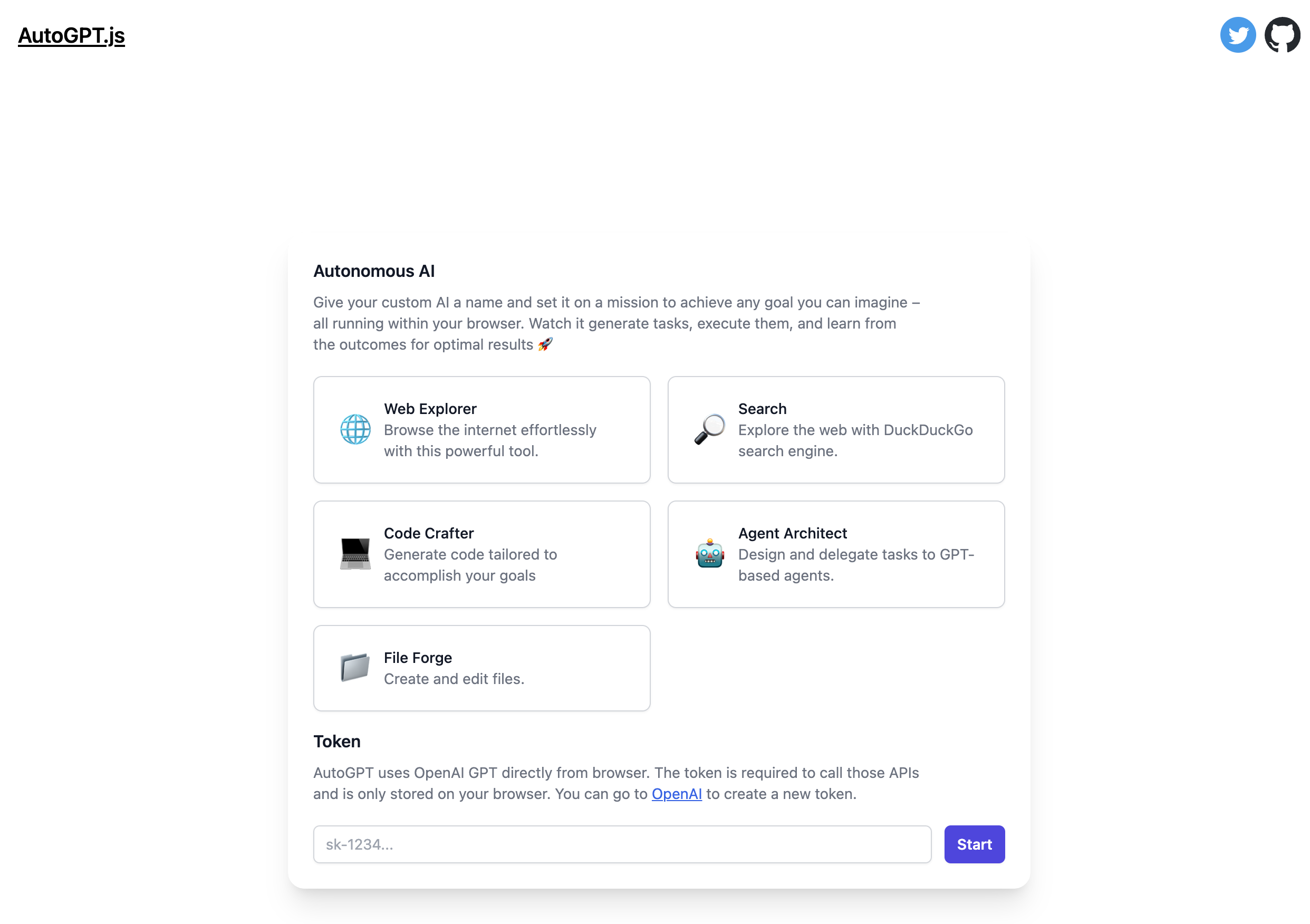
Table of Contents

Features

  • Create/Read files from your local computer (uses new Web File System Access APIs)
  • Create and run other GPT agents
  • Generates code
  • Short term memory
  • Searching using Duck Duck Go (currently proxies fetching of DuckDuckGo page through server)
  • Stateless visiting a URL (currently proxies fetching of website through server)

Roadmap/Ideas

  • 🚧 Using LangChain for a more extensible architecture for AutoGPT
  • Advance settings to configure the AutoGPT e.g. Temperature, Prompt etc.
  • Running JS code in a sandbox (e.g. iframe)
  • Switching to different LLM APIs e.g. Bard, Cohere etc.
  • Integrating Web based LLMs e.g. WebLLM, LLaMa in browser etc. (currently performance maybe a limitation)
  • Tabbed UX to show Files Created/Accessed

Development

  1. Copy .env.example to .env and change as necessary.
  2. Run npm install to get all the dependencies.
  3. Run npm run dev to start the development server.

Deployment

Fly.io

  • Install Fly

  • Sign up and log in to Fly

    fly auth signup
    

    Note: If you have more than one Fly account, ensure that you are signed into the same account in the Fly CLI as you are in the browser. In your terminal, run fly auth whoami and ensure the email matches the Fly account signed into the browser.

  • Create an app on Fly

    fly apps create autogpt-js
    
  • Add a SESSION_SECRET to your fly app secrets, to do this you can run the following commands:

    fly secrets set SESSION_SECRET=$(openssl rand -hex 32) --app autogpt-js
    

    If you don't have openssl installed, you can also use 1Password to generate a random secret, just replace $(openssl rand -hex 32) with the generated secret.

  • Create a persistent volume for the sqlite database. Though there is no code reading/writing to sqlite but that dependency from this project starter template was not removed.

    fly volumes create data --size 1 --app autogpt-js
    
  • Now that everything is set up you can deploy.

    fly deploy --app autogpt-js
    

Docker

  1. Run docker build -t IMAGE_NAME . to create the docker image
  2. Deploy the docker image based on what cloud and infrastructure you are using
  3. Start the container based on your infra e.g. docker run -p PORT:8080 IMAGE_NAME.

Direct

  1. Run npm install to get all dependencies.
  2. Run npm run build to build the project.
  3. Run NODE_ENV="production" npm run start to start the server which will expose the endpoint at localhost:3000. You can then use a reverse proxy like NGINX to route to that local address on your server.

Contributing

We welcome and encourage contributions from the developer community.

License

This project is licensed under the MIT License. By contributing to this project, you agree to the terms and conditions of the license.

排名相邻
同类项目