FlyCut Caption - AI-Powered Video Subtitle Editing Tool
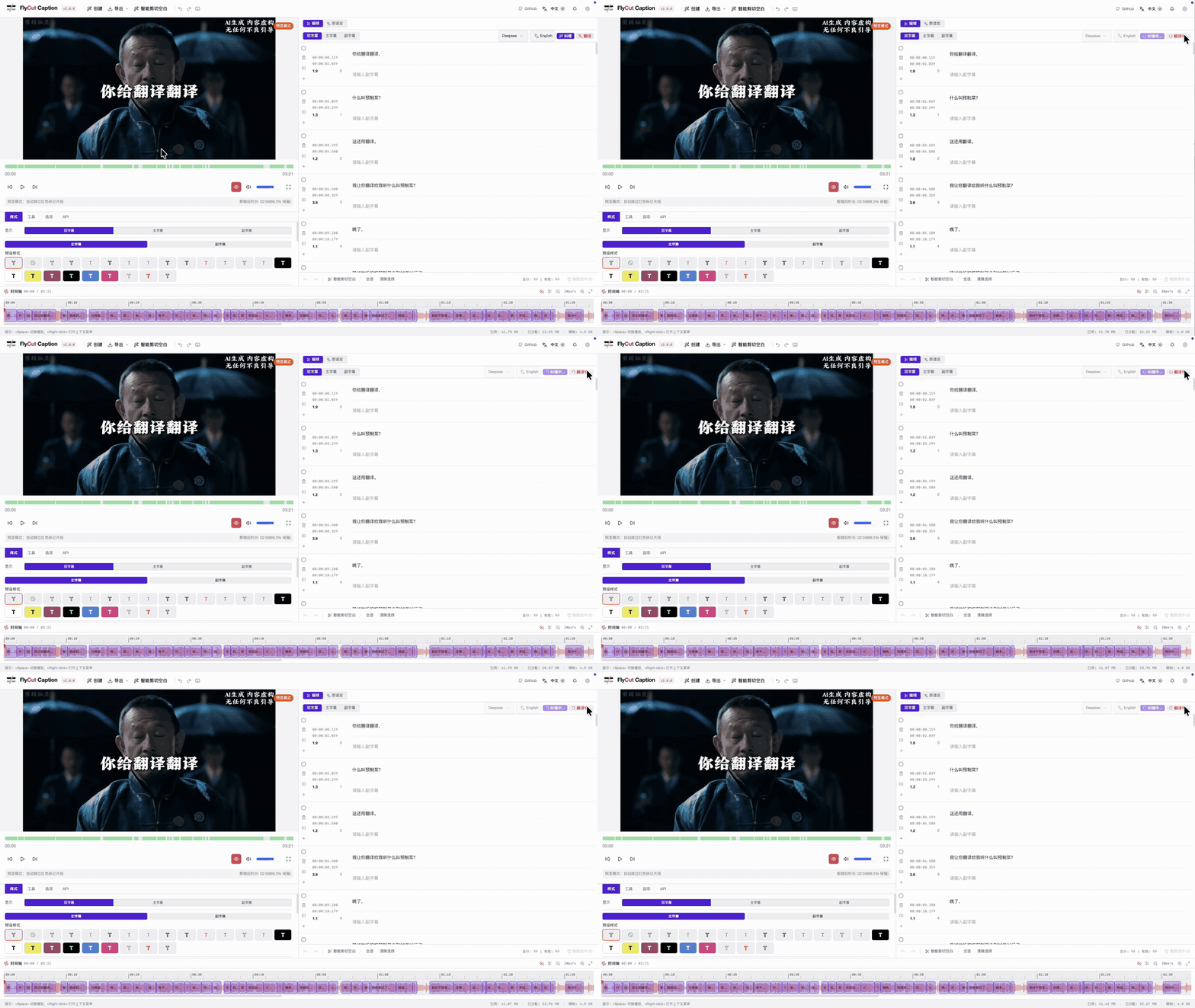
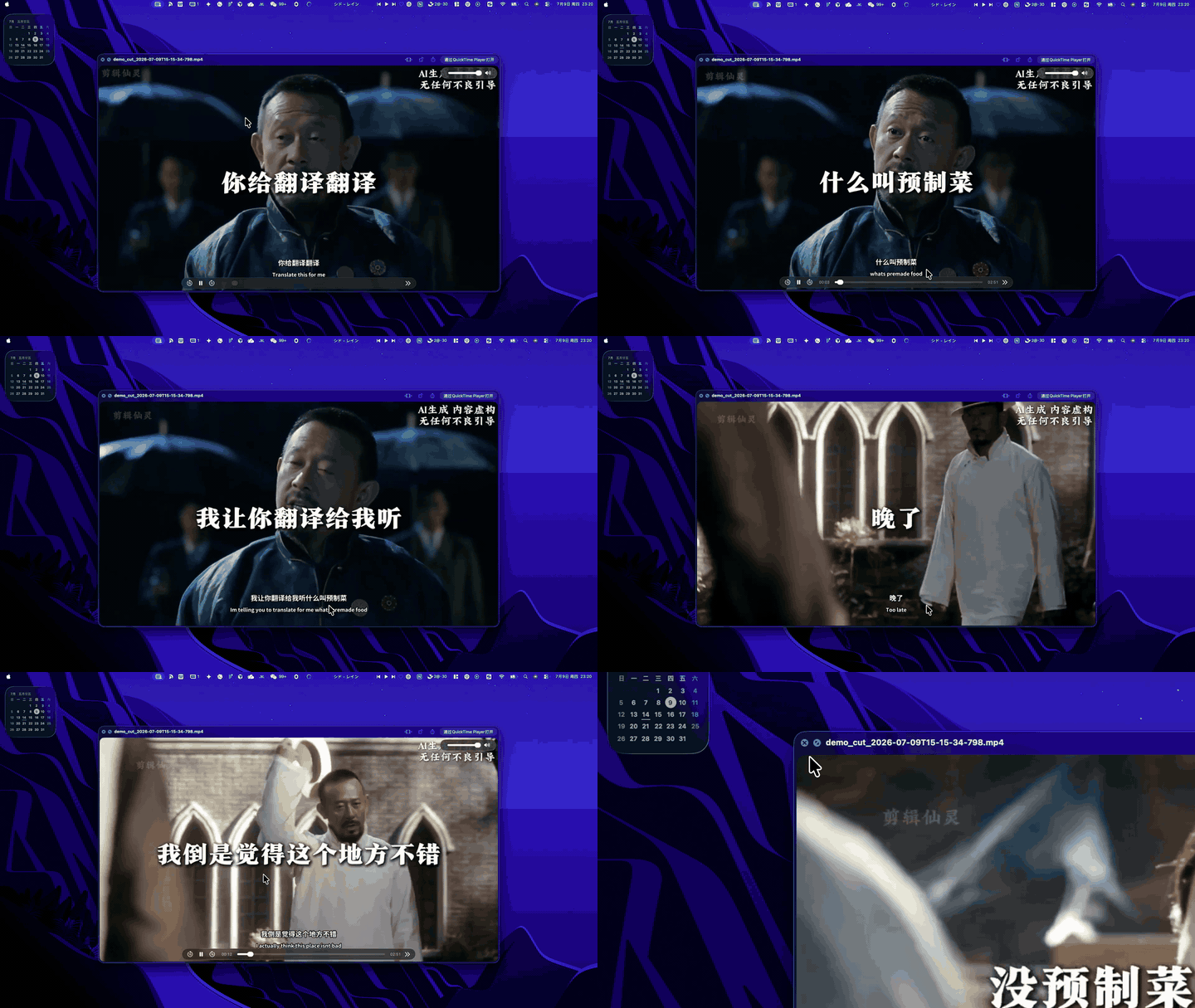
A powerful AI-driven video subtitle editing tool focused on intelligent subtitle generation, bilingual editing, smart blank cutting, and hard-burn export.
✨ Features
🎯 Core Features
- 🎤 Intelligent Speech Recognition: High-precision ASR with Whisper (browser) and FunASR (desktop/Tauri), word-level timestamps
- 🌐 Bilingual Subtitles: Primary + secondary tracks, AI translation (e.g. Chinese ↔ English), dual-track editing
- ✂️ Visual Subtitle Editing: Select, delete, restore segments; word-level mark/delete modes
- ⚡ Smart Cut Blank: One-click detect and remove silent gaps to tighten the cut
- 🎬 Real-time Preview: Player synced with timeline; preview mode skips deleted segments
- 🎨 Subtitle Style Customization: Fonts, colors, presets, dual-track layout
- 📤 Multi-format Export: SRT / JSON subtitles, clip-only video, or hard-burn dual subtitles into the video
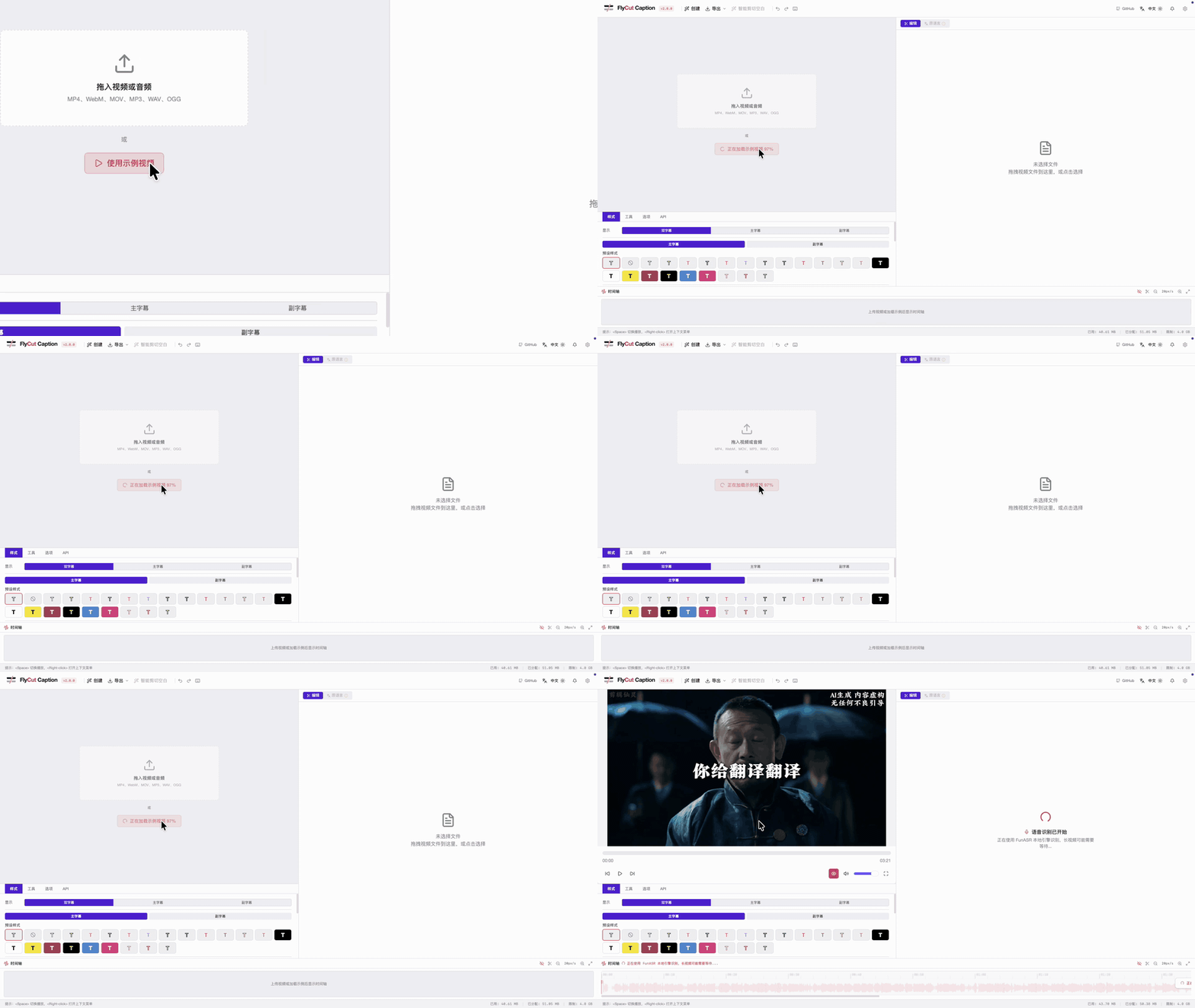
- 🧪 Sample Video: One-click load a cloud sample to try the full pipeline
🔧 Technical Features
- ⚡ Modern Tech Stack: React 19 + TypeScript + Vite + Tailwind CSS 4 + Tauri
- 🧠 Local AI Processing: Browser models via Transformers.js; desktop FunASR sidecar for higher quality
- 🎯 Web Workers / Sidecars: ASR and encoding stay off the UI thread
- 📱 Responsive Design: Modern workstation UI adapted to different screen sizes
- 🎪 Component Architecture: Modular design, easy to maintain and extend
🚀 Quick Start
Prerequisites
- Node.js 18+
- pnpm (recommended) or npm
Installation Steps
- Clone the project
git clone https://github.com/x007xyz/flycut-caption.git
cd flycut-caption
- Install dependencies
pnpm install
- Start development server
pnpm dev
- Open browser
http://localhost:5173
Build for Production
# Build project
pnpm build

# Preview build result
pnpm preview
📋 User Guide
1. Upload Video Files
- Supported formats: MP4, WebM, AVI, MOV
- Supported audio: MP3, WAV, OGG
- Drag and drop files, pick a local file, or click Use sample video to try instantly
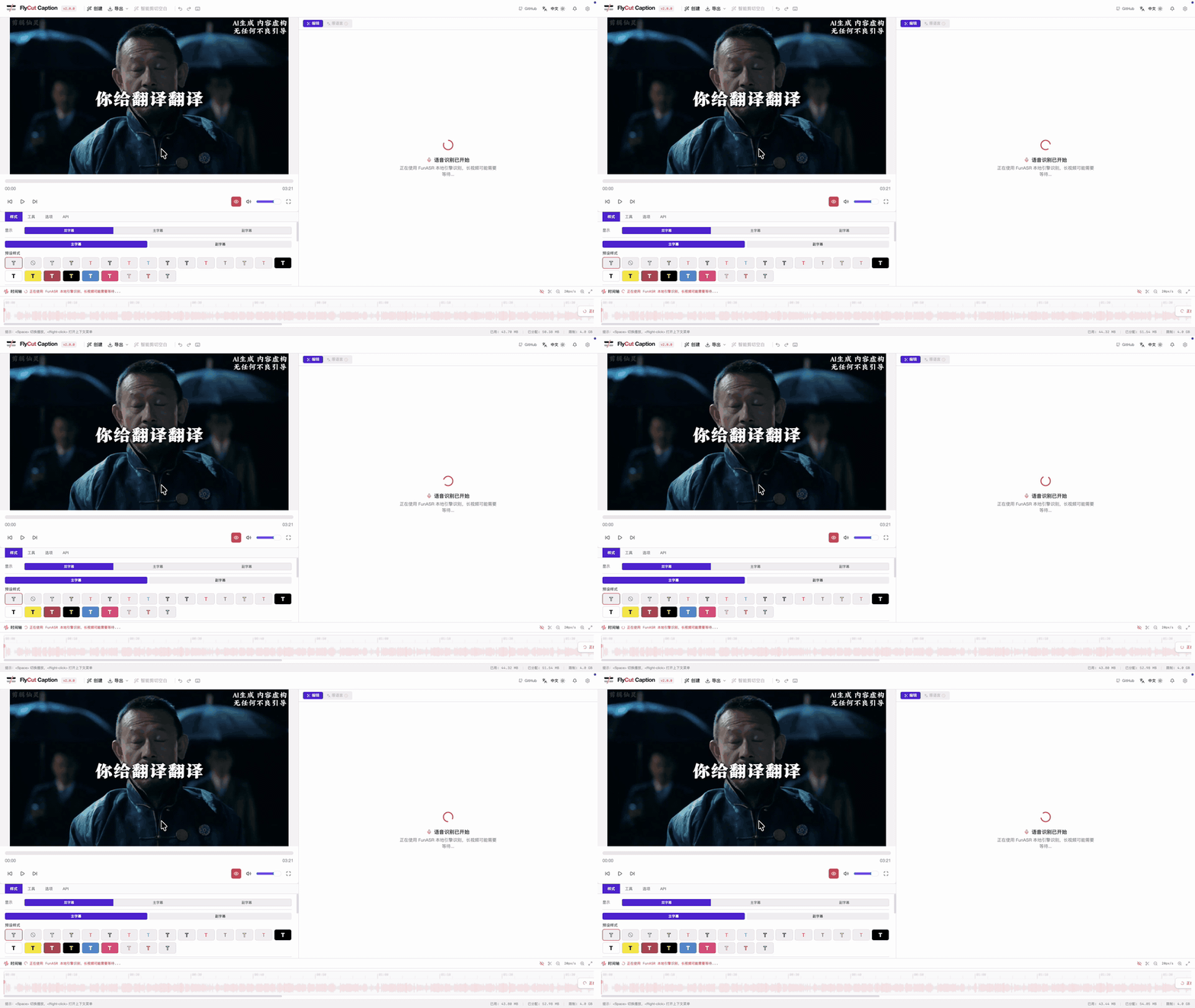
2. Generate Subtitles
- Choose ASR engine / model and recognition language
- Click start recognition; AI generates timestamped subtitles in the background
- Desktop builds can use FunASR for higher accuracy on longer clips
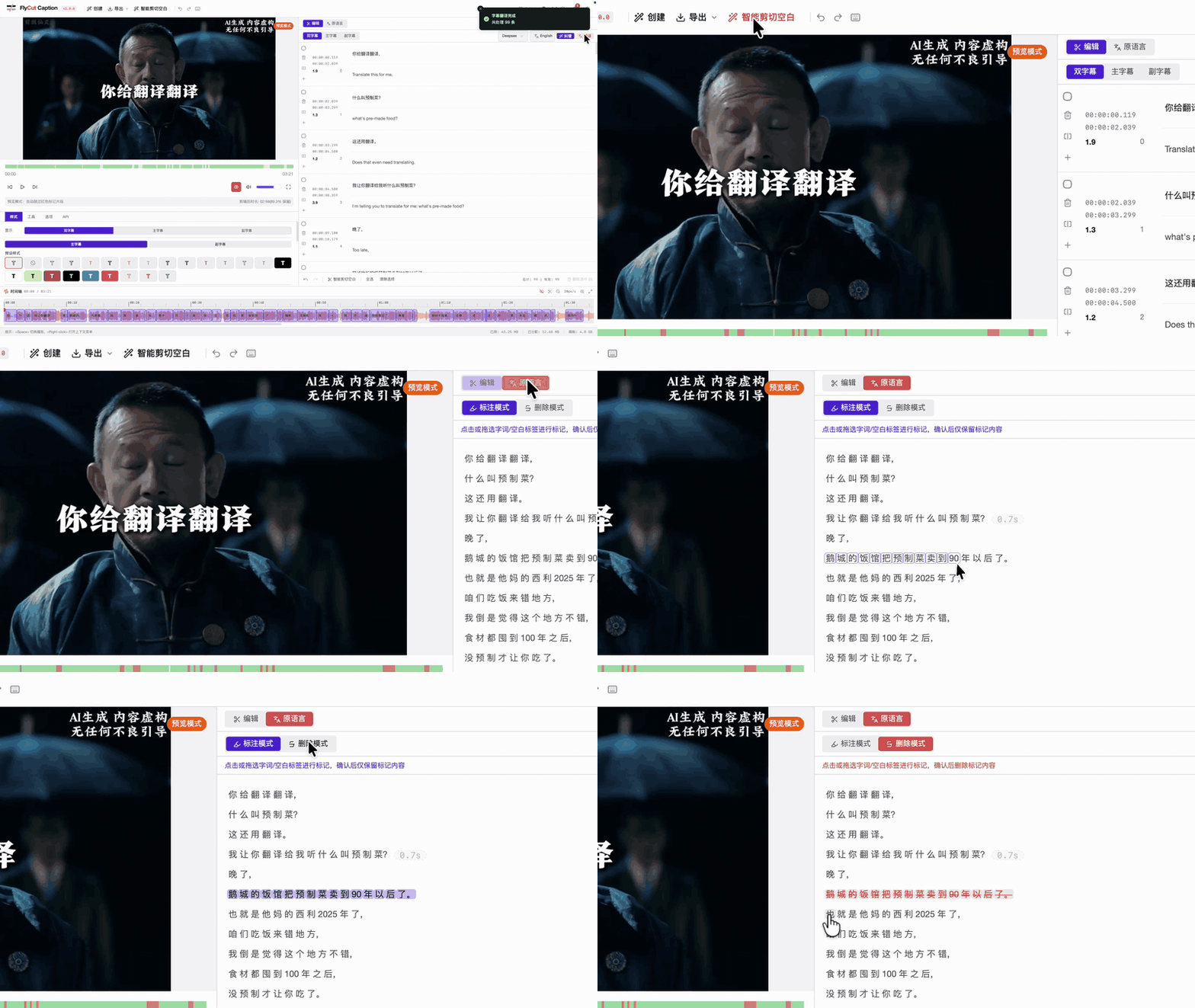
3. Edit Subtitles & Translate
- Dual tracks: Primary + secondary (bilingual) list and timeline
- AI translation: Translate the full track (e.g. Deepseek → English)
- Select / delete: Segment-level or word-level mark & remove
- History: Undo / redo supported
4. Smart Cut Blank
- Click Smart Cut Blank to detect long silences and mark them for removal
- Timeline shows kept (green) vs removed (red) regions
- Preview mode plays only kept segments so you can judge the cut before export
5. Video Preview
- Preview mode: Automatically skip deleted segments to preview final result
- Keyboard shortcuts:
Space: Play/Pause←/→: Rewind/Fast forward 5 secondsShift + ←/→: Rewind/Fast forward 10 seconds↑/↓: Adjust volumeM: Mute/UnmuteF: Fullscreen
6. Subtitle Styling
- Font settings: Font size, weight, color, presets
- Dual layout: Primary / secondary track styles independently
- Background style: Background color, transparency, border
- Real-time preview: WYSIWYG style adjustment on the player
7. Export Results
- Subtitle export: SRT, JSON, and other subtitle formats
- Video export:
- Keep only non-deleted segments (smart cut applied)
- Optional hard-burn of dual subtitles into the video
- Hardware-accelerated encode on desktop when available
🌐 Internationalization Design
FlyCut Caption adopts componentized internationalization design, supporting flexible language pack management and real-time language switching. The component can automatically sync external language changes with internal UI components.
Built-in Language Packs
import { FlyCutCaption, zhCN, enUS } from '@flycut/caption-react'

// Use built-in Chinese language pack


// Use built-in English language pack
Custom Language Packs
import { FlyCutCaption, type FlyCutCaptionLocale } from '@flycut/caption-react'

// Create custom language pack (Japanese example)
const customJaJP: FlyCutCaptionLocale = {
  common: {
    loading: '読み込み中...',
    error: 'エラー',
    success: '成功',
    confirm: '確認',
    cancel: 'キャンセル',
    ok: 'OK',
    // ... more common translations
  },
  components: {
    fileUpload: {
      dragDropText: 'ビデオファイルをここにドラッグするか、クリックして選択',
      selectFile: 'ファイルを選択',
      supportedFormats: 'サポート形式:',
      // ... more component translations
    },
    subtitleEditor: {
      title: '字幕エディター',
      addSubtitle: '字幕を追加',
      deleteSelected: '選択項目を削除',
      // ... more editor translations
    },
    // ... other component translations
  },
  messages: {
    fileUpload: {
      uploadSuccess: 'ファイルアップロード成功',
      uploadFailed: 'ファイルアップロード失敗',
      // ... more message translations
    },
    // ... other message translations
  }
}

// Use custom language pack
Componentized Language Switching
The new componentized approach provides better language synchronization between external controls and internal components:
import { useState } from 'react'
import { FlyCutCaption, zhCN, enUS, type FlyCutCaptionLocale } from '@flycut/caption-react'

function App() {
  const [currentLanguage, setCurrentLanguage] = useState('zh')
  const [currentLocale, setCurrentLocale] = useState(undefined)

  const handleLanguageChange = (language: string) => {
    console.log('Language switched to:', language)
    setCurrentLanguage(language)

    // Set corresponding language pack based on language
    switch (language) {
      case 'zh':
      case 'zh-CN':
        setCurrentLocale(zhCN)
        break
      case 'en':
      case 'en-US':
        setCurrentLocale(enUS)
        break
      case 'ja':
      case 'ja-JP':
        setCurrentLocale(customJaJP) // Custom Japanese pack
        break
      default:
        setCurrentLocale(undefined) // Use default language pack
    }
  }

  return (


          FlyCut Caption Internationalization Demo


        {/* External Language Controls */}


Language Switcher


               handleLanguageChange('zh')}
              >
                中文 (Built-in)

               handleLanguageChange('en')}
              >
                English (Built-in)

               handleLanguageChange('ja')}
              >
                日本語 (Custom)


              Current Language: {currentLanguage}


              Language Pack Type: {currentLocale ? 'Custom Language Pack' : 'Built-in Language Pack'}


        {/* FlyCut Caption Component */}


FlyCut Caption Component

           {
              console.error('Component error:', error)
            }}
            onProgress={(stage, progress) => {
              console.log(`Progress: ${stage} - ${progress}%`)
            }}
          />


  )
}
Available Language Packs
| Language | Import | Description |
|---|---|---|
| Chinese (Simplified) | zhCN |
简体中文 |
| English (US) | enUS |
English (United States) |
| Default | defaultLocale |
Same as zhCN |
Language Pack API
// Import language pack utilities
import { LocaleProvider, useLocale, useTranslation } from '@flycut/caption-react'

// Use LocaleProvider for nested components


// Access language pack context
const { t, setLanguage, registerLocale } = useLocale()

// Register custom language pack
registerLocale('fr', frenchLocale)

// Programmatic language switching
setLanguage('fr')
📚 Detailed internationalization guide: See INTERNATIONALIZATION.md for complete documentation on language packs, custom localization and advanced i18n features.
📚 Usage Guide
1. Installation & Setup
# Install package
npm install @flycut/caption-react

# TypeScript projects don't need additional type packages
# Type definitions are included
2. Import Styles
The component requires CSS styles to work properly:
import '@flycut/caption-react/styles'
// or specific CSS file
import '@flycut/caption-react/dist/caption-react.css'
3. Basic Integration
import { FlyCutCaption } from '@flycut/caption-react'
import '@flycut/caption-react/styles'

function VideoEditor() {
  return (


  )
}
4. Event Handling
import { FlyCutCaption } from '@flycut/caption-react'

function VideoEditorWithEvents() {
  const handleFileSelected = (file: File) => {
    console.log('Selected file:', file.name, file.size)
  }

  const handleSubtitleGenerated = (subtitles: SubtitleChunk[]) => {
    console.log('Generated subtitles:', subtitles.length)
    // Save subtitles to backend
    saveSubtitles(subtitles)
  }

  const handleVideoProcessed = (blob: Blob, filename: string) => {
    // Handle processed video
    const url = URL.createObjectURL(blob)
    // Download or upload to server
    downloadFile(url, filename)
  }

  const handleError = (error: Error) => {
    // Handle errors gracefully
    console.error('FlyCut Caption error:', error)
    showErrorNotification(error.message)
  }

  return (

  )
}
5. Configuration Options
import { FlyCutCaption } from '@flycut/caption-react'

function ConfiguredEditor() {
  const config = {
    // Theme settings
    theme: 'dark' as const,

    // Language settings
    language: 'zh-CN',
    asrLanguage: 'zh',

    // Feature toggles
    enableDragDrop: true,
    enableExport: true,
    enableVideoProcessing: true,
    enableThemeToggle: true,
    enableLanguageSelector: true,

    // File constraints
    maxFileSize: 1000, // 1GB
    supportedFormats: ['mp4', 'webm', 'mov']
  }

  return (

  )
}
6. Custom Styling
import { FlyCutCaption } from '@flycut/caption-react'
import './custom-styles.css'

function StyledEditor() {
  return (

  )
}
/* custom-styles.css */
.my-custom-editor {
  --flycut-primary: #10b981;
  --flycut-border-radius: 12px;
}

.my-custom-editor .subtitle-item {
  border-radius: var(--flycut-border-radius);
}
📖 API Reference
FlyCutCaptionProps
| Property | Type | Default | Description |
|---|---|---|---|
className |
string |
undefined |
Custom CSS class name |
style |
CSSProperties |
undefined |
Custom inline styles |
config |
FlyCutCaptionConfig |
defaultConfig |
Component configuration |
locale |
FlyCutCaptionLocale |
undefined |
Custom language pack |
onReady |
() => void |
undefined |
Called when component is ready |
onFileSelected |
(file: File) => void |
undefined |
Called when a file is selected |
onSubtitleGenerated |
(subtitles: SubtitleChunk[]) => void |
undefined |
Called when subtitles are generated |
onSubtitleChanged |
(subtitles: SubtitleChunk[]) => void |
undefined |
Called when subtitles are changed |
onVideoProcessed |
(blob: Blob, filename: string) => void |
undefined |
Called when video processing is complete |
onExportComplete |
(blob: Blob, filename: string) => void |
undefined |
Called when export is complete |
onError |
(error: Error) => void |
undefined |
Called when an error occurs |
onProgress |
(stage: string, progress: number) => void |
undefined |
Called to report progress updates |
onLanguageChange |
(language: string) => void |
undefined |
Called when language changes |
FlyCutCaptionConfig
| Property | Type | Default | Description |
|---|---|---|---|
theme |
'light' | 'dark' | 'auto' |
'auto' |
Theme mode |
language |
string |
'zh-CN' |
Interface language |
asrLanguage |
string |
'auto' |
ASR recognition language |
enableDragDrop |
boolean |
true |
Enable drag and drop file upload |
enableExport |
boolean |
true |
Enable export functionality |
enableVideoProcessing |
boolean |
true |
Enable video processing functionality |
enableThemeToggle |
boolean |
true |
Enable theme toggle button |
enableLanguageSelector |
boolean |
true |
Enable language selector |
maxFileSize |
number |
500 |
Maximum file size in MB |
supportedFormats |
string[] |
['mp4', 'webm', 'avi', 'mov', 'mp3', 'wav', 'ogg'] |
Supported file formats |
🎨 Styling
The component comes with built-in styles that you need to import:
import '@flycut/caption-react/styles'
You can also customize the appearance by:
- CSS Custom Properties: Override CSS variables for colors and spacing
- Custom CSS Classes: Use the
classNameprop to apply custom styles - Theme Configuration: Use the
themeconfig option for light/dark modes
CSS Variables
:root {
  --flycut-primary: #3b82f6;
  --flycut-background: #ffffff;
  --flycut-foreground: #1f2937;
  --flycut-muted: #f3f4f6;
  --flycut-border: #e5e7eb;
}

.dark {
  --flycut-background: #111827;
  --flycut-foreground: #f9fafb;
  --flycut-muted: #374151;
  --flycut-border: #4b5563;
}
🏗️ Project Architecture
Tech Stack
- Frontend Framework: React 19 with Hooks
- Type Checking: TypeScript 5.8
- Build Tool: Vite 7.1
- Styling Solution: Tailwind CSS 4.1 + Shadcn/ui
- State Management: Zustand + React Context
- AI Model: Hugging Face Transformers.js
- Video Processing: WebAV
- Internationalization: react-i18next
Project Structure
src/
├── components/          # UI Components
│   ├── FileUpload/     # File upload component
│   ├── VideoPlayer/    # Video player
│   ├── SubtitleEditor/ # Subtitle editor
│   ├── ProcessingPanel/ # Processing panel
│   ├── ExportPanel/    # Export panel
│   └── ui/             # Basic UI components
├── hooks/              # Custom Hooks
├── services/           # Business service layer
│   ├── asrService.ts   # ASR speech recognition service
│   └── UnifiedVideoProcessor.ts # Video processing service
├── stores/             # State management
│   ├── appStore.ts     # Application global state
│   ├── historyStore.ts # Subtitle history records
│   └── themeStore.ts   # Theme state
├── types/              # TypeScript type definitions
├── utils/              # Utility functions
├── workers/            # Web Workers
│   └── asrWorker.ts    # ASR processing worker thread
└── locales/            # Internationalization files
Core Modules
ASR Speech Recognition
- Local speech recognition based on Whisper model
- Web Workers background processing without blocking main thread
- Support multiple languages and audio formats
- Generate precise word-level timestamps
Subtitle Editor
- Visual subtitle segment management
- Support batch selection and operations
- Real-time video playback position synchronization
- History records and undo/redo functionality
Video Processing
- Local video processing based on WebAV
- Support interval clipping and merging
- Subtitle burn-in functionality
- Multiple output formats and quality options
🛠️ Development Guide
Development Commands
# Start development server
pnpm dev

# Type checking
pnpm run typecheck

# Code linting
pnpm lint

# Build project
pnpm build

# Preview build
pnpm preview
Adding New Components
Project uses Shadcn/ui component library:
pnpm dlx shadcn@latest add
Code Standards
- TypeScript strict mode
- ESLint + React related rules
- Functional components + Hooks
- Componentized and modular design
🎬 Video Processing
The component supports various video processing features:
Supported Formats
- Video: MP4, WebM, AVI, MOV
- Audio: MP3, WAV, OGG
Processing Options
- Quality: Low, Medium, High
- Format: MP4, WebM
- Subtitle Processing: Burn-in, Separate file
- Audio Preservation: Enabled by default
📱 Browser Support
- Chrome 88+
- Firefox 78+
- Safari 14+
- Edge 88+
💡 Examples & Best Practices
Complete React Application
import React, { useState, useCallback } from 'react'
import { FlyCutCaption, zhCN, enUS, type FlyCutCaptionLocale } from '@flycut/caption-react'
import '@flycut/caption-react/styles'

function VideoEditorApp() {
  const [language, setLanguage] = useState<'zh' | 'en'>('zh')
  const [subtitles, setSubtitles] = useState([])
  const [isProcessing, setIsProcessing] = useState(false)

  const locale = language === 'zh' ? zhCN : enUS

  const handleLanguageChange = useCallback((newLang: string) => {
    setLanguage(newLang as 'zh' | 'en')
  }, [])

  const handleSubtitleGenerated = useCallback((newSubtitles) => {
    setSubtitles(newSubtitles)
    // Auto-save to local storage
    localStorage.setItem('flycut-subtitles', JSON.stringify(newSubtitles))
  }, [])

  const handleProgress = useCallback((stage: string, progress: number) => {
    setIsProcessing(progress < 100)
  }, [])

  return (


Video Editor


               handleLanguageChange('zh')}
                className={language === 'zh' ? 'btn-primary' : 'btn-secondary'}
              >
                中文

               handleLanguageChange('en')}
                className={language === 'en' ? 'btn-primary' : 'btn-secondary'}
              >
                English


           {
              console.error('Error:', error)
              // Show user-friendly error message
              alert('An error occurred during processing, please try again')
            }}
          />


        {isProcessing && (


              Processing, please wait...


        )}

        {subtitles.length > 0 && (


Generated Subtitles ({subtitles.length} items)


              Subtitles have been automatically saved to local storage


        )}


  )
}

export default VideoEditorApp
Next.js Integration
// pages/editor.tsx
import dynamic from 'next/dynamic'
import { useState } from 'react'

// Dynamically import to avoid SSR issues
const FlyCutCaption = dynamic(
  () => import('@flycut/caption-react').then(mod => mod.FlyCutCaption),
  { ssr: false }
)

export default function EditorPage() {
  return (


       {
          // Handle video processing result
          const url = URL.createObjectURL(blob)
          window.open(url, '_blank')
        }}
      />


  )
}
Best Practices
- Always import styles: The component requires CSS to work properly
- Handle errors gracefully: Implement proper error boundaries and user feedback
- Optimize for performance: Use dynamic imports for SSR applications
- Provide user feedback: Show loading states and progress indicators
- Responsive design: Ensure your container has appropriate height/width
- Accessibility: The component includes ARIA labels and keyboard navigation
- Memory management: Clean up blob URLs when components unmount
🔧 Development
Prerequisites
- Node.js 18+
- pnpm 8+
Setup
git clone https://github.com/x007xyz/flycut-caption.git
cd flycut-caption
pnpm install
Development
# Start development server
pnpm dev

# Build library
pnpm run build:lib

# Build demo
pnpm run build:demo

# Lint code
pnpm lint

# Run test app
cd test-app && pnpm dev
🤝 Contributing
We welcome contributions of all kinds!
How to Contribute
- Fork this project
- Create feature branch (
git checkout -b feature/AmazingFeature) - Commit changes (
git commit -m 'Add some AmazingFeature') - Push to branch (
git push origin feature/AmazingFeature) - Create Pull Request
Contribution Types
- 🐛 Bug fixes
- ✨ New feature development
- 📝 Documentation improvements
- 🎨 UI/UX optimizations
- ⚡ Performance optimizations
- 🌐 Internationalization translations
📝 License
This project is licensed under the MIT License with additional terms:
- ✅ Allowed: Personal, educational, commercial use
- ✅ Allowed: Modification, distribution, creating derivative works
- ❌ Prohibited: Removing or modifying logos, watermarks, brand elements in the software interface
- ❌ Prohibited: Hiding or tampering with attribution statements
To remove brand elements, please contact FlyCut Team for explicit written permission.
See LICENSE file for details.
🙏 Acknowledgments
- Hugging Face - Excellent Transformers.js library
- OpenAI Whisper - Powerful speech recognition model
- Shadcn/ui - Elegant UI component library
- WebAV - Powerful web audio/video processing library
📞 Support
- 📧 Email: x007xyzabc@gmail.com
- 🐛 Issues: GitHub Issues
- 📖 Documentation: API Docs
If this project helps you, please give us a ⭐ Star!
Made with ❤️ by FlyCut Team