 CC-Panes
Chinese | Japanese | Korean | Spanish | French | Portuguese
The desktop command center for parallel AI coding.
Run CLI agents side by side, organize their workspaces and sessions, then coordinate the work through MCP, plans, skills, Git, and local history.

Product captures below are recorded from real CC-Panes desktop interactions.
Features
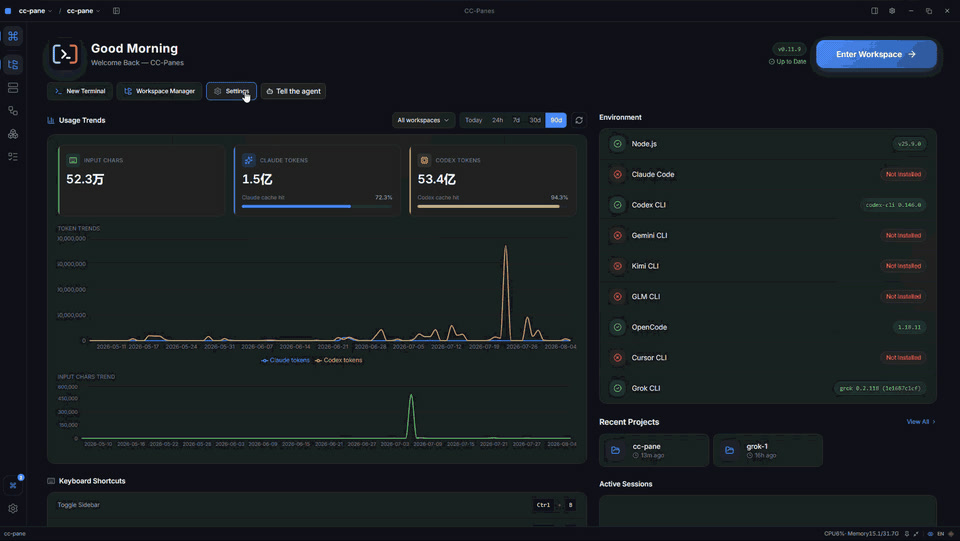
Workspace Command Center
See active sessions, recent projects, available CLIs, usage trends, and workspace context in one local desktop view. Move between a workspace, project, task, and terminal without losing the thread of the work.
Provider and Launch Profiles
Choose a CLI, provider, MCP set, skills, runtime, and permission policy as one reusable launch profile. Keep local, WSL, and SSH workflows under the same workspace model.

Agent Orchestration
Turn a bounded task into a coordinated run. The built-in ccpanes MCP lets a leader dispatch workers, observe their progress, collect results, and keep plans and Todos close to the sessions that perform the work.

Skills and Shared Tooling
Browse reusable workflows, manage global skills, and attach shared MCP services to the profiles that need them. CC-Panes also surfaces installed CLI skills without forcing them into every session.

Terminal Splits and Tabs
Real PTY sessions with flexible horizontal and vertical layouts, scrollback, and saved pane layouts in one window.

Resume and Remote Access
Reopen previous work and attach from desktop, web, or Android. Keep the same workspace model across clients.

Git and Local History
Inspect branches and worktrees, then use labeled snapshots, diffs, and restore points without leaving the workspace.

Planning Surfaces
Todos, journals, plans, specs, session summaries, and persistent memory stay next to the agents doing the work.

Workspace-aware Development
File browser, Monaco editor, Markdown and image previews, project hooks, and CLI adapters in the same shell.

Web Access
Connect to a workspace from any browser. Keep sessions in sync across desktop, web, and Android with the same workspace model.
Background Settings
Personalize the shell with themes, wallpaper, opacity, and window effects. Save looks as reusable presets across workspaces.

Also included:
- Project hooks and CLI adapters for provider injection, MCP setup, resume, and lifecycle events.
- Desktop workflow extras: screenshots, tray, mini mode, command palette, themes, and resource monitoring.
Supported CLI Agents
CC-Panes works with any CLI agent that runs in a terminal. First-class adapters add provider injection, MCP setup, resume, workspace flags, system prompts, and project hooks where each CLI supports them.
Claude Code Codex Gemini CLI Kimi Grok OpenCode Cursor Jcode
- any terminal CLI
Install
Desktop - Windows, macOS, Linux
- Download the latest release
- See the release page for current installers and package formats.
Stable releases include the in-app updater. Pre-releases are available for manual installation from the release page.
First launch
- Install at least one supported CLI and make sure it is available on your
PATH. - Open CC-Panes, create or import a workspace, add a project, and launch a session.
- Split the terminal when the task benefits from parallel work, or use the orchestration view to dispatch bounded subtasks.
For the full walkthrough, see the user guide. For web and Android setup, see the web and mobile guide.
Community and Support
-
Discussions: github.com/wuxiran/cc-pane/discussions
-
WeChat: add
yemaofeng66and mentionCC-Panes chatorCC-Panes bug feedback.

Left: chat group · Right: bug feedback group. Group QR codes rotate periodically — if one has expired, add yemaofeng66 instead.
Developing
See CONTRIBUTING.md for contribution guidance.
git clone https://github.com/wuxiran/cc-pane.git
cd cc-pane
npm install
npm run tauri:dev
Useful checks:
npx tsc --noEmit
npm run build
npm run test:run
cargo fmt --all -- --check
cargo check --workspace
cargo test --workspace
npm run tauri:dev uses com.ccpanes.dev and ~/.cc-panes-dev/. Release builds use com.ccpanes.app and ~/.cc-panes/.
License
CC-Panes is free and open source under the GPL-3.0 license.
Acknowledgements
Community & support: Linux.do | Sponsor relay hub
Built with: Claude Code | Tauri | xterm.js | portable-pty | Allotment | shadcn/ui