
Mirobody
Turn scattered health data into answers you can trace.
A self-hosted AI health data engine that brings lab reports, wearables and genetic files into one standardized record.
Standardize health data with one command. Try the full app in Codespaces with your own model key, or run the app, the data and the models 100% on your own machine.
English · 中文
▶ Live demo · Try one command · Open in Codespaces · 100% local
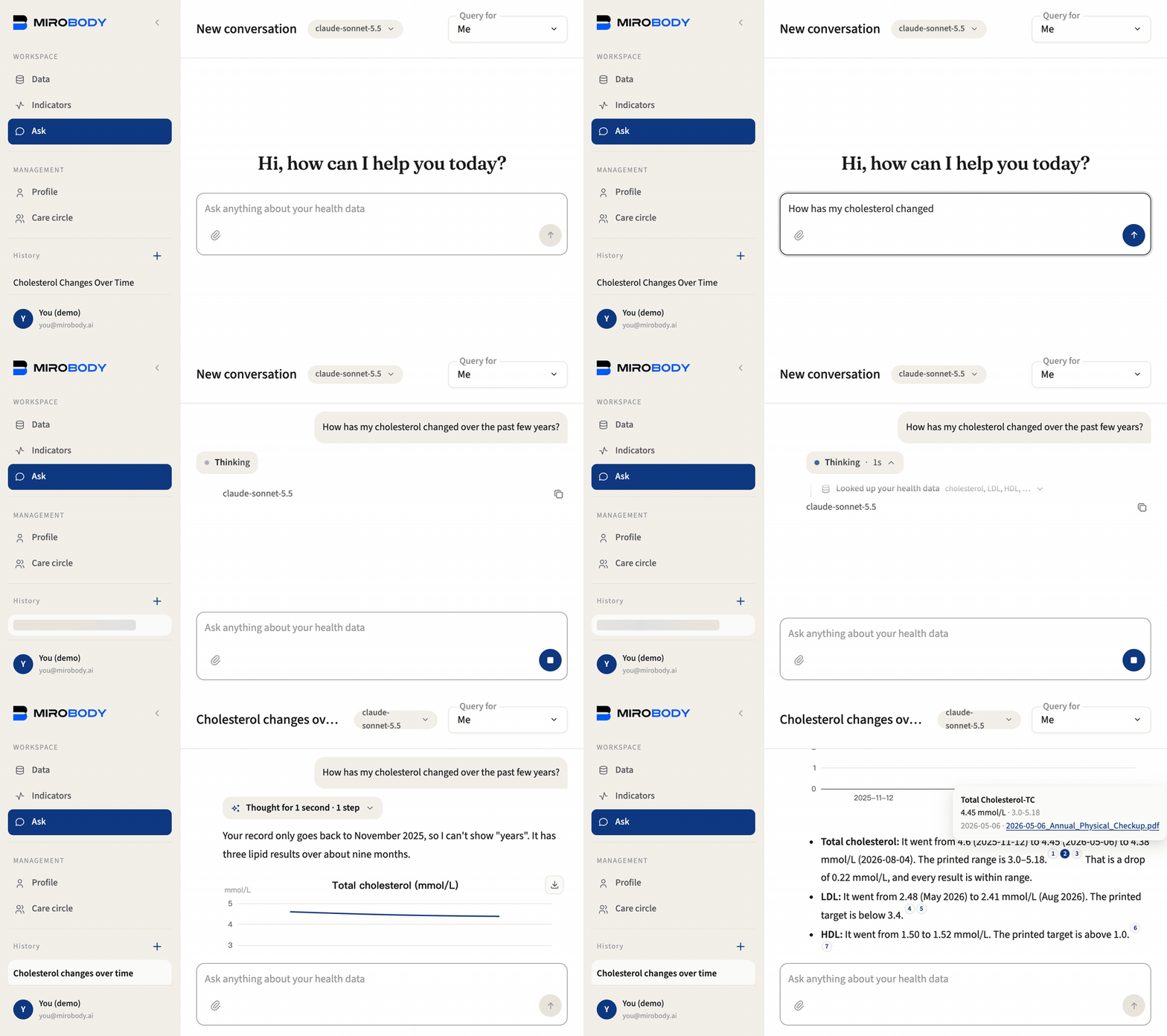
Three reports, three names for the same test. One trend, with the file behind every number.
Choose where to start
| You want to | Start here | What you need |
|---|---|---|
| Standardize names and units | One command | uv; no model or API key |
| Try the full app in your browser | GitHub Codespaces | A GitHub account and your own model API key |
| Keep the app, models and records on your machine | 100% local with Docker | Docker with Compose; 16 GB memory; no API key |
| Keep the app and records on your machine, without Docker | No Docker | Debian or Ubuntu; PostgreSQL 16; Python 3.12; your own model API key |
Try the engine with one command
With uv installed, paste this into your terminal:
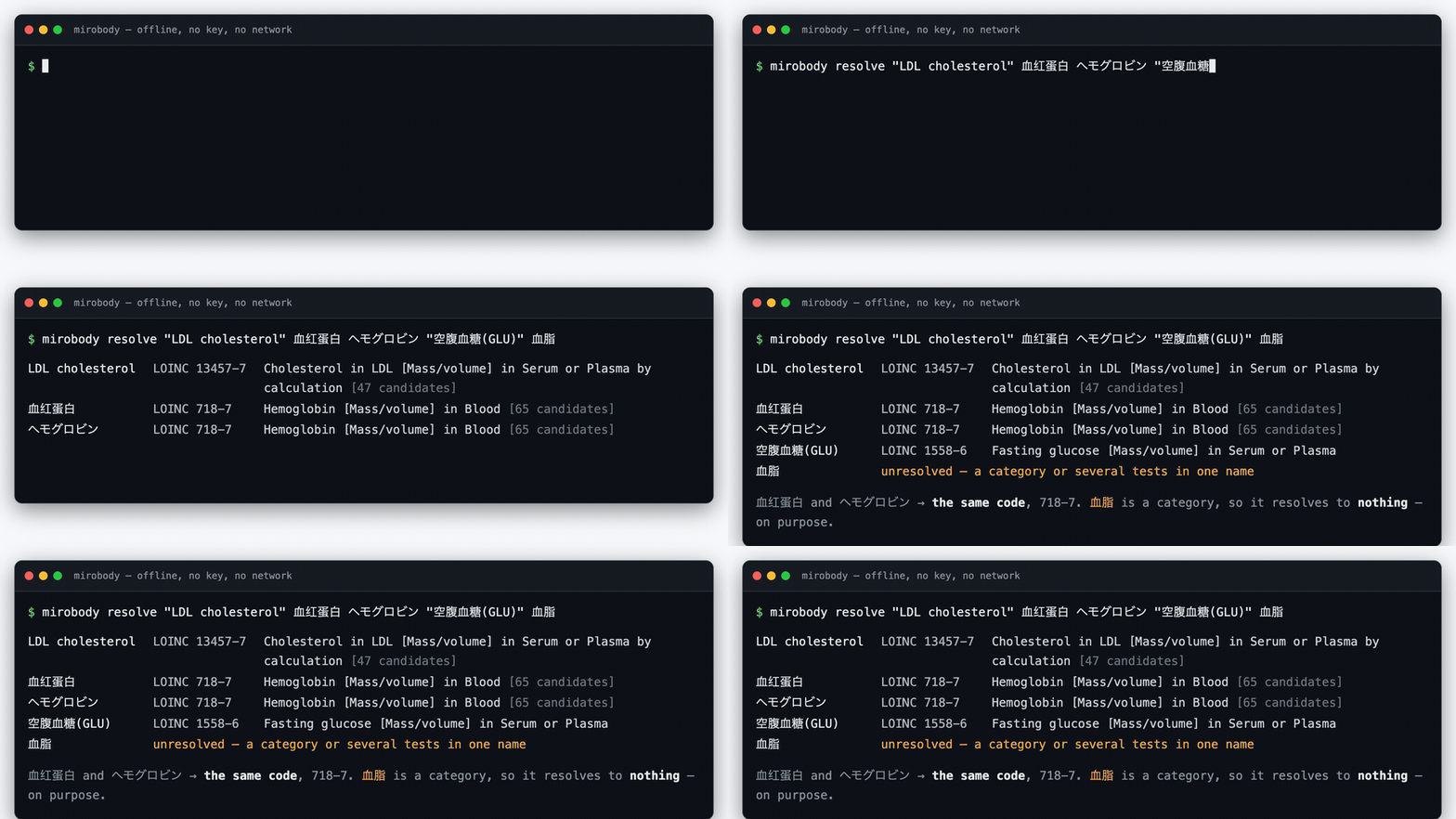
uvx --python 3.12 mirobody resolve "LDL cholesterol" 血红蛋白 ヘモグロビン "Total Kolesterol" 血脂
No repository clone, Docker, model or API key. uv prepares Python and the package for you; the first run needs a network connection to download them. The resolver then works offline from the bundled vocabulary.
血红蛋白 and ヘモグロビン both resolve to 718-7. 血脂 stays unresolved: it names a category, not one test. The same engine standardizes names and units across the full app.
→ Use the engine from Python or MCP
Try the full app in Codespaces
Run the web app in your browser with your own model API key. GitHub prepares the environment; you do not need to install Docker or Python on your computer.

- Create the codespace and wait for the automatic setup to finish in its terminal. It starts the app, Postgres, the worker and the synthetic demo data.
- Open the setup link printed in the terminal and enter your own model API key: OpenRouter, OpenAI, Gemini, Anthropic, DeepSeek, DashScope, or any OpenAI-compatible gateway. The key is saved only after a real request succeeds. The forwarded app port is private by default.
- Sign in as
you@mirobody.ai, code111111, on the Email code tab. Ask "How has my cholesterol changed?" The demo holds 2,019 readings across your record andmom@mirobody.ai's, shared with you view-only. - Upload a synthetic sample from
demo/upload/on the Data page to see a new report join the record, or switch to mom's record and ask again.
The app and its records run in GitHub's cloud; the model service receives the documents and questions it processes. Use the included synthetic data to explore. Codespaces has usage limits and billing; model usage is billed by your model provider. Stop the codespace when you finish. For complete control on your own machine, use the local route below.
Run everything 100% locally
The app, records and models all run on your own machine. No model API key needed. Docker with Compose starts the stack and llama.cpp, with a small answering model and a document reader:
git clone --depth 1 https://github.com/thetahealth/mirobody.git && cd mirobody
COMPOSE_PROFILES=local-cpu ./deploy.sh
Allow 16 GB of memory, at least 8 GB of it for Docker. No GPU is required; on Windows, run the commands in a WSL 2 terminal. The first start needs a network connection to download container images and model weights. If the registry is not reachable from your network, deploy.sh says so and retries through a mirror; DOCKER_MIRROR in .env names your own. After those downloads, document reading, standardization and answers run locally. CPU answers can take minutes; Mac, NVIDIA and Windows options explain how to use your GPU.
Open the app link the script prints. The local models are already selected; sign in with the same demo account above, ask a question or upload a sample. Which model to choose compares the local options.
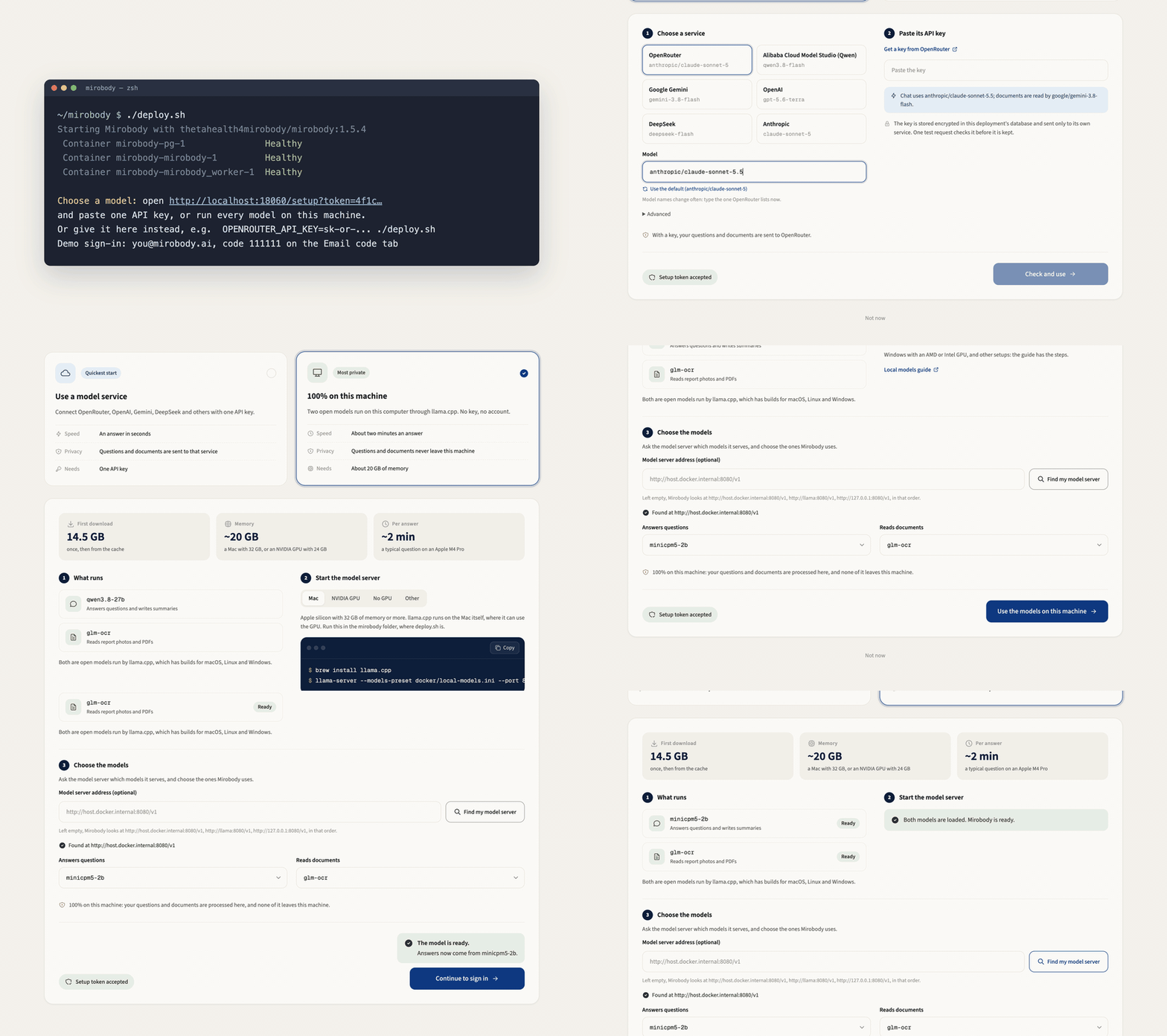
Prefer Docker with a cloud model? Run ./deploy.sh without a local model profile, then paste your own model key into the printed setup link. The app and records stay on your host; the model service processes your documents and questions.
→ Self-host guide · Walkthrough · Deploy on a server
Run without Docker
No container, and nothing pulled from a registry. On Debian or Ubuntu, PostgreSQL 16 with pgvector comes from the distribution's own packages and the app runs straight from the checkout. It is the same install the Codespaces path performs:
git clone --depth 1 https://github.com/thetahealth/mirobody.git && cd mirobody
scripts/install_native.sh   # PostgreSQL, pgvector, the Python package, a .env
scripts/start_native.sh     # the worker and the app on port 18060
Open the link it prints and sign in as you@mirobody.ai, code 111111: the demo record is seeded already. A model key from the printed setup link adds document extraction and answers. install_native.sh installs system packages with sudo and writes one sudoers rule for the postgres account, and says so as it runs.
The local models belong to the Docker path, so this one answers through a model service. Everything else matches the row above it in what stays on your machine: the records live in the PostgreSQL you just installed, and a name to a code never leaves the machine.
What you can do
- Compare reports across labs. PDFs, phone photos and spreadsheets, 23 file types in all, land in one history. Every reading links to the page it was read from.
- Bring in everyday data. Import an Apple Health export, or connect Garmin, Oura and Whoop.
- Look after your family. Invite someone who shares their own record, or keep one for a parent who never signs in.
- Write a health journal.
headache since last night, BP 150/95, no feverbecomes a coded complaint and two coded readings; "no fever" is not logged as a fever. - Explore genetic data. Upload a 23andMe, AncestryDNA or WeGene export, or a VCF, and ask by rsID, gene or region. Drug questions get CPIC coverage, never a change of medication.
- Use your own agent. Connect Claude Code, Codex or Cursor over MCP, or embed the offline engine in Python.
Collect · Translate · Agent

| Stage | What it does | Where |
|---|---|---|
| ① Collect | Files, devices and journal entries come in; the source is kept, so every reading points back to it. | collect/ |
| ② Translate | A1c, HbA1c and Glycated Hemoglobin resolve to one code, units to one standard, offline. A name it cannot place stays unresolved. |
engine/ · translate/ |
| ③ Agent | Ask over the coded record: trends, comparisons across labs and devices, a chart, and the file behind every number. | agent/ |
The model reads documents and reasons; the codes and units come from vocabularies bundled with the package, never from the model. How a reading moves through the pipeline.
Care for your family

Joining a care circle shares nothing by itself. Each member decides whether others may view or edit their own record. A parent who never signs in can be managed by you until they claim the record and choose what you keep. See it in the walkthrough.
What stays on your machine
Where the app runs and where the model runs are separate choices. Mirobody does not report usage anywhere.
| Codespaces + a model key | Local Docker + a model key | 100% on this machine | |
|---|---|---|---|
| App and stored records | in your codespace on GitHub's cloud | on your machine | on your machine |
| Documents and questions sent for model processing | sent to your model vendor, under its terms | sent to your model vendor, under its terms | stay on your machine |
| A name to a code, a unit to UCUM (② Translate) | in the codespace, from the bundled vocabulary | on your machine, with no network | on your machine, with no network |
| Model weights | managed by the model vendor | managed by the model vendor | downloaded once from Hugging Face |
The command-line resolver also runs on your machine without a model or network access after its initial download.
Device vendors see data only after you link one. Before this reaches a network you do not control, read SECURITY.md: it lists every address the server can call.
Build on Mirobody
| You want | Start here |
|---|---|
| Your record in Claude Code, Codex, Cursor or Gemini CLI | Settings → MCP link, then one line per client |
| Names and units resolved in your own code | pip install mirobody: offline, no key, numpy the only dependency (library guide) |
| Your coding agent taught the workflow | npx skills add thetahealth/mirobody --skill translate-health-data (skills) |
| A new device provider or tool | Drop a file into mirobody/collect/providers/ or mirobody/agent/tools/ (CONTRIBUTING) |
| Try the app without deploying | Mirobody Web demo, using the same synthetic demo files |
Over MCP the stack serves seven tools, each scoped to the signed-in person: four read your record (readings, medications, genotypes, pharmacogenomics) and three resolve names and units.
After pip install mirobody, use the same engine from Python:
from mirobody.engine import resolve, resolve_reading

resolve("血红蛋白").loinc                                     # '718-7'   any language, one code
resolve_reading("total cholesterol", "5.0", "mmol/L").loinc  # '14647-2' the unit picks the code...
resolve_reading("total cholesterol", "193", "mg/dL").loinc   # '2093-3'  ...mass, not moles
resolve("中性粒细胞百分比").loinc                               # '26511-6' Neutrophils/Leukocytes
resolve("血脂").resolved                                     # False    a category, not one test
Numbers you can check
| Claim | Check it |
|---|---|
| 337/337 on the tests an ordinary checkup prints, in English, Chinese, Japanese, Russian, Estonian and Turkish | test_engine_coverage.py prints the score |
| 330 UCUM units with dimensional analysis, and 316 standard device indicators | Standardization · Device crosswalk |
The package names its vocabulary: mirobody.BUNDLE_VERSION is loinc-2.83+2026.09.17-aacb2c715b56 |
python -c "import mirobody; print(mirobody.BUNDLE_VERSION)" |
| Public health-agent benchmarks: ESL-Bench, MedHall-Bench, MedHarm-Bench | mirobody-eval · benchmarks/ |
Mirobody is the engine under Theta Wellness, a live consumer health app.
Contributing
The most useful contribution is a term the resolver gets wrong. Run mirobody resolve ""; if the answer is wrong or empty, report it or send a fix with a test case. That is how the vocabulary grows into new languages: Russian panel and Estonian vitamin terms arrived in #88 and Turkish lab-report spellings in #140, each one row of resolver_overrides.tsv and one test case per term. CONTRIBUTING.md has the setup and the checks.
Built on HL7 FHIR, LOINC from the Regenstrief Institute, UCUM, ICPC-3 (WONCA), CPIC, llama.cpp and deepagents, with thanks. Terminology licences: LICENSE-3RD-PARTY.
If Mirobody helped you make sense of a report, a star helps the next person find it.
Documentation · Roadmap · Changelog · Security · AGENTS.md
Apache 2.0 · © 2026 Theta Health