Fast and accurate face landmark detection library using PyTorch; Support 68-point semi-frontal and 39-point profile landmark detection; Support both coordinate-based and heatmap-based inference; Up to 100 FPS landmark inference speed with SOTA face detector on CPU.
Notion MCP Server AI-friendly MCP server for the Notion API. It helps agents find, read, query, and update Notion workspaces while keeping responses compact enough for day-to-day AI workflows. This server targets the Notion API and uses the current database/data source model. It exposes MCP tools, prompts, resources, structured tool results, and optional MCP Apps for interactive Notion workflows. Highlights Search and target discovery with . Compact page reading with stable block IDs via . Schema-aware data
source querying and item creation with simple values. Simple page editing tools for paragraphs, headings, lists, todos, quotes, callouts, code blocks, dividers, and safe Markdown append. Raw Notion API tools for advanced block, page, database, data source, comment, and user operations. Optional MCP Apps: Data Source Explorer and Page Workbench. Quick Start Add this server to an MCP host such as Claude Desktop: Restart your MCP host after saving the configuration. Create a Notion integration Open the Notion integrations dashboard
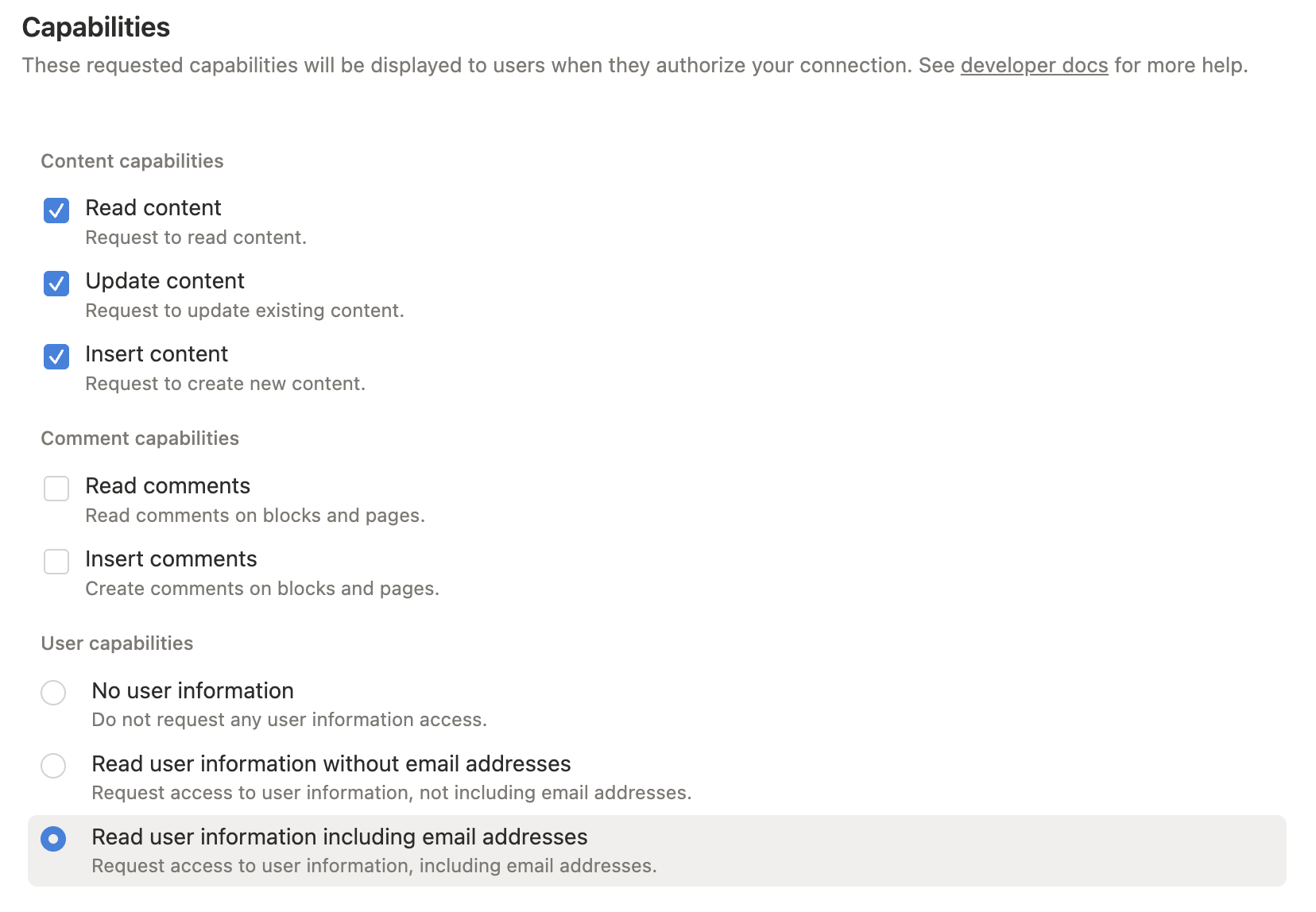
, then create a new internal integration. Configure capabilities Grant only the capabilities you need: Read content: required for search, page reads, data source retrieval, and queries. Insert content: required for creating pages/items and appending blocks. Update content: required for updating pages, blocks, and data source schemas. Read comments / Insert comments: required only for comment tools. User information: required only when using user lookup tools. For full functionality during setup, enable read, insert, and update content. Add comment or user
capabilities only if you plan to use those tools. Grant content access Open the **Content access** tab for your integration, then select the pages or databases you want the MCP server to read or edit. You can also grant access from the target Notion page or database: open the menu, choose **Connections**, then add your integration. Notion only lets an integration access pages and databases that have been shared with it. A connection added to a page can also access
that page's children. Copy the internal integration token Copy the integration secret. This value becomes in your MCP host config. Configure your MCP host For Cursor, Claude Desktop, and other MCP hosts, add this server config to your MCP settings: For a locally built checkout: Recommended Workflow 1. Use for page context and editable block IDs. Use before querying or creating data source items. Fall back to raw JSON tools only when the simplified tools do not cover the Notion
API shape you need. For Developers These references are mainly for development, customization, and advanced MCP workflows: Configuration: environment variables, command-line arguments, MCP host examples, development commands, and troubleshooting. Tools: complete tool reference grouped by workflow area. Workflows: practical read, write, data source, migration, and error-handling guidance. MCP Apps: interactive Data Source Explorer and Page Workbench details. Use the MCP inspector during local development: License This MCP server is licensed under the MIT License. This means you are
free to use, modify, and distribute the software, subject to the terms and conditions of the MIT License. For more
常见问题
记录了多少星标和分叉?
suekou/mcp-notion-server 有 920 个星标和 181 个分叉。
仓库排名是多少?
suekou/mcp-notion-server 排名第 12,638。
记录的语言和类别是什么?
suekou/mcp-notion-server 有 920 个星标,语言为 TypeScript,类别为 AI Engineering。
AI-friendly MCP server for the Notion API. It helps agents find, read, query, and update Notion workspaces while keeping responses compact enough for day-to-day AI workflows.
This server targets the Notion API 2026-03-11 and uses the current database/data source model. It exposes MCP tools, prompts, resources, structured tool results, and optional MCP Apps for interactive Notion workflows.
Highlights
Search and target discovery with notion_find.
Compact page reading with stable block IDs via notion_read_page.
Data source schema inspection with notion_inspect_data_source.
Schema-aware data source querying and item creation with simple values.
Simple page editing tools for paragraphs, headings, lists, todos, quotes, callouts, code blocks, dividers, and safe Markdown append.
Raw Notion API tools for advanced block, page, database, data source, comment, and user operations.
Optional MCP Apps: Data Source Explorer and Page Workbench.
Quick Start
Add this server to an MCP host such as Claude Desktop:
Read content: required for search, page reads, data source retrieval, and queries.
Insert content: required for creating pages/items and appending blocks.
Update content: required for updating pages, blocks, and data source schemas.
Read comments / Insert comments: required only for comment tools.
User information: required only when using user lookup tools.
For full functionality during setup, enable read, insert, and update content. Add comment or user capabilities only if you plan to use those tools.
3. Grant content access
Open the Content access tab for your integration, then select the pages or databases you want the MCP server to read or edit.
You can also grant access from the target Notion page or database: open the ... menu, choose Connections, then add your integration.
Notion only lets an integration access pages and databases that have been shared with it. A connection added to a page can also access that page's children.
4. Copy the internal integration token
Copy the integration secret. This value becomes NOTION_API_TOKEN in your MCP host config.
5. Configure your MCP host
For Cursor, Claude Desktop, and other MCP hosts, add this server config to your MCP settings:
Use notion_read_page for page context and editable block IDs.
Use notion_inspect_data_source before querying or creating data source items.
Use notion_query_data_source_by_values and notion_create_data_source_item_from_values for common data source work.
Use notion_append_markdown, notion_append_content, notion_update_content, or notion_update_content_batch for normal page edits.
Fall back to raw JSON tools only when the simplified tools do not cover the Notion API shape you need.
For Developers
These references are mainly for development, customization, and advanced MCP workflows:
Configuration: environment variables, command-line arguments, MCP host examples, development commands, and troubleshooting.
Tools: complete tool reference grouped by workflow area.
Workflows: practical read, write, data source, migration, and error-handling guidance.
MCP Apps: interactive Data Source Explorer and Page Workbench details.
Development
This project uses Node.js 22 or newer and pnpm.
pnpm install --frozen-lockfile
pnpm run build
pnpm test
Use the MCP inspector during local development:
pnpm run inspector
License
This MCP server is licensed under the MIT License. This means you are free to use, modify, and distribute the software, subject to the terms and conditions of the MIT License. For more details, please see the LICENSE file in the project repository.