
TPU-MLIR
An open-source, MLIR-based machine-learning compiler for TPUs.




English · 简体中文 · Quick Start · Docs · Issues
✨ Overview
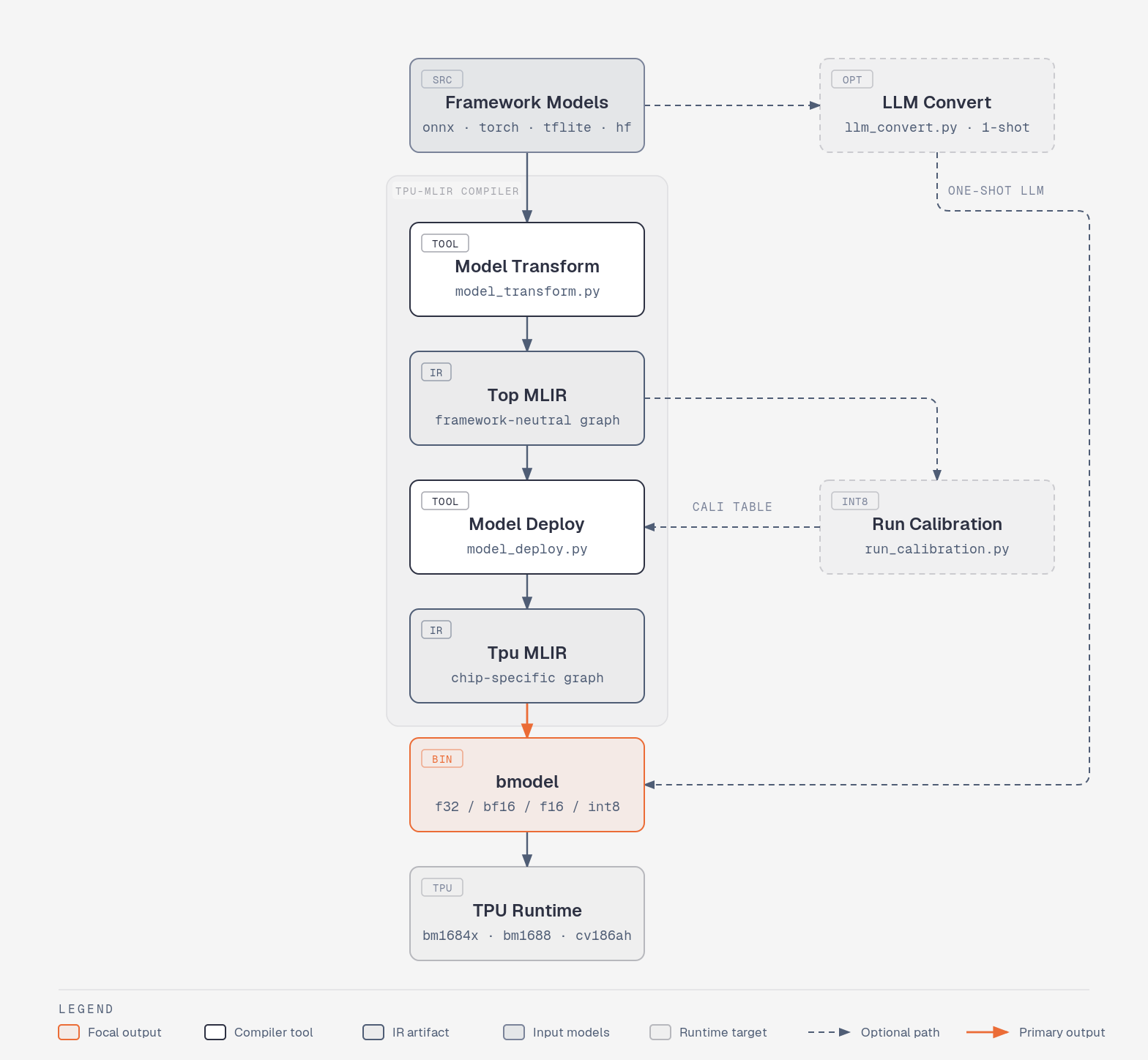
TPU-MLIR converts pre-trained neural networks from mainstream frameworks into bmodel files that run efficiently on TPUs. Built on top of MLIR, it provides a unified IR, a clean lowering pipeline, and a rich set of tools for quantization, calibration, and deployment.
🚀 Highlights
- Multi-framework front-ends — PyTorch, ONNX, TFLite, Caffe (other frameworks via ONNX).
- LLM-ready — one-shot conversion of HuggingFace LLMs (Qwen, MiniCPM-V, …) via
llm_convert.py. - Full quantization toolchain — F32 / BF16 / F16 / INT8 (symmetric & asymmetric), AWQ / GPTQ / AutoRound passthrough, calibration, QAT.
- MLIR-based pipeline — clean dialects (Top / Tpu), pattern rewrites, layer-group memory planning.
- Production tooling —
model_runner,model_tool, accuracy validation, simulator, visualizer. - Bilingual docs & active community — English / 中文 manuals, papers, and video tutorials.
📚 Table of Contents
- Installation
- Quick Start (LLM — Qwen)
- Quick Start (Vision — YOLOv5)
- Auxiliary Tools
- Resources
- Citation
- Contributing
- License
🔧 Installation
TPU-MLIR runs inside a prebuilt Docker image. After the container is running you can either install the Python wheel or build from source.
1. Pull the Docker image
docker pull sophgo/tpuc_dev:latest
If the pull fails, download the tarball and load it manually:
wget https://sophon-assets.sophon.cn/sophon-prod-s3/drive/25/04/15/16/tpuc_dev_v3.4.tar.gz
docker load -i tpuc_dev_v3.4.tar.gz
Create and enter the container:
docker run --privileged --name tpu-mlir -v $PWD:/workspace -it sophgo/tpuc_dev:latest
2a. Install the prebuilt wheel
Requires Python ≥ 3.10 on Ubuntu 22.04 (already satisfied inside the Docker image).
pip install tpu_mlir
2b. Build from source (recommended)
# git clone with --depth 1
cd /workspace/tpu-mlir
pip install -r requirements.txt
source ./envsetup.sh
./build.sh
🤖 Quick Start — LLM (Qwen)
Convert and run a HuggingFace LLM (here: Qwen) on a TPU.
Click to expand the full LLM walkthrough
1. Download the model
A pre-quantized AWQ / GPTQ / AutoRound build is recommended.
git lfs install
git clone https://huggingface.co/Intel/Qwen3.5-2B-int4-AutoRound
2. Compile to bmodel
LLM compilation falls into two scenarios, controlled by --use_history_kv.
Without history KV — compiles two instruction groups: block_ (prefill) and block_cache_ (decode). Recommended for single-turn conversations with short context (e.g. within 4K):
# -s sets the max total sequence length;
# --max_input_length sets the max input length (defaults to -s if omitted).
llm_convert.py \
  -m /workspace/Qwen3.5/Qwen3.5-2B-int4-AutoRound \
  -s 2048 \
  --max_input_length 1024 \
  -c bm1684x \
  -o qwen3.5_4b
With history KV — compiles three instruction groups: block_ (prefill), block_kv_ (prefill with history), and block_cache_ (decode). Recommended for multi-turn conversations, long contexts (e.g. 8K), or when unsure — it is more flexible with good overall performance:
llm_convert.py \
  -m /workspace/Qwen3.5/Qwen3.5-2B-int4-AutoRound \
  -s 8192 \
  --use_history_kv \
  --chunk_length 1024 \
  -c bm1684x \
  -o qwen3.5_4b_history
--chunk_length sets the segment length for chunked inference: with 1K chunks, a 7K input runs prefill as block_ + 7 × block_kv_; decode is also segmented by KV-cache length, so performance differs at 1K / 2K / 4K / 8K lengths.
Main arguments of llm_convert.py:
| Parameter | Short | Required | Description |
|---|---|---|---|
model_path |
m |
✅ | Path to the model weights |
seq_length |
s |
✅ | Maximum sequence length |
max_input_length |
— | — | Maximum input length; defaults to seq_length (-s) when omitted |
use_history_kv |
— | — | Enable history KV cache (adds the block_kv_ prefill-with-history instruction group) |
chunk_length |
— | — | Segment length for chunked inference; only meaningful with use_history_kv |
chip |
c |
✅ | Target platform: bm1684x / bm1688 / cv186ah |
out_dir |
o |
✅ | Output directory |
dynamic |
— | — | Dynamic-shape compilation; recommended for all new conversions (Qwen3.5 forces it) |
do_sample |
— | — | Enable random sampling |
max_pixels |
— | — | Max image size for VLMs; leave unset to use the per-model defaults |
embedding_disk |
— | — | Store word embeddings in a .bin file and run them on CPU (saves on-chip memory) |
lora_max_rank |
— | — | Max LoRA rank; setting it compiles a LoRA-enabled version |
3. Run on PCIe / SoC
Copy the cpp_demo folder onto your device and build it:
mkdir build && cd build
cmake ..
make
mv pipeline ..
cd ..
Then run the bmodel:
./pipeline -m xxxx.bmodel -c config
Sample output:
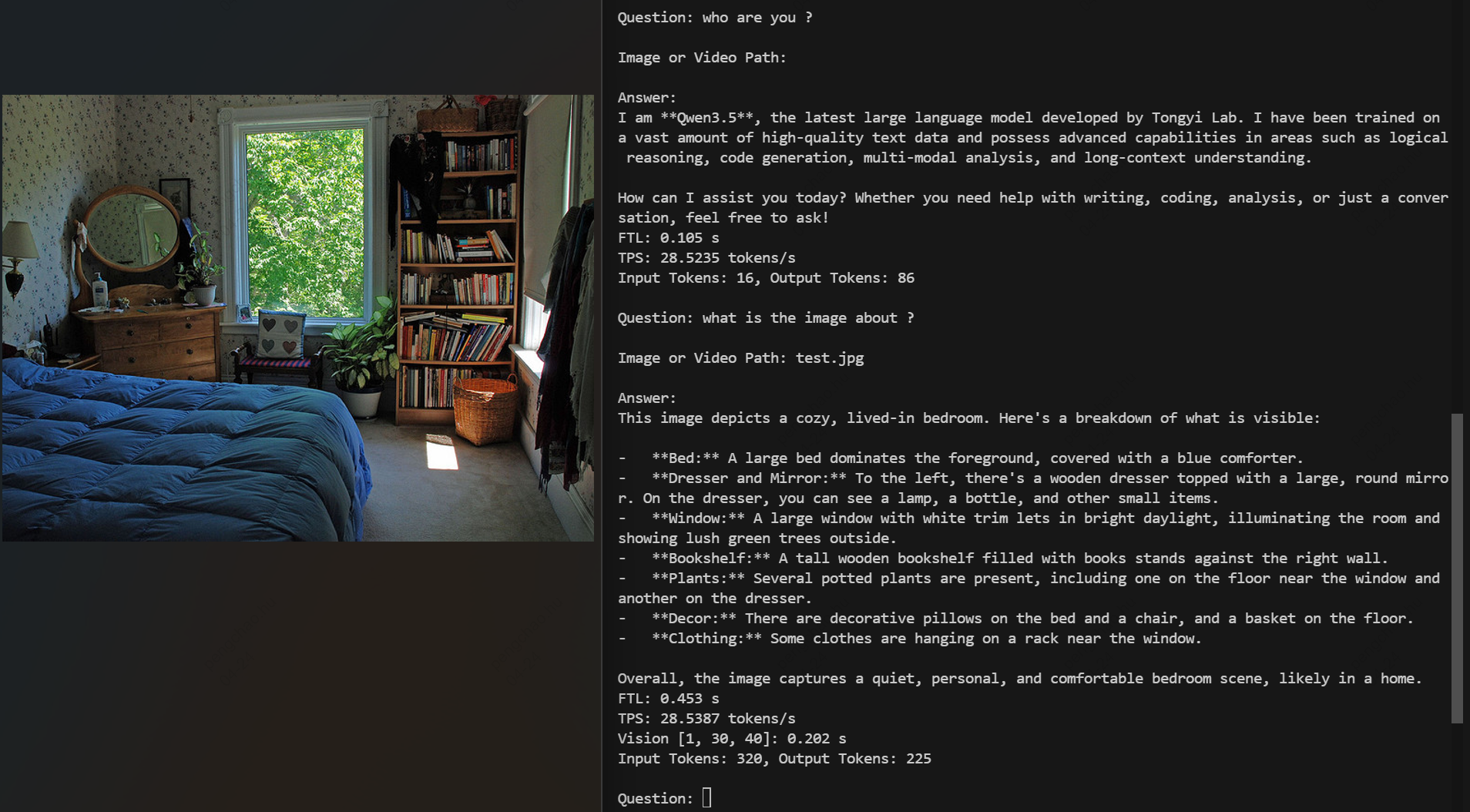
The demo accepts slash commands (e.g. /exit, /clear) and uses @ to attach files — what is the image about? @./test.jpg for images, or what is it talking about? @./story.txt for text files (.txt / .md).
🖼️ Quick Start — Vision (YOLOv5)
Compile and run yolov5s.onnx on the BM1684X TPU. The model is bundled in regression/model/yolov5s.onnx.
Click to expand the full YOLOv5 walkthrough
1. Prepare the working directory
mkdir model_yolov5s && cd model_yolov5s
cp ${REGRESSION_PATH}/model/yolov5s.onnx .
cp -rf ${REGRESSION_PATH}/dataset/COCO2017 .
cp -rf ${REGRESSION_PATH}/image .
mkdir workspace && cd workspace
2. Convert the model to MLIR
If the model takes images as input, the preprocessing must be specified. The preprocessing formula is:
$$y = (x - \text{mean}) \times \text{scale}$$
YOLOv5's official input is RGB scaled by 1/255, so mean = 0,0,0 and scale = 0.0039216,0.0039216,0.0039216.
model_transform.py \
  --model_name yolov5s \
  --model_def ../yolov5s.onnx \
  --input_shapes [[1,3,640,640]] \
  --mean 0.0,0.0,0.0 \
  --scale 0.0039216,0.0039216,0.0039216 \
  --keep_aspect_ratio \
  --pixel_format rgb \
  --output_names 350,498,646 \
  --test_input ../image/dog.jpg \
  --test_result yolov5s_top_outputs.npz \
  --mlir yolov5s.mlir
Main arguments of model_transform.py:
| Argument | Required | Description |
|---|---|---|
model_name |
✅ | Model name |
model_def |
✅ | Model definition file (.onnx, .pt, .tflite, .prototxt) |
model_data |
— | Caffe weight file (.caffemodel) |
input_shapes |
— | Input shape, e.g. [[1,3,640,640]] — supports multiple inputs |
resize_dims |
— | Image resize size before feeding into the model |
keep_aspect_ratio |
— | Keep aspect ratio (pads with 0). Off by default |
mean |
— | Per-channel mean (default 0,0,0) |
scale |
— | Per-channel scale (default 1,1,1) |
pixel_format |
— | rgb / bgr / gray / rgbd |
output_names |
— | Output tensor names. Defaults to model outputs |
test_input |
— | Validation input (image / npy / npz). Skipped if not specified |
test_result |
— | Output file for validation |
excepts |
— | Comma-separated list of layers excluded from validation |
debug |
— | Keep intermediate files |
mlir |
✅ | Output MLIR file path |
A ${model_name}_in_f32.npz file containing the preprocessed input is generated after this step.
3. MLIR → F16 bmodel
model_deploy.py \
  --mlir yolov5s.mlir \
  --quantize F16 \
  --processor bm1684x \
  --test_input yolov5s_in_f32.npz \
  --test_reference yolov5s_top_outputs.npz \
  --model yolov5s_1684x_f16.bmodel
Main arguments of model_deploy.py:
| Argument | Required | Description |
|---|---|---|
mlir |
✅ | Input MLIR file |
quantize |
✅ | F32 / BF16 / F16 / INT8 |
processor |
✅ | Target chip |
calibration_table |
— | Calibration table (required for INT8) |
tolerance |
— | Min similarity between MLIR-quantized and MLIR-fp32 inference |
correctness |
— | Min similarity between simulator and MLIR-quantized inference (default 0.99,0.90) |
excepts |
— | Comma-separated layers excluded from validation |
debug |
— | Keep intermediate files |
model |
✅ | Output bmodel path |
dynamic |
— | Dynamic codegen for dynamic shapes |
4. MLIR → INT8 bmodel
Run calibration first (typically 100–1000 images). Prefer symmetric quantization unless accuracy demands asymmetric.
run_calibration.py yolov5s.mlir \
  --dataset ../COCO2017 \
  --input_num 100 \
  -o yolov5s_cali_table

model_deploy.py \
  --mlir yolov5s.mlir \
  --quantize INT8 \
  --calibration_table yolov5s_cali_table \
  --processor bm1684x \
  --test_input yolov5s_in_f32.npz \
  --test_reference yolov5s_top_outputs.npz \
  --tolerance 0.85,0.45 \
  --model yolov5s_1684x_int8.bmodel
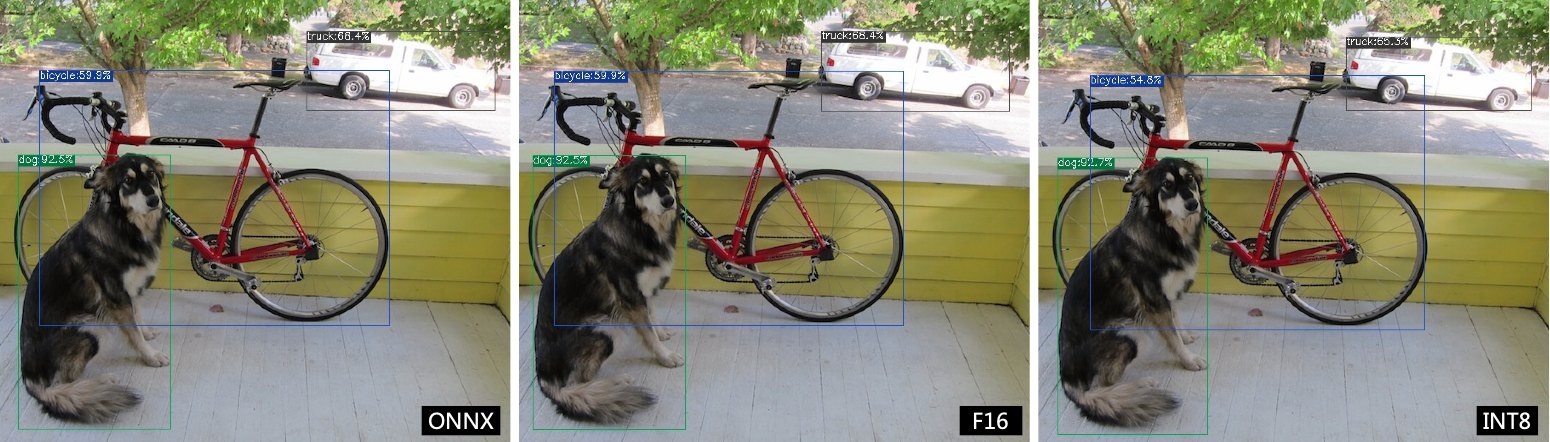
5. Verify the results
The sample script lives at python/samples/detect_yolov5.py.
# ONNX
detect_yolov5.py --input ../image/dog.jpg --model ../yolov5s.onnx          --output dog_origin.jpg
# F16 bmodel
detect_yolov5.py --input ../image/dog.jpg --model yolov5s_1684x_f16.bmodel --output dog_f16.jpg
# INT8 bmodel
detect_yolov5.py --input ../image/dog.jpg --model yolov5s_1684x_int8.bmodel --output dog_int8.jpg
Comparison of outputs:
🛠️ Auxiliary Tools
model_runner.py — universal inference runner
Supports bmodel / mlir / PyTorch / ONNX / TFLite / Caffe.
model_runner.py \
  --input  resnet18_in_f32.npz \
  --model  resnet18_1684x_f32.bmodel \
  --output resnet18_output.npz
model_tool — inspect & edit bmodel
model_tool
  --info     model_file                                : show brief model info
  --print    model_file                                : show detailed model info
  --extract  model_file                                : split a multi-net bmodel into single-net bmodels
  --combine  file1 .. fileN -o new_file                : merge bmodels by file path
  --combine_dir dir1 .. dirN -o new_dir                : merge bmodels by directory
  --dump     model_file start_offset byte_size out_file: dump raw bytes from a bmodel
model_tool --info resnet18_1684x_f32.bmodel
📖 Resources
Documentation & Papers
| Type | Link |
|---|---|
| Paper | TPU-MLIR (arXiv 2210.15016) |
| Paper | An MLIR-Based Compilation Method for Large Language Models (arXiv 2607.15865) |
| Manual | Technical Reference Manual |
| Guide | Quick Start |
Talks
Video tutorials
Click to expand video index
| # | Topic | Links |
|---|---|---|
| 01 | What is a Deep Learning Compiler? | Intro |
| 02 | MLIR Intro | Syntax 1 · Syntax 2 · Syntax 3 · Dialect Conversion · Pattern Rewriting |
| 03 | TPU-MLIR Intro | Overview · Front-end · Lowering |
| 04 | Quantization | Overview · Formula · Calibration · QAT |
| 05 | TPU Memory | Ep1 · Ep2 |
| 06 | TPU-MLIR Practice | To ONNX · Graph Optimization · Operator Support · Model Support · Fuse Preprocess · Accuracy Validation |
📝 Citation
If TPU-MLIR helps your research, please cite:
@misc{tpumlir2022,
  title         = {TPU-MLIR: A Compiler For TPU Using MLIR},
  author        = {HuPengchao and LuMan and WangLei and JiangGuoyue},
  year          = {2022},
  eprint        = {2210.15016},
  archivePrefix = {arXiv},
  primaryClass  = {cs.PL}
}

@misc{llmtpu2026,
  title         = {An MLIR-Based Compilation Method for Large Language Models},
  author        = {HuPengchao and XinZhibin and ChenYifan and ZhouYangyang and WangLiang and ZhangXin},
  year          = {2026},
  eprint        = {2607.15865},
  archivePrefix = {arXiv},
  primaryClass  = {cs.PL}
}
🤝 Contributing
Bug reports, feature requests and pull requests are welcome! Before you start:
- Search existing issues to avoid duplicates.
- For non-trivial changes, open an issue first to discuss the design.
- Run the regression tests under
regression/before sending a PR.
📄 License
This project is licensed under the terms of the LICENSE file in the root of this repository.