
skillshare
English · Deutsch · Español · Français · 日本語 · 한국어 · Português · 简体中文 · 繁體中文


Your AI coding setup, everywhere.
Manage skills, agents, rules, MCP connections and hooks in one place.
For Claude Code, Codex, Pi, OpenCode and more.
Website • Install • Quick Start • Highlights • Screenshots • Desktop App • Docs

[!NOTE] Latest: v0.25.0 —
skillshare mcp serveserves your skills over MCP (the SEP-2640 Skills extension) to agents that can only reach an MCP endpoint, withlist_skillsandread_skilltools for clients without the extension, and the dashboard's Add server gets a Skillshare tab for it;skillshare linkandunlinkadd or remove a folder kept elsewhere, such as your own checkout or an external drive, as a followed source link, also from the Skills page; and the Oh My Pi (omp) target gains MCP, code hooks, plugins and extension selection. All releases →
Why skillshare
Switching AI tools should not mean rebuilding your setup. skillshare gives your skills and other AI resources a home you control.
- Switch tools, keep your skills — edit once, then sync to Claude Code, Codex, Pi and the other tools you use.
- Take your setup with you — version your source in Git and pull it onto another machine.
- Share with your team — keep project resources with your code and distribute shared skills through tracked repositories.
One teammate uses Claude Code, another uses Codex. Keep their shared code-review checklist in .skillshare/ alongside the project. New teammates install the declared skills and sync to the configured tools instead of copying instructions from chat. Team onboarding →
Use the desktop app or CLI to manage everything locally, audit skills before use, and choose what each tool receives.
Coming from another tool? Migration Guide · Comparison
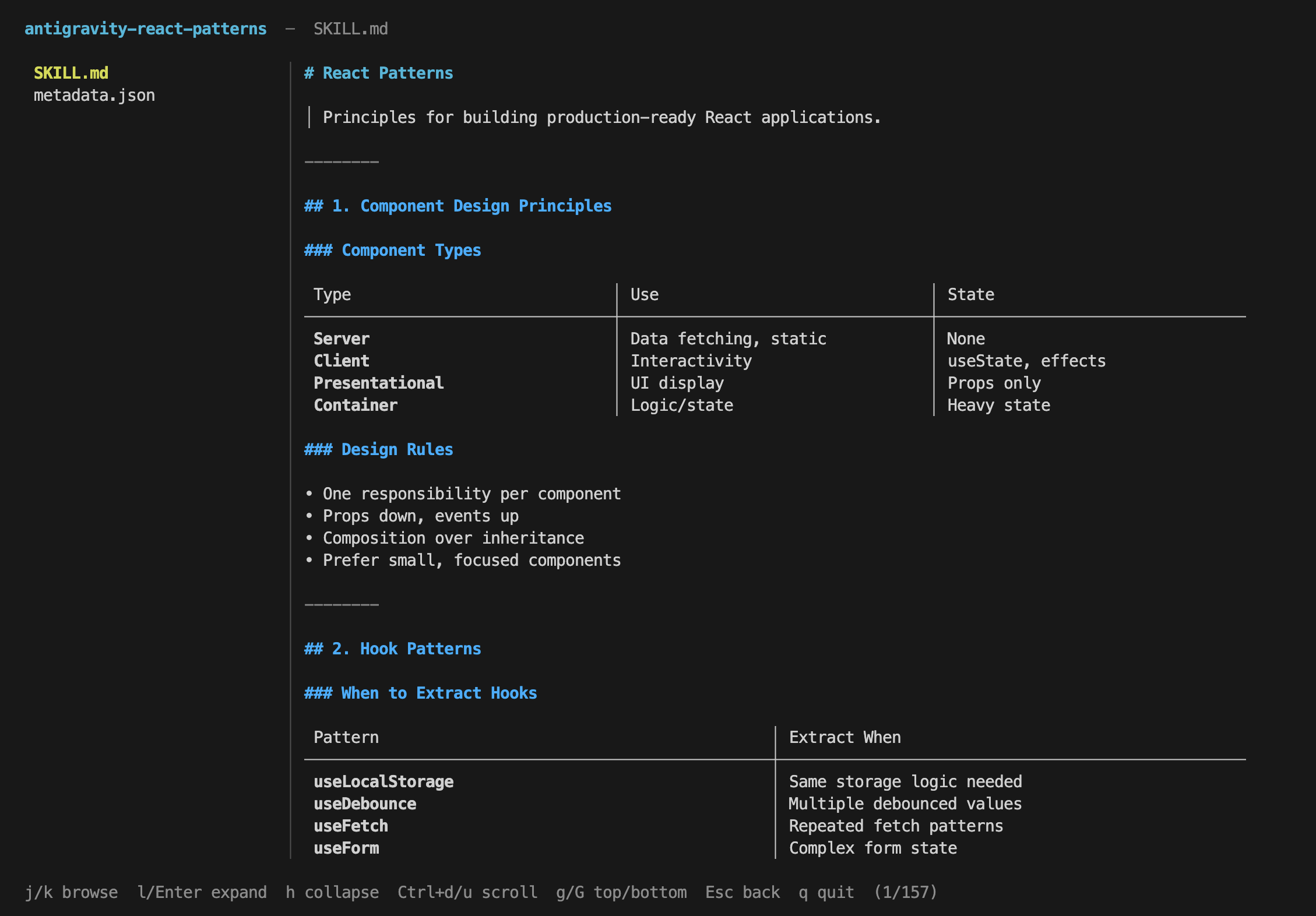
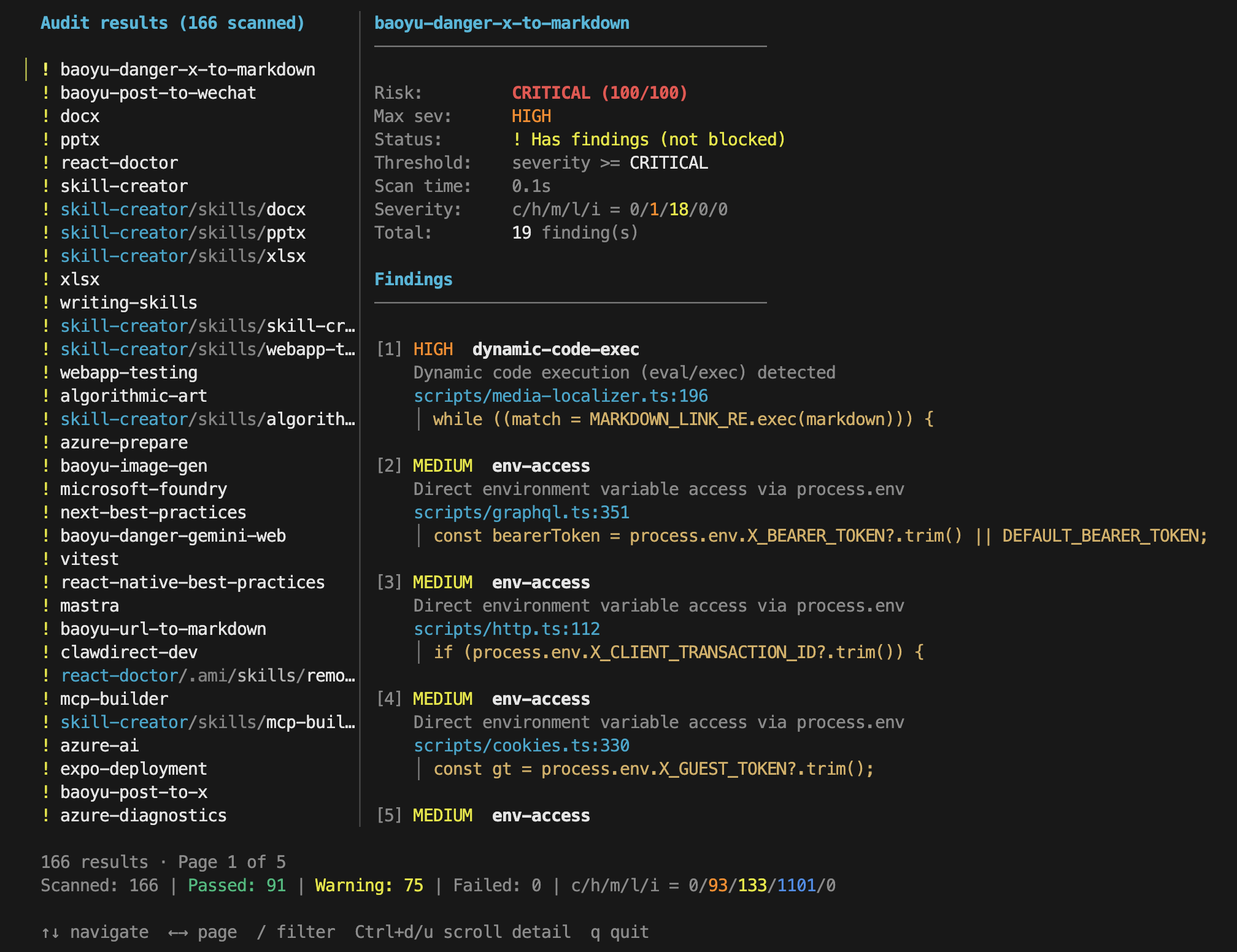
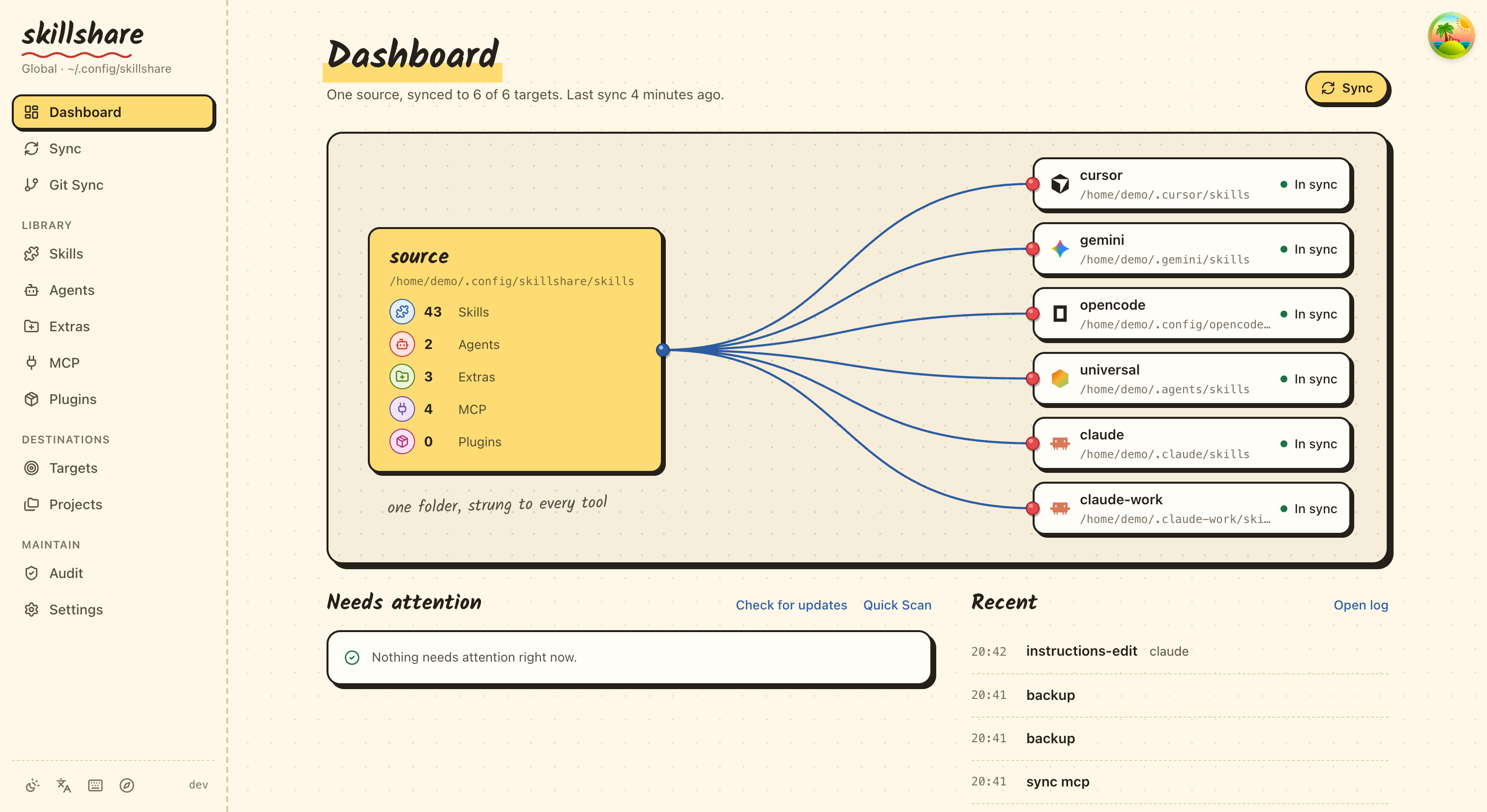
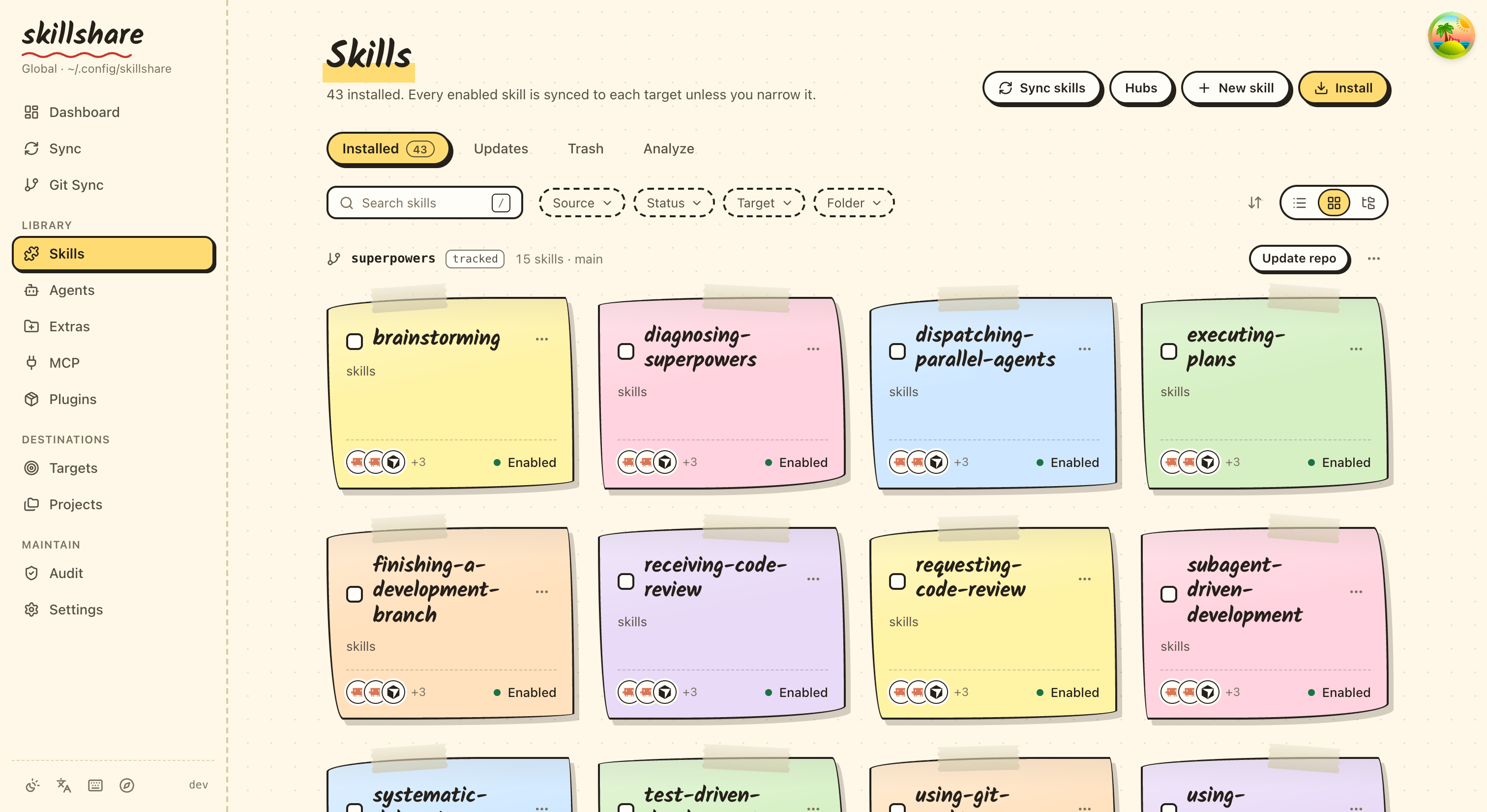
CLI and UI Preview
| Skill Detail | Security Audit |
|---|---|
 |
 |
| UI Dashboard | UI Skills |
|---|---|
 |
 |
Installation
[!TIP] Use skillshare from your desktop. Get Skillshare App for macOS (Apple Silicon), Windows and Linux. First launch helps you install or locate the CLI, choose your AI tools and run your first sync. Installation guide.
Desktop App — visual setup and daily management
Skillshare App puts skills, agents, MCP and hooks in a desktop window. Install the app, open it, and follow first-launch setup.
macOS (Apple Silicon), with Homebrew:
brew tap runkids/tap
brew install --cask skillshare-app
Windows / Linux, or a manual macOS install: Download the latest app installers. See the Desktop App guide for platform details.
CLI: macOS / Linux
curl -fsSL https://raw.githubusercontent.com/runkids/skillshare/main/install.sh | sh
The script installs to ~/.local/bin by default, so normal installs and updates do not need sudo. If the installer prints PATH setup instructions, follow them before running skillshare. Add the suggested line to your shell config (such as ~/.zshrc or ~/.bashrc) for future terminals. Set INSTALL_DIR to use another location.
Windows PowerShell
irm https://raw.githubusercontent.com/runkids/skillshare/main/install.ps1 | iex
CLI: Homebrew
brew install skillshare
Tip: Run
skillshare upgradeto update to the latest version. It auto-detects your install method and handles the rest.
GitHub Actions
- uses: runkids/setup-skillshare@v1
  with:
    source: ./skills
- run: skillshare sync
See setup-skillshare for all options (audit, project mode, version pinning).
Shorthand (Optional)
Add an alias to your shell config (~/.zshrc or ~/.bashrc):
alias ss='skillshare'
Quick Start
skillshare init            # Create config, source, and detected targets
skillshare sync            # Sync skills to all targets
How It Works
- macOS / Linux:
~/.config/skillshare/ - Windows:
%AppData%\skillshare\
┌─────────────────────────────────────────────────────────────┐
│                    Source Directory                         │
│   ~/.config/skillshare/skills/    ← skills (SKILL.md)       │
│   ~/.config/skillshare/agents/    ← agents                  │
│   ~/.config/skillshare/extras/    ← rules, commands, etc.   │
└─────────────────────────────────────────────────────────────┘
                              │ sync
              ┌───────────────┼───────────────┐
              ▼               ▼               ▼
       ┌───────────┐   ┌───────────┐   ┌───────────┐
       │  Claude   │   │  OpenCode │   │ OpenClaw  │   ...
       └───────────┘   └───────────┘   └───────────┘
| Platform | Skills Source | Agents Source | Extras Source | Link Type |
|---|---|---|---|---|
| macOS/Linux | ~/.config/skillshare/skills/ |
~/.config/skillshare/agents/ |
~/.config/skillshare/extras/ |
Symlinks |
| Windows | %AppData%\skillshare\skills\ |
%AppData%\skillshare\agents\ |
%AppData%\skillshare\extras\ |
NTFS Junctions for folders (no admin required); file symlinks need Developer Mode, otherwise copied |
| Imperative (install-per-command) | Declarative (skillshare) | |
|---|---|---|
| Source of truth | Skills copied independently | Single source → symlinks (or copies) |
| New machine setup | Re-run every install manually | git clone config + sync |
| Security audit | None | Built-in audit + auto-scan on install/update |
| Web dashboard | None | skillshare ui |
| Runtime dependency | Node.js + npm | None (single Go binary) |
Highlights
Install & update skills —from GitHub, GitLab, or any Git host
skillshare install github.com/reponame/skills
skillshare update --all
skillshare target claude --mode copy  # if symlinks don't work
Symlink issues? — switch to copy mode per target
skillshare target  --mode copy
skillshare sync
Security audit —scan before skills reach your agent
skillshare audit
Project skills —per-repo, committed with your code
skillshare init -p && skillshare sync
Agents —sync custom agents to agent-capable targets
skillshare sync agents            # sync agents only
skillshare sync --all             # sync skills + agents + extras + MCP + hooks together
Extras —manage rules, commands, prompts & more
skillshare extras init rules          # create a "rules" extra
skillshare sync --all                 # sync skills + agents + extras + MCP + hooks together
skillshare extras collect rules       # collect local files back to source
MCP connections —configure once for Claude Code, Codex, Pi, VS Code, OpenCode and more
skillshare mcp add                    # guided URL or JSON setup
skillshare sync mcp --dry-run         # preview native configuration changes
skillshare sync mcp                   # apply connection settings
Keep definitions in config.yaml or reference a separate mcp.yaml.
See MCP setup
for examples, environment references and importing existing connections.
Manage native hooks without executing them:
skillshare hooks add check --file ./check.yaml
skillshare hooks sync --dry-run
skillshare hooks sync
Plugins —install a complete plugin and pick which tools receive it
skillshare plugin add                 # guided: source, plugin, targets, review
skillshare plugin add owner/repo --target claude --target codex --no-tui
skillshare sync plugins --dry-run     # plugins sync separately from sync --all
Existing native installations can be adopted with plugin import.
See Manage plugins across tools.
Shell completion —tab-complete commands, flags, and subcommands
skillshare completion bash --install # also: zsh, fish, powershell, nushell
Local checkpoints — commit source changes without pushing
skillshare commit -m "Update review skill"
skillshare commit --dry-run
Web dashboard — visual control panel
skillshare ui
Contributing
Contributions welcome! Open an issue first, then submit a draft PR with tests. See CONTRIBUTING.md for setup details.
git clone https://github.com/runkids/skillshare.git && cd skillshare
make check  # format + lint + test
[!TIP] Not sure where to start? Browse open issues or try the Playground for a zero-setup dev environment.
Contributors
Thanks to everyone who helped shape skillshare.











































































Support skillshare ❤️
skillshare is free and open source.
If skillshare saves you time, consider buying me a coffee. Every contribution helps with ongoing development, cross-platform testing, documentation, and maintenance.
You can also help by giving skillshare a ⭐ on GitHub!
Star History
License
MIT