← 开源
rasbt

mini-coding-agent

Minimal and readable coding agent harness implementation in Python to explain the core components of coding agents.

TutorialsAIE roadmapPython
在 GitHub 打开
增长势头
+124 小时新增 Star+0.1%
1.20k
Star
218
Fork
+2
本周
3
贡献者
创建于 2026-04-02 · 更新于 2026-10-15 · 今日第 5753 名
主要开发者
rasbtshixy96pierre-allain-ds

rasbt/mini-coding-agent 排名第 5,753,有 1,202 个星标。

同类别比较

rasbt/mini-coding-agent 排名第 5,753,此处有 8 个同类条目;tatsath/fin-ml 排名第 5,757。

同类别比较
名称排名指标
xianyu110/gpt-codex5,704
语言:
HTML
星标数:
1,245
分叉数:
92
简介:
这是一个关于 OpenAI CodeX 的完整教程网站,专为国内开发者打造。
vmayoral/basic_reinforcement_learning5,713
语言:
Jupyter Notebook
星标数:
1,234
分叉数:
368
简介:
An introductory series to Reinforcement Learning (RL) with comprehensive step-by-step tutorials.
jadijadi/machine_learning_with_python_jadi5,736
语言:
Jupyter Notebook
星标数:
1,216
分叉数:
401
简介:
The notebooks we use on ML course
Ceyron/machine-learning-and-simulation5,743
语言:
Jupyter Notebook
星标数:
1,209
分叉数:
225
简介:
All the handwritten notes 📝 and source code files 🖥️ used in my YouTube Videos on Machine Learning & Simulation (https://www.youtube.com/channel/UCh0P7KwJhuQ4vrzc3IRuw4Q)
tatsath/fin-ml5,757
语言:
Jupyter Notebook
星标数:
1,200
分叉数:
492
简介:
This github repository of "Machine Learning and Data Science Blueprints for Finance". Please star.
srush/LLM-Training-Puzzles5,760
语言:
Jupyter Notebook
星标数:
1,198
分叉数:
74
简介:
What would you do with 1000 H100s...
fcakyon/claude-codex-settings5,781
语言:
Python
星标数:
1,178
分叉数:
111
简介:
Battle-tested Claude Code, OpenAI Codex, Cursor configs, plugins, hooks and agents with Kimi, MiniMax and GLM API support.
bishwaghimire/ai-learning-roadmaps5,832
星标数:
1,122
分叉数:
126
关键参数与规格
关键参数与规格
参数值
语言Python
类别Tutorials
子类别AIE roadmap
关键词Agent-ready APIs, Memory management, Prompt engineering, Tool use
星标数1,202
分叉数218
贡献者3
创建日期2026-04-02
更新日期2026-10-15
1 天星标数1
7 天星标数2
排名5,753
上次排名4,089
排名变化-1,664
7 天星标排名8,172
上次 7 天星标排名8,242
7 天星标排名变化70
总星标排名9,689
上次总星标排名9,682
总星标排名变化-7
国家USA
README 摘录

Mini-Coding-Agent This folder contains a small standalone coding agent: code: CLI: It is a minimal local agent loop with: workspace snapshot collection stable prompt plus turn state structured tools approval handling for risky tools transcript and memory persistence bounded delegation The model backend is currently based on Ollama. **The detailed tutorial: Components of a Coding Agent** Six Core Components This coding harness is organized around six practical building blocks: 1. **Live repo context** The agent collects stable workspace
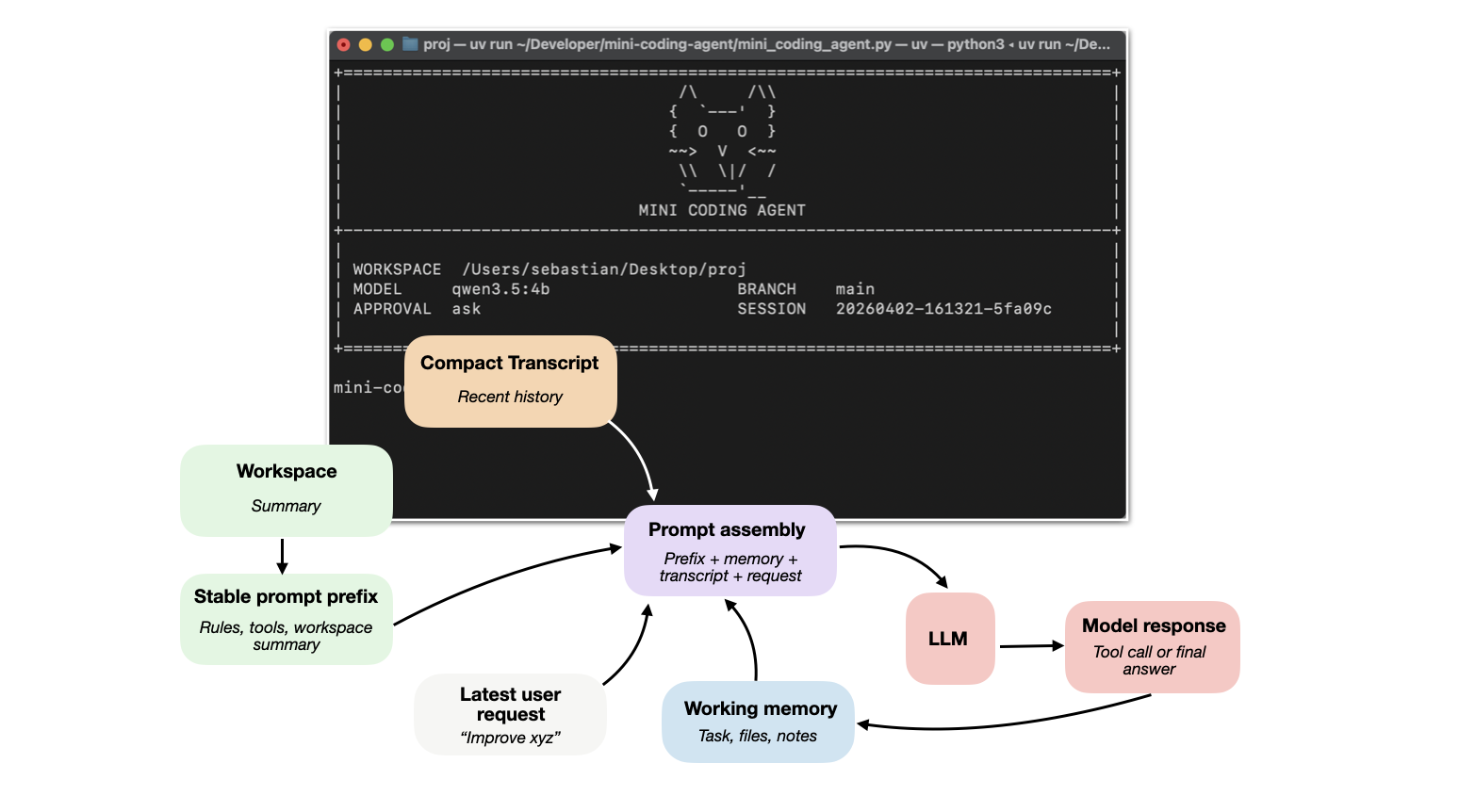
facts upfront, such as repo layout, instructions, and git state. **Prompt shape and cache reuse** A stable prompt prefix, which is separate from the changing request, transcript, and memory so repeated model calls can reuse the static parts efficiently. **Structured tools, validation, and permissions** The model works through named tools with checked inputs, workspace path validation, and approval gates instead of free-form arbitrary actions. **Context reduction and output management** Long outputs are clipped, repeated reads are deduplicated, and older

transcript entries are compressed to keep prompt size under control. **Transcripts, memory, and resumption** The runtime keeps both a full durable transcript and a smaller working memory so sessions can be resumed while preserving important state via working memory. **Delegation and bounded subagents** Scoped subtasks can be delegated to helper agents that inherit enough context to help (but operate within limits). 10+ Ollama installed an Ollama model pulled locally Optional: for environment management and the CLI entry point This project

has no Python runtime dependency beyond the standard library, so you can run it directly with if you do not want to use . Install Ollama Install Ollama on your machine so the command is available in your shell. com/download Then verify: Start the server: In another terminal, pull a model. If you have sufficient memory, it is worth trying a larger model such as or another larger Qwen 3. The agent just sends prompts to Ollama's endpoint. Project Setup

Clone the repo or your fork and change into it: If you forked it first, use your fork URL instead: Basic Usage Start the agent: Without , run the script directly: By default it uses: model: approval: For a concrete usage example, see EXAMPLE. Approval Modes Risky tools such as shell commands and file writes are gated by approval. prompts before risky actions (default and recommended) allows risky actions automatically, including arbitrary command execution and file writes by the model; use

only with trusted prompts and trusted repositories denies risky actions Example: Resume Sessions The agent saves sessions under the target workspace root in: Resume the latest session: Resume a specific session: Interactive Commands Inside the REPL, slash commands are handled directly by the agent instead of being sent to the model as a normal task. shows the list of available interactive commands prints the distilled session memory, including the current task, tracked files, and notes prints the path to the

current saved session JSON file clears the current session history and distilled memory but keeps you in the REPL exits

常见问题

记录了多少星标和分叉?

rasbt/mini-coding-agent 有 1,202 个星标和 218 个分叉。

仓库排名是多少?

rasbt/mini-coding-agent 排名第 5,753。

记录的语言和类别是什么?

rasbt/mini-coding-agent 有 1,202 个星标,语言为 Python,类别为 Tutorials。

哪个仓库排名最接近?

rasbt/mini-coding-agent 与 tatsath/fin-ml 比较,后者排名第 5,757,有 1,200 个星标。

README


Mini-Coding-Agent

This folder contains a small standalone coding agent:

  • code: mini_coding_agent.py
  • CLI: mini-coding-agent

It is a minimal local agent loop with:

  • workspace snapshot collection
  • stable prompt plus turn state
  • structured tools
  • approval handling for risky tools
  • transcript and memory persistence
  • bounded delegation

The model backend is currently based on Ollama.

The detailed tutorial: Components of a Coding Agent


Six Core Components
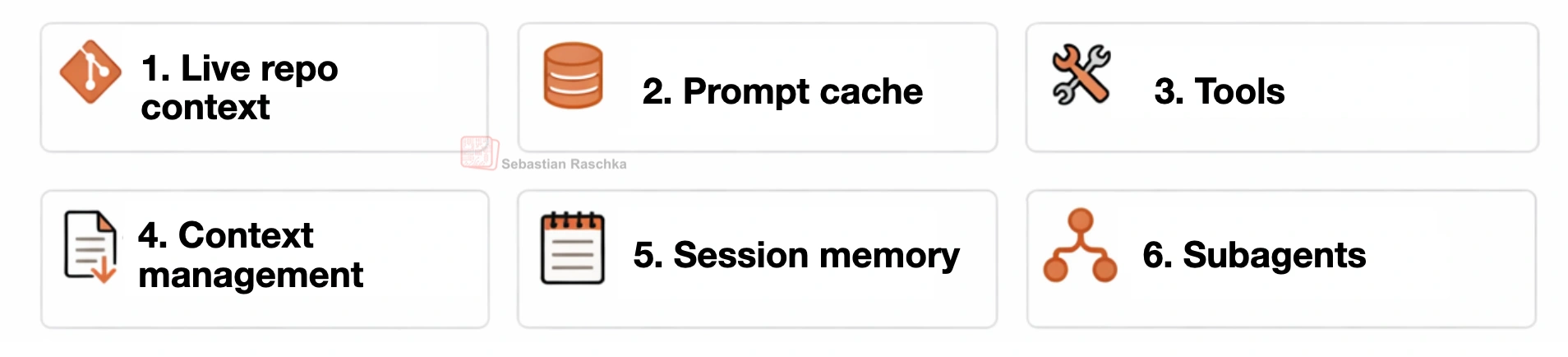
This coding harness is organized around six practical building blocks:

  1. Live repo context
    The agent collects stable workspace facts upfront, such as repo layout, instructions, and git state.
  2. Prompt shape and cache reuse
    A stable prompt prefix, which is separate from the changing request, transcript, and memory so repeated model calls can reuse the static parts efficiently.
  3. Structured tools, validation, and permissions
    The model works through named tools with checked inputs, workspace path validation, and approval gates instead of free-form arbitrary actions.
  4. Context reduction and output management
    Long outputs are clipped, repeated reads are deduplicated, and older transcript entries are compressed to keep prompt size under control.
  5. Transcripts, memory, and resumption
    The runtime keeps both a full durable transcript and a smaller working memory so sessions can be resumed while preserving important state via working memory.
  6. Delegation and bounded subagents
    Scoped subtasks can be delegated to helper agents that inherit enough context to help (but operate within limits).


Requirements

You need:

  • Python 3.10+
  • Ollama installed
  • an Ollama model pulled locally

Optional:

  • uv for environment management and the mini-coding-agent CLI entry point

This project has no Python runtime dependency beyond the standard library, so you can run it directly with python mini_coding_agent.py if you do not want to use uv.


Install Ollama

Install Ollama on your machine so the ollama command is available in your shell.

Official installation link: ollama.com/download

Then verify:

ollama --help

Start the server:

ollama serve

In another terminal, pull a model. Example:

ollama pull qwen3.5:4b

Qwen 3.5 model library:

The default in this project is qwen3.5:4b. If you have sufficient memory, it is worth trying a larger model such as qwen3.5:9b or another larger Qwen 3.5 variant. The agent just sends prompts to Ollama's /api/generate endpoint.


Project Setup

Clone the repo or your fork and change into it:

git clone https://github.com/rasbt/mini-coding-agent.git
cd mini-coding-agent

If you forked it first, use your fork URL instead:

git clone https://github.com//mini-coding-agent.git
cd mini-coding-agent


Basic Usage

Start the agent:

cd mini-coding-agent
uv run mini-coding-agent

Without uv, run the script directly:

cd mini-coding-agent
python mini_coding_agent.py

By default it uses:

  • model: qwen3.5:4b
  • approval: ask

For a concrete usage example, see EXAMPLE.md.


Approval Modes

Risky tools such as shell commands and file writes are gated by approval.

  • --approval ask prompts before risky actions (default and recommended)
  • --approval auto allows risky actions automatically, including arbitrary command execution and file writes by the model; use only with trusted prompts and trusted repositories
  • --approval never denies risky actions

Example:

uv run mini-coding-agent --approval auto


Resume Sessions

The agent saves sessions under the target workspace root in:

.mini-coding-agent/sessions/

Resume the latest session:

uv run mini-coding-agent --resume latest

Resume a specific session:

uv run mini-coding-agent --resume 20260401-144025-2dd0aa


Interactive Commands

Inside the REPL, slash commands are handled directly by the agent instead of being sent to the model as a normal task.

  • /help shows the list of available interactive commands
  • /memory prints the distilled session memory, including the current task, tracked files, and notes
  • /session prints the path to the current saved session JSON file
  • /reset clears the current session history and distilled memory but keeps you in the REPL
  • /exit exits the interactive session
  • /quit exits the interactive session; alias for /exit


Main CLI Flags

uv run mini-coding-agent --help

Without uv:

python mini_coding_agent.py --help

CLI flags are passed before the agent starts. Use them to choose the workspace, model connection, resume behavior, approval mode, and generation limits.

Important flags:

  • --cwd sets the workspace directory the agent should inspect and modify; default: .
  • --model selects the Ollama model name, such as qwen3.5:4b; default: qwen3.5:4b
  • --host points the agent at the Ollama server URL (usually not needed); default: http://127.0.0.1:11434
  • --ollama-timeout controls how long the client waits for an Ollama response (usually not needed); default: 300 seconds
  • --resume resumes a saved session by id or uses latest; default: start a new session
  • --approval controls how risky tools are handled: ask, auto, or never; default: ask
  • --max-steps limits how many model and tool turns are allowed for one user request; default: 6
  • --max-new-tokens caps the model output length for each step; default: 512
  • --temperature controls sampling randomness; default: 0.2
  • --top-p controls nucleus sampling for generation; default: 0.9


Example

See EXAMPLE.md


Notes & Tips

  • The agent expects the model to emit either ... or ....
  • Different Ollama models will follow those instructions with different reliability.
  • If the model does not follow the format well, use a stronger instruction-following model.
  • The agent is intentionally small and optimized for readability, not robustness.
排名相邻
同类项目