
OASIS
🏝️ Open Automated Security Intelligence Scanner

🛡️ An AI-powered security auditing tool that leverages local LLMs (Ollama, or any OpenAI-compatible server: vLLM, LiteLLM, LM Studio…) to detect and analyze potential security vulnerabilities in your code.
Advanced code security analysis through the power of AI
📑 Table of contents
| Section | Topics |
|---|---|
| Features | Highlights, dashboard, canonical reports |
| Finding Validation Principle | Deterministic verdict, scope anchoring, narrative guardrails |
| Getting started | Prerequisites, pipx install, Docker (quick), maintenance |
| Hardware Requirements | CPUs, GPU, scaling |
| Advanced Usage Examples | Example CLI invocations |
| Command Line Arguments | Flags, web/assistant options, streaming |
| CI integration | --fail-on gate, exit codes, GitHub Actions example |
| Model providers | Ollama / OpenAI-compatible backends (vLLM, LM Studio...) |
| Getting the Most out of OASIS | Models, LangGraph workflow, tips |
| Supported Vulnerability Types | Type tags reference table |
| Output Structure | security_reports/, project slug, canonical JSON |
| Run with Docker | Compose, docker run, web from container |
| Cache Management | Embeddings and scan caches |
| Audit Mode | Pre-scan audit, structured audit_report.json |
| Suppression registry | Fingerprint registry, SARIF suppressions, candidates |
| Inline ignore markers | #oasisignore / #noqa-style source markers dropped before reports |
| Scan diff | --diff-against baseline comparison, new/fixed/persistent |
| Consolidated report | -rm multi-model merge, fingerprint groups, LLM narrative |
| Web Interface | --web, security |
| Changelog | Release notes |
| Contributing | PRs and issues |
| License | GPL v3 |
| Acknowledgments | Credits |
| Support | Discord / issues |
🌟 Features
- 🤖 Dashboard assistant: In the report modal, the AI assistant triages single-vulnerability JSON reports or executive / scan-wide mode (aggregated JSON under the run) with optional RAG over the local embedding cache, a chat model selector (Ollama tags), Markdown replies, persisted chat sessions keyed by the canonical report path, and configurable Ollama/RAG flags (
--web-ollama-url,--web-embed-model,--web-assistant-rag) - ⏳ Multi-model scan progress: the dashboard Scan progress card renders an Overall tab (aggregate bar +
X/N models complete) plus one tab per deep model — emoji + display name, with current (⏳) / done (✓) / pending (grayed) states and per-model phase rows; multi-model runs can no longer stick to the first model's completion - 🛡️ Finding validation agent: Findings are validated automatically during the scan — a deterministic, code-driven investigation (entry points, call chains, taint flows, on-path mitigations) embeds an exploitability verdict with confidence in every report, shown as color-coded badges. In the dashboard, the assistant panel exposes the full evidence per finding via a single finding picker or the Ask AI buttons in the Detailed analysis section; a manual
POST /api/assistant/investigatere-validation with optional LLM narrative stays available and is constrained to stay consistent with the deterministic result. See Finding Validation Principle for full behavior and guardrails. - 🔍 Multi-Model Analysis: Leverage multiple Ollama models for comprehensive security scanning
- 🤝 OpenAI-compatible backends: Run the same pipeline against vLLM, LM Studio, llama.cpp server, LocalAI, ... via
--provider openai --api-base URL - 🔄 Two-Phase Scanning: Use lightweight models for initial scanning and powerful models for deep analysis
- 🧠 LangGraph Orchestration: Single pipeline (discover → scan → expand → deep → verify → report, optional PoC assist) with bounded context-expand retries
- 🔄 Interactive Model Selection: Guided selection of scan and analysis models with parameter-based filtering
- 💾 Dual-Layer Caching: Efficient caching for both embeddings and analysis results to dramatically speed up repeated scans
- 🔧 Scan Result Caching: Store and reuse vulnerability analysis results with model-specific caching
- 📊 Rich Reporting: Canonical JSON reports plus derived HTML, PDF, and Markdown exports
- 🔄 Parallel Processing: Optimized performance through parallel vulnerability analysis
- 📝 Executive summaries: Structured canonical JSON with overview KPIs, tier context, similarity highlights, and matching dashboard/modal HTML (TOC, anchors, charts); generation starts during the scan and updates as phases complete (live progress during long runs)
- 🎯 Customizable Scans: Support for specific vulnerability types and file extensions
- 📈 Distribution / audit mode: Embedding-based similarity audit before a full scan; with JSON in your output formats you get
audit_report.json(and Markdown) with the same facts—the dashboard reads it for comparison tables and HTML preview in the report modal when available. - 🔄 Content Chunking: Intelligent content splitting for better analysis of large files
- 🤖 Interactive Model Installation: Guided installation for required Ollama models
- 🌐 Web Interface: Secure, password-protected web dashboard for exploring reports
- ⚡ Incremental Reporting: Vulnerability reports are published as soon as each vulnerability analysis completes
- 🎚️ Dashboard filters: Narrow listings by project, severity (tier bands), model, and date; report modal JSON/HTML/content previews stay within the active filter set
- 🌗 Web UI themes: Light/dark toggle in the header; Chart.js severity rollups follow the selected theme
- 📁 Project grouping: Optional
--project-name/-pnforsecurity_reports/layout and dashboard filters (Output structure)
🚀 Getting started
Prerequisites
- Python 3.9+
- Ollama installed and running; pull the models you need before scanning.
- pipx (recommended CLI install):
# macOS
brew install pipx
pipx ensurepath

# Ubuntu/Debian
python3 -m pip install --user pipx
python3 -m pipx ensurepath

# Windows (with pip)
pip install --user pipx
python -m pipx ensurepath
Standard run (pipx)
git clone https://github.com/psyray/oasis.git
cd oasis
pipx install -e .

oasis --input test_files/
Reports are written under security_reports/ beside the path you analyze (see Output structure).
Docker (optional)
From the repository root, with Ollama on the host:
docker compose build
docker compose run --rm oasis -i /work/test_files -ol http://host.docker.internal:11434
Code is mounted at /work; use -i paths under /work. More options (bundled Ollama, dashboard, docker run) are in Run with Docker.
Maintenance
Update from GitHub releases (recommended when you installed from tags / non-editable):
oasis --check-update   # compare installed version vs latest stable release on GitHub
oasis --self-update    # reinstall latest stable via pipx (requires pipx on PATH)
Stable releases only: GitHub entries marked pre-release are ignored. To skip the occasional “update available” line on stderr, set OASIS_NO_UPDATE_CHECK=1. For unexpected banner failures, set OASIS_DEBUG_UPDATE to 1, true, or yes to print a short diagnostic on stderr (developer troubleshooting).
Editable / development clone — after git pull, your editable pipx install tracks the repo:
git pull origin master
pipx upgrade oasis
(pipx upgrade is optional for editable installs; use it when you want pipx’s recorded version to match.)
Uninstall
pipx uninstall oasis
Feature branches (optional, may be unstable):
git fetch --all
git checkout feat/vX.X
🛠️ Hardware Requirements
Minimum Requirements
- CPU: 4+ cores (Intel i5/AMD Ryzen 5 or better)
- RAM: 16 GB minimum, 32 GB recommended
- Storage: 100 GB+ free space for models (more for caching large codebases)
- GPU: Not required for basic usage (will use CPU but really slow)
Recommended Setup
- CPU: 8+ cores (Intel i7/i9 or AMD Ryzen 7/9)
- RAM: 32 GB-64 GB for large codebases
- GPU: NVIDIA with 8 GB+ VRAM (RTX 3060 or better)
- Storage: SSD with 100 GB+ free space
Scaling Guidelines
- Small Projects (< 10,000 Lines of Code (LOC)): Minimum requirements sufficient
- Medium Projects (10,000-100,000 Lines of Code (LOC)): 8-core CPU, 32 GB+ RAM recommended
- Large Projects (> 100,000 Lines of Code (LOC)): High-end CPU, 64 GB+ RAM, dedicated GPU essential
GPU Recommendations by Model Size
- 4-8B parameter models: 8 GB VRAM minimum
- 12-20B parameter models: 16 GB VRAM recommended
- 30B+ parameter models: 24 GB+ VRAM (RTX 3090/4090/A5000 or better)
Network Requirements
- Stable internet connection for model downloads
- Initial model downloads: 3GB-15GB per model
Performance Tips
- Use SSD storage for cache directories
- Prioritize GPU memory over compute performance
- Consider running overnight for large codebases
- For enterprise usage, dedicated server with 128GB+ RAM and A100/H100 GPU recommended
🔥 Advanced Usage Examples
Standard two-phase analysis with separate models:
# Use a lightweight model for initial scanning and a powerful model for deep analysis
oasis -i [path_to_analyze] -sm gemma3:4b -m gemma3:27b
LangGraph pipeline (default) with optional PoC hints and expand budget:
# Same two-model setup; optional: cap context-expand retries, PoC hint bullets, and/or LLM PoC text
oasis -i [path_to_analyze] -t 0.6 -m llama3 --langgraph-max-expand 2 --poc-hints
Targeted vulnerability scan with caching control:
# Analyze only for SQL Injection and XSS, clear cache, specify models
oasis -i [path_to_analyze] -v sqli,xss --clear-cache-scan -sm gemma3:4b -m gemma3:27b
Full production scan:
# Comprehensive scan of a large codebase
oasis -i [path_to_analyze] -sm gemma3:4b -m llama3:latest,codellama:latest -t 0.7 --vulns all
🎮 Command Line Arguments
Input/Output Options
--input-i: Path to file, directory, or .txt file containing newline-separated paths to analyze--project-name-pn: Optional project alias for report grouping/filtering (overrides the name derived from-i; allowed chars:A-Z,a-z,0-9,_,-)--diff-againstPATH: Write a scan diff report comparing this run with a baseline run — new / fixed / persistent findings plus severity changes. See Scan diff.--output-format-of: Comma-separated formats orallfor json, sarif, pdf, html, md (default: all)--extensions-x: Custom file extensions to analyze (e.g., "py,js,java")--language-l: Language for reports (default: en)
Supported: 🇬🇧 English (en), 🇫🇷 Français (fr), 🇪🇸 Español (es), 🇩🇪 Deutsch (de), 🇮🇹 Italiano (it), 🇵🇹 Português (pt), 🇷🇺 Русский (ru), 🇨🇳 中文 (zh), 🇯🇵 日本語 (ja)
Analysis Configuration
-
Removed flags:
--adaptive/-adand--analyze-type/-atwere dropped in favor of LangGraph-only orchestration; the CLI exits with guidance if they appear—use the options below and-eatfor embedding segmentation instead. -
--embeddings-analyze-type-eat: Analyze code by entire file or by individual functions [file, function] (default: file)- file: Performs the embedding on the entire file as a single unit, preserving overall context but potentially diluting details.
- function (EXPERIMENTAL): Splits the file into individual functions for analysis, allowing for more precise detection of issues within specific code blocks but with less contextual linkage across functions.
-
--langgraph-max-expandN: Maximum context-expand retries after verify detects structured-output problems (default: 2). -
--validate-findings/--no-validate-findings: Run the deterministic finding validation automatically during the scan and embed the verdicts in the reports (default: on). Findings are validated per(file, line)anchor with verdict deduplication; the dashboard can still run a live investigation per finding for full evidence. -
--validate-findings-budgetSEC: Total wall-clock budget (seconds) for scan-time finding validation per scan (default: 120). Findings past the budget stay unannotated and remain validatable on demand from the dashboard. -
--validate-findings-narrative: Additionally generate a thinking-enabled LLM narrative for each scan-time verdict (uses the deep model, stored in thefinding_validations.jsonsidecar; off by default — increases scan time). Narrative reasoning is captured as collapsible thought segments in the dashboard; verdicts with no signal to explain (insufficient_signal,error) are skipped, and the narrative phase shares the same wall-clock budget. -
--poc-hints: Log optional high-level PoC hint bullets from structured findings only (no extra LLM call; does not run code). -
--poc-assist: Ask the deep model for a standalone executable PoC (script or commands) from findings; logged only — OASIS does not run generated code. -
--custom-instructions: Extra text appended to deep-analysis and--poc-assistprompts (merged with the file variant below; does not inject into the dashboard assistant system prompt—the assistant uses the canonical report JSON and optional RAG). -
--custom-instructions-file: UTF-8 file merged with--custom-instructions(file first, then inline text). -
--threshold-t: Similarity threshold (default: 0.5) -
--suppressions-filePATH: JSON registry of suppressed finding fingerprints; matching findings are exported with a native SARIF suppressions entry. See Suppression registry. -
--write-suppression-candidates: Writesuppression_candidates.jsonin the run output listing every finding fingerprint to copy into a registry. -
--inline-ignore/--no-inline-ignore: Honor inline ignore markers on source lines (e.g.# noqa,# oasisignore) and drop annotated findings before validation and reports (default: on). See Inline ignore markers. -
--inline-ignore-tokensCSV: Comma-separated ignore markers to honor (default:oasisignore,nosec,noqa,nosemgrep). -
--fail-onSEVERITY: Exit with code 3 when the run reports findings at or above this severity [critical, high, medium, low] (case-insensitive). See CI integration. -
--vulns-v: Vulnerability types to check (comma-separated or 'all') -
--chunk-size-ch: Maximum size of text chunks for embedding (default: auto-detected)
Model Selection
--models-m: Comma-separated list of models to use for deep analysis--scan-model-sm: Model to use for quick scanning (default: same as main model)--model-thinking-mt: Enable/disable thinking for deep analysis models [yes,no] (default: no)--small-model-thinking-smt: Enable/disable thinking for the quick scan model [yes,no] (default: no)--embed-model-em: Embedding model(s); in audit mode, supports a comma-separated list (example:-em nomic-embed-text,bge-m3) (default: nomic-embed-text)--list-models-lm: List available models and exit--provider: Model backend —ollama(native API, auto-pull) oropenai(OpenAI-compatible server: vLLM, LM Studio, llama.cpp, LocalAI...) (default:ollama, envOASIS_LLM_PROVIDER)--api-base: Base URL of the OpenAI-compatible server, e.g.https://llm.example.com/v1(default:http://localhost:8000/v1, envOASIS_OPENAI_BASE_URL)--api-key: API key for the OpenAI-compatible server (default: envOASIS_OPENAI_API_KEY, elselocal; never logged).--embed-provider: Embedding backend —ollama(native API) oropenai(OpenAI-compatible embedding server: vLLM, llama.cpp, LiteLLM...). Default: inherits the chat backend (--provider), so chat and embedding workloads can still be routed to separate servers with an explicit flag (envOASIS_EMBED_PROVIDER). See Model providers.--embed-api-base: Base URL of the OpenAI-compatible embedding server (default: inherited from--api-base; envOASIS_EMBED_OPENAI_BASE_URL).--embed-api-key: API key for the OpenAI-compatible embedding server (default: inherited from--api-key; envOASIS_EMBED_OPENAI_API_KEY; never logged).--report-model-rm: Consolidation model — after a multi-model run, merge the per-model findings into one consolidated report (deterministic fingerprint groups; the model synthesizes the narrative). See Consolidated multi-model report.
See Model providers for details and per-server examples.
Cache Management
--clear-cache-embeddings-cce: Clear embeddings cache before starting--clear-cache-scan-ccs: Clear scan analysis cache for the current analysis type--cache-days-cd: Maximum age in days for both embedding and analysis caches (default: 7)
Web Interface
--web-w: Serve reports via a web interface--web-expose-we: Web interface exposure (local: 127.0.0.1, all: 0.0.0.0) (default: local)--web-password-wpw: Web interface password (if not specified, a random password will be generated)--web-port-wp: Web interface port (default: 5000)--web-ollama-url: Ollama HTTP API URL for the in-dashboard assistant (overridden byOASIS_WEB_OLLAMA_URL, otherwise same as--ollama-url).--web-provider: Model backend for the dashboard assistant (default: same as--provider, envOASIS_WEB_LLM_PROVIDER).--web-api-base: OpenAI-compatible base URL for the dashboard assistant (default: same as--api-base, envOASIS_WEB_OPENAI_BASE_URL).--web-api-key: API key for the dashboard assistant backend (default: same as--api-key, envOASIS_WEB_OPENAI_API_KEY).--web-embed-model: Embedding model for optional RAG over the local.oasis_cachepickle (defaults to the report’sembed_modelornomic-embed-text).--web-embed-provider: Embedding backend for assistant RAG queries (default: same as--embed-provider, else the chat backend; envOASIS_WEB_EMBED_PROVIDER).--web-embed-api-base: OpenAI-compatible base URL for assistant RAG embeddings (default: same as--embed-api-base, else the chat--web-api-base; envOASIS_WEB_EMBED_OPENAI_BASE_URL).--web-embed-api-key: API key for assistant RAG embeddings (default: same as--embed-api-key, else the chat--web-api-key; envOASIS_WEB_EMBED_OPENAI_API_KEY).--web-assistant-rag/--no-web-assistant-rag: Use embedding-cache retrieval in assistant answers (default: on).
For JSON reports, the dashboard modal includes an Assistant panel (triage, codebase context). Optional 0-based file/chunk/finding indices focus the model on one structured finding; RAG uses the same project root and cache file as the scan when available.
Assistant replies are rendered as Markdown (sanitized HTML). Model “thinking” sections wrapped in tags such as … are stripped from the visible answer and shown in collapsible blocks when present.
Chat persistence stores each conversation under security_reports///.../json/.../.json in a sibling chat/ folder (one JSON file per session). The UI can resume the latest session, start a new chat, or delete saved sessions. Data stays on the server filesystem next to your reports (no separate database). REST endpoints: GET /api/assistant/sessions, GET /api/assistant/session, POST /api/assistant/chat, POST /api/assistant/chat-stream (NDJSON progressive replies—the UI falls back to POST /api/assistant/chat when streaming is unavailable), POST /api/assistant/session-branch, DELETE /api/assistant/session, DELETE /api/assistant/sessions. Scan-time verdicts are served from a sibling finding_validations.json sidecar via GET /api/assistant/finding-validations?report_path=… (with finding_scope_report_path=… in executive aggregate mode) and also feed the chat system prompt when no session validation exists.
Logging and Debug
--debug-d: Enable debug output--silent-s: Disable all output messages
Special Modes
--audit-a: Run embedding distribution analysis--ollama-url-ol: Ollama URL (default: http://localhost:11434; used when--providerisollama)--version-V: Show OASIS version and exit
Environment overrides (advanced)
Optional OASIS_* variables tune timeouts and heuristic budgets without editing code (see oasis/config.py for the full list). Examples:
OASIS_LLM_PROVIDER— default model backend (ollama|openai) when--provideris not set.OASIS_OPENAI_BASE_URL— OpenAI-compatible base URL when--api-baseis not set.OASIS_OPENAI_API_KEY— API key for OpenAI-compatible servers (never logged).OASIS_OPENAI_CTX_TOKENS— declared context window (tokens) of OpenAI-compatible models; used for chunk sizing and assistant budget (the OpenAI protocol does not expose it).OASIS_OPENAI_STRUCTURED_OUTPUT—auto(default: sendresponse_formatJSON schema, fall back to schema-in-prompt on HTTP 4xx),on(always send, surface errors),off(schema-in-prompt only).OASIS_OPENAI_THINKING_KWARGS—auto(default: translate the-mt/-smtthinking flags into vLLM-stylechat_template_kwargs.enable_thinking, retry without it on HTTP 4xx),on(always translate, surface errors),off(never send — strict servers).OASIS_EMBED_PROVIDER— embedding backend (ollama|openai); defaults to the chat backend configuration when unset.OASIS_EMBED_OPENAI_BASE_URL/OASIS_EMBED_OPENAI_API_KEY— embedding server settings when the embedding provider isopenai.OASIS_WEB_EMBED_PROVIDER/OASIS_WEB_EMBED_OPENAI_BASE_URL/OASIS_WEB_EMBED_OPENAI_API_KEY— dashboard assistant RAG embeddings (fall back to the scan-side embedding backend, then the chat backend).OASIS_WEB_OLLAMA_URL— Ollama base URL for the dashboard assistant when--web-ollama-urlis not set.OASIS_CHUNK_ANALYZE_TIMEOUT_SEC— server-side deadline for one Ollama generate call (seconds).OASIS_CHUNK_DEEP_NUM_PREDICT— cap on structured deep output tokens (num_predict).OASIS_OLLAMA_HTTP_CLIENT_TIMEOUT_SEC— HTTP client timeout (must cover one full generate round-trip).OASIS_POC_DIGEST_JSON_MAX_CHARS/OASIS_POC_STAGE_LOG_MAX_CHARS— PoC JSON prompt size and INFO log cap for PoC-stage output.OASIS_STRUCTURED_DEGENERACY_*— thresholds for repetitive structured-output detection.
Higher limits increase worst-case latency and memory use on the Ollama host.
🤝 CI integration
Failing a pipeline on severity (--fail-on)
Pass --fail-on to make OASIS exit with code 3 when the finished run reports at least one finding at or above the given severity (critical, high, medium, low; case-insensitive). The gate reads the canonical JSON documents of the run after analysis completes, so it covers every deep model of the pass. Operational failures still exit with 1 and argparse usage errors with 2, keeping the three outcomes distinguishable in CI.
oasis -i ./my-project -m qwen2.5-coder:14b --fail-on high
# → exit 0: no finding at or above High
# → exit 3: N finding(s) at or above High
# → exit 1: operational failure (backend unreachable, no models, ...)
The gate summary is logged at the end of the run with per-severity counts, e.g. CI gate --fail-on high: findings at or above threshold: 2 (low=3, medium=1, high=2, critical=0).
GitHub Actions example
Combine --fail-on with the SARIF export (-of sarif or all) and upload the result to GitHub Code Scanning:
- name: Run OASIS security scan
  id: oasis
  continue-on-error: true
  run: |
    oasis -i . -m qwen2.5-coder:14b --fail-on high -of sarif

- name: Upload SARIF
  if: always()
  uses: github/codeql-action/upload-sarif@v3
  with:
    sarif_file: security_reports/**/sarif/*.sarif
The scan step uses
continue-on-errorso the SARIF upload still happens when the gate trips (exit 3); the job result then reflects the OASIS exit code.
E2E fixture checks (manual/dev)
scripts/e2e_fixture_scan.py runs the CLI against the bundled realistic fixtures (test_files/realistic_app/, 5 languages) on a reduced vulnerability set (default: the Injection family — SQL Injection, Command Injection, XSS) and prints a per-(language, vulnerability) pass/fail table from the canonical JSON reports, scan-time verdicts included. It needs a live LLM server, so it stays a manual/dev gate rather than a CI test:
python scripts/e2e_fixture_scan.py \
  --provider openai --api-base http://llm.example.com/v1 \
  --model Qwen/Qwen2.5-Coder-32B-Instruct --embed-model bge-m3
See test_files/realistic_app/README.md for fixture details and expectations.
🤝 Model providers (backends)
OASIS talks to local LLM servers through a backend abstraction (oasis/backends/). Two providers ship out of the box:
| Provider | Flag | Servers | Notes |
|---|---|---|---|
ollama (default) |
-ol / --ollama-url |
Ollama | Auto-pulls missing models, detects runtime context (ps()), per-model think support |
openai |
--api-base / --api-key |
vLLM, LM Studio, llama.cpp server, LocalAI, LiteLLM, ... | Any server exposing /v1/chat/completions, /v1/embeddings, /v1/models |
vLLM example
oasis -i /path/to/codebase \
  --provider openai \
  --api-base https://llm.example.com/v1 \
  -m Qwen/Qwen2.5-Coder-32B-Instruct \
  -sm Qwen/Qwen2.5-Coder-7B-Instruct
- Model ids must exactly match what the server serves (check
oasis --provider openai --api-base URL -lm); there is no auto-pull — deploy/serve the models on the server first. - Embeddings run on the same server by default (
/v1/embeddings); point-emat a served embedding model (e.g.nomic-embed-texton LM Studio / vLLM with--task embed). To route embeddings to a different server instead, see Embedding backend below. - Declare the model context with
OASIS_OPENAI_CTX_TOKENSso chunk sizing and the assistant budget adapt (the OpenAI protocol does not expose context windows). - Structured outputs are sent as
response_formatJSON schemas; on servers that reject them, OASIS automatically retries with the schema appended to the prompt (seeOASIS_OPENAI_STRUCTURED_OUTPUT). - Thinking flags (
-mt/-smt) map tochat_template_kwargs.enable_thinking(vLLM convention) so reasoning models like Qwen3 honor the OASIS default (thinking off= no reasoning tokens); on servers rejecting the field, OASIS retries without it (seeOASIS_OPENAI_THINKING_KWARGS). When thinking is left enabled, reasoning tokens consume themax_tokensbudget. - Dashboard assistant:
--web-provider openai --web-api-base ...(or nothing — it follows the scan backend by default).
Provider selection precedence: --provider → OASIS_LLM_PROVIDER → auto (openai when an API base is set, else ollama).
🔀 Embedding backend (independent routing)
Chat (scan / deep / assistant) and embedding are two different LLM workloads; OASIS resolves them independently so they can be spread across servers — e.g. embeddings on a dedicated local RAG server while the chat models run elsewhere.
| Workload | Flags | Default |
|---|---|---|
| Chat (scan/deep) | --provider, --api-base, --api-key |
Ollama (--ollama-url) |
| Embeddings | --embed-provider, --embed-api-base, --embed-api-key |
Inherited from the chat backend (same provider / base URL / API key); explicit --embed-* flags override |
| Assistant RAG embeddings | --web-embed-provider, --web-embed-api-base, --web-embed-api-key |
Same as the scan-side embedding backend, then the chat backend |
# Chat models and embeddings on the same OpenAI-compatible server (default inheritance)
oasis -i ./my-project --provider openai --api-base https://llm.example.com/v1 -m Qwen/Qwen2.5-Coder-32B-Instruct

# Embeddings on a dedicated OpenAI-compatible server instead
oasis -i ./my-project --provider openai --api-base https://llm.example.com/v1 \
  --embed-provider openai --embed-api-base http://127.0.0.1:9999/v1 -em nomic-embed-text
Embedding backend precedence: --embed-provider → OASIS_EMBED_PROVIDER → auto (openai when an embedding API base is set) → the chat backend configuration (--provider / --api-base / --api-key) → local Ollama. The dashboard assistant RAG follows the same policy: --web-embed-* → OASIS_WEB_EMBED_* → the scan-side embedding backend → the chat backend. Both routed backends are logged at startup, and every embed model must be available on its backend (/v1/models match for OpenAI-compatible servers, local pull for Ollama) — startup aborts with a clear Model not available error otherwise. When the RAG embedding backend fails at query time, the dashboard assistant shows a ⚠️ notice on the affected answer.
💡 Getting the Most out of OASIS
Model Selection Strategy
OASIS uses a two-phase scanning approach that leverages different models for optimal results:
Model Selection by Purpose
-
Initial Scanning Models (4-7B parameters):
- Optimized for speed:
gemma3:4b,llama3.2:3b,phi3:mini - Used for quick pattern matching and identifying potentially suspicious code segments
- Resource-efficient for scanning large codebases
- Optimized for speed:
-
Deep Analysis Models (>20B parameters):
- Optimized for thorough analysis:
gemma3:27b,deepseek-r1:32b,qwen2.5-coder:32b,mistral-nemo,mixtral:instruct - Used only for code sections flagged as suspicious in the initial scan
- Provides detailed vulnerability assessment
- Optimized for thorough analysis:
-
Specialized Code Models:
- Code-specific models:
codellama,codestral,starcoder,phind-codellama - Best for specific languages and frameworks
codellamafor general code,codestralfor Python/C++,starcoder/phind-codellamafor web technologies
- Code-specific models:
Example Model Combinations
# For quick analysis of a small project
oasis -i ./src -sm llama3.2:3b -m llama3.2:8b

# For thorough analysis of web application code (PHP, JavaScript)
oasis -i ./webapp -sm gemma3:4b -m codellama:34b -v xss,sqli,csrf

# For security audit of Python backend with specialized models
oasis -i ./backend -sm phi3:mini -m deepseek-r1:32b,qwen2.5-coder:32b -v rce,input,data

# For critical infrastructure security analysis (most thorough)
oasis -i ./critical-service -sm gemma3:7b -m mixtral:instruct -v all -t 0.6 --langgraph-max-expand 3
Scanning workflow (LangGraph)
Analysis is orchestrated by a single LangGraph pipeline:
- Discover — embedding-based candidate files per vulnerability type
- Scan — structured chunk verdicts (
ScanVerdict) - Expand — widen suspicious chunk context within budget (retries capped by
--langgraph-max-expand) - Deep —
ChunkDeepAnalysisfor flagged chunks - Verify — schema consistency; may loop back to Expand when retries remain
- Report — vulnerability reports + executive summary; duplicate findings from the deep pass (same file + identical snippet fingerprint or overlapping resolved lines) are merged automatically beforehand — the best finding of each cluster (highest severity, then longest snippet) is kept at its original position and duplicates are dropped before validation and report writing, so every artifact (canonical JSON, stats, exports, sidecar, diff baseline) sees the deduplicated list; with
--validate-findings(default: on) each finding is deterministically validated right before its report is written (verdicts embedded in the reports and visible as badges) - PoC stage (optional) —
--poc-hints(hint bullets from findings) and/or--poc-assist(LLM-produced executable PoC text, not run by OASIS)
Within each run you still choose a scan model (-sm) and deep model(s) (-m) as before.
Optimization Tips
For the best results with OASIS:
-
Caching Strategy:
- Leverage the dual-layer caching system for repeated scans
- Only clear embedding cache (
-cce) when changing embedding models or after major code changes - Clear scan cache (
-ccs) when upgrading to better models or after fixing vulnerabilities
-
Workflow Optimization:
- Start with higher thresholds (0.7-0.8) for large codebases to focus on high-probability issues
- Use
--auditmode to understand vulnerability distribution before full analysis - Specify relevant vulnerability types (
-v) and file extensions (-x) to target your analysis
-
Resource Management:
- For large projects, run initial scans during off-hours
- Balance CPU/GPU usage by choosing appropriate model sizes
- Use model combinations that maximize speed and accuracy based on your hardware
-
Report Utilization:
- View HTML reports for the best interactive experience
- Use the web interface (
--web) for team collaboration - Export PDF reports for documentation and sharing
🛡️ Supported Vulnerability Types
| Tag | Description |
|---|---|
sqli |
SQL Injection |
xss |
Cross-Site Scripting |
input |
Insufficient Input Validation |
data |
Sensitive Data Exposure |
session |
Session Management Issues |
config |
Security Misconfiguration |
logging |
Sensitive Data Logging |
crypto |
Insecure Cryptographic Function Usage |
rce |
Remote Code Execution |
ssrf |
Server-Side Request Forgery |
xxe |
XML External Entity |
pathtra |
Path Traversal |
idor |
Insecure Direct Object Reference |
auth |
Authentication Issues |
csrf |
Cross-Site Request Forgery |
cmdi |
Command Injection |
cors |
CORS Misconfiguration |
debug |
Debug Information Exposure |
deser |
Insecure Deserialization |
jwt |
JWT Implementation Flaws |
lfi |
Local File Inclusion |
redirect |
Open Redirect |
rfi |
Remote File Inclusion |
secrets |
Hardcoded Secrets |
upload |
File Upload Vulnerabilities |
📁 Output Structure
Vulnerability runs are stored under security_reports//YYYYMMDD_HHMMSS/, where project_slug is derived from the last segment of your --input path when it points to a directory (e.g. example/test_files → test_files), or from the folder that contains the file when you pass a file path, then sanitized for safe folder names. If you provide --project-name/-pn, that alias overrides the default value derived from -i for both folder naming and UI filters. For predictable grouping in the web UI, prefer --input on a project folder, not a single file, and avoid generic paths like . or / as the sole argument (the CLI will warn in those cases). Older scans may still use the previous flat layout, security_reports/_YYYYMMDD_HHMMSS/; the dashboard reads both. For each model, per-format folders include a canonical JSON report (json/*.json) used by the web dashboard for statistics and previews. Chunk objects may include start_line / end_line (1-based inclusive bounds for the analyzed source segment, computed at split time, not inferred by the model). Each finding may include snippet_start_line / snippet_end_line when the tool can match vulnerable_code inside that chunk (otherwise SARIF falls back to the chunk span). SARIF 2.1.0 (sarif/*.sarif) is generated from the same document for toolchains (DefectDojo, SonarQube, IDE SARIF viewers) and maps those spans to region.startLine / region.endLine when available. HTML and PDF are rendered from that JSON via Jinja2; Markdown is an additional human-readable export. Canonical JSON includes a top-level project field (human-readable label) alongside report_type, title, etc.
security_reports/
└── [project_slug]/
    └── YYYYMMDD_HHMMSS/
        ├── logs/
        │   └── oasis_errors_[run_id].log
        └── [sanitized_model_name]/
            ├── json/
            │   └── vulnerability_type.json
            ├── sarif/
            │   └── vulnerability_type.sarif
            ├── md/
            │   └── vulnerability_type.md
            ├── html/
            │   └── vulnerability_type.html
            └── pdf/
                └── vulnerability_type.pdf
🐋 Run with Docker
The quickest Docker flow is under Getting started → Docker (optional). This section is the full reference: Compose variants, plain docker run, and Ollama behaviour notes.
The container installs OASIS with pipx (same isolation as local development). Reports are written under security_reports/ next to the parent of your --input path—the project root is mounted at /work, so analyze paths under /work.
Docker Compose (recommended)
From the repository root, build once:
docker compose build
Ollama on the host (Linux uses host.docker.internal via extra_hosts; ensure Ollama is listening on 0.0.0.0 or reachable from Docker):
docker compose run --rm oasis -i /work/test_files -ol http://host.docker.internal:11434
Bundled Ollama (profile ollama; GPU setup depends on your Docker/NVIDIA stack):
docker compose --profile ollama up -d ollama
docker compose exec ollama ollama pull mistral
docker compose exec ollama ollama pull nomic-embed-text
docker compose run --rm oasis -i /work/test_files -ol http://ollama:11434
Web dashboard from the container (-we lan listens on all interfaces inside the container; map the port on the host):
docker compose run --rm -p 5000:5000 oasis -w -we lan -wp 5000 -i /work/test_files -ol http://host.docker.internal:11434
Docker only
The image default command is oasis --help. Pass the full CLI after the image name (there is no ENTRYPOINT, so debugging with docker run … bash works). Example scan:
docker build -t oasis:local .
docker run --rm -it -v "$(pwd):/work" -w /work --add-host=host.docker.internal:host-gateway oasis:local oasis -i /work/test_files -ol http://host.docker.internal:11434
Ollama structured outputs
Deep and scan analysis calls use Ollama structured outputs (format with a JSON schema). Use a recent Ollama server; model quality still varies by GGUF. If structured validation fails, the analyzer falls back to safe defaults or regex (function extraction only).
Structured output hardening
Use this priority order to reduce invalid JSON responses (Field required, json_invalid, EOF while parsing a string):
- Model selection first
- Choose a scan model that is stable with strict JSON outputs.
- Keep a deep model only if it stays stable across repeated runs on the same corpus.
- Compare candidates with the same target files and track invalid JSON rate + average chunk latency.
- Ollama generation settings
- Keep conservative generation settings for structured scan/deep calls.
- Keep thinking disabled for strict JSON runs unless a model explicitly requires it.
- Ensure chunk size and model context window are compatible to avoid truncated outputs.
- Targeted retry policy
- Retry only known structured failures: missing required
verdict(scan) and invalid/truncated JSON (json_invalid,EOF while parsing) for deep responses. - Keep retries bounded (scan: up to 2 retries, deep: up to 1 retry) and append a strict JSON correction reminder on retries.
- Keep final fallback behavior deterministic when retries fail.
- Retry only known structured failures: missing required
- Operational safeguards
- Track invalid JSON ratio per run and alert when it exceeds your acceptance threshold.
- Review
security_reports///logs/oasis_errors__.logafter each scan to identify the failing model/phase/chunk quickly.
Each structured-output error log line includes context fields such as run identifier, model, phase, vulnerability (if available), file path, chunk index, exception type, and a truncated raw preview.
Retry-aware logs also include retry_attempt and retry_max so you can distinguish first failure from final fallback.
Example hardened command:
oasis -i ./critical-service -sm qwen2.5-coder:7b -m bugtraceai-apex-q4 -t 0.6 -smt no -mt no --langgraph-max-expand 3
Web dashboard and Reload
- Assistant (when viewing a JSON-backed report): open the Assistant panel in the vulnerability modal to chat about the current report; optional RAG uses the same project root and
.oasis_cacheembedding pickle as the scan when enabled. You can disable RAG globally at startup (--no-web-assistant-rag) or per message from the UI when supported. - Statistics and risk summaries are read from
json/*.json. analysis_rootin JSON stores the scanned project path relative tosecurity_reports/when generated by a current OASIS version (older reports may still store an absolute path). After copying a workspace to another machine, keepsecurity_reports/and.oasis_cache/alongside the scanned project folder (same parent directory layout as when the scan ran) so the dashboard can resolve source files and assistant RAG; if the tree does not match, the UI surfaces a codebase unreachable warning on report chips, HTML preview, and the assistant panel.- Project filter (
📁 Filter by project) narrows/api/reports/ stats using the sameprojectlabel as in canonical JSON (and--project-namewhen set). - Reload refreshes both
/api/stats?force=1and/api/reports?force=1so listings stay in sync with the filesystem. - Theme toggle is available in the header on all WebUI pages. On first load, OASIS follows your OS/browser preference (
prefers-color-scheme), then stores your manual light/dark choice in local storage for the next visits. - Canonical JSON reports open in the modal as HTML rendered from that JSON, so what you see matches downloadable HTML/PDF.
- Markdown preview stays the fallback when no sibling JSON exists for that report or HTML generation is unavailable.
- Executive summary stays visible even when vulnerability filters are active, so scan-wide context is always available.
- Language filtering is available in the dashboard (
🌐 Filter by language) and uses the same emoji-flag format as report language badges. - Scan progress can be queried via
/api/progressto retrieve the latest executive summary progress metadata (completed_vulnerabilities,total_vulnerabilities,is_partial). - Executive summary now records all model roles used for the run: Deep model, Small model (Scan model), and Embedding model. These fields are rendered in markdown and therefore propagated to HTML/PDF outputs, and also included in the executive-summary progress sidecar JSON. For backward compatibility, sidecar
modelremains the legacy primary deep-model field. - Audit runs: comparison cards use metrics from the structured audit JSON when present, otherwise from Markdown; model-tag filters apply to dates and comparison rows (multi-select).
- Date-based filtering supports multiple
modelquery params (/api/dates?model=...&model=...&vulnerability=...) and falls back to API fetch if local in-memory report data is stale. - Severity filter: narrows vulnerability listings and aligns stats (tier bands); when filters are applied, modal JSON/HTML/content previews return only reports that match the current filter set (guard error otherwise).
- Sidebar / stats JSON uses
severity_finding_totals(per-tier finding counts) from/api/stats.
Finding Validation Principle
The finding-validation flow is designed so the verdict stays deterministic, while optional LLM prose remains a constrained presentation layer.
-
Deterministic verdict first (source of truth)
POST /api/assistant/investigateruns a code-driven investigation and produces the exploitability outcome (status,confidence,summary) from deterministic analysis and citations. -
Sink anchoring via resolved
scope
The investigation is anchored on the selected sink by resolving(file_index, chunk_index, finding_index)against the matching vulnerability report. The responsescopeechoes the resolvedsink_fileandsink_line, and downstream reasoning is expected to stay attached to that anchor. -
Executive flow path resolution (
finding_scope_report_path)
In executive / aggregated flows, the request usesfinding_scope_report_pathto resolve the exact vulnerability report that owns the selected finding before sink anchoring is applied. -
Post-verdict entry-point filtering is presentation-only
After the deterministic verdict is computed,entry_pointsare filtered for presentation when the finding family is flow or access, reducing unrelated noise in the "Related to" panel and optional narrative. This filtering does not change verdict semantics (status,confidence,summary), andconfigfindings keep their original entry-point payload. -
Optional LLM narrative with no-invention guardrails When synthesis is enabled (
synthesize_narrative, defaulttrue) and a chat model is available, the API may returnnarrative_markdown. That narrative is secondary, must not contradict the deterministic verdict, is focused with the same sink anchor (scope_focus), and must not invent files, paths, call chains, or evidence absent from the deterministic JSON. Narrative synthesis requests thinking by default (think=True): reasoning models' chain-of-thought — either the non-streamingreasoning_contentchannel or inline think tags — is captured asnarrative_thought_segmentsand rendered as collapsible thought segments next to the narrative; models/servers that refuse thinking are retried once without it so the narrative still succeeds. -
Scan-time validation is automatic The same deterministic validator runs during the scan (after each vulnerability type's deep pass) and embeds a compact verdict (
status,confidence,summary, backend) in the canonical reports (files[].chunk_analyses[].findings[].validation), also rendered in the HTML/Markdown exports with a color-coded status badge next to the severity pill in each finding summary (dashboard modal and saved HTML/PDF reports). Verdicts are deduplicated per(file, line)anchor and gated by--validate-findings-budget; findings past the budget stay unannotated and can still be validated on demand from the dashboard, where the full evidence (entry points, call chains, taint flows) is returned. With--validate-findings-narrative(off by default), a thinking-enabled LLM narrative is additionally generated per verdict with the deep model and persisted into the sidecar (same budget, no narrative forinsufficient_signal/errorverdicts). -
Full scan-time evidence in the assistant panel
The scan also persists every full investigation payload beside the report as afinding_validations.jsonsidecar (same stable finding keys as chat sessions). Selecting a finding in the assistant panel shows the complete scan-time verdict — scope, entry points, taint flows, call chains, mitigations — even before any chat session exists (a Scan-time pill marks the origin). Finding selection is a single flat picker (one `` grouped per file, one entry per finding with title, severity and source line) instead of the former cascading File/Chunk/Finding dropdowns. Every finding in the Detailed analysis section also carries a 💬 Ask AI button (dashboard previews only) that selects the finding, reveals the scan-time verdict, scrolls to the assistant and focuses the chat input. The chat system prompt (FINDING_VALIDATION_JSON) falls back to the sidecar too, so the assistant can discuss the verdict from the first message; a session validation (manual Validate findings, with LLM narrative) always wins over the sidecar, and a Generate narrative button on scan-time panels triggers a live re-validation that persists the narrated result into the active session.
Language coverage: the deterministic catalog (oasis/helpers/vuln/validation_patterns.py) provides entry points, taint sources, sinks and mitigations for Python (Flask/Django/FastAPI/CLI), JavaScript/Node (Express), PHP (superglobals/Laravel), Ruby (Rails), Java (Servlet/Spring/JDBC/JPA), C#/.NET (ASP.NET Core, Razor, Blazor, desktop), Go (net/http/gin/echo/fiber), Kotlin (ktor) and Rust (axum/actix/rocket/warp). Adding support for a new framework only touches that catalog file.
💾 Cache Management
OASIS implements a sophisticated dual-layer caching system to optimize performance:
Embedding Cache
- Stores vector embeddings of your codebase to avoid recomputing them for repeated analyses
- Default cache duration: 7 days
- Cache location:
.oasis_cache/[project_slug]/(same project key assecurity_reports, then per-embedding-model cache files) - Use
--clear-cache-embeddings(-cce) to force regeneration of embeddings
Analysis Cache
- Stores the results of LLM-based vulnerability scanning for each model and analysis mode
- Separate caches for scan (lightweight) and deep analysis results
- Model-specific caching ensures results are tied to the specific model used
- Analysis mode-aware (scan vs deep artifacts; LangGraph orchestration uses graph-aligned cache layout where applicable)
- Use
--clear-cache-scan(-ccs) to force fresh vulnerability scanning
This dual-layer approach dramatically improves performance:
- First-time analysis: Compute embeddings + full scanning
- Repeated analysis (same code): Reuse embeddings + scanning results
- After code changes: Update only changed file embeddings + scan only modified components
The cache system intelligently handles:
- Different model combinations (scan model + deep model)
- Different analysis types and modes
- Different vulnerability types
- Cache expiration based on configured days
For the best performance:
- Only clear the embedding cache when changing embedding models or after major code changes
- Clear the scan cache when upgrading to a newer/better model or after fixing vulnerabilities
📊 Audit Mode
OASIS offers a specialized Audit Mode that performs an embedding distribution analysis to help you understand your codebase's vulnerability profile before conducting a full scan.
# Run OASIS in audit mode
oasis --input [path_to_analyze] --audit

# Compare multiple embedding models in one audit run
oasis --input [path_to_analyze] --audit -em qwen3-embedding:4b,bge-m3
What Audit Mode Does
- Embedding Analysis: Generates embeddings for your entire codebase and all vulnerability types
- Chunk-size strategy (auto mode): When
--chunk-sizeis not set, audit mode auto-detects chunk size once from the first embedding model and reuses it across all audit embedding models for consistent run semantics - Similarity Distribution: Calculates similarity scores between your code and various vulnerability patterns
- Threshold Analysis: Shows the distribution of similarity scores across different thresholds
- Statistical Overview: Provides mean, median, and max similarity scores for each vulnerability type
- Top Matches: Identifies the files or functions with the highest similarity to each vulnerability type
- Audit Metrics Summary: Exports a stable
Metric | ValueMarkdown table (counts, similarity tiers, etc.) that the dashboard uses for cross-run comparisons. - Structured audit export: If
jsonis in--output-format(orall), OASIS writesaudit_report.jsonnext toaudit_report.md—same facts as Markdown, in a single machine-readable document. The dashboard prefers this file for listing metrics when it exists; opening the audit report in the web UI shows HTML generated from that JSON when the JSON is on disk, otherwise Markdown as before.
Benefits of Audit Mode
- Pre-Scan Intelligence: Understand which vulnerability types are most likely to be present in your codebase
- Threshold Optimization: Determine the optimal similarity threshold for your specific project
- Resource Planning: Identify which vulnerabilities require deeper analysis with more powerful models
- Faster Insights: Get a quick overview without running a full security analysis
- Targeted Scanning: Use the results to focus your main analysis on the most relevant vulnerability types
Example Workflow
-
Initial Audit:
oasis -i [path_to_analyze] --audit -
Targeted Analysis based on audit results:
oasis -i [path_to_analyze] -v sqli,xss,rce -t 0.65
The Audit Mode is especially valuable for large codebases where a full scan might be time-consuming, allowing you to make informed decisions about where to focus your security analysis efforts.
🧹 Suppression registry
OASIS can persist triage decisions ("this finding is a known false positive") in a suppressions registry and carry them into future scans.
Registry format
A JSON file (recommended location: /.oasis_suppressions.json) mapping finding fingerprints to a triage entry:
{
  "version": 1,
  "suppressions": {
    "sha256:9f2c…": { "note": "intentional test sink, covered by unit tests" }
  }
}
A flat {"sha256:…": "note"} form is also accepted. The fingerprint is a stable content hash of (file path + vulnerability type + normalized vulnerable snippet), so the same unfixed finding keeps its identity across runs even when titles, severities, or chunk boundaries change. Missing or malformed registry files fail open (the scan runs, a warning is logged).
Usage
# 1. List every finding fingerprint of a run to build your registry
oasis -i ./my-project -m qwen2.5-coder:14b --write-suppression-candidates
# → security_reports///suppression_candidates.json

# 2. Copy the fingerprints you consider false positives into .oasis_suppressions.json with a note

# 3. Future runs mark matching findings in the SARIF export
oasis -i ./my-project -m qwen2.5-coder:14b --suppressions-file .oasis_suppressions.json -of sarif
Matching findings are not removed — they are exported with a native SARIF 2.1.0 suppressions entry (kind: "logical", status: "accepted", your note as justification), so GitHub Code Scanning and other SARIF consumers can filter them, and the canonical JSON stays untouched for auditability. A log line summarizes how many findings matched the registry at the end of the run.
🚫 Inline ignore markers
Findings whose source lines carry an ignore marker are dropped from the reports. The marker is honored on the vulnerable lines themselves, on the line right after the snippet (trailing-comment convention), and inside the quoted snippet. Default markers: oasisignore (OASIS-specific) plus the common ecosystem triage tokens noqa, nosec, nosemgrep, matched case-insensitively on any line of the span.
# Known test-only sink — skipped by OASIS from the next scans
password = "hunter2"  # oasisignore
# Default behavior (on): annotated findings never reach the reports
oasis -i ./my-project -m qwen2.5-coder:14b

# Keep annotated findings visible in the reports
oasis -i ./my-project -m qwen2.5-coder:14b --no-inline-ignore

# Honor only your own marker
oasis -i ./my-project -m qwen2.5-coder:14b --inline-ignore-tokens oasisignore
Notes:
- Detection is deterministic and language-agnostic (no comment-syntax parsing); a marker on the line above the vulnerable line is deliberately not honored (it may belong to another statement).
- The scan still sees annotated code (no LLM-cost change); the filter runs right after the deep pass, before scan-time validation, so ignored findings consume no validation budget.
- Chunk notes are rewritten when findings are dropped: the section displays
N finding(s) skipped via inline ignore markerwith the original LLM notes kept afterOriginal notes:for traceability. - Combine with the Suppression registry for cross-run triage of findings that cannot be annotated in code.
- Unreadable files fail open: the finding is kept and a warning is logged.
🔄 Scan diff (baseline)
Pass --diff-against PATH to compare the finished run with a previous run and write a diff report under the current run output:
diff/diff_report.json— canonical document (report_type: "diff", schemaDiffReportDocument)diff/diff_report.md— human-readable Markdown sibling
Findings are matched across runs by a stable fingerprint (file path + vulnerability type + normalized vulnerable snippet), so buckets stay accurate even when titles, severities, or chunk boundaries change:
- New — fingerprint present in the current run only
- Fixed — fingerprint present in the baseline only
- Persistent — present in both; a severity change is tracked separately (and the finding stays listed as persistent)
# Scan 1 (baseline)
oasis -i ./my-project -pn my-project -m qwen2.5-coder:14b
# Scan 2, compared with scan 1
oasis -i ./my-project -pn my-project -m qwen2.5-coder:14b \
  --diff-against security_reports/my-project/
The baseline PATH accepts a run directory (security_reports//), a model directory (containing json/), a json directory, or a single canonical JSON file. Executive-summary, audit, and progress documents are ignored; only report_type: "vulnerability" documents participate. A per-run log line summarizes the buckets, e.g. Scan diff vs baseline: new=1 fixed=2 persistent=9 severity_changes=1.
🧩 Consolidated multi-model report
When several deep models run in the same pass (-m model-a,model-b), each model writes its own report subtree. Pass -rm/--report-model MODEL to merge all per-model findings of the run into one consolidated report:
consolidated/consolidated_report.json— canonical document (report_type: "consolidated", schemaConsolidatedReportDocument)consolidated/consolidated_report.md— human-readable Markdown sibling
The merge is deterministic: findings are grouped by the same stable fingerprint as the scan diff (file + vulnerability type + normalized snippet) and bucketed by confirmation — confirmed by all models, confirmed by several models, single-model findings — with per-model severities kept side by side. The report model is then asked only to narrate an executive overview, a prioritized action list and remediation guidance from a compact digest of the groups (structured output; it never re-detects findings). An LLM failure degrades to a narrative-less document — the grouping still stands on its own.
# Two deep models + a third model for the consolidated narrative
oasis -i ./my-project -m qwen2.5-coder:32b,deepseek-r1:32b -rm qwen2.5-coder:14b
# → consolidated/consolidated_report.json + .md in the run output
Runs with a single model skip the feature (a log line explains it). The digest sent to the model is capped by OASIS_REPORT_CONSOLIDATION_DIGEST_MAX_CHARS (default 24000, best-confirmed groups kept first). The per-model reports stay untouched — the consolidated document is an additive, cross-model view.
The dashboard lists it under the Consolidated pseudo-model; opening it renders the canonical JSON preview (TOC, summary buckets, narrative, per-bucket group tables).
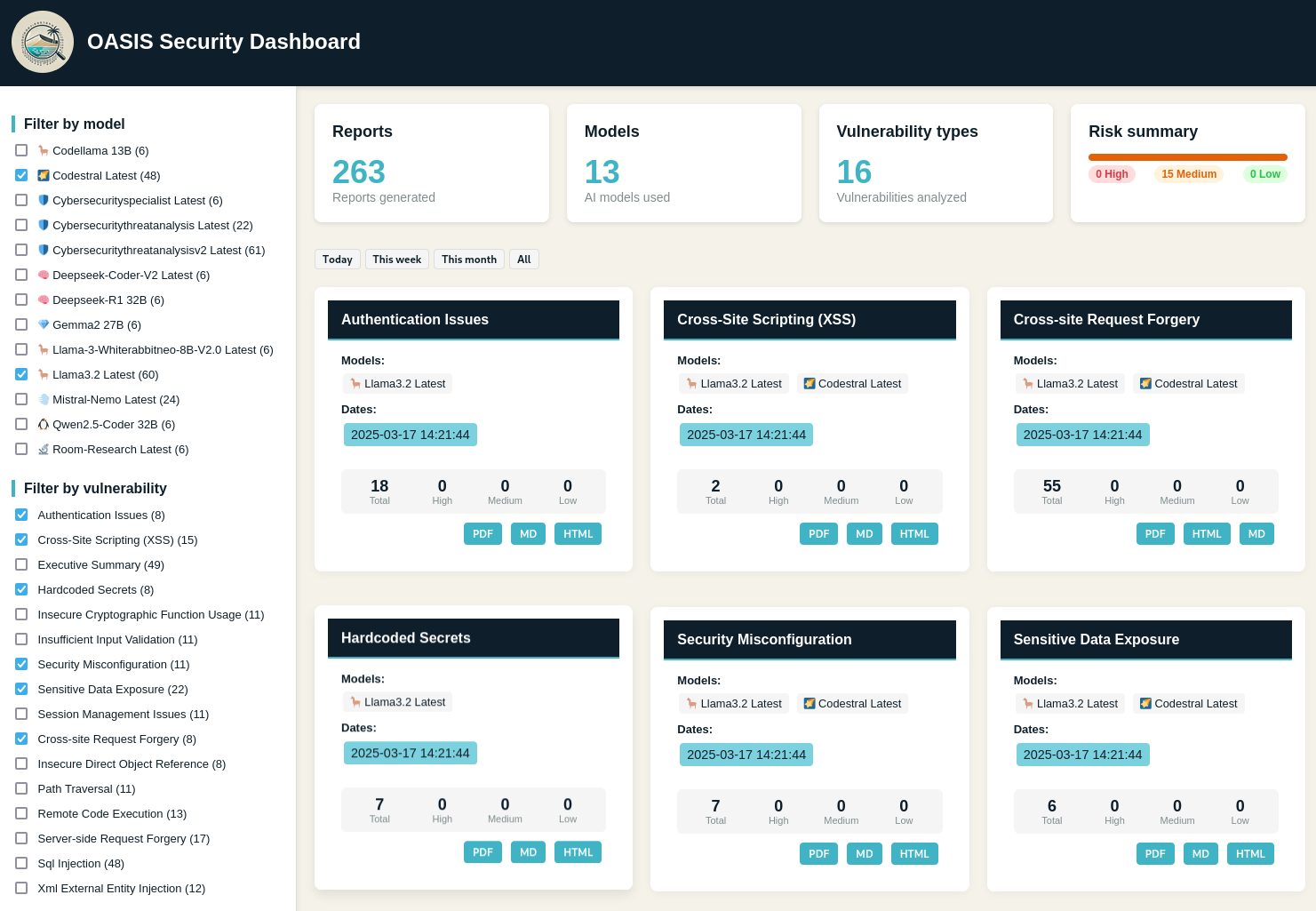
🌐 Web Interface
OASIS includes a web interface to view and explore security reports:
# Start the web interface with default settings (localhost:5000)
oasis --input [path_to_analyze] --web

# Start with custom port and expose to all network interfaces
oasis --input [path_to_analyze] --web --web-port 8080 --web-expose all

# Start with a specific password
oasis --input [path_to_analyze] --web --web-password mysecretpassword
Security Features
- Password Protection: By default, a random password is generated and displayed in the console
- Network Isolation: By default, the server only listens on 127.0.0.1
- Custom Port: Configurable port to avoid conflicts with other services
When no password is specified, a secure random password will be generated and displayed in the console output. The web interface provides a dashboard to explore security reports, filter results, and view detailed vulnerability information.
📝 Changelog
See CHANGELOG.md for the latest updates and changes.
🤝 Contributing
Contributions are welcome! Please feel free to submit a Pull Request. Check out our Contributing Guidelines for more details.
Alternatively, you can also contribute by reporting issues or suggesting features.
Come and join our Discord server to discuss the project.
📄 License
GPL v3 - feel free to use this project for your security needs.
🙏 Acknowledgments
- Built with Ollama
- Uses WeasyPrint for PDF generation
- Uses Jinja2 for report templating
- Special thanks to all contributors and the open-source community
📫 Support
If you encounter any issues or have questions, come asking help on our Discord server or please file an issue.