ComfyUI-PainterI2V 此节点由抖音博主:绘画小子 制作。
Wan2.2 图生视频增强节点,专门针对4步LoRA(如 lightx2v)的慢动作问题 进行优化。
2026-7-25,为方便节点升级更新,我所有节点包括PainterI2V,都集成到一个节点包内,项目地址:https://github.com/princepainter/ComfyUI-PainterNodes
欢迎使用!
🛠 解决的问题
-
✅ 1.减少慢动作:提升运动幅度 15-50%
-
✅ 2.增强运镜:让运镜提示词更听话,运镜幅度更大
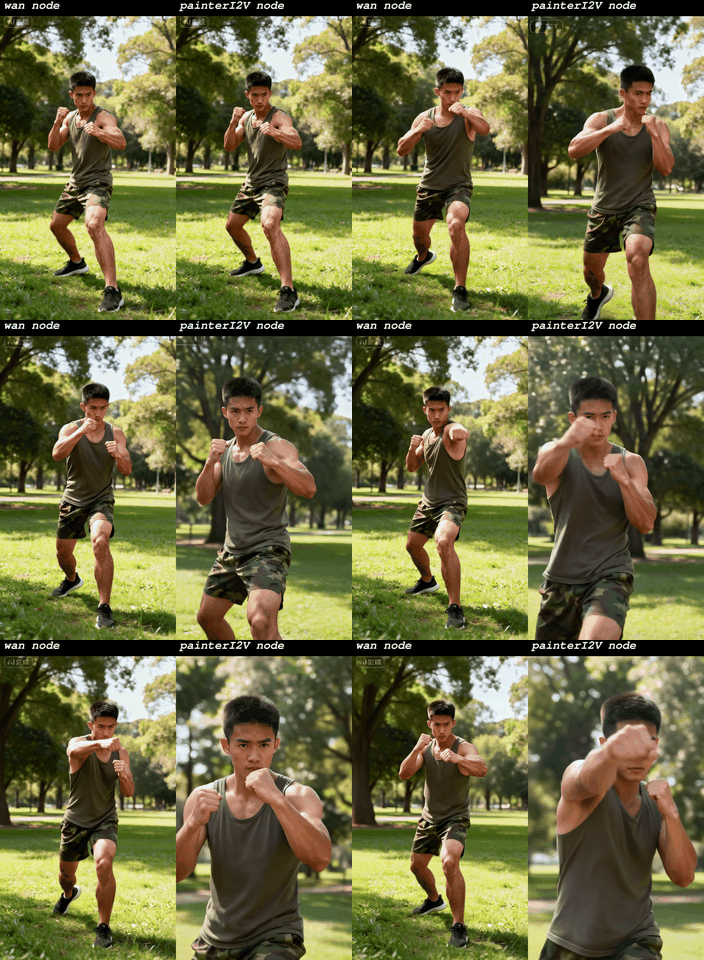
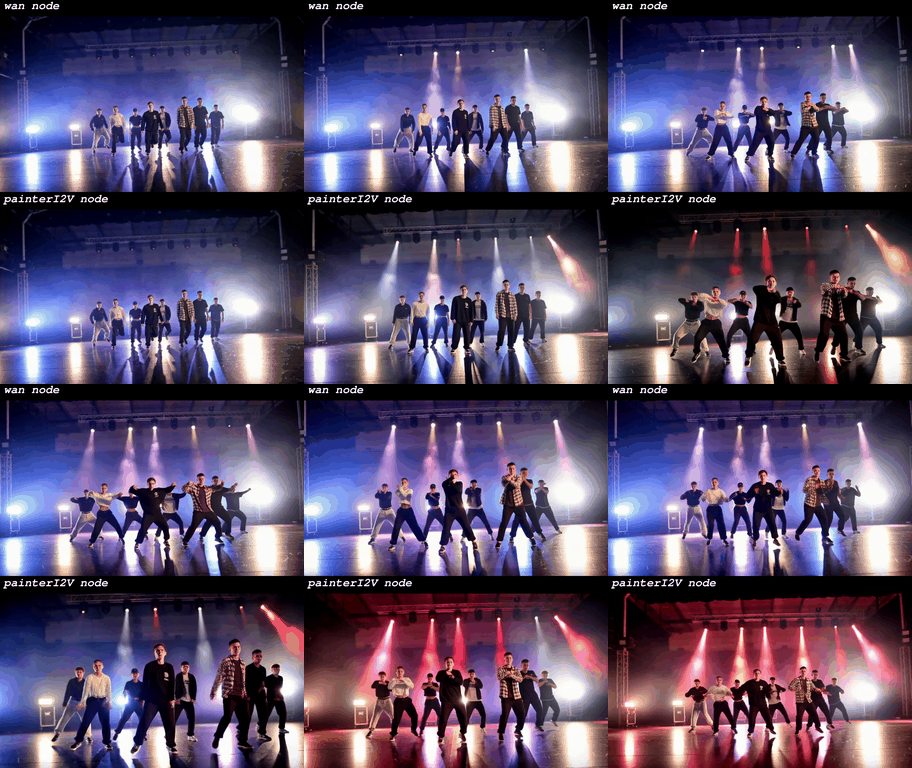
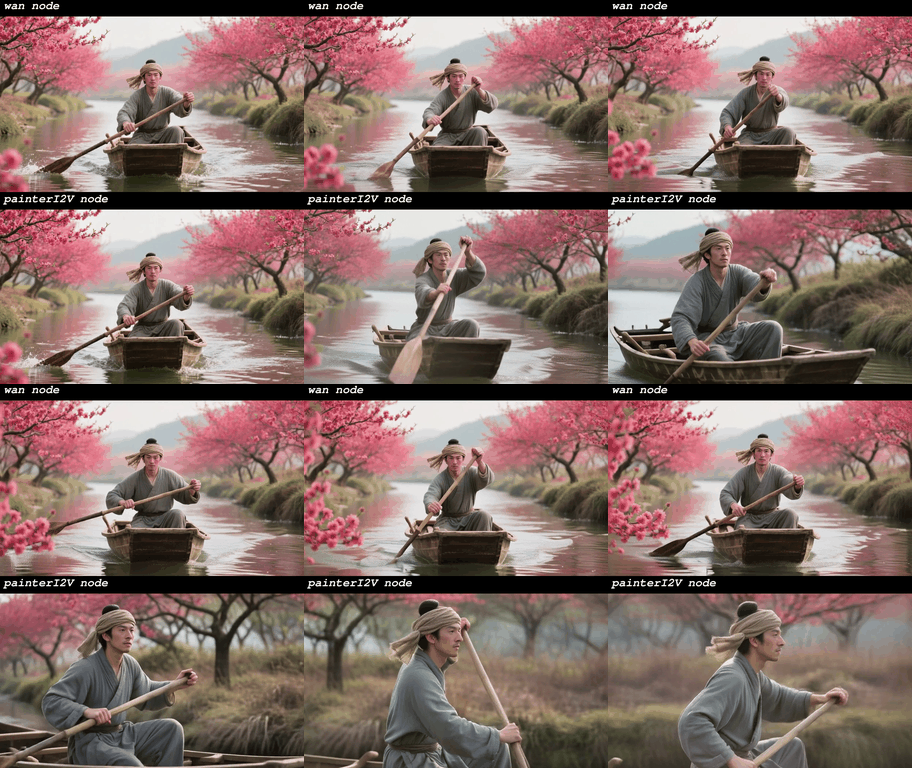
和wan2.2官方节点效果对比
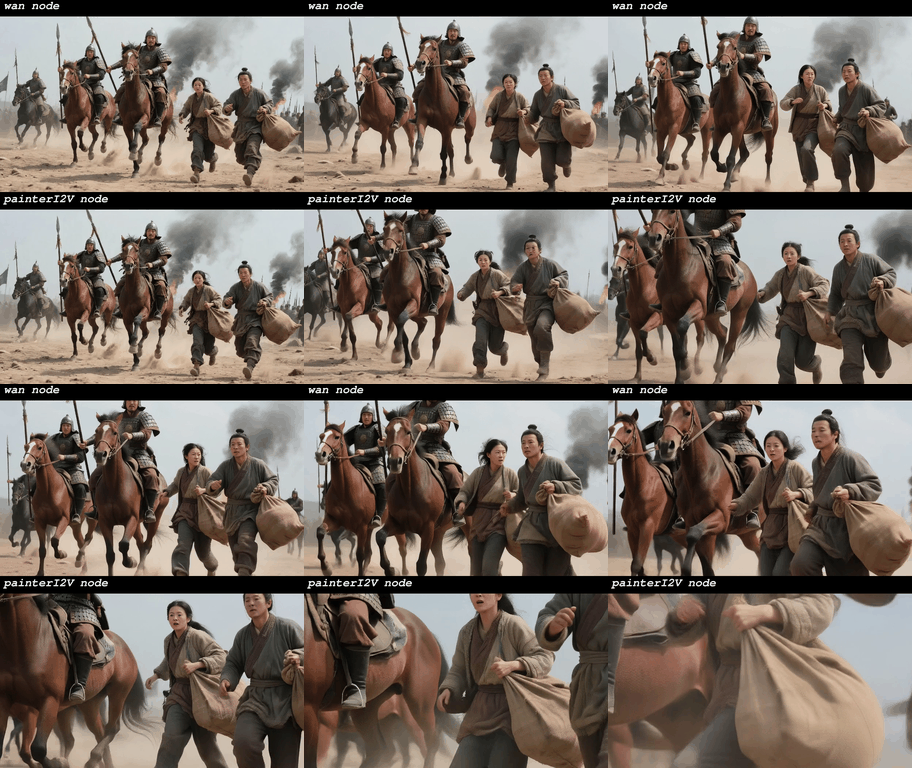
motion_amplitude=1.2
motion_amplitude=1.15
motion_amplitude=1.15
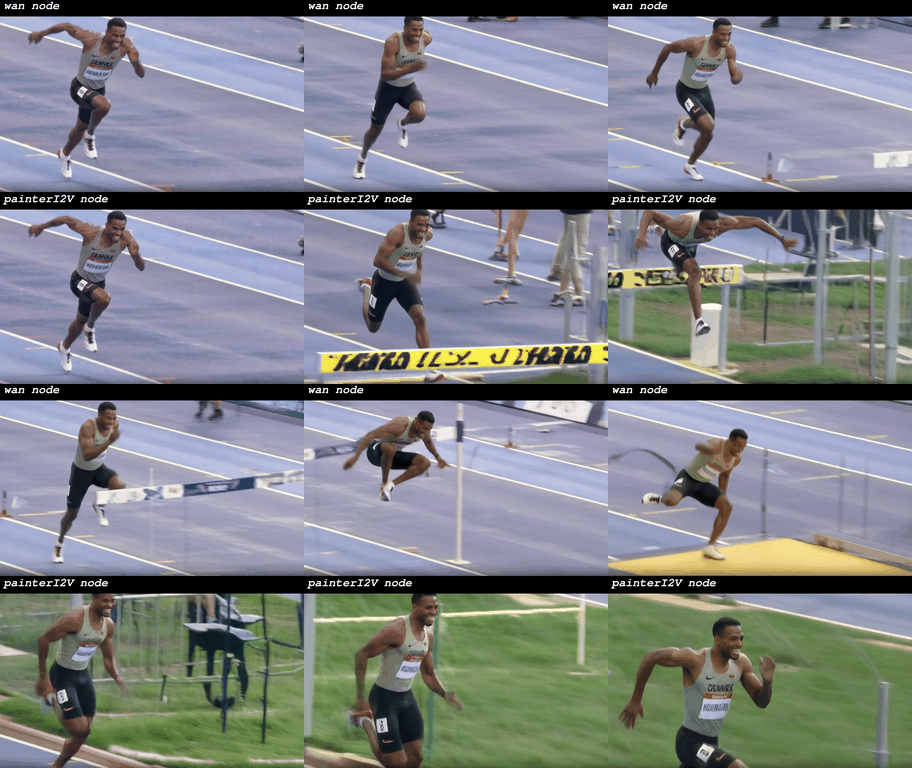
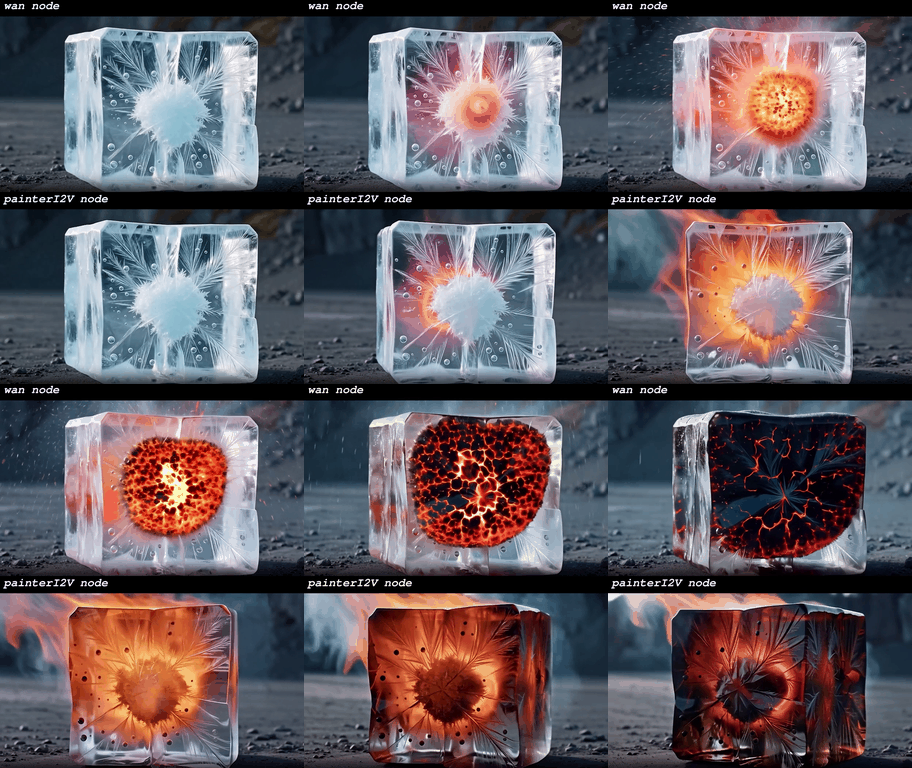
motion_amplitude=1.5
motion_amplitude=1.2
motion_amplitude=1.15
以上视频对比效果,我是使用wan2.2官方模型+light2v 4步i2v lora V1.0做的测试(见下图),其他模型使用效果有待各位自行测试

节点特点
- 单帧输入优化:专为wan2.2单帧图生视频设计
- 即插即用:完全兼容原版 Wan2.2 工作流
📦 安装
方法 1: ComfyUI Manager(推荐)
- 打开 ComfyUI Manager
- 搜索 PainterI2V
- 点击安装
方法 2: 手动安装
# 进入ComfyUI的custom_nodes目录
cd ComfyUI/custom_nodes

# 克隆仓库
git clone https://github.com/princepainter/ComfyUI-PainterI2V.git
重启ComfyUI
💡 使用方法
替换节点
在工作流中将 WanImageToVideo 替换为 PainterI2V

参数设置
motion_amplitude: 1.15(推荐起始值)- 其他参数与原版保持一致
场景参数推荐
| 运动类型 | 推荐参数 | 示例提示词 |
|---|---|---|
| 快速(跑步 / 跳跃) | 1.25–1.35 | "快速向前奔跑" |
| 正常(走路 / 挥手) | 1.10–1.20 | "流畅地行走" |
| 动态增强 | 1.00–1.10 | "略微增强动态和运镜" |
提示词优化
- 明确描述运动节奏,如 “快速奔跑”、“流畅行走”
- 避免模糊描述如 “移动”、“走动”
🔬 技术细节
| 参数值 | 运动提升 | 亮度变化 | 适用场景 |
|---|---|---|---|
| 1.0(原版) | 0% | 无 | 和WAN原版节点无区别 |
| 1.15(默认) | +15% | 无 | 通用场景 |
| 1.3 | +30% | 无 | 体育运动 |
| 1.5 | +50% | 无 | 极限运动 |
核心算法原理
- 亮度保护的运动缩放:放大运动向量前分离亮度均值
- 零 latent 初始化:严格保持 4 步 LoRA 的时序依赖链
- 参考帧增强:使用
reference_latents保持主体一致性,不约束运动
⚡ 进阶技巧
- 最佳效果:配合强运动提示词使用
- 运动过快:每次减少
motion_amplitude0.05 - 仍然偏慢:可适当增大到 1.4
🙏 致谢
-
Wan2.2 团队:提供惊人的视频生成模型
-
ComfyUI 社区:灵活的节点系统
🙏如果这个项目对你有帮助,请给颗星 ⭐️ 支持一下! -
ComfyUI-Painterl2V
This node is created by Douyin creator: 绘画小子
PainterI2V node that specifically fixes the slow-motion issue in 4-step LoRAs (e.g., lightx2v).
2025-12-30现在已经推出升级版PainterI2Vadvanced,建议使用。项目地址:https://github.com/princepainter/PainterI2Vadvanced
The comparative effects in the above video are from my test using the official Wan2.2 model + Light2v 4-step I2V LoRA V1.0. The performance of other models awaits your own testing .
If you're using KJ's wan2.2-i2v workflow, use this node specifically developed for KJ — the effect is consistent.https://github.com/princepainter/ComfyUI-PainterI2VforKJ
🛠 Problems Solved
- ✅ Reduces Slow-Motion Drag: Increases motion amplitude by 15-50%
- ✅ Enhance camera movement: Make the camera movement prompts more responsive and increase the movement amplitude.
- ✅ Optimized for Single Frame: Designed specifically for single-frame image-to-video workflows
- ✅ Plug & Play: Fully compatible with original Wan2.2 workflows
📦 Installation
Method 1: ComfyUI Manager (Recommended)
- Open ComfyUI Manager
- Search for PainterI2V
- Click Install
Method 2: Manual Installation
# Navigate to ComfyUI's custom_nodes directory
cd ComfyUI/custom_nodes

# Clone the repository
git clone https://github.com/princepainter/ComfyUI-PainterI2V.git
💡 Usage Guide
Replace the Node
In your workflow, replace WanImageToVideo with PainterI2V.
Parameter Settings
motion_amplitude: 1.15 (recommended starting value)- Keep all other parameters consistent with the original node.
Recommended Parameters by Scene
| Motion Type | Recommended Value | Example Prompt |
|---|---|---|
| Fast (running / jumping) | 1.25–1.35 | "Running forward quickly" |
| Normal (walking / waving) | 1.10–1.20 | "Walking smoothly" |
| Motion Enhancement | 1.00–1.10 | "Slightly enhance motion and camera movement" |
Prompt Optimization Tips
- Clearly describe motion rhythm, e.g., “run fast”, “walk smoothly”
- Avoid vague terms like “move” or “walk around”
🔬 Technical Details
| Parameter | Motion Boost | Brightness Change | Best For |
|---|---|---|---|
| 1.0 (original) | 0% | None | No difference from the original WAN node |
| 1.15 (default) | +15% | None | General use |
| 1.3 | +30% | None | Sports action |
| 1.5 | +50% | None | Extreme motion |
Core Algorithm Principles
- Brightness-Protected Motion Scaling: Separates luminance mean before scaling motion vectors
- Zero Latent Initialization: Strictly preserves the temporal dependency chain required by 4-step LoRAs
- Reference Frame Enhancement: Uses
reference_latentsto maintain subject consistency without constraining motion
⚡ Advanced Tips
- Best results: Use with strong motion-related prompts
- Motion too fast? Reduce
motion_amplitudeby 0.05 increments - Still too slow? Try increasing up to 1.4
🙏 Acknowledgements
- Wan2.2 Team: For the amazing video generation model
- ComfyUI Community: For the flexible node system
- Contributors & testers: For helping refine this node
If you find this project helpful, please give it a star ⭐ to show your support!