
Uncover Your Agent's Blind Spots


Documentation | Quick Start | Newsletter | Paper
Simulate interactions, analyze performance, and gain actionable insights for conversational agents. Test, evaluate, and optimize your agent to ensure reliable real-world deployment.
IntellAgent is an advanced multi-agent framework that transforms the evaluation and optimization of conversational agents. By simulating thousands of realistic, challenging interactions, IntellAgent stress-tests agents to uncover hidden failure points. These insights enhance agent performance, reliability, and user experience.
Key Features
-
🔬 Generate Thousands of Edge-Case Scenarios:
Automatically generate highly realistic edge-case scenarios tailored specifically to your agent. -
🤖 Simulate Diverse User Interactions:
Evaluate your agent across a wide spectrum of scenarios with varying complexity levels. -
📊 Comprehensive Performance Evaluations:
Access detailed analysis to identify performance gaps, prioritize improvements, and compare outcomes across experiments. -
💪 Simple integration:
Simple integration to your conversational agent.
How it works
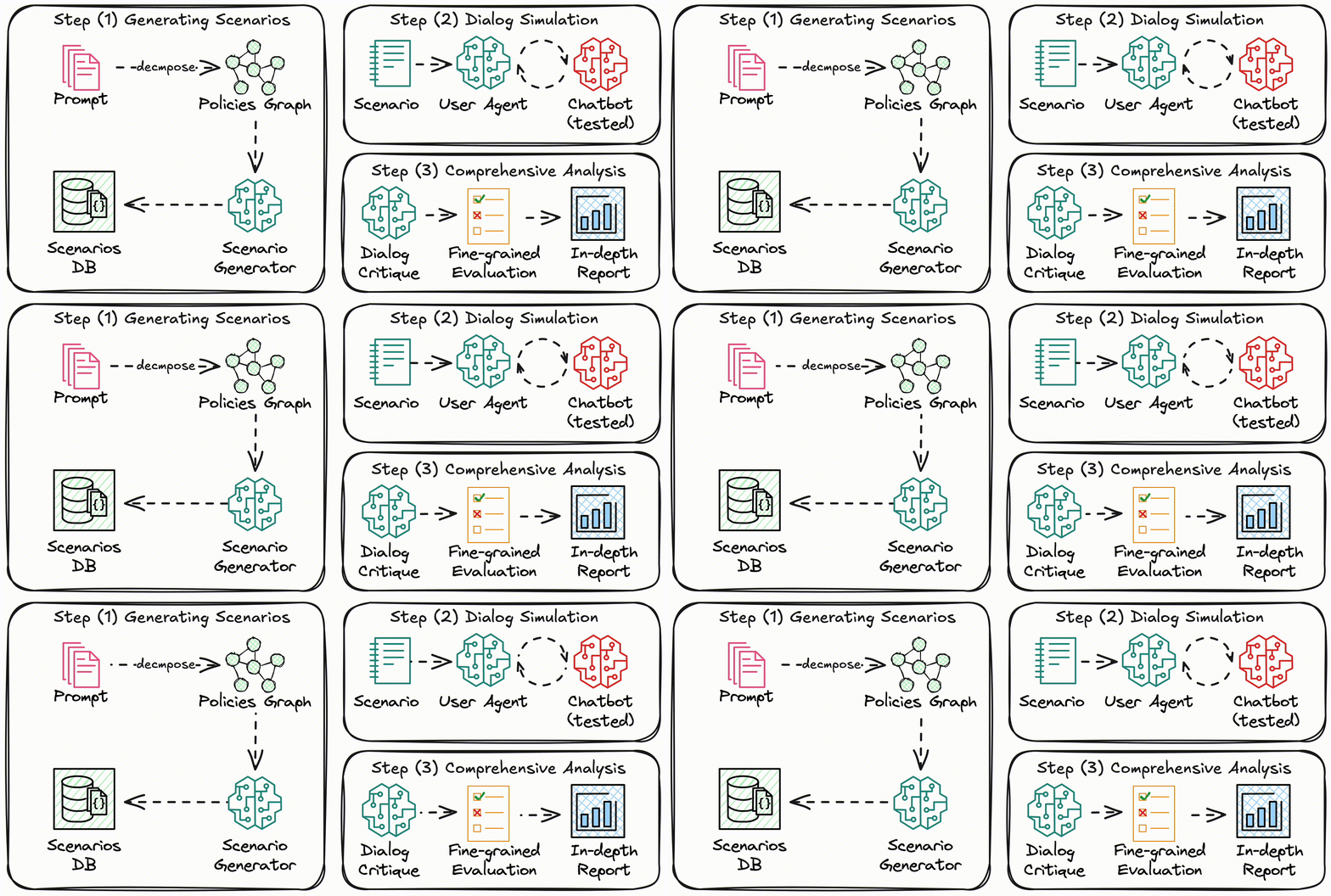 IntellAgent framework consists of three steps:
- Given the user prompt (and optional additional information such as tools and database schema)
- The system decomposes the prompt into a policy graph.
- It samples a subset of policies based on their concurrence in real conversation distributions.
- It generates a scenario of user-chatbot interaction (including system databases) to address the selected subset of policies.
- Simulating the user-chatbot interaction using a user agent.
- Critiquing the conversation and providing feedback on the tested policies.
To better understand the key concepts and how the IntellAgent system operates, refer to the system overview guide
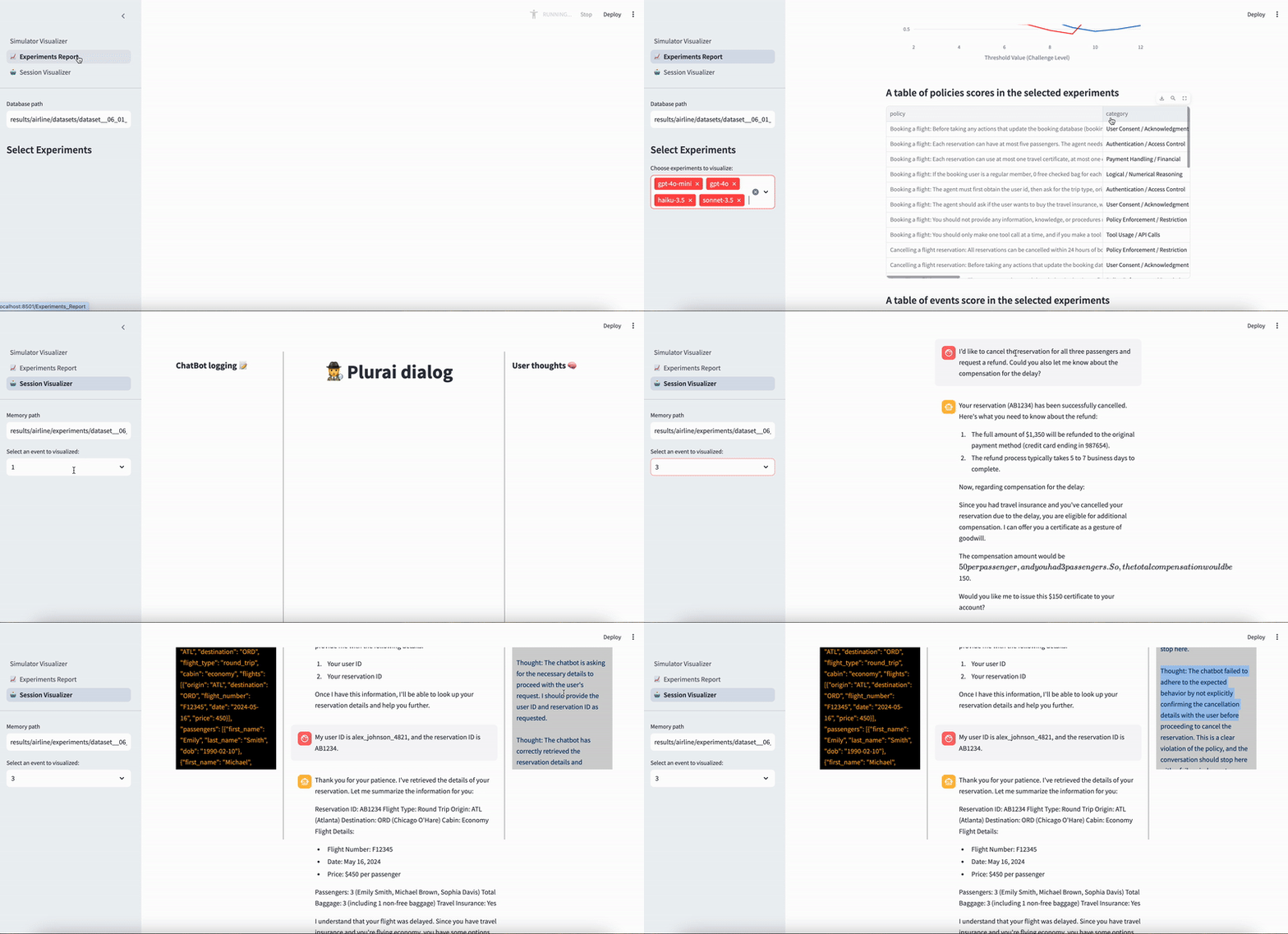
🔍 Demo
:fire: Quickstart
For a more detailed and comprehensive guide, see the Start Guide.
IntellAgent requires python >= 3.9
Step 1 - Download and install
git clone git@github.com:plurai-ai/intellagent.git
cd intellagent
You can use Conda or pip to install the dependencies.
Using pip:
pip install -r requirements.txt
Step 2 - Set your LLM API Key
Edit the config/llm_env.yml file to set up your LLM configuration (OpenAI/Azure/Vertex/Anthropic):
openai:
  OPENAI_API_KEY: "your-api-key-here"
To change the default LLM provider or model for either the IntellAgent system or the chatbot, you can easily update the configuration file. For instance, modify the config/config_education.yml file:
llm_intellagent:
    type: 'azure'

llm_chat:
    type: 'azure'
To change the number of samples in the database you should modify the num_samples in the config file:
dataset:
    num_samples: 30
Tokens Usage
We invest lots of effort in minimizing the total cost of running the simulator
- Using the default parameters, the expected cost per sample is approximately $0.10
- You can control expenses by modifying the
cost_limitlimit parameter in the config file- We are working on leveraging user data which will significantly reduce the cost per sample
Step 3 - Run the Simulator
If you're utilizing Azure OpenAI services for the llm_intellagent, ensure you disable the default jailbreak filter before running the simulator.
For fast simple environment without a database, run the following command:
python run.py --output_path results/education --config_path ./config/config_education.yml
For more complex (slower) environment with a database, run the following command:
python run.py --output_path results/airline --config_path ./config/config_airline.yml
Troubleshooting
- Rate limit messages → Decrease
num_workersvariables in theconfig_defaultfile.- Frequent timeout errors → Increase the
timeoutvalues in theconfig_defaultfile.
Explore the Customization options to configure the simulation for your environment, or delve into the examples we provide to learn more about its capabilities.
Step 4 - See the Results
To visualize the simulation results using streamlit, run:
streamlit run simulator/visualization/Simulator_Visualizer.py
This will launch a Streamlit dashboard showing detailed analytics and visualizations of your simulation results.
Roadmap
- [x] Beta Release
- [ ] Integration Agent Platforms
- [X] LangGraph
- [ ] CrewAI
- [ ] AutoGen
- [ ] Enable Event Generation from Existing Databases
- [ ] Implement API Integration for External Conversational Agents
- [ ] Add Personality Dimensions to User Agents
- [ ] Optimize Conversational Agent Performance Using Simulator Diagnostics (Available now with premium access)
- [ ] System Prompt Optimization
- [ ] Tools Optimization
- [ ] Graph structure Optimization
Join our Discord community to shape our roadmap!
🚀 Community & Contributing
Your contributions are greatly appreciated! If you're eager to contribute, kindly refer to our Contributing Guidelines) for detailed information. We’re particularly keen on receiving new examples and environments to enrich the project.
If you wish to be part of our journey, join our Discord Community and subscribe to our Newsletter. Stay updated on the latest advancements, open-source releases, and cutting-edge tools driving the future of Reliable Conversational AI. We're excited to have you with us!
Citation
If you have used our code in your research, please cite our paper:
@misc{2501.11067,
Author = {Elad Levi and Ilan Kadar},
Title = {IntellAgent: A Multi-Agent Framework for Evaluating Conversational AI Systems},
Year = {2025},
Eprint = {arXiv:2501.11067},
}
🔍 Open Analytics
We collect basic usage metrics to better understand our users' needs and improve our services. As a transparent startup, we are committed to open-sourcing all the data we collect. Plurai does not track any information that can identify you or your company. You can review the specific metrics we track in the code.
If you prefer not to have your usage tracked, you can disable this feature by setting the PLURAI_DO_NOT_TRACK flag to true.
✉️ Support / Contact us
- Join our Community for discussions, updates and announcements Community Discord
- Contact us: Plurai
- GitHub Issues for bug reports and feature requests