


Robotics Toolbox for MATLAB® release 10
Which toolbox do I want?
| If you are… | use | get it from |
|---|---|---|
| starting something new | Robotics Toolbox for Python, actively developed, and used by the 3rd edition of Robotics, Vision & Control | pip install roboticstoolbox-python, or GitHub |
| working in MATLAB, or using the 2nd edition of Robotics, Vision & Control (2017) | this toolbox, release 10.4 | RTB.mltbx: open it in MATLAB and it installs itself (see Installation) |
| using the 1st edition of Robotics, Vision & Control (2011), or a course built on release 9 | release 9.10 | the Robotics Toolbox page, with the older releases |
| using the MATLAB version of the 3rd edition of Robotics, Vision & Control (2023) | MathWorks' Robotics System Toolbox and related toolboxes, not this one | MathWorks |
This toolbox is no longer actively developed, and questions and issues here may go unanswered. The FAQ covers the common problems, most of which come from an incorrect MATLAB path; the Google group has years of past discussion.
Synopsis
This toolbox brings robotics specific functionality to MATLAB, exploiting the native capabilities of MATLAB (linear algebra, portability, graphics).
The Toolbox uses a very general method of representing the kinematics and dynamics of serial-link manipulators as MATLAB® objects – robot objects can be created by the user for any serial-link manipulator and a number of examples are provided for well known robots from Kinova, Universal Robotics, Rethink as well as classical robots such as the Puma 560 and the Stanford arm.
The toolbox also supports mobile robots with functions for robot motion models (unicycle, bicycle), path planning algorithms (bug, distance transform, D*, PRM), kinodynamic planning (lattice, RRT), localization (EKF, particle filter), map building (EKF) and simultaneous localization and mapping (EKF), and a Simulink model a of non-holonomic vehicle. The Toolbox also including a detailed Simulink model for a quadrotor flying robot.
Advantages of the Toolbox are that:
- the code is mature and provides a point of comparison for other implementations of the same algorithms;
- the routines are generally written in a straightforward manner which allows for easy understanding, perhaps at the expense of computational efficiency. If you feel strongly about computational efficiency then you can always rewrite the function to be more efficient, compile the M-file using the MATLAB compiler, or create a MEX version;
- since source code is available there is a benefit for understanding and teaching.
This Toolbox dates back to 1993 and significantly predates the Robotics Systems Toolbox® from MathWorks. The former is free, open and not supported, while the latter is a fully supported commercial product.
Code Example
>> mdl_puma560
>> p560
p560 =

Puma 560 [Unimation]:: 6 axis, RRRRRR, stdDH, fastRNE
 - viscous friction; params of 8/95;
+---+-----------+-----------+-----------+-----------+-----------+
| j |     theta |         d |         a |     alpha |    offset |
+---+-----------+-----------+-----------+-----------+-----------+
|  1|         q1|          0|          0|     1.5708|          0|
|  2|         q2|          0|     0.4318|          0|          0|
|  3|         q3|    0.15005|     0.0203|    -1.5708|          0|
|  4|         q4|     0.4318|          0|     1.5708|          0|
|  5|         q5|          0|          0|    -1.5708|          0|
|  6|         q6|          0|          0|          0|          0|
+---+-----------+-----------+-----------+-----------+-----------+

>> p560.fkine([0 0 0 0 0 0])  % forward kinematics
ans =
         1         0         0    0.4521
         0         1         0     -0.15
         0         0         1    0.4318
         0         0         0         1
We can animate a path
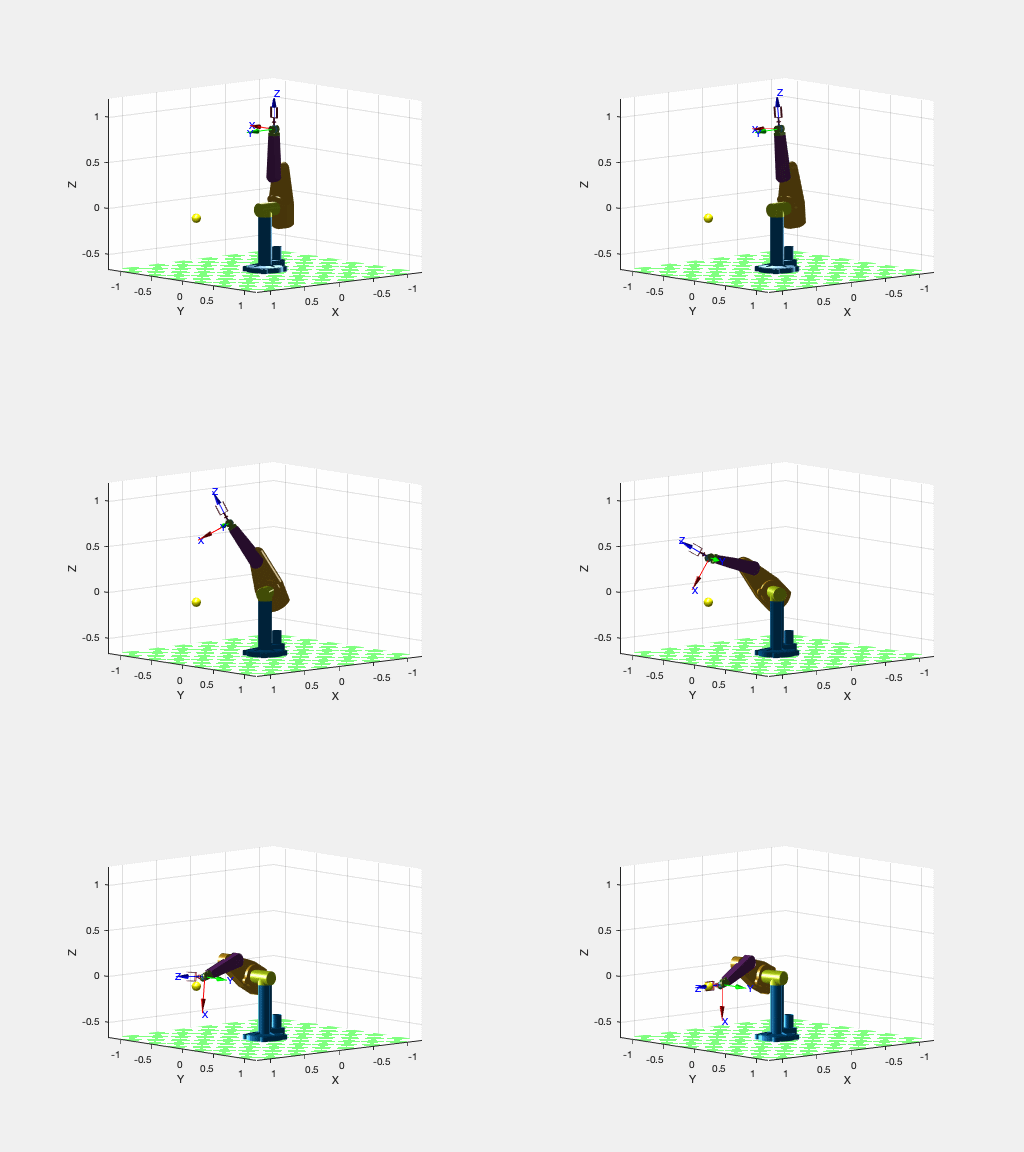
mdl_puma560

p = [0.8 0 0];
T = transl(p) * troty(pi/2);
qr(1) = -pi/2;
qqr = p560.ikine6s(T, 'ru');
qrt = jtraj(qr, qqr, 50);

plot_sphere(p, 0.05, 'y');
p560.plot3d(qrt, 'view', ae, 'movie', 'move2ball.gif');
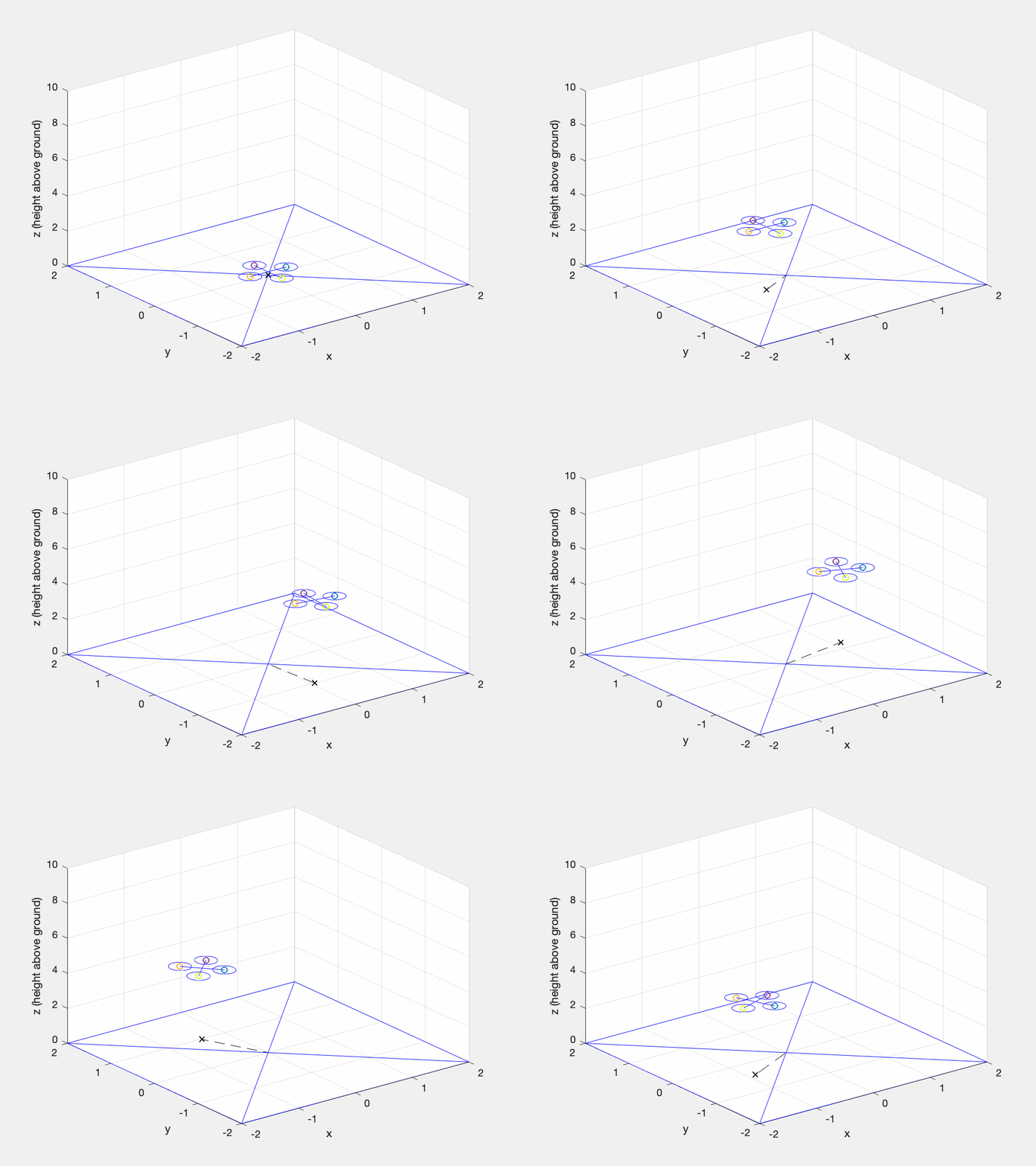
Quadrotor animation
Mobile robot lifting off and hovering over a point following a circular trajectory, while also slowly turning.
>> sl_quadrotor
Mobile robot animation
Car-like mobile robot doing a 3-point turn computed using the Reeds-Shepp planner
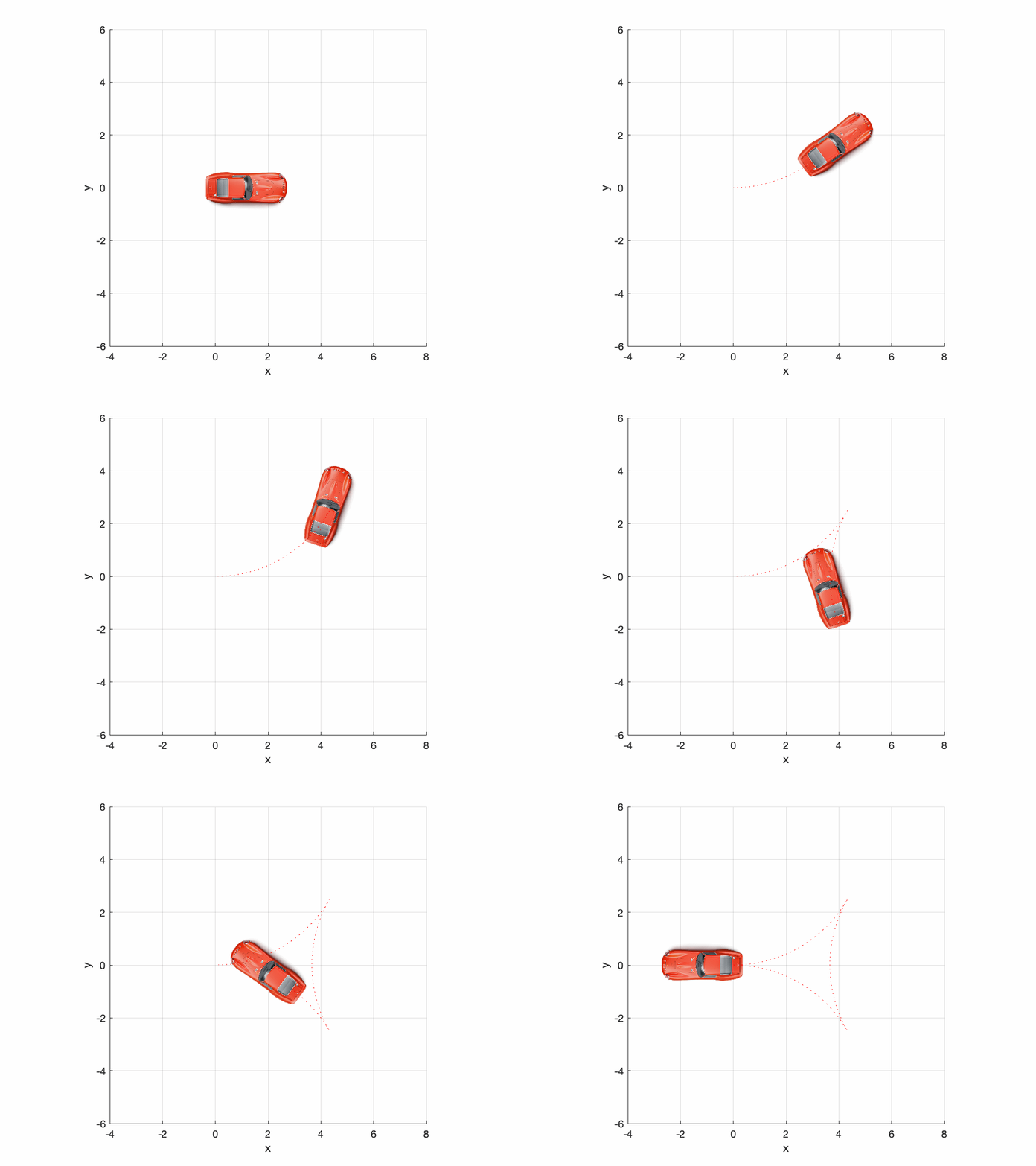
q0 = [0 0 0]'; % initial configuration [x y theta]
qf = [0 0 pi]'; % final configuration
maxcurv = 1/5;   % 5m turning circle
rs = ReedsShepp(q0, qf, maxcurv, 0.05)

% set up a vehicle model for animation
[car.image,~,car.alpha] = imread('car2.png');
car.rotation = 180; % degrees
car.centre = [648; 173]; % pix
car.length = 4.2; % m

% setup the plot
clf; plotvol([-4 8 -6 6])
a = gca;
a.XLimMode = 'manual';
a.YLimMode = 'manual';
set(gcf, 'Color', 'w')
grid on
a = gca;
xyzlabel

% now animate
plot_vehicle(rs.path, 'model', car, 'trail', 'r:', 'movie', '3point.gif');
Particle filter localization animation
Mobile robot localizing from beacons using a particle filter.
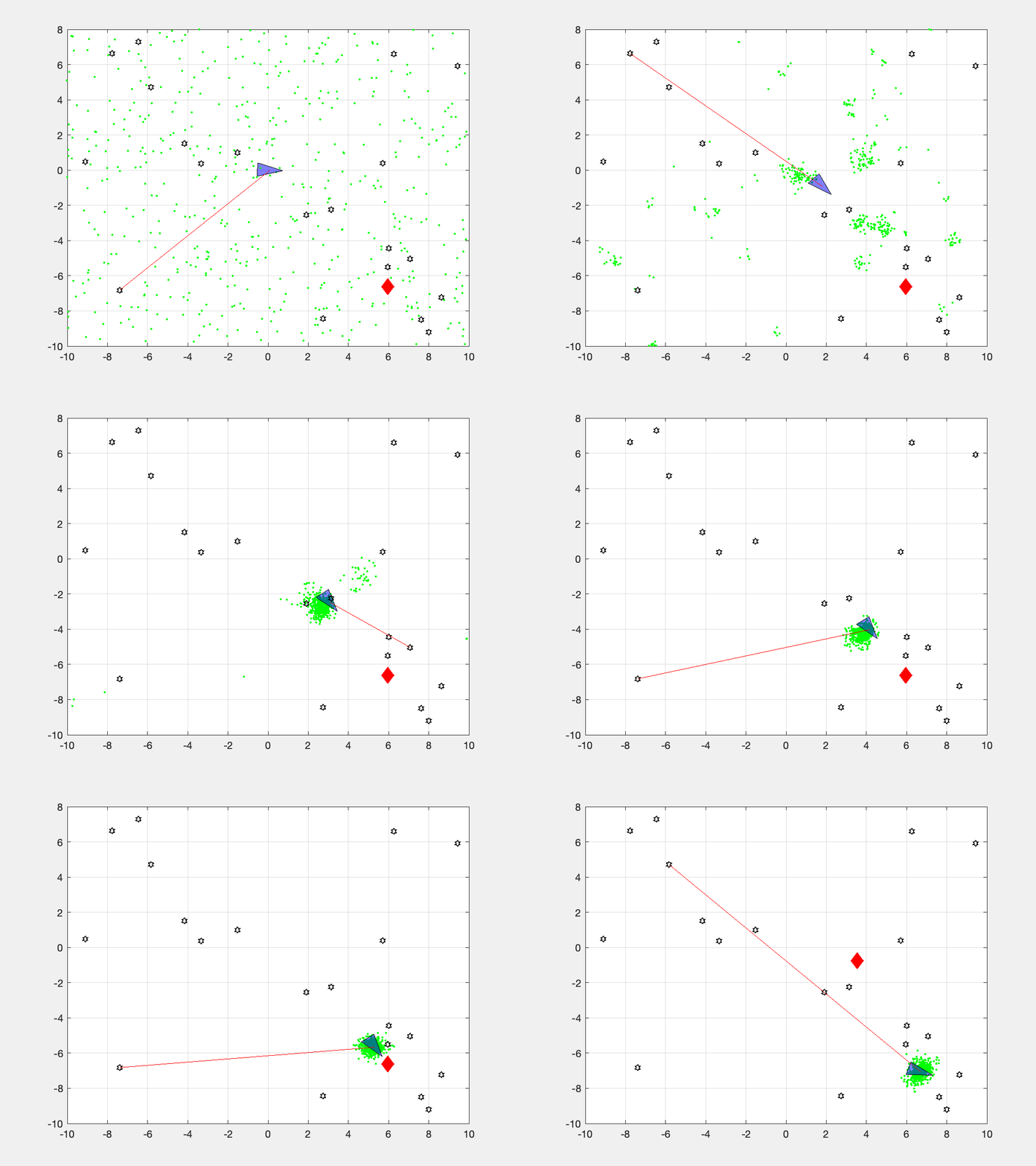
V = diag([0.1, 1*pi/180].^2);
veh = Vehicle(V);
veh.add_driver( RandomPath(10) );
map = Map(20, 10);
W = diag([0.1, 1*pi/180].^2);
L = diag([0.1 0.1]);
Q = diag([0.1, 0.1, 1*pi/180]).^2;

pf = ParticleFilter(veh, sensor, Q, L, 1000, 'movie', 'pf.mp4');
pf.run(100);
A fully commented version of this is provided in the LiveScript demos/particlefilt.mlx.
What's new in release 10
- All code related to pose representation has been split out into the Spatial Math Toolbox. This repo is now a dependency.
SerialLinkclass has atwistsmethod which returns a vector ofTwistobjects, one per joint. This supports the product of exponential formulation for forward kinematics and Jacobians.- a prototype URDF parser
Installation
Install the packaged toolbox (simplest)
Download RTB.mltbx and open it in MATLAB (double-click it, or drag it into the Command Window). MATLAB installs the toolbox and sets up its path, permanently. Everything it needs, including the spatial maths functions, is included. Manage or remove it later from Home → Add-Ons → Manage Add-Ons.
Install from shared MATLAB Drive folder
This will work for MATLAB Online or MATLAB Desktop provided you have MATLAB drive setup.
- Click on the appropriate link below and an invitation to share will be emailed to the address associated with your MATLAB account:
- Accept the invitation.
- A folder named RVC1 or RVC2 will appear in your MATLAB drive folder.
- Use the MATLAB file browser and navigate to the folder RVCx/rvctools and double-click the script named startup_rvc.m
Note that this is a combo-installation that includes the Machine Vision Toolbox (MVTB) as well.
Install from github
You need to have a recent version of MATLAB, R2016b or later.
The Robotics Toolbox for MATLAB has dependency on two other GitHub repositories: spatialmath-matlab and toolbox-common-matlab.
To install the Toolbox on your computer from github follow these simple instructions.
From the shell:
mkdir rvctools
cd rvctools
git clone https://github.com/petercorke/robotics-toolbox-matlab.git robot
git clone https://github.com/petercorke/spatialmath-matlab.git smtb
git clone https://github.com/petercorke/toolbox-common-matlab.git common
make -C robot
The last command builds the MEX files and Java class files. Then, from within MATLAB
>> addpath rvctools/common  %  rvctools is the same folder as above
>> startup_rvc
The second line sets up the MATLAB path appropriately but it's only for the current session. You can either:
- Repeat this everytime you start MATLAB
- Add the MATLAB commands above to your
startup.mfile - Once you have run startup_rvc, run
pathtooland push theSavebutton, this will save the path settings for subsequent sessions.
Online resources
- Robotics Toolbox page, with all releases
- FAQ
- Discussion group (archive of past questions)
- Robotics Toolbox for Python, the actively developed successor
License
This toolbox is released under GNU LGPL.
Other MATLAB toolboxes for robotics
- Compliant joint toolbox, MATLAB and Simulink blocks to simulate robots with compliant joints
- ARTE: Robotics Toolbox for Education, a MATLAB toolbox focussed on industrial robotic manipulators, with rich 3D graphics, teach pendants and the ABB RAPID language.
- RTB interface to V-REP, a MATLAB class-based interface to the V-REP robotics simulator. Includes an implementation for the TRS task.
- MATLAB Interface for Mobile Robots (US NPL), a pure MATLAB toolbox for control of P3 mobile robots.
- Kuka-Sunrise toolbox, A Toolbox used to control KUKA iiwa 7 R 800 robot from an external computer using MATLAB.
- Robotics System Toolbox, MathWorks proprietary.