Special thanks to:
Moshi: Terminals weren’t made for phones. Moshi is.
A mobile terminal designed for AI coding agents.
herdr-reviewr

install · quick start · controls · scopes · configuration · limitations · changelog
A code-review pane for herdr. Your agent writes the code. You read its diff in a pane beside the chat, comment on the lines, and send the notes back. You never leave the terminal.
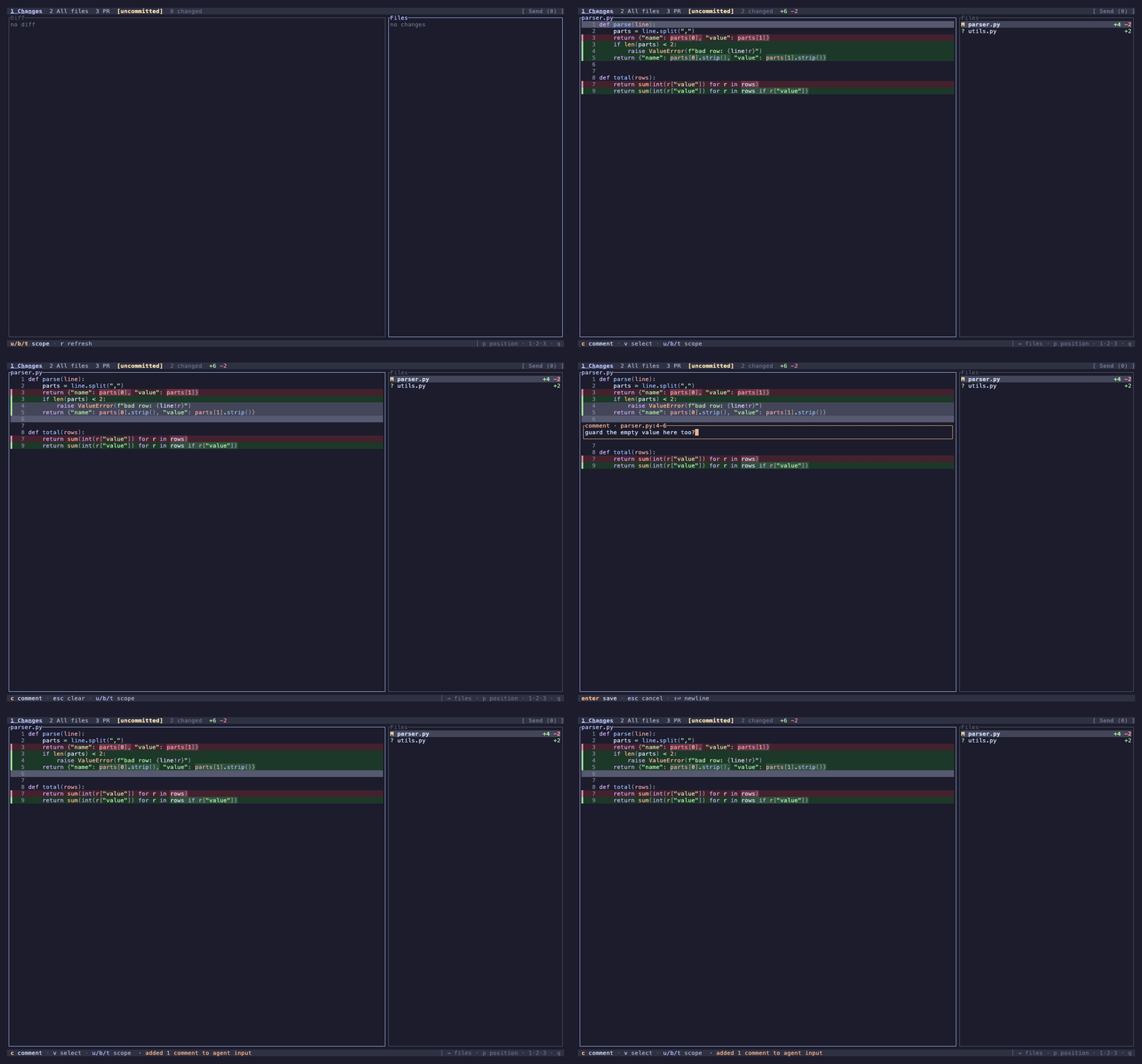
One persistent pane, pointed at a git worktree:
- Diff review — the agent's changed files, syntax-highlighted.
- Four diff scopes — uncommitted, branch, last turn, commits.
- Last-turn diff — what the worktree's latest turn changed, on its own.
- Line comments — comment on a line or a range. Then send it to the agent.
- Text selection — drag over any text to copy it, like an editor.
- File viewer — any file's current content from the whole worktree.
- Search — fuzzy file names and live code grep across the worktree, powered by fff.
- Find in file — search the open file and step between every match.
- PR view — the branch's pull request in the pane, read-only.
- Markdown review — flip a
.mdfile to rendered withm. - Themes — 20 palettes in dark and light.
It never edits your worktree and sends nothing on its own. The PR tab reads GitHub, GitLab, or Azure DevOps and never posts.
Requirements
- herdr ≥ 0.9.3 (the plugin system and its event socket).
- git on
PATH. - A truecolor terminal with Unicode box-drawing.
- macOS, Linux, or Windows.
gh(GitHub),glab(GitLab), oraz(Azure DevOps, with theazure-devopsextension), authenticated. Only the PR tab needs one.
Install
Prebuilt binaries, no Rust toolchain needed:
herdr plugin install persiyanov/herdr-reviewr
Open it in the current workspace:
herdr plugin action invoke open --plugin persiyanov.reviewr
reviewr auto-opens when herdr creates a workspace for a worktree, whether the checkout is new or
opened from disk. auto_open = false keeps it hidden until you ask
(Configuration).
To update, reinstall. Your config is keyed by plugin id and survives:
herdr plugin uninstall persiyanov.reviewr && herdr plugin install persiyanov/herdr-reviewr
Without herdr, reviewr runs as a plain terminal app. Grab a release binary and point it at a repo:
herdr-reviewr ~/some/repo
Everything works except Send and the last turn scope. Those need herdr around.
Quick start
Open reviewr next to your agent:
- Pick a file. Changed files are in the navigator.
j/kmoves, the diff follows. Or]walks the changes hunk by hunk, file after file. - Focus the diff.
Tabswitches panes. - Select lines.
v, thenj/kto extend (or click or drag the gutter). - Comment.
c, type,Enter. - Send.
ssends every comment to the agent's input.
The footer shows the next step. Press ? for every key that works right now.
For a shortcut, bind a key to the toggle in your herdr config (user config, not the plugin manifest):
[[keys.command]]
key = "cmd+r"
type = "plugin_action"
command = "persiyanov.reviewr.toggle"   # . — note the id, not the name
cmd+… chords reach herdr. Many macOS terminals swallow alt+… themselves.
Controls
The keys below are defaults. You can rebind every action, even to several keys at once (Keybindings).
Getting around
| Key | Action |
|---|---|
1 2 3 |
Switch tab — Changes / All files / PR |
u b t g |
Switch scope — uncommitted / branch / last turn / commits |
B |
Pick the base branch |
G |
Pick the commits to review |
j k · ↑ ↓ |
Move cursor |
] [ |
Jump to next / previous hunk |
f F |
Jump to next / previous file |
PageUp PageDown |
Move a page |
Ctrl+U Ctrl+D |
Move a half-page |
Tab |
Switch focus |
→ ← |
Expand / collapse, or scroll sideways |
/ |
Search files and code |
Ctrl+F |
Find in file |
: |
Jump to a line number (:0 first, :$ last) |
w |
Toggle line wrap |
m |
Flip markdown between rendered and source |
p |
Rotate navigator |
z |
Hide / show navigator |
< > |
Grow / shrink navigator |
r |
Refresh |
? |
Open shortcuts helper |
q |
Quit (asks first when comments are unsent) |
Q |
Quit and drop unsent comments, when asked |
Reviewing (in the diff)
| Key | Action |
|---|---|
v |
Select lines |
c |
Comment on line or selection |
e |
Edit the comment under the cursor, or open the file in your editor |
d |
Delete comment |
n N |
Jump to next / previous comment |
l |
List all comments |
s |
Send comments to agent |
y |
Copy comments to clipboard |
esc |
Clear selection |
In the comment box
| Key | Action |
|---|---|
Enter |
Save comment |
Esc |
Cancel |
Shift+Enter · Alt+Enter · Ctrl+J |
Insert newline |
Plus the usual caret moves: arrows, Home / End, Ctrl+A / Ctrl+E, Alt+b / Alt+f word
jumps, and Ctrl+W / Ctrl+U / Ctrl+K deletes.
PR tab (read-only)
| Key | Action |
|---|---|
j k |
Move through description and comments |
PageUp PageDown |
Scroll focused pane |
o |
Open PR in browser |
r |
Refresh |
The mouse works too. Drag over any text to select and copy it, double-click a word, triple-click a line. Click or drag the line-number gutter to comment. Click files, tabs, and links, and scroll with the wheel.
The three tabs
- Changes — the active scope's changed files with
+/-stats and totals in the header. - All files — any file's current content from the whole worktree, comments too. A collapsed folder with a changed file under it shows a dot. Ignored paths show dimmed.
- PR — a read-only mirror of the branch's pull request (GitHub, Azure DevOps) or merge request (GitLab): state, checks, description, and comments, rendered as markdown. reviewr never writes to the forge.
Diff scopes
- uncommitted — the working tree vs
HEAD(staged, unstaged, and untracked). - branch — the working tree vs the merge-base with the base branch: uncommitted plus
the branch's commits. The base is your repo's default branch until you pick another with
B(Base branch). - last turn — everything that changed in this worktree since its most recent turn started (Limitations).
- commits — one commit, or several in a row, picked with
G. Read what the agent committed one step at a time, without its unsaved edits mixed in.
reviewr starts in uncommitted. default_scope changes that. Switching with u/b/t/g
wins for the rest of the session. g without a pick opens the picker.
Every scope respects .gitignore, so build output never clutters Changes. To review a file,
track it. All files still browses any ignored path.
Configuration
CLI flags on the pane command:
| Flag | Default | Meaning |
|---|---|---|
--base |
auto | base for branch scope, any rev, overrides the pick |
--theme |
catppuccin |
UI + syntax theme (see below) |
--wrap |
on |
soft-wrap long diff lines (w toggles at runtime) |
Everything else lives in reviewr's config file:
~/.config/herdr/plugins/config/persiyanov.reviewr/config.toml
Create it if missing. It is reviewr's file. Settings in herdr's ~/.config/herdr/config.toml
never reach it. reviewr re-reads it whenever you save it, so edits apply without a relaunch.
The file accepts these keys:
theme = "tokyo-night"
default_scope = "branch"
markdown_view = "rendered"
navigator_position = "right"
toggle_placement = "overlay"
toggle_direction = "down"
auto_open = false
github_host = "github.example.com"
editor = "code -g {file}:{line}"

[keybindings]
comment = ["c", "ㅊ"]
select  = ["v", "ㅍ"]
A missing file or omitted key uses its default. An invalid file is rejected whole — the pane shows the error and recovers as soon as you save the fix.
Theme
One theme colors the whole UI, chrome and syntax together:
theme = "tokyo-night"
--theme overrides the file. Match your terminal's light or dark background. Available:
- Dark:
catppuccin,catppuccin-frappe,catppuccin-macchiato,dracula,nord,gruvbox,one-dark,solarized,monokai,tokyo-night,rose-pine,ayu,everforest. - Light:
catppuccin-latte,gruvbox-light,one-light,solarized-light,github-light,tokyo-night-day,rose-pine-dawn.
Names and accents match herdr's where both ship a palette, so focus in the pane matches herdr's frame. Every color stays readable on whatever sits behind it.
Markdown view
Markdown opens as source. m flips to rendered, and every markdown file you open in the pane
follows until you press m again. markdown_view = "rendered" opens it rendered from the
start:
markdown_view = "rendered"
Navigator position
The navigator starts on the right. Set navigator_position to right, bottom, left, or
top, or press p to cycle clockwise:
navigator_position = "bottom"
< grows, > shrinks, or drag the divider. z hides the navigator altogether and brings it
back.
Base branch
The branch scope diffs against the merge-base with your repo's default branch, with or
without a remote. The header shows the resolved base, vs main.
When the trunk is something else, or you review a stacked branch, press B (or click the
base name) and pick the branch. Every branch is a row with its age, and a row says when it
is the open PR's target (pr base), the repo's default, or the branch checked out here
(current). Type to narrow the list, fuzzily. The pick is stored for this worktree and holds
until you pick again. Other worktrees on the same clone keep their own pick. Pick the default
branch to go back to it.
You can also type any revision, like HEAD~2, a tag, or a SHA prefix. It appears as one more
row under the matches, and the header shows what resolved: vs HEAD~2 (a1b2c3d).
--base sets the base for this pane. It wins over the pick and disables the picker.
Editor
e opens the file at the line you're on, or the navigator's selected file. On a line you have
already commented, e edits the comment instead.
Set $EDITOR (or $VISUAL) and reviewr opens it at the right line. With neither set, it opens
the editor git uses (core.editor). It knows vim, neovim, helix, emacs, nano, VS Code and its
forks, Zed, Sublime Text, JetBrains, Notepad++, and the rest of the usual set.
A terminal editor takes the pane, and reviewr refreshes when you quit it. A window editor opens its own window, so the diff stays up and your save shows up in it as soon as you save.
Write the command yourself when you need to. {file} and {line} are reviewr's, everything
else is your editor's:
editor = "code -g {file}:{line}"
URL opener
o and link clicks open URLs with open (macOS), xdg-open (Linux), or the default browser
(Windows). Under herdr --remote that runs on the server, so point url_opener at a command
that reaches your browser:
url_opener = "browser-bridge --new-tab {url}"
It reads like the editor key: quotes group words, and {url} goes where you put it, or at the
end. The URL always arrives as one argument, never through a shell. So don't use
ssh host open {url}: ssh hands its arguments to the remote shell, where a crafted link could run
commands.
Keybindings
[keybindings] maps an action name to an array of keys. The array replaces that action's
defaults, actions you don't mention keep theirs, and hints show the first key:
[keybindings]
comment = ["c", "ㅊ"]
select  = ["v", "ㅍ"]
Several keys per action serves CJK input sources — bind the character your layout produces on the same physical key.
The action names and their defaults:
| Action | Default |
|---|---|
down / up |
j / k |
next-hunk / prev-hunk |
] / [ |
next-file / prev-file |
f / F |
scope-uncommitted / scope-branch / scope-last-turn / scope-commits |
u / b / t / g |
base-pick / commit-pick |
B / G |
tab-changes / tab-all-files / tab-pr |
1 / 2 / 3 |
wrap |
w |
rendered |
m |
navigator-position |
p |
navigator-hide |
z |
navigator-grow / navigator-shrink |
< / > |
select |
v |
comment |
c |
edit / delete |
e / d |
next-comment / prev-comment |
n / N |
comments |
l |
search |
/ |
find |
ctrl+f |
goto-line |
: |
keys |
? |
send |
s, S |
copy |
y, Y |
open-pr |
o |
refresh |
r |
quit |
q |
quit-discard |
Q |
A key is one printable character, or a ctrl+/alt+ chord like ctrl+f. Tab, Esc, and
Enter are fixed. Keys still type normally in the comment box.
Forge repositories and hosts
The PR tab reads upstream when you have one, otherwise origin. A standard fork clone works
without setup. Checking out a contributor PR (gh pr checkout, glab mr checkout) in an
upstream clone attaches it too.
GitHub.com, GitLab.com, dev.azure.com, and the *.visualstudio.com organization hosts work
without configuration. For one self-hosted instance per forge, set its bare hostname:
github_host = "github.example.com"
gitlab_host = "git.corp.example"
azure_devops_host = "tfs.corp.example"
Matching is exact. reviewr does not infer SSH aliases like github.com-work — use a
canonical-host remote or an insteadOf rewrite. Authenticate with
gh auth login --hostname github.example.com, glab auth login --hostname git.corp.example,
or az login.
Pane placement
The toggle opens reviewr as a split to the right of your agent. toggle_placement changes the
shape:
toggle_placement = "overlay"   # split | overlay | zoomed | tab   (default: split)
toggle_direction = "down"      # right | down — split only        (default: right)
splitsits next to your agent.toggle_directionputs reviewr on the right (default) or below.overlaycovers the tab. Toggle again to drop back.zoomedfills the tab.tabopens its own tab.
Every placement takes the keyboard on toggle. New worktree workspaces auto-open only split and
tab, and never steal focus.
Auto-open and layout plugins
reviewr auto-opens when herdr creates a workspace for a new or existing worktree checkout. Opening
an already-live workspace does not resurrect a reviewr pane you closed there. auto_open = false
makes it wait for the toggle:
auto_open = false # default: true
A layout places reviewr like any other program. Give one pane the command:
command = "herdr-reviewr"
That pane is a full reviewr pane. On macOS and Linux, the install links the binary at
~/.local/bin/herdr-reviewr and at
~/.local/state/herdr/plugins/persiyanov.reviewr/bin/herdr-reviewr. Use the long path if
~/.local/bin is not on your PATH.
A layout hook can also invoke the actions, once its panes are in place:
herdr plugin action invoke open --plugin persiyanov.reviewr
open ignores auto_open, and both actions are safe to repeat. They target the focused
workspace. Put herdr-reviewr itself in a layout pane, never the invoke.
Limitations
The known constraints:
Terminal & theme
- Truecolor required — colors are 24-bit RGB with no 256/8-color fallback. Basic terminals render wrong colors.
- Theme must match the terminal — the pane keeps the terminal's background, and there is no auto light/dark detection yet. You match the theme by hand.
- Add / remove are red / green — no secondary cue for colorblind users yet.
- Box-drawing glyphs required, but no Nerd Font.
Platform
- Clipboard export uses
pbcopy,wl-copy,xclip, orxsel. With none installed it says so, and Send still works. Windows writes the clipboard directly. - Windows: one process per pane — herdr reports a single process for each Windows pane. A reviewr you start by hand inside a PowerShell pane doesn't count as a reviewr pane, so toggle opens one beside it.
- Windows: the launch folder — a PowerShell pane may report the folder it started in, not
the one you
cd'd to. Toggle can open reviewr on the launch folder. - Windows: no stable launch path — layouts reference the plugin's own
binfolder, since the~/.locallinks need symlink rights Windows doesn't grant by default. - Network filesystems send no file events — on macOS and Linux reviewr checks them every
five seconds instead. On Windows a network drive or a
\\wsl$path can miss edits, so pressrto refresh.
herdr coupling
- Send needs an agent in the workspace — one agent takes the comments straight away, and several open a picker so you choose. With no agent, Send says so and keeps your comments.
- Send refuses an agent at a permission prompt — the prompt would drop the paste. Your comments stay, so answer it and send again. A working agent takes them as usual.
- last turn is complete or empty — when the agent's first write lands just as its turn starts, reviewr can't tell it apart from the snapshot. The scope then shows nothing for that turn and says why, rather than part of it.
PR tab (GitHub, GitLab, and Azure DevOps)
- Read-only — needs the forge's authenticated CLI (
gh,glab, oraz) and a recognizedupstreamororigin. Without either it tells you what to fix, and the other tabs keep working. Other forges are not supported. - One repository, never a cross-repository search — a readable, recognized
upstreamis authoritative, otherwiseorigin. Clones that target different parent repositories stay separate. - Mirrors the branch's open PR or MR — merged or closed shows as history. Each comment
surface caps at its newest 100 rows, with a
+moremarker naming the forge when there is more.
Refreshes
- A pane in a background tab waits — it picks up changes 30 seconds after they happen, and at once when you switch back to it.
- Renames can pair differently for a moment — after an edit reviewr re-reads only the
files that changed, so a rename may match a different file than a full read would. Press
rto read everything again.
Review model
- Comments are in-memory and single-session — closing the pane loses any you haven't sent or copied out.
- Sending is all-or-nothing — Send (or copy) delivers the whole set and clears it. A failure leaves everything in place.
- No line-number rebasing — a comment stays locatable by its diff snippet, not its line number. reviewr flags a stale comment instead of dropping it.
Budgets
- Files over 2 MB or 50,000 lines show a "too large" notice. Binary files get no diff.
Building from source
For the dev setup, tests, and benchmarks, see CONTRIBUTING.md. To run your
own build inside herdr panes, link the checkout. herdr plugin link runs the binary you build
at bin/herdr-reviewr:
git clone https://github.com/persiyanov/herdr-reviewr
cd herdr-reviewr
just install   # build release → bin/herdr-reviewr, ad-hoc re-signed on macOS
herdr plugin link .
After every just install, toggle the reviewr pane off and on. An open pane keeps running the old
process. The loop only works while the plugin is linked: a github:… source in
herdr plugin list runs a downloaded binary that local rebuilds never touch. Switch with:
herdr plugin uninstall persiyanov.reviewr   # config is keyed by id and survives
herdr plugin link .
Roadmap
Structured (JSON) export, a side-by-side split view, mark-file-reviewed,
named-key notation for keybindings, OSC light/dark theme autodetect, more themes
(kanagawa, vesper, a dark github), a terminal-following palette,
and OSC 52 clipboard.
Sponsors
reviewr is built and maintained by one person. If it saves you review time, you can sponsor its development. Company sponsors get their logo here.
License
MIT. Syntax highlighting comes from syntect and two-face. Most themes' syntax colors come from two-face's bundled set.
Bundled .tmTheme syntax files in assets/, each under its own license:
- Catppuccin Mocha — MIT.
- Tokyo Night (
tokyo-night,tokyo-night-day) — Apache-2.0. - Rosé Pine (
rose-pine,rose-pine-dawn) — MIT. - ayu (
ayu) — MIT, converted from its Sublime color scheme. - Everforest (
everforest) — MIT, built from its palette and highlight groups.