← 开源
omriav

blended-latent-diffusion

Official implementation for "Blended Latent Diffusion" [SIGGRAPH 2023]

Model DevelopmentArchitectureJupyter Notebook
在 GitHub 打开
增长势头
+024 小时新增 Star0.0%
631
Star
37
Fork
+0
本周
1
贡献者
创建于 2022-06-06 · 更新于 2026-09-26 · 今日第 15804 名
主要开发者
omriav

omriav/blended-latent-diffusion 排名第 15,804,有 631 个星标。

同类别比较

omriav/blended-latent-diffusion 排名第 15,804,此处有 8 个同类条目;smazzanti/mrmr 排名第 15,805。

同类别比较
名称排名指标
pumpikano/tf-dann15,795
语言:
Jupyter Notebook
星标数:
632
分叉数:
219
简介:
Domain-Adversarial Neural Network in Tensorflow
shamangary/FSA-Net15,796
语言:
Python
星标数:
632
分叉数:
154
简介:
[CVPR19] FSA-Net: Learning Fine-Grained Structure Aggregation for Head Pose Estimation from a Single Image
tue-mps/eomt15,799
语言:
Jupyter Notebook
星标数:
632
分叉数:
64
简介:
[CVPR 2025 Highlight] Official code and models for Encoder-only Mask Transformer (EoMT).
gugarosa/opytimizer15,802
语言:
Python
星标数:
631
分叉数:
43
简介:
🐦 Opytimizer is a Python library consisting of meta-heuristic optimization algorithms.
smazzanti/mrmr15,805
语言:
Python
星标数:
631
分叉数:
91
简介:
mRMR (minimum-Redundancy-Maximum-Relevance) for automatic feature selection at scale.
PRBonn/PIN_SLAM15,809
语言:
Python
星标数:
630
分叉数:
82
简介:
📍PIN-SLAM: LiDAR SLAM Using a Point-Based Implicit Neural Representation for Achieving Global Map Consistency [TRO 24]
facebookresearch/kill-the-bits15,816
语言:
Python
星标数:
630
分叉数:
121
简介:
Code for: "And the bit goes down: Revisiting the quantization of neural networks"
google-research/ravens15,817
语言:
Python
星标数:
630
分叉数:
108
简介:
Train robotic agents to learn pick and place with deep learning for vision-based manipulation in PyBullet. Transporter Nets, CoRL 2020.
关键参数与规格
关键参数与规格
参数值
语言Jupyter Notebook
类别Model Development
子类别Architecture
关键词Diffusion, Image production
星标数631
分叉数37
贡献者1
创建日期2022-06-06
更新日期2026-09-26
1 天星标数0
7 天星标数0
排名15,804
上次排名15,607
排名变化-197
7 天星标排名15,190
上次 7 天星标排名15,195
7 天星标排名变化5
总星标排名16,147
上次总星标排名16,121
总星标排名变化-26
国家Israel
README 摘录

Blended Latent Diffusion [SIGGRAPH 2023] **Blended Latent Diffusion** Omri Avrahami, Ohad Fried, Dani Lischinski Abstract: The tremendous progress in neural image generation, coupled with the emergence of seemingly omnipotent vision-language models has finally enabled text-based interfaces for creating and editing images. Handling *generic* images requires a diverse underlying generative model, hence the latest works utilize diffusion models, which were shown to surpass GANs in terms of diversity. One major drawback of diffusion models, however, is their relatively slow

inference time. In this paper, we present an accelerated solution to the task of *local* text-driven editing of generic images, where the desired edits are confined to a user-provided mask. Our solution leverages a recent text-to-image Latent Diffusion Model (LDM), which speeds up diffusion by operating in a lower-dimensional latent space. We first convert the LDM into a local image editor by incorporating Blended Diffusion into it. Next we propose an optimization-based solution for

the inherent inability of this LDM to accurately reconstruct images. Finally, we address the scenario of performing local edits using thin masks. We evaluate our method against the available baselines both qualitatively and quantitatively and demonstrate that in addition to being faster, our method achieves better precision than the baselines while mitigating some of their artifacts Applications Background Editing Text Generation Multiple Predictions Alter an Existing Object Add a New Object Scribble Editing Installation Install the conda virtual environment: Usage

New :fire: - Stable Diffusion Implementation You can use the newer Stable Diffusion implementation based on Diffusers library. For that, you need to install PyTorch 2. 1 and Diffusers via the following commands: For using Stable Diffusion XL (requires a stronger GPU), use the following script: You can use smaller in order to save GPU memory. 1, use the following script: Old - Latent Diffusion Model Implementation For using the old implementation, based on the Latent Diffusion Model (LDM), you need first

to download the pre-trained weights (5. 7GB): If the above link is broken, you can use this mirror link. Then, editing the image may require two steps: Step 1 - Generate initial predictions The predictions will be saved in . You can use a larger batch size by specifying to the maximum number that saturates your GPU. Step 2 (optional) - Reconstruct the original background If you want to reconstruct the original image background, you can run the following: You can choose

the specific image indices that you want to reconstruct. Citation If you find this project useful for your research, please cite the following: Acknowledgements This code is based on Latent Diffusion Models.

常见问题

记录了多少星标和分叉?

omriav/blended-latent-diffusion 有 631 个星标和 37 个分叉。

仓库排名是多少?

omriav/blended-latent-diffusion 排名第 15,804。

记录的语言和类别是什么?

omriav/blended-latent-diffusion 有 631 个星标,语言为 Jupyter Notebook,类别为 Model Development。

哪个仓库排名最接近?

omriav/blended-latent-diffusion 与 smazzanti/mrmr 比较,后者排名第 15,805,有 631 个星标。

README

Blended Latent Diffusion [SIGGRAPH 2023]

=2.1.0-Red?logo=pytorch">

Blended Latent Diffusion

Omri Avrahami, Ohad Fried, Dani Lischinski

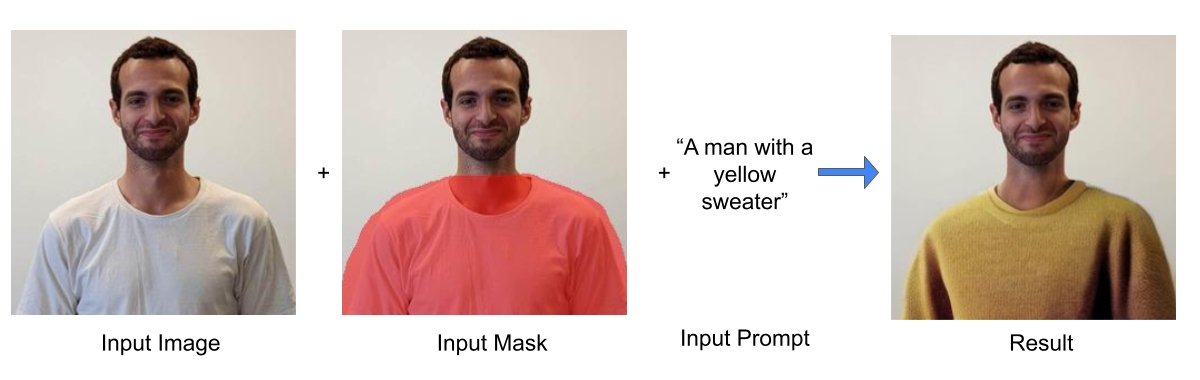
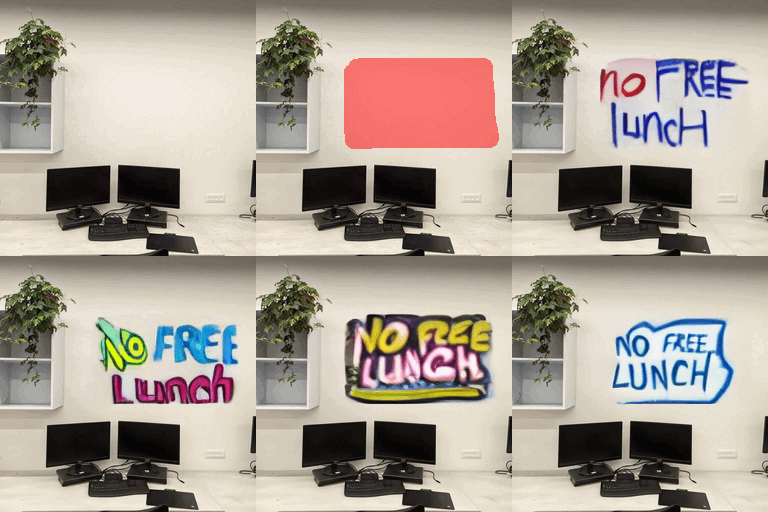
Abstract: The tremendous progress in neural image generation, coupled with the emergence of seemingly omnipotent vision-language models has finally enabled text-based interfaces for creating and editing images. Handling generic images requires a diverse underlying generative model, hence the latest works utilize diffusion models, which were shown to surpass GANs in terms of diversity. One major drawback of diffusion models, however, is their relatively slow inference time. In this paper, we present an accelerated solution to the task of local text-driven editing of generic images, where the desired edits are confined to a user-provided mask. Our solution leverages a recent text-to-image Latent Diffusion Model (LDM), which speeds up diffusion by operating in a lower-dimensional latent space. We first convert the LDM into a local image editor by incorporating Blended Diffusion into it. Next we propose an optimization-based solution for the inherent inability of this LDM to accurately reconstruct images. Finally, we address the scenario of performing local edits using thin masks. We evaluate our method against the available baselines both qualitatively and quantitatively and demonstrate that in addition to being faster, our method achieves better precision than the baselines while mitigating some of their artifacts
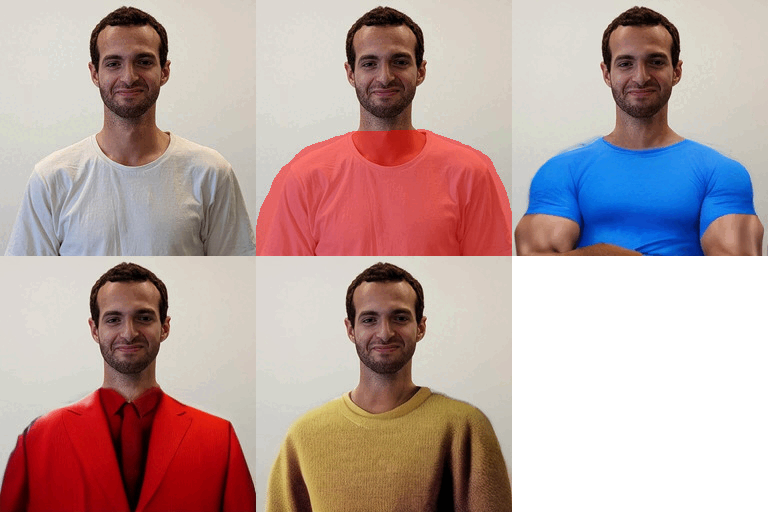
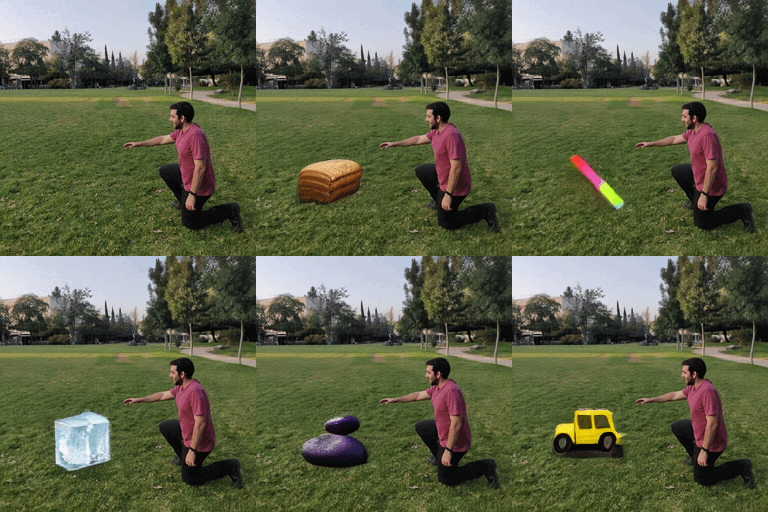
Applications

Background Editing

Text Generation
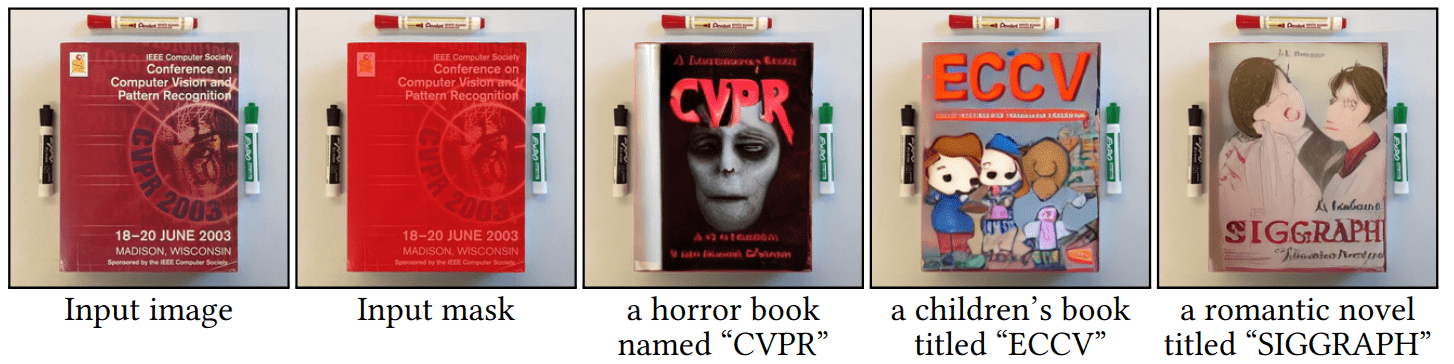
Multiple Predictions

Alter an Existing Object
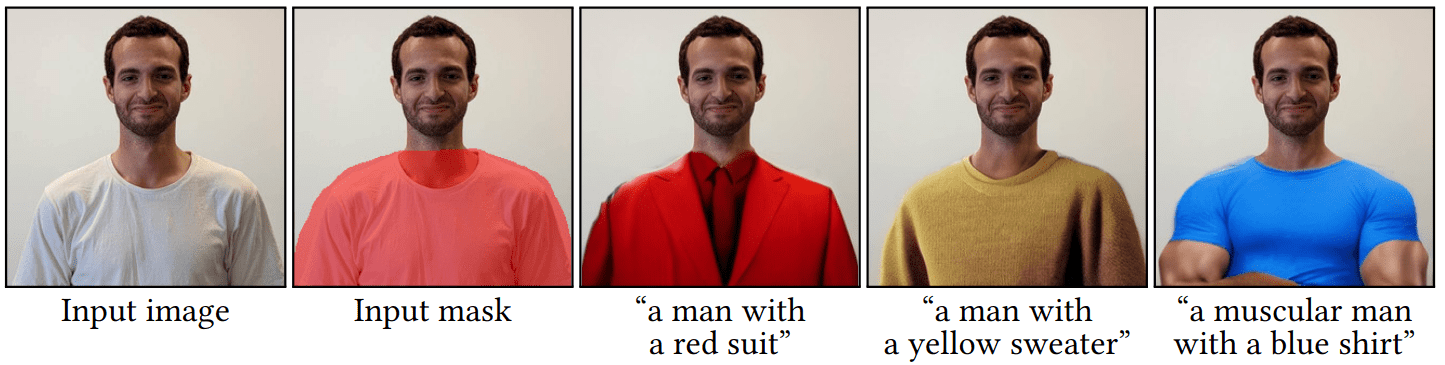
Add a New Object

Scribble Editing
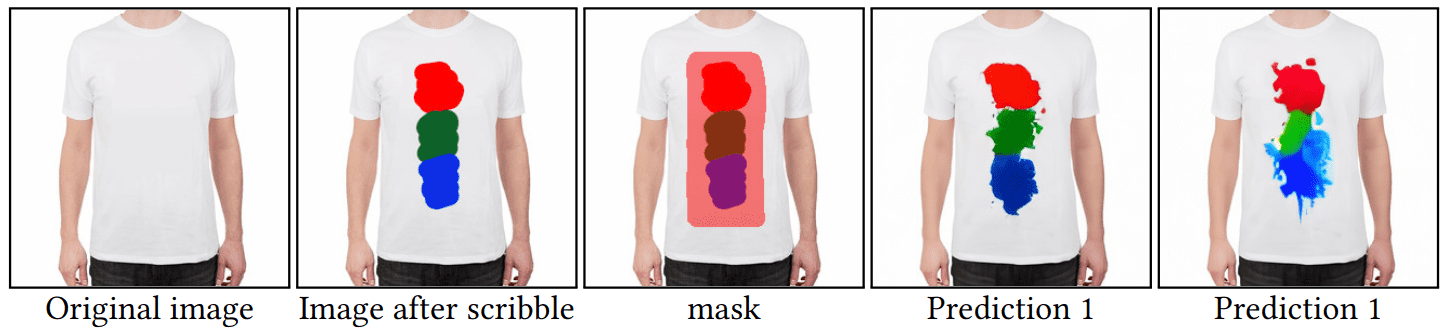
Installation

Install the conda virtual environment:

$ conda env create -f environment.yaml
$ conda activate ldm

Usage

New :fire: - Stable Diffusion Implementation

You can use the newer Stable Diffusion implementation based on Diffusers library. For that, you need to install PyTorch 2.1 and Diffusers via the following commands:

$ conda install pytorch==2.1.0 torchvision==0.16.0  pytorch-cuda=11.8 -c pytorch -c nvidia
$ pip install -U diffusers==0.19.3
  • For using Stable Diffusion XL (requires a stronger GPU), use the following script:
$ python scripts/text_editing_SDXL.py --prompt "a stone" --init_image "inputs/img.png" --mask "inputs/mask.png"

You can use smaller --batch_size in order to save GPU memory.

  • For using Stable Diffusion v2.1, use the following script:
$ python scripts/text_editing_SD2.py --prompt "a stone" --init_image "inputs/img.png" --mask "inputs/mask.png"

Old - Latent Diffusion Model Implementation

For using the old implementation, based on the Latent Diffusion Model (LDM), you need first to download the pre-trained weights (5.7GB):

$ mkdir -p models/ldm/text2img-large/
$ wget -O models/ldm/text2img-large/model.ckpt https://ommer-lab.com/files/latent-diffusion/nitro/txt2img-f8-large/model.ckpt

If the above link is broken, you can use this mirror link.

Then, editing the image may require two steps:

Step 1 - Generate initial predictions

$ python scripts/text_editing_LDM.py --prompt "a pink yarn ball" --init_image "inputs/img.png" --mask "inputs/mask.png"

The predictions will be saved in outputs/edit_results/samples.

You can use a larger batch size by specifying --n_samples to the maximum number that saturates your GPU.

Step 2 (optional) - Reconstruct the original background

If you want to reconstruct the original image background, you can run the following:

$ python scripts/reconstruct.py --init_image "inputs/img.png" --mask "inputs/mask.png" --selected_indices 0 1

You can choose the specific image indices that you want to reconstruct. The results will be saved in outputs/edit_results/samples/reconstructed_optimization.

Citation

If you find this project useful for your research, please cite the following:

@article{avrahami2023blendedlatent,
        author = {Avrahami, Omri and Fried, Ohad and Lischinski, Dani},
        title = {Blended Latent Diffusion},
        year = {2023},
        issue_date = {August 2023},
        publisher = {Association for Computing Machinery},
        address = {New York, NY, USA},
        volume = {42},
        number = {4},
        issn = {0730-0301},
        url = {https://doi.org/10.1145/3592450},
        doi = {10.1145/3592450},
        journal = {ACM Trans. Graph.},
        month = {jul},
        articleno = {149},
        numpages = {11},
        keywords = {zero-shot text-driven local image editing}
}

@InProceedings{Avrahami_2022_CVPR,
        author    = {Avrahami, Omri and Lischinski, Dani and Fried, Ohad},
        title     = {Blended Diffusion for Text-Driven Editing of Natural Images},
        booktitle = {Proceedings of the IEEE/CVF Conference on Computer Vision and Pattern Recognition (CVPR)},
        month     = {June},
        year      = {2022},
        pages     = {18208-18218}
}

Acknowledgements

This code is based on Latent Diffusion Models.

排名相邻
同类项目