This node provides lip-sync capabilities in ComfyUI using ByteDance's LatentSync model. It allows you to synchronize video lips with audio input.
关键参数与规格
关键参数与规格
参数
值
语言
Rust
类别
AI Engineering
子类别
Give agent tools
关键词
Agent-ready APIs, Guardrails, MCP
星标数
966
分叉数
75
贡献者
22
创建日期
2025-07-15
更新日期
2026-10-15
1 天星标数
0
7 天星标数
6
排名
12,341
上次排名
6,153
排名变化
-6,188
7 天星标排名
5,201
上次 7 天星标排名
4,816
7 天星标排名变化
-385
总星标排名
11,448
上次总星标排名
11,426
总星标排名变化
-22
国家
USA
README 摘录
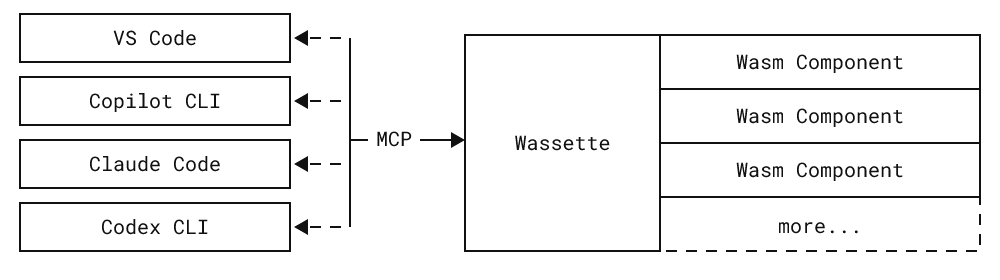
WARNING] **Early Development**: This repository is not production ready yet. It is in early development and may change significantly. **Convenience**: Wassette makes it easy to extend AI agents with new tools, all without ever having to leave the chat window. **Reusability**: Wasm Components are generic and reusable; there is nothing MCP-specific about them. **Security**: Wassette is built on the Wasmtime security sandbox, providing browser-grade isolation of tools. Architecture Installation **Quick start:** For Linux/macOS, use our one-liner
install script: **For complete installation instructions** for all platforms (including Windows, Homebrew, Nix, Docker, and more), see our **Installation Guide**. Using Wassette With Wassette installed, the next step is to register it with your agent of choice. See our [Quick Start] guide (3 simple steps), or check the MCP Clients guide for detailed setup instructions for GitHub Copilot, Copilot CLI, Claude Code, and Codex CLI. Once configured, you can start loading WebAssembly components. To teach your agent to tell the
time, ask it to load a time component: Now that the time component is loaded, we can ask your agent to tell you the current time: The agent will respond with the current time, which is fetched from the time component running in a secure WebAssembly sandbox: Congratulations! You've just run your first Wasm Component and taught your agent how to tell time! Demo Discord You can join us via the channel on the Microsoft Open Source Discord: Contributing Please
see CONTRIBUTING. md for more information on how to contribute to this project. License This project is licensed under the MIT License . Trademarks This project may contain trademarks or logos for projects, products, or services. Authorized use of Microsoft trademarks or logos is subject to and must follow Microsoft’s Trademark & Brand Guidelines. Use of Microsoft trademarks or logos in modified versions of this project must not cause confusion or imply Microsoft sponsorship. Any use of third-party trademarks or
logos are subject to those third-party’s policies. Contributors Thanks to all contributors who are helping shape Wassette into something great.
常见问题
记录了多少星标和分叉?
microsoft/wassette 有 966 个星标和 75 个分叉。
仓库排名是多少?
microsoft/wassette 排名第 12,341。
记录的语言和类别是什么?
microsoft/wassette 有 966 个星标,语言为 Rust,类别为 AI Engineering。
For complete installation instructions for all platforms (including Windows, Homebrew, Nix, Docker, and more), see our Installation Guide.
Using Wassette
With Wassette installed, the next step is to register it with your agent of choice. See our Quick Start guide (3 simple steps), or check the MCP Clients guide for detailed setup instructions for GitHub Copilot, Copilot CLI, Claude Code, and Codex CLI.
Once configured, you can start loading WebAssembly components. To teach your agent to tell the time, ask it to load a time component:
Please load the time component from oci://ghcr.io/microsoft/time-server-js:latest
Now that the time component is loaded, we can ask your agent to tell you the current time:
What is the current time?
The agent will respond with the current time, which is fetched from the time component running in a secure WebAssembly sandbox:
The current time July 31, 2025 at 10:30 AM UTC
Congratulations! You've just run your first Wasm Component and taught your agent how to tell time!
This project may contain trademarks or logos for projects, products, or services. Authorized use of Microsoft trademarks or logos is subject to and must follow Microsoft’s Trademark & Brand Guidelines. Use of Microsoft trademarks or logos in modified versions of this project must not cause confusion or imply Microsoft sponsorship. Any use of third-party trademarks or logos are subject to those third-party’s policies.
Contributors
Thanks to all contributors who are helping shape Wassette into something great.