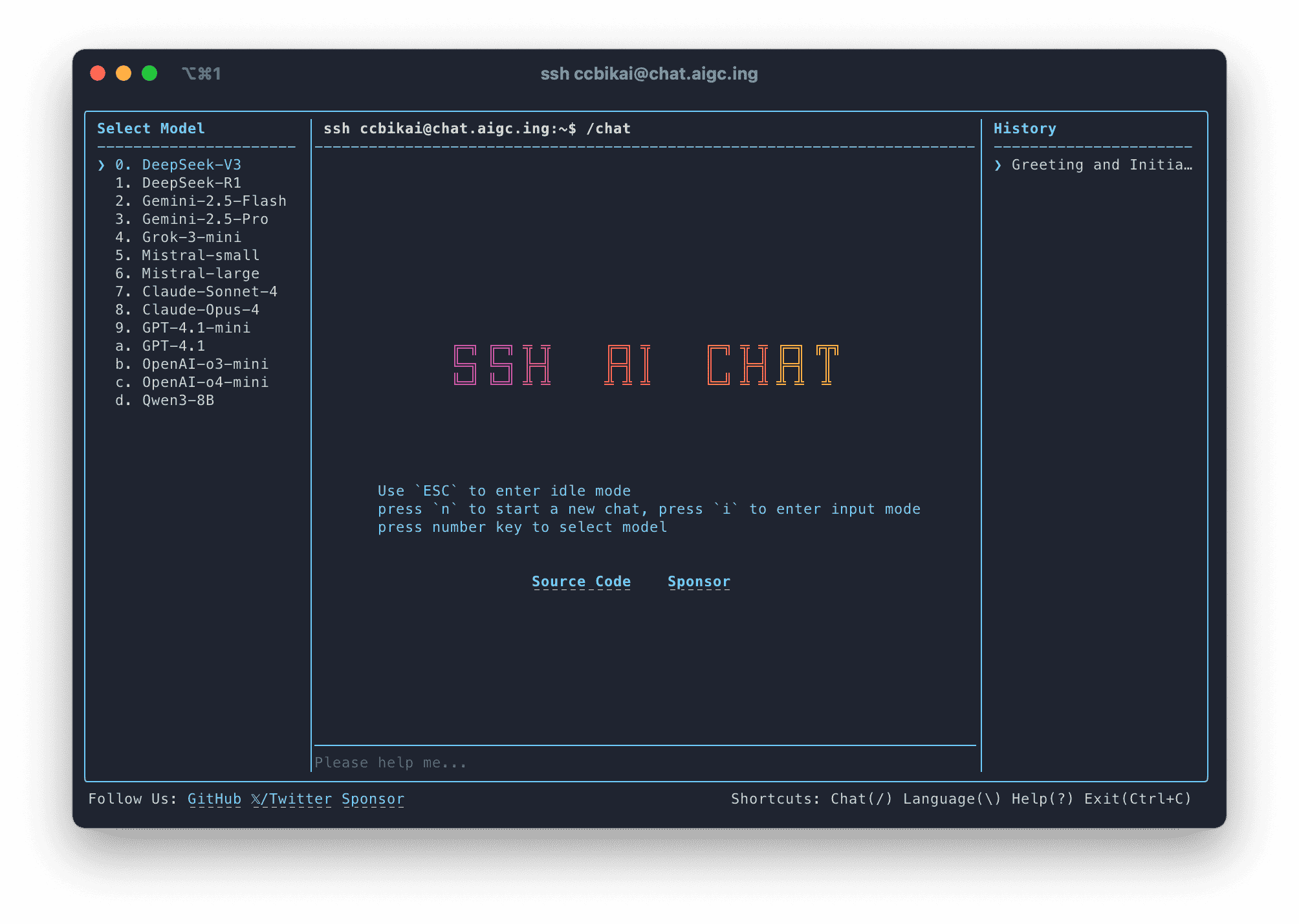
🤖 SSH AI Chat
Chat with AI over SSH.
English | 简体中文
💡 How To Use
# Replace username with your GitHub username
ssh username@chat.agi.li
https://github.com/user-attachments/assets/e676ba1b-b2ea-4568-ab5c-f7ba6c79d790
Supported Terminals
🧱 Tech Stack
🏗️ Deployment
Docker (Recommended)
We recommend using V.PS servers for Docker deployment.
- Copy the contents of
.env.exampleto a.envfile and modify it according to the.envfile description below. - Create a
docker-compose.ymlfile with the following content. This is all you need to deploy SSH AI Chat. If you need to deploy PostgreSQL and Redis alongside it, refer to the docker-compose.dev.yml file.
services:
  ssh-ai-chat:
    image: ghcr.io/miantiao-me/ssh-ai-chat
    ports:
      - 22:2222
    volumes:
      - ./data:/app/data
    env_file:
      - .env
    mem_limit: 4g
- Start with the
docker compose up -dcommand. - Access using
ssh username@host -p 22, making sure to replace the hostname and port number.
.env File Configuration
# Server name, optional, can be changed to your own domain
SERVER_NAME=chat.agi.li

# Whether it's a public server, required. If not configured, it defaults to private server and requires whitelist configuration
PUBLIC_SERVER=false

# Rate limiting settings, optional. TTL suffix is for time, LIMIT is for count. Strongly recommended for public servers
RATE_LIMIT_TTL=3600
RATE_LIMIT_LIMIT=300
LOGIN_FAILED_TTL=600
LOGIN_FAILED_LIMIT=10

# Blacklist and whitelist, optional. Configure GitHub usernames separated by commas
BLACK_LIST=alice
WHITE_LIST=bob

# Redis URL, optional. If not configured, it will use simulated Redis and data will be lost on restart
REDIS_URL=redis://default:ssh-ai-chat-pwd@127.0.0.1:6379
# Database URL, optional. If not configured, it will use PGLite to store data in the /app/data directory
DATABASE_URL=postgres://postgres:ssh-ai-chat-pwd@127.0.0.1:5432/ssh-ai-chat

# Umami configuration, optional
UMAMI_HOST=https://eu.umami.is
UMAMI_SITE_ID=6bc6dd79-4672-44bc-91ea-938a6acb63a2

# System prompt, optional
AI_MODEL_SYSTEM_PROMPT="You are an AI chat assistant that..."

# Model list, **required**, separated by commas
AI_MODELS="DeepSeek-V3,DeepSeek-R1,Gemini-2.5-Flash,Gemini-2.5-Pro"

# Models that support chain of thought, use `` tags to return reasoning chain. Optional, if not configured will display reasoning content
AI_MODEL_REASONING_MODELS="DeepSeek-R1,Qwen3-8B"

# System reasoning model, optional, used for generating conversation titles. Only one model can be configured. If not configured, uses the first model from the model list
AI_SYSTEM_MODEL="Qwen3-8B"

# Model configuration file, configures API call information for models in `AI_MODELS` and `AI_SYSTEM_MODEL` lists.
# Name format: prefix `AI_MODEL_CONFIG_`, model name in all caps, `-` and `.` replaced with `_`. Conversion relationships will be shown in startup logs.
# Value format: type, model ID, BaseURL, APIKey. API format must support OpenAI-compatible format. Type is currently unused
AI_MODEL_CONFIG_GEMINI_2_5_FLASH=fast,gemini-2.5-flash,https://api.example.com/v1,sk-abc
AI_MODEL_CONFIG_GEMINI_2_5_PRO=pro,gemini-2.5-pro,https://api.example.com/v1,sk-abc
👨💻 Local Development
# Install dependencies
pnpm i

# Develop CLI interface
pnpm run dev:cli

# Develop SSH Server
pnpm run dev
💖 Credits
☕ Sponsors
Special thanks to V.PS for sponsoring our servers.