CARLA-Air: Fly Drones Inside a CARLA World
A Unified Infrastructure for Air-Ground Embodied Intelligence
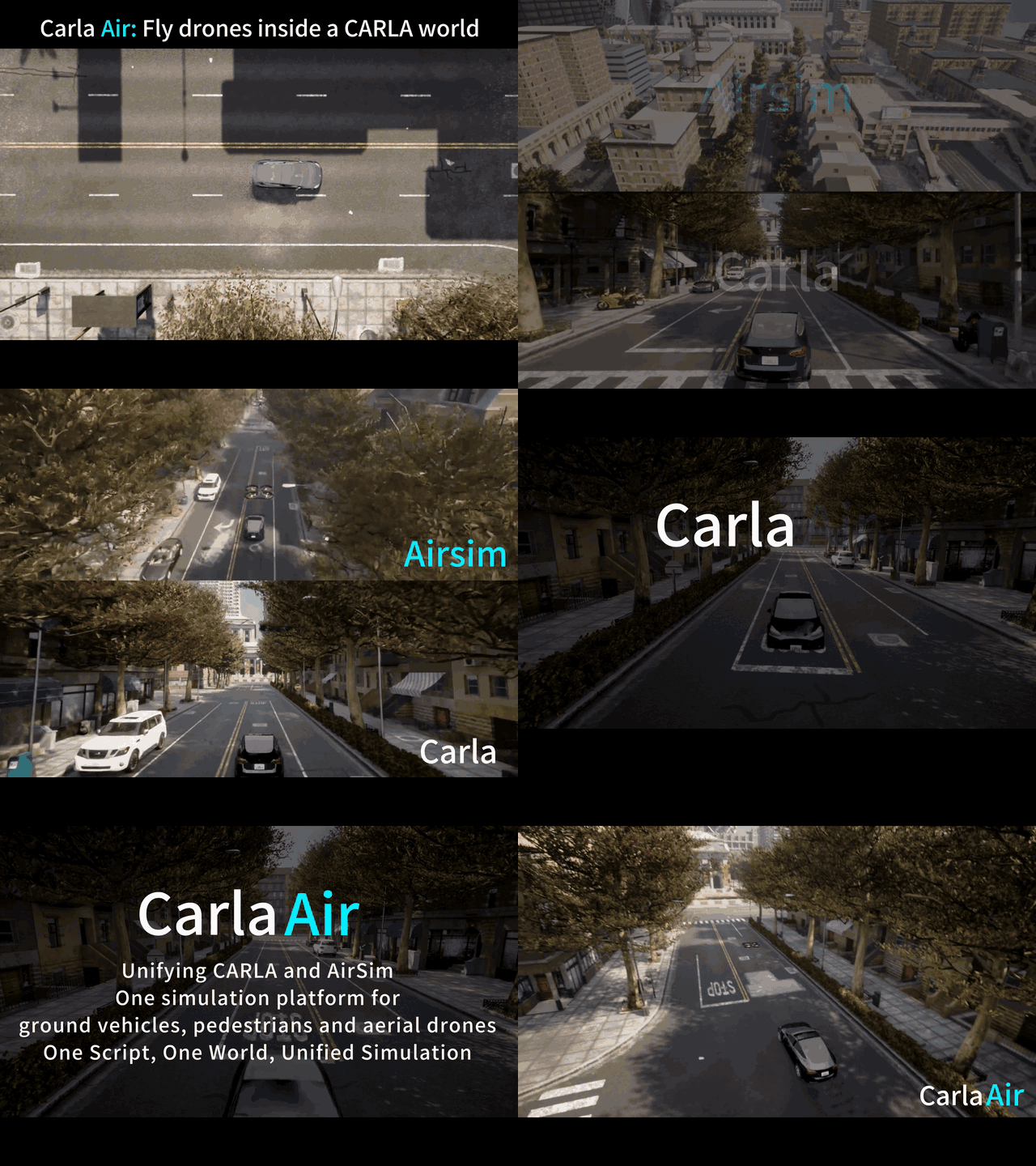
CARLA-Air is an open-source infrastructure that unifies high-fidelity urban driving and physics-accurate multirotor flight within a single Unreal Engine process, providing a practical simulation foundation for air-ground embodied intelligence research.
👉 Pre-built executable — Ubuntu (20.04 / 22.04), no compilation required:
Baidu Pan | Hugging Face
👉 Pre-built executable — Windows (Windows 11 x86_64 recommended), no compilation required:
Baidu Pan
-red.svg)
English | 简体中文 | 📄 Paper | 🌐 Project Page | 📖 Docs | 🎬 Video

📌 Table of Contents
- 🔥 News
- ✨ Highlights
- 🏆 Platform Comparison — 15 simulators, side-by-side
- 🎮 Quick Start — up and running in 4 steps
- 🐍 One Script, Two Worlds — dual API code examples
- 🔬 Research Directions & Workflows — W1–W5 validated workflows
- ⌨️ Flight Controls
- 📚 Documentation & Tutorials — 8 step-by-step tutorials
- 🗺️ Roadmap
- 📝 Citation
- 📜 License & Acknowledgments
- ⭐ Star History
🔥 News
- [2026-04-20] 🤖 ROS 2 examples released! -- Minimal vehicle/drone sensor bridges + RViz 2 preset under
examples/ros2/. Humble-ready, nocarla-ros-bridgesource build required. - [2026-04-17] 🌐 Project page is live! -- Explore CARLA-Air features, tutorials, and demos at our official website.
- [2026-04-16] $\color{red}{\textbf{Windows pre-built package is now available.}}$ Download: Baidu Pan — Windows build (Win11 x86_64 recommended; no compilation)
- [2026-04-10]
Windows source branch published -- Windows build and runtime support is now available on the dedicated branch
- [2026-04-01] 🏆 $\color{red}{\text{\textbf{No.~1 Paper of the Day — Hugging Face Daily Papers!}}}$ (paper / leaderboard)
- [2026-03-30] 📄 Technical report released -- Read the paper
- [2026-03]
v0.1.7released -- VSync fix, stable traffic, one-click env setup, drone recording toolkit, coordinate docs - [2026-03]
v0.1.6released -- Auto traffic spawn, UE4 native Sweep collision, ground clamping - [2026-03]
v0.1.5released -- 12-direction collision system, bilingual help overlay (H) - [2026-03]
v0.1.4released -- ROS2 validation (63 topics), first official binary release
✨ Highlights
| 🏗️ Single-Process Composition | CARLAAirGameMode inherits CARLA and composes AirSim. Only 3 upstream files modified (~35 lines). No bridge, no latency. |
| 🎯 Absolute Coordinate Alignment | Exact 0.0000 m error between CARLA (left-handed) and AirSim (NED) coordinate frames. |
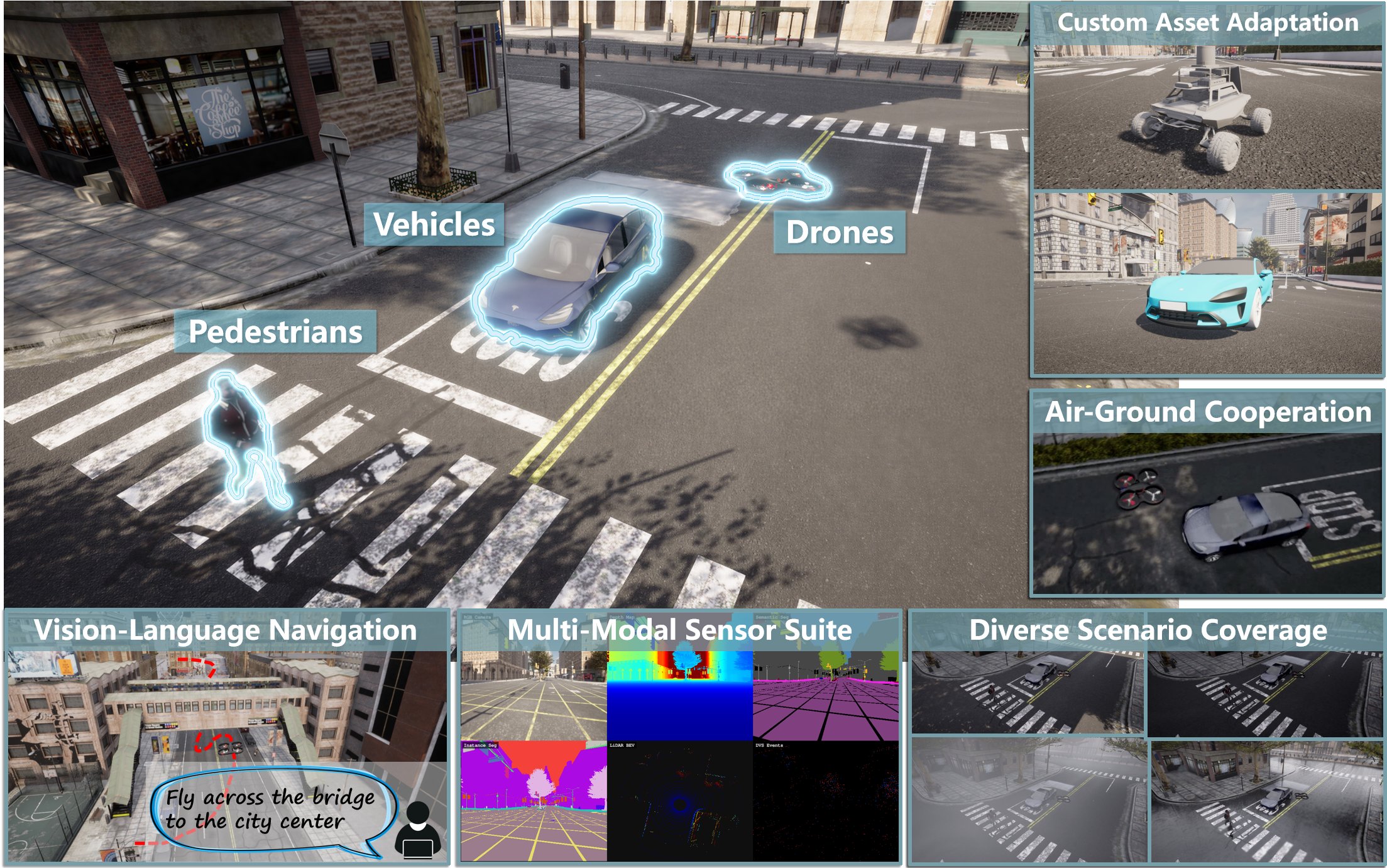
| 📸 Up to 18 Sensor Modalities | RGB, Depth, Semantic Seg, Instance Seg, LiDAR, Radar, Surface Normals, IMU, GNSS, Barometry -- all frame-aligned across air and ground. |
| 🔄 Zero-Modification Code Migration | Existing CARLA and AirSim Python scripts and ROS 2 nodes run on CARLA-Air without any code changes. 89/89 CARLA API tests passing. |
| ⚡ ~20 FPS Joint Workloads | Moderate joint configuration (vehicles + drone + 8 sensors) sustains 19.8 +/- 1.1 FPS. Communication overhead < 0.5 ms (vs. 1--5 ms bridge co-sim). |
| 🛡️ 3-Hour Stability Verified | 357 spawn/destroy cycles, zero crashes, zero memory accumulation (R² = 0.11). |
| 🚁 Built-in FPS Drone Control | Fly the drone in viewport using WASD + Mouse -- no Python scripts needed. |
| 🚦 Realistic Urban Traffic | Rule-compliant traffic flow, socially-aware pedestrians, 13 urban maps. |
| 🧩 Extensible Asset Pipeline | Import custom robot platforms, UAV configurations, vehicles, and environment maps. |
🏆 Platform Comparison
A comprehensive comparison of CARLA-Air against 14 existing simulation platforms (based on Table 1 from the technical report).
Category
Platform
Urban Traffic
Pedestrians
UAV Flight
Single Process
Shared Renderer
Native APIs
Joint Sensors
Prebuilt Binary
Test Suite
Custom Assets
Open Source
Autonomous Driving
CARLA
✓
✓
✗
✓
✓
✓
✗
✓
✗
✓
✓
LGSVL
✓
✓
✗
✓
✓
✓
✗
✓
✗
~
✓
SUMO
✓
✓
✗
✓
✗
✓
✗
✓
✗
✗
✓
MetaDrive
✓
~
✗
✓
~
✓
✗
✗
✗
✗
✓
VISTA
~
✗
✗
✓
~
✓
✗
✗
✗
✗
✓
Aerial / UAV
AirSim
✗
✗
✓
✓
✓
✓
✗
✓
✗
✓
✓
Flightmare
✗
✗
✓
✓
✓
✓
✗
✗
✗
~
✓
FlightGoggles
✗
✗
✓
✓
✓
✓
✗
✗
✗
~
✓
Gazebo/RotorS
~
~
✓
✓
~
✓
✗
✓
✗
✓
✓
OmniDrones
✗
✗
✓
✓
✓
✓
✗
✗
✗
✓
✓
gym-pybullet-drones
✗
✗
✓
✓
~
✓
✗
✗
✗
~
✓
Joint / Co-Sim
TranSimHub
✓
✓
✓
✗
✗
✗
~
—
✗
✗
✓
CARLA+SUMO
✓
✓
✗
✗
✗
~
✗
—
✗
✗
✓
AirSim+Gazebo
~
~
✓
✗
✗
~
~
—
✗
~
✓
Embodied AI & RL
Isaac Lab
✗
✗
~
✓
✓
✓
✗
✗
✓
✓
✓
Isaac Gym
✗
✗
~
✓
✓
✓
✗
✗
✗
✗
✓
Habitat
✗
~
✗
✓
✓
✓
✗
✗
✗
✗
✓
SAPIEN
✗
✗
✗
✓
✓
✓
✗
✗
✗
~
✓
RoboSuite
✗
✗
✗
✓
✓
✓
✗
✗
✗
~
✓
Ours
CARLA-Air
✓
✓†
✓
✓
✓
✓
✓
✓
✓
✓
✓
✓ = supported; ~ = partial or constrained; ✗ = not supported; — = not applicable.
† Pedestrian AI is inherited from CARLA and fully functional; behavior under high actor density in joint scenarios is an active engineering target.
🎮 Quick Start
Option A: Binary Release (Recommended)
# 1. Download and extract CARLA-Air v0.1.7
tar xzf CarlaAir-v0.1.7.tar.gz
cd CarlaAir-v0.1.7

# 2. One-click environment setup (first time only)
bash env_setup/setup_env.sh      # creates conda env, installs deps, deploys carla module
conda activate carlaAir
bash env_setup/test_env.sh        # verify: should show all PASS

# 3. Launch the simulator (auto-spawns traffic)
./CarlaAir.sh Town10HD

# 4. Run the showcase! (in another terminal)
conda activate carlaAir
python3 examples/quick_start_showcase.py
What you'll see: A Tesla cruises through the city while a drone chases it from above. A 4-panel display shows RGB, Depth, Semantic Segmentation, and LiDAR BEV -- all synchronized. Weather cycles automatically.
Option B: Build from Source
Please refer to the Build Guide for detailed instructions on compiling CARLA-Air with UE4.26.
🐍 One Script, Two Worlds
Both APIs share the same simulated world -- no bridge, no sync headaches.
import carla, airsim

carla_client = carla.Client("localhost", 2000)
air_client   = airsim.MultirotorClient(port=41451)
world = carla_client.get_world()

# One weather call affects EVERY sensor — ground AND air
world.set_weather(carla.WeatherParameters.HardRainSunset)

# Spawn a car, let it drive
vehicle = world.spawn_actor(vehicle_bp, spawn_point)
vehicle.set_autopilot(True)

# Fly the drone above — same world, same rain, same physics
air_client.takeoffAsync().join()
air_client.moveToPositionAsync(80, 30, -25, 5)
6 demo scripts -- try them all:
python3 examples/quick_start_showcase.py   # 🎬 4-panel sensors + drone chase + weather cycling
python3 examples/drive_vehicle.py          # 🚗 Drive a Tesla with WASD
python3 examples/walk_pedestrian.py        # 🚶 Walk the city on foot (mouse look)
python3 examples/switch_maps.py            # 🗺️  Fly through all 13 maps automatically
python3 examples/sensor_gallery.py         # 📸 6-grid sensor showcase on one vehicle
python3 examples/air_ground_sync.py        # 🔄 Car + drone split-screen: same rain, same world
Recording toolkit -- record trajectories for vehicle, drone, and pedestrian, then replay them with a director camera:
python3 examples/recording/record_vehicle.py     # 🚗 Drive & record vehicle trajectory
python3 examples/recording/record_drone.py       # 🚁 Fly & record drone trajectory (zero intrusion)
python3 examples/recording/record_walker.py      # 🚶 Walk & record pedestrian trajectory
python3 examples/recording/demo_director.py \    # 🎬 Replay all + free camera + MP4 recording
    trajectories/vehicle_*.json trajectories/drone_*.json
Docs: Coordinate Systems (CARLA to AirSim) | Quick Start Guide | FAQ
🔬 Research Directions & Workflows
CARLA-Air is designed to support four major research directions in air-ground embodied intelligence:
- Air-Ground Cooperation -- Heterogeneous air-ground agents collaborating in a shared urban environment.
- Embodied Navigation (VLN/VLA) -- Vision-and-language-driven navigation and action in photorealistic cities.
- Multi-Modal Perception and Dataset Collection -- Synchronized aerial-ground sensor data acquisition across diverse conditions.
- RL-Based Policy Training -- Closed-loop reinforcement learning with joint air-ground interaction.
The platform provides five reference workflows that cover these directions:
| Workflow | Direction | Key Result | |
|---|---|---|---|
| W1 | Air-Ground Cooperation | Air-ground cooperation | Real-time cross-domain coordination |
| W2 | VLN/VLA Tasks | Embodied navigation | Cross-view VLN data pipeline |
| W3 | Multi-Modal Dataset Collection | Perception and dataset | 12-stream sync, 1-tick alignment |
| W4 | Cross-View Perception | Perception and dataset | 14/14 weather presets verified |
| W5 | RL Training Environment | RL policy training | 357 reset cycles, 0 crashes |

W1: Air-Ground Cooperation

W2: VLN/VLA Tasks

W3: Multi-Modal Dataset Collection

W4: Cross-View Perception

W5: RL Training Environment

Custom Asset Import

ROS 2 Integration — 63 Topics across Both Backends
⌨️ Flight Controls
When the simulator is running, click inside the window to capture the mouse:
| Key | Action |
|---|---|
W / A / S / D |
Move Forward / Left / Backward / Right |
Space / Shift |
Ascend / Descend |
Mouse |
Yaw (Turn Left/Right) |
Scroll Wheel |
Adjust Flight Speed |
N |
Cycle Weather Presets (Clear, Rain, Fog, Night, etc.) |
P |
Toggle Collision Mode (Physics vs. Noclip/Invincible) |
H |
Show/Hide On-Screen Help Menu |
Tab |
Release / Capture Mouse |
📚 Documentation & Tutorials
We provide 6 curated Python examples showcasing the core air-ground cooperative capabilities:
| Example | Description |
|---|---|
quick_start_showcase.py |
4-panel sensors + drone chase + weather cycling |
drive_vehicle.py |
Drive a Tesla with WASD keyboard control |
walk_pedestrian.py |
Walk the city on foot with mouse look |
switch_maps.py |
Fly through all 13 maps automatically |
sensor_gallery.py |
6-grid sensor showcase on one vehicle |
air_ground_sync.py |
Car + drone split-screen: same rain, same world |
Step-by-step tutorials (8 scripts in CarlaAir_Release/guide/examples/, beginner-friendly):
| # | Tutorial | What You Will Learn |
|---|---|---|
| 01 | 01_hello_world.py |
Connect to both APIs, verify setup |
| 02 | 02_weather_control.py |
Change weather parameters in real-time |
| 03 | 03_spawn_traffic.py |
Generate vehicles and pedestrians |
| 04 | 04_sensor_capture.py |
Attach and read sensors |
| 05 | 05_drone_takeoff.py |
Basic drone flight commands |
| 06 | 06_drone_sensors.py |
Aerial sensor configuration |
| 07 | 07_combined_demo.py |
Air-ground joint operation |
| 08 | 08_full_showcase.py |
Full platform capabilities |
Full Documentation:
- Quick Start Guide
- Coordinate Systems (CARLA to AirSim)
- Architecture Details
- Modifications from Upstream
- FAQ
🗺️ Roadmap
- [x] Single-process CARLA + AirSim integration (UE4.26)
- [x] FPS drone control (WASD + Mouse)
- [x] Auto traffic spawn (vehicles + pedestrians)
- [x] 18-channel synchronized sensors
- [x] Dual Python API (CARLA + AirSim)
- [x] ROS2 validation (63 topics)
- [x] One-click environment setup
- [x] Recording toolkit (vehicle, drone, pedestrian trajectories)
- [x] Technical report (PDF)
- [x] Project page (carla-air.com)
- [ ] Tutorial documentation
- [ ] 3DGS rendering pipeline integration
- [ ] World Model integration
- [ ] Multi-drone support
📝 Citation
If you find CARLA-Air useful in your research, please consider citing our paper:
@misc{zeng2026carlaairflydronesinside,
  title={CARLA-Air: Fly Drones Inside a CARLA World -- A Unified Infrastructure for Air-Ground Embodied Intelligence},
  author={Tianle Zeng and Yanci Wen and Hong Zhang},
  year={2026},
  eprint={2603.28032},
  archivePrefix={arXiv},
  primaryClass={cs.RO},
  url={https://arxiv.org/abs/2603.28032}
}
📜 License & Acknowledgments
CARLA-Air is built upon the shoulders of giants. We sincerely thank the developers of:
- CARLA Simulator (MIT License)
- Microsoft AirSim (MIT License)
- Unreal Engine
CARLA-Air specific code is distributed under the MIT License. CARLA specific assets are distributed under the CC-BY License.