AViD — Adaptive Vision-Language Detector 🦖
Fine-tune Grounding DINO on your own objects with LoRA, EMA, and a complete evaluation loop.


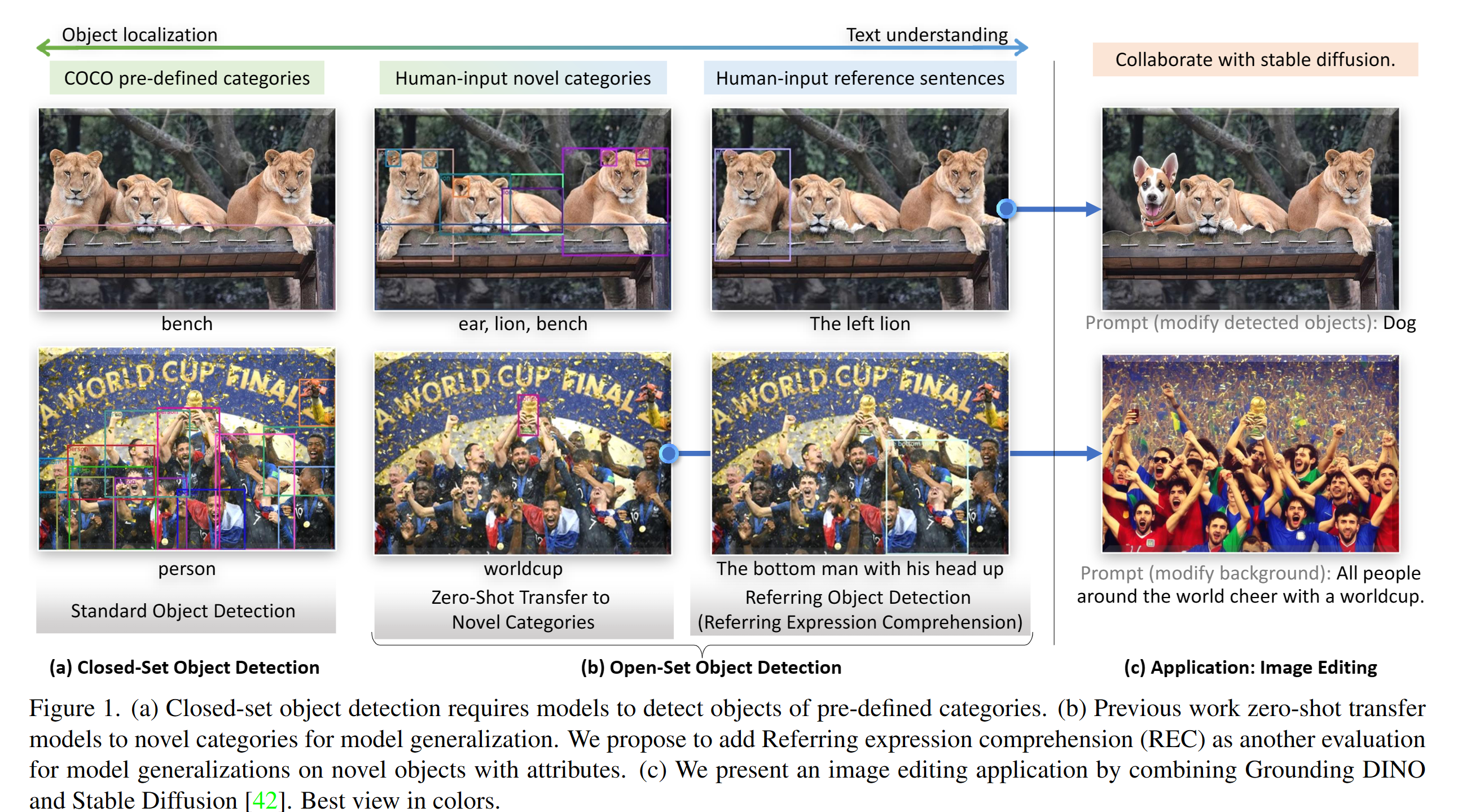
AViD turns the open-vocabulary capabilities of Grounding DINO into a practical custom-dataset workflow. It is aimed at teams that need domain-specific grounding without updating every parameter of a large detector.
Why AViD?
- End-to-end custom training — CSV dataset loading, training, checkpointing, validation, and standalone evaluation live in one repository.
- Parameter-efficient adaptation — LoRA targets the detector's attention, projection, FFN, bounding-box, and feature-map layers; rank 32 is the default starting point.
- Training stabilization — optional exponential moving averages help retain a smoother model trajectory during fine-tuning.
- Detection-focused evaluation — mAP, precision, recall, F1, per-class summaries, and visual comparisons are available through the evaluation pipeline.
- Usable entry points — YAML-driven training, evaluation, single-image inference, and a Gradio demo cover the common paths from experiment to inspection.
Results at a glance
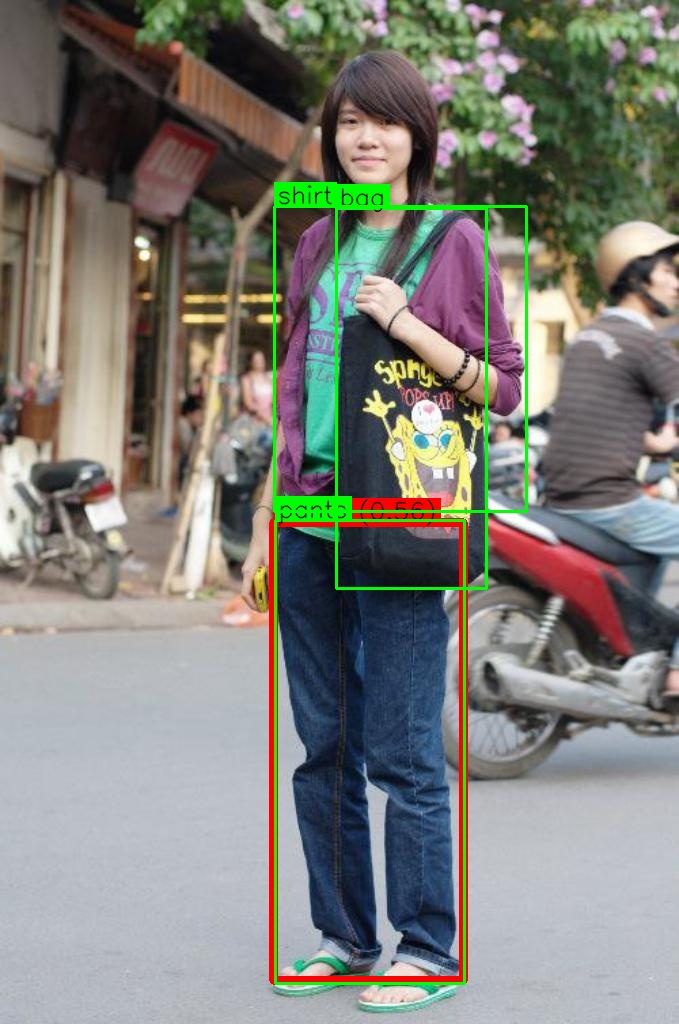
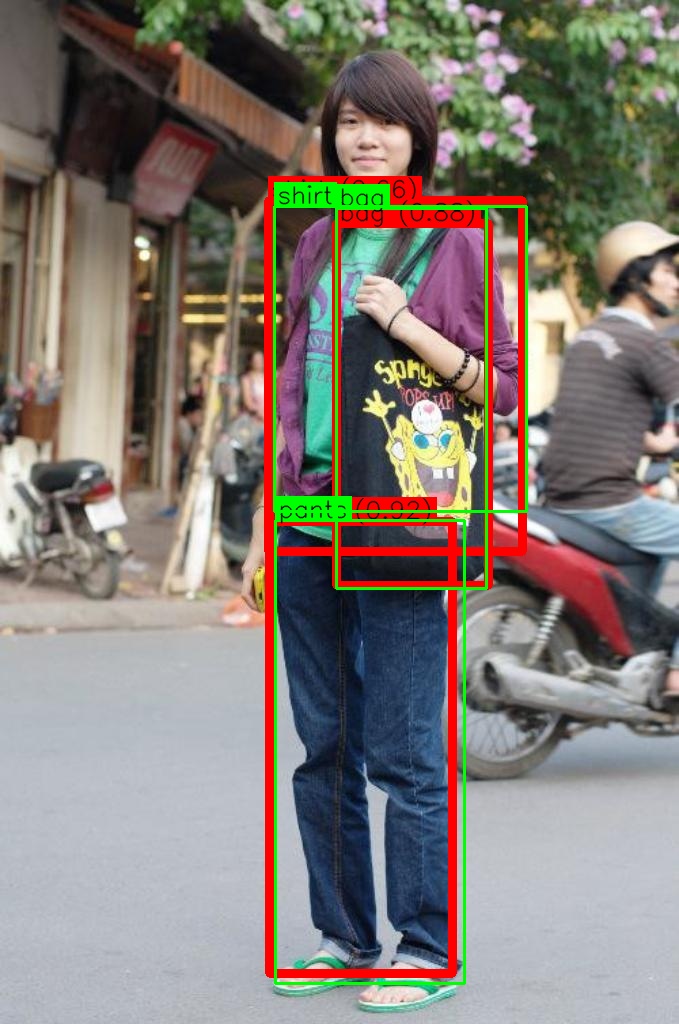
These images are qualitative examples from the original fashion experiment. AViD does not yet publish a checkpoint, immutable dataset revision, and machine-readable run manifest that can support a verified benchmark table, so no numerical result is claimed here. The evaluation protocol records its vocabulary and thresholds in every new JSON report so future results can be compared honestly.
Quick start
1. Clone and install
git clone https://github.com/levyflux/AViD.git
cd AViD

python -m venv .venv
source .venv/bin/activate
python -m pip install --upgrade pip
python -m pip install -e .
The default install creates a portable Python package and supports CPU execution. GPU execution uses the custom CUDA operator inherited from Grounding DINO. Install a PyTorch build compatible with your CUDA toolkit first, then explicitly build the operator without build isolation:
nvidia-smi --query-gpu=gpu_name,compute_cap --format=csv
export TORCH_CUDA_ARCH_LIST="8.6"  # replace with your GPU's compute capability
export AVID_BUILD_CUDA=1
python -m pip install --no-build-isolation -e .
The CUDA build fails closed when PyTorch, nvcc, or CUDA_HOME is unavailable instead of silently
producing a GPU installation without its required operator.
2. Prepare the base checkpoint and data
Download the Grounding DINO Swin-T configuration/checkpoint pair from the
upstream Grounding DINO project and place the
checkpoint at the path configured by model.weights_path (the examples use
weights/groundingdino_swint_ogc.pth).
AViD's training dataset reader expects one CSV row per object:
image_name,bbox_x,bbox_y,bbox_width,bbox_height,label_name
example.jpg,120,80,240,310,shirt
example.jpg,410,190,160,120,bag
Bounding boxes are pixel-space x, y, width, height. Image names are resolved relative to the
configured image directory. Labels are normalized to lowercase, and AViD builds one sorted class
vocabulary shared by every train and validation image. Update configs/train_config.yaml with your
train/validation paths.
The original fashion subset can also be downloaded with:
python -m pip install gdown
gdown https://drive.google.com/uc?id=1D2qphEE98Dloo3fUURRnsxaIRw076ZXX
unzip fashion_dataset_subset.zip -d multimodal-data
3. Train
python train.py --config configs/train_config.yaml
Key configuration fields:
data:
  train_dir: multimodal-data/fashion_dataset_subset/images/train
  train_ann: multimodal-data/fashion_dataset_subset/train_annotations.csv
  val_dir: multimodal-data/fashion_dataset_subset/images/val
  val_ann: multimodal-data/fashion_dataset_subset/val_annotations.csv
  batch_size: 4
  num_workers: 8

model:
  config_path: groundingdino/config/GroundingDINO_SwinT_OGC.py
  weights_path: weights/groundingdino_swint_ogc.pth

training:
  num_epochs: 200
  learning_rate: 1e-3
  use_lora: true
  use_ema: false
  save_dir: weights
Each invocation creates one timestamped run directory containing the reloadable configuration,
checkpoints, history, visualizations, and evaluation outputs. Use --save-dir to override the
configured parent directory and --device cpu for a CPU smoke run.
4. Evaluate
python evaluate.py \
  --config configs/evaluation_config.yaml \
  --output-dir evaluation_results \
  --device cuda \
  --visualize
See EVALUATION.md for metrics, output layout, and evaluation-during-training configuration.
AViD evaluation uses one fixed vocabulary for the entire evaluation split. Predictions are ranked
globally per class across the dataset; missing detections and false positives remain in the metric.
This is a phrase-conditioned detection protocol, not COCO mAP, and every metrics.json records the
protocol, class names, IoU thresholds, score threshold, and maximum detections.
Single-image inference
python demo/inference_on_a_image.py \
  --config_file groundingdino/config/GroundingDINO_SwinT_OGC.py \
  --checkpoint_path weights/groundingdino_swint_ogc.pth \
  --image_path .asset/cat_dog.jpeg \
  --text_prompt "cat . dog" \
  --output_dir outputs \
  --box_threshold 0.30 \
  --text_threshold 0.25
For phrase-specific mode, --token_spans accepts a nested list of character ranges such as
'[[[2, 5]], [[12, 15]]]'. Input is parsed as data and validated; it is not executed as Python.
Interactive demo
The Gradio demo downloads the upstream Grounding DINO checkpoint from Hugging Face on first use:
python -m pip install -r requirements-demo.txt
python demo/gradio_app.py
Add --share only when you intentionally want Gradio to create a public share link.
Repository map
| Path | Responsibility |
|---|---|
train.py |
YAML-driven fine-tuning orchestration, checkpointing, EMA, and optional evaluation |
evaluate.py |
Standalone evaluation and report generation |
test.py |
Checkpoint-based validation/inference entry point |
config.py |
Typed configuration objects and YAML loading |
groundingdino/datasets/ |
CSV-backed grounding dataset and transforms |
groundingdino/util/lora.py |
LoRA attachment and trainable-parameter helpers |
groundingdino/util/evaluation.py |
Metrics and prediction visualization |
demo/ |
Single-image, Gradio, COCO, and editing examples |
configs/ |
Training, testing, and evaluation examples |
Development checks
Fast checks do not require a GPU, model weights, or the full ML dependency stack:
python -m pip install pyyaml ruff
ruff check .
python -m compileall -q config.py train.py test.py evaluate.py demo groundingdino
python -m unittest tests.test_cli tests.test_config -v
After installing AViD and the demo dependencies, run the ML/UI contract tests. They use synthetic tensors and temporary CSVs; they do not download weights or require a GPU:
python -m pip install -r requirements-demo.txt
python -m unittest \
  tests.test_dataset \
  tests.test_demo \
  tests.test_evaluation \
  tests.test_training_entrypoint \
  -v
GPU-dependent changes should additionally record an end-to-end command and environment. See CONTRIBUTING.md for the pull request checklist.
Roadmap
- [x] LoRA-based parameter-efficient fine-tuning
- [x] EMA integration
- [x] Standalone and in-training evaluation
- [x] Dependency-light CI and regression tests
- [ ] Reproducible benchmark manifests and published checkpoints
- [ ] Distributed training
- [ ] Quantization-aware export/inference
- [ ] Hugging Face model and dataset integration
- [ ] Versioned releases and migration notes
Acknowledgements
AViD builds on Grounding DINO and the broader PyTorch, Transformers, PEFT, COCO, and open-source computer-vision ecosystems. Please cite the upstream projects relevant to your use of AViD.
License
AViD is released under the MIT License.