SWE Agent with LangGraph - by LangTalks
A sophisticated AI-powered software engineering agent that automates code implementation through intelligent planning and execution. Built with LangGraph for reliable multi-agent workflows.
⚠️ Alpha Status: This project is in active development. Features may change and some functionality is experimental. Perfect for early adopters and contributors who want to shape the future of AI-powered development.
🚀 Features
- Intelligent Code Planning: AI architect analyzes requirements and creates detailed implementation plans
- Automated Code Generation: Developer agent executes plans with precise file modifications
- Multi-Agent Workflow: Separate planning and implementation phases for better reliability
- Codebase Understanding: Advanced code analysis using tree-sitter and semantic search
- Incremental Development: Atomic task breakdown for safer, more manageable changes
🏗️ Architecture
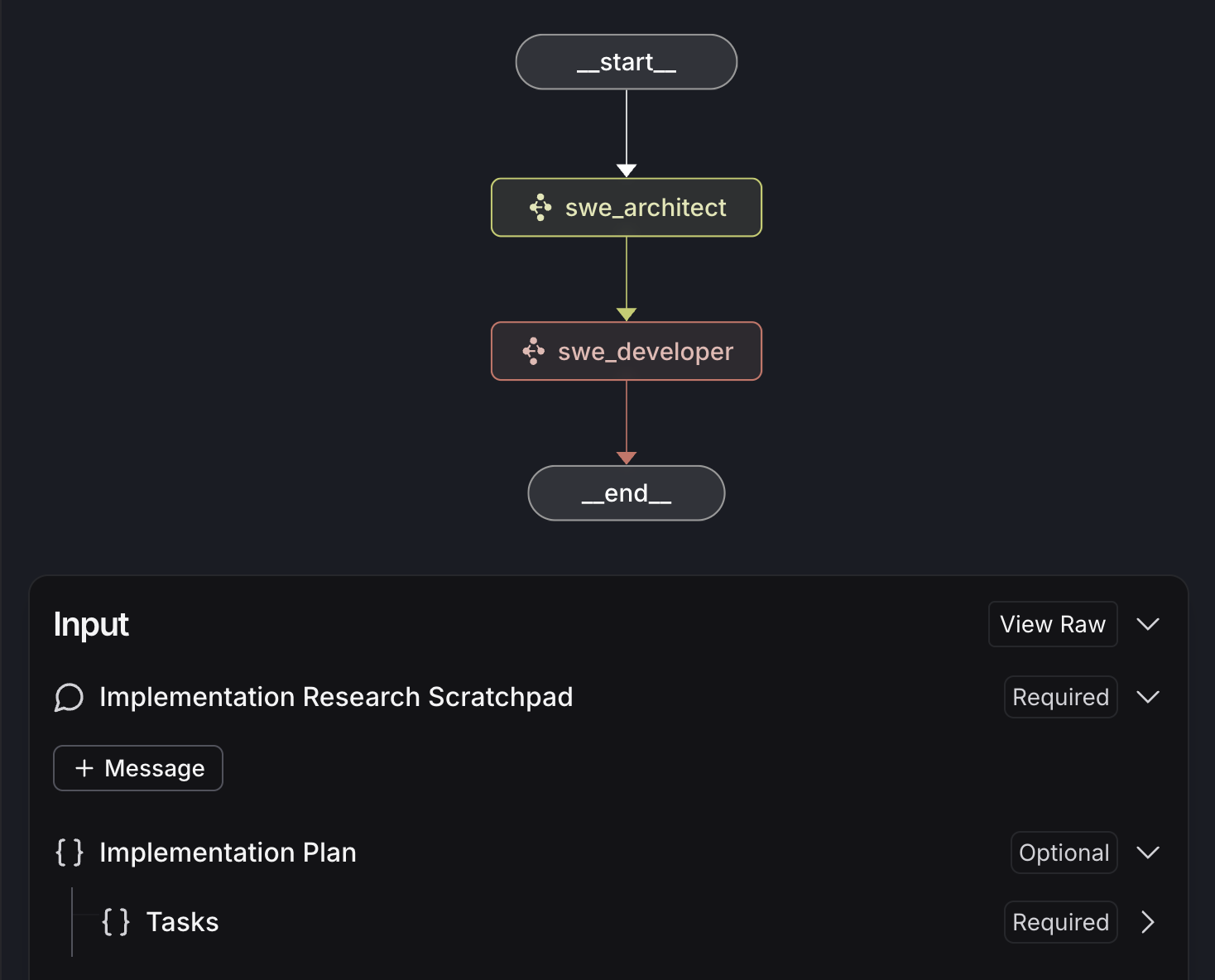
The system uses a two-stage LangGraph workflow:
1. Architect Agent - Research & Planning
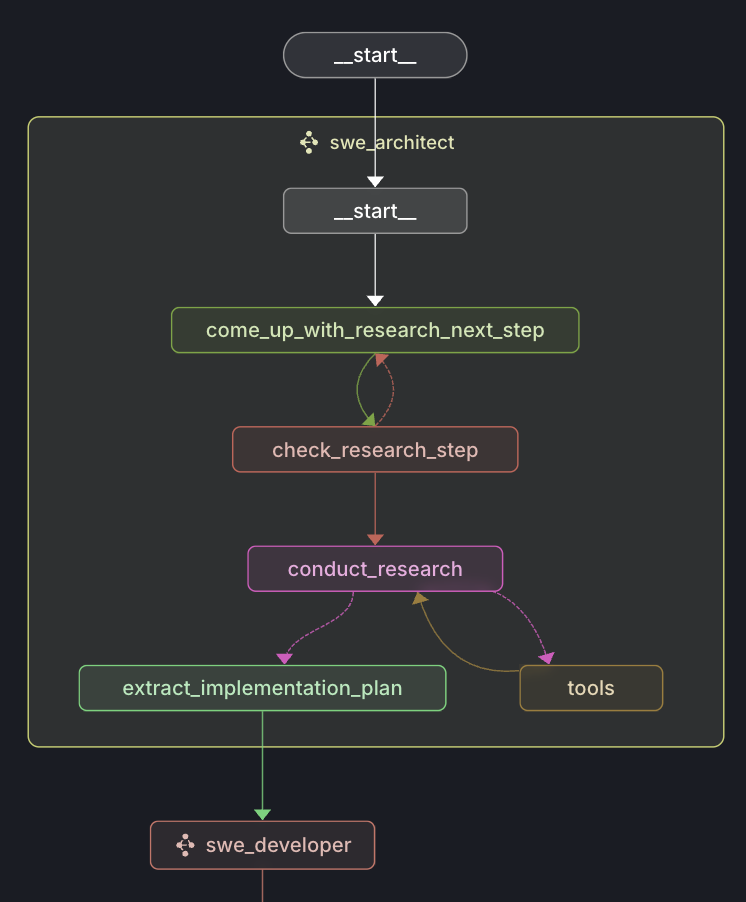
The architect agent:
- Researches the codebase structure and patterns
- Analyzes requirements and creates hypotheses
- Generates detailed implementation plans with atomic tasks
- Uses tools for code search and semantic understanding
2. Developer Agent - Implementation
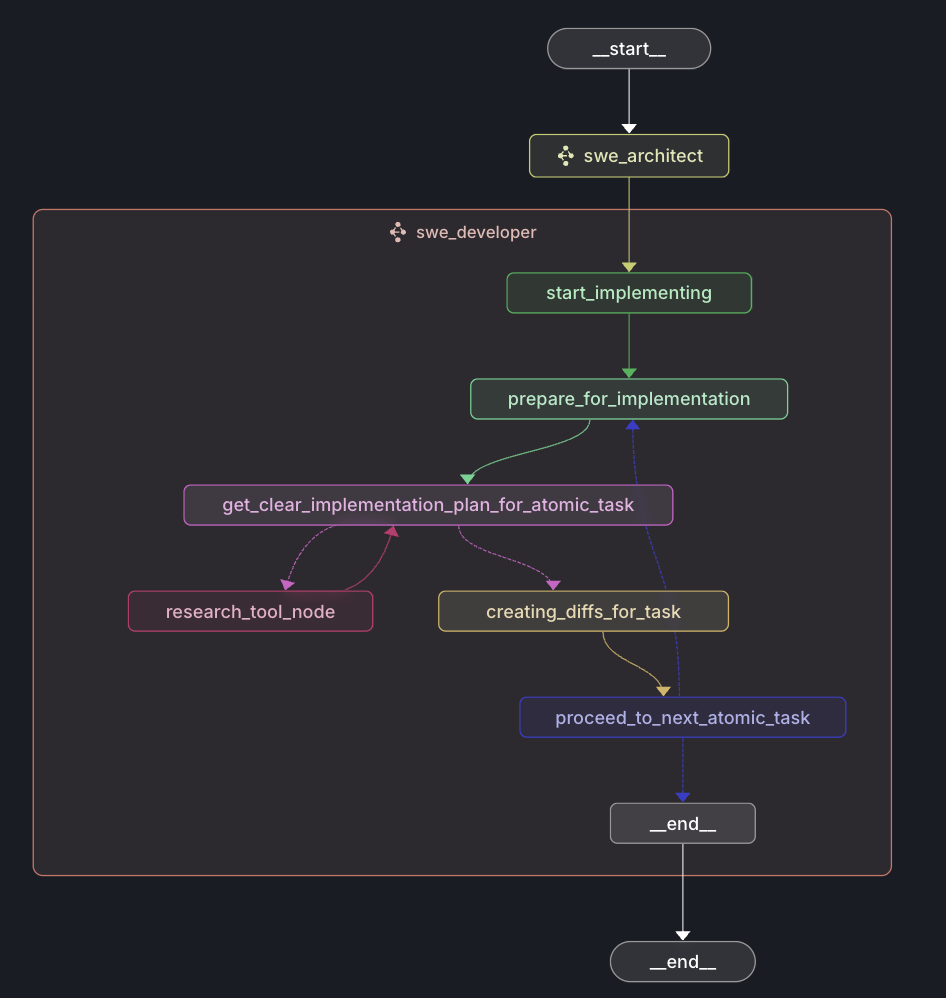
The developer agent:
- Executes implementation plans step by step
- Performs atomic code modifications with precision
- Creates new files and modifies existing ones
- Validates changes against the original requirements
Workflow Overview
User Request → Architect (Research & Plan) → Developer (Implement) → Results
Key Components:
- State Management: Structured data flow between agents using Pydantic models
- Tool Integration: File system operations, code search, and structure analysis
- Research Pipeline: Hypothesis-driven exploration of codebases
- Atomic Execution: Granular tasks for reliable implementation
🔄 Agent State Management
The system uses a hierarchical state management approach with Pydantic models for type safety and validation. Each agent maintains its own state while sharing common entities for seamless data flow.
Main Agent State (AgentState)
The top-level orchestrator state that manages the overall workflow:
class AgentState(BaseModel):
    implementation_research_scratchpad: Annotated[list[AnyMessage], add_messages]
    implementation_plan: Optional[ImplementationPlan] = None
Fields:
implementation_research_scratchpad: Message history from research and planning phaseimplementation_plan: Structured plan created by architect agent for developer execution
Architect Agent State (SoftwareArchitectState)
Manages the research and planning phase with hypothesis-driven exploration:
class SoftwareArchitectState(BaseModel):
    research_next_step: Optional[str] = None
    implementation_plan: Optional[ImplementationPlan] = None
    implementation_research_scratchpad: Annotated[list[AnyMessage], add_messages] = []
    is_valid_research_step: Optional[bool] = None
Fields:
research_next_step: Current hypothesis or research direction being exploredimplementation_plan: Generated structured plan with atomic tasksimplementation_research_scratchpad: Research conversation history and tool outputsis_valid_research_step: Validation flag for research hypothesis quality
Workflow:
- Generate research hypothesis → Validate hypothesis → Conduct research → Extract implementation plan
Developer Agent State (SoftwareDeveloperState)
Handles the step-by-step implementation of the architect's plan:
class SoftwareDeveloperState(BaseModel):
    implementation_plan: Optional[ImplementationPlan] = None
    current_task_idx: Optional[int] = 0
    current_atomic_task_idx: Optional[int] = 0
    diffs: Optional[Diffs] = None
    atomic_implementation_research: Annotated[list[AnyMessage], add_messages_with_clear]
    codebase_structure: Optional[str] = None
    current_file_content: Optional[str] = None
Fields:
implementation_plan: Plan received from architect agentcurrent_task_idx: Index of current file-level task being implementedcurrent_atomic_task_idx: Index of current atomic change within the taskdiffs: Generated code differences for precise file modificationsatomic_implementation_research: Research specific to current implementation stepcodebase_structure: Current snapshot of target codebase structurecurrent_file_content: Contents of file being modified
Workflow:
- Iterate through tasks → Research specific implementation → Generate diffs → Apply changes
Shared Entities
These Pydantic models provide the data contracts between agents:
ImplementationPlan
class ImplementationPlan(BaseModel):
    tasks: List[ImplementationTask]
The top-level plan containing all file-level implementation tasks.
ImplementationTask
class ImplementationTask(BaseModel):
    file_path: str                    # Target file for modifications
    logical_task: str                 # High-level description of changes
    atomic_tasks: List[AtomicTask]    # Granular modification steps
Represents changes needed for a specific file.
AtomicTask
class AtomicTask(BaseModel):
    atomic_task: str            # Specific code modification instruction
    additional_context: str     # Research context for this change
The smallest unit of implementation - a single code change.
DiffTask (Developer-specific)
class DiffTask(BaseModel):
    original_code_snippet: str    # Exact code being replaced
    task_description: str         # Detailed change instructions
Precise diff instructions for code modifications.
State Flow Example
User Request
    ↓
AgentState {research_scratchpad: [HumanMessage("Add auth")]}
    ↓
SoftwareArchitectState {
    research_next_step: "Find existing auth patterns",
    implementation_research_scratchpad: [research_messages...]
}
    ↓ (after research)
SoftwareArchitectState {
    implementation_plan: ImplementationPlan([
        ImplementationTask(
            file_path: "auth.py",
            atomic_tasks: [AtomicTask("Add User model")]
        )
    ])
}
    ↓
SoftwareDeveloperState {
    implementation_plan: ,
    current_task_idx: 0,
    current_atomic_task_idx: 0,
    current_file_content: "# auth.py content"
}
    ↓ (after implementation)
Final Result: Modified codebase
State Management Benefits
- Type Safety: Pydantic validation prevents state corruption
- Traceability: Complete message history for debugging
- Resumability: State can be persisted and resumed
- Modularity: Each agent manages its own concerns
- Atomicity: Granular task breakdown enables precise control
📋 Prerequisites
- Python 3.12+
- uv (Python package manager)
- Anthropic API key (Claude Sonnet 4)
⚡ Quick Start
- Clone the repository
git clone https://github.com/langtalks/swe-agent-langgraph.git
cd swe-agent-langgraph
- Set up environment
# Install dependencies with uv
uv sync

# Create environment file
cp .env.example .env.local
# Add your Anthropic API key and langsmith to .env
- Clone a repo to ./workspace_repo
git clone https://github.com/browser-use/browser-use ./workspace_repo
- Run the agent
# Activate environment
source .venv/bin/activate

# Start LangGraph server
langgraph dev
- Example usage
Input:
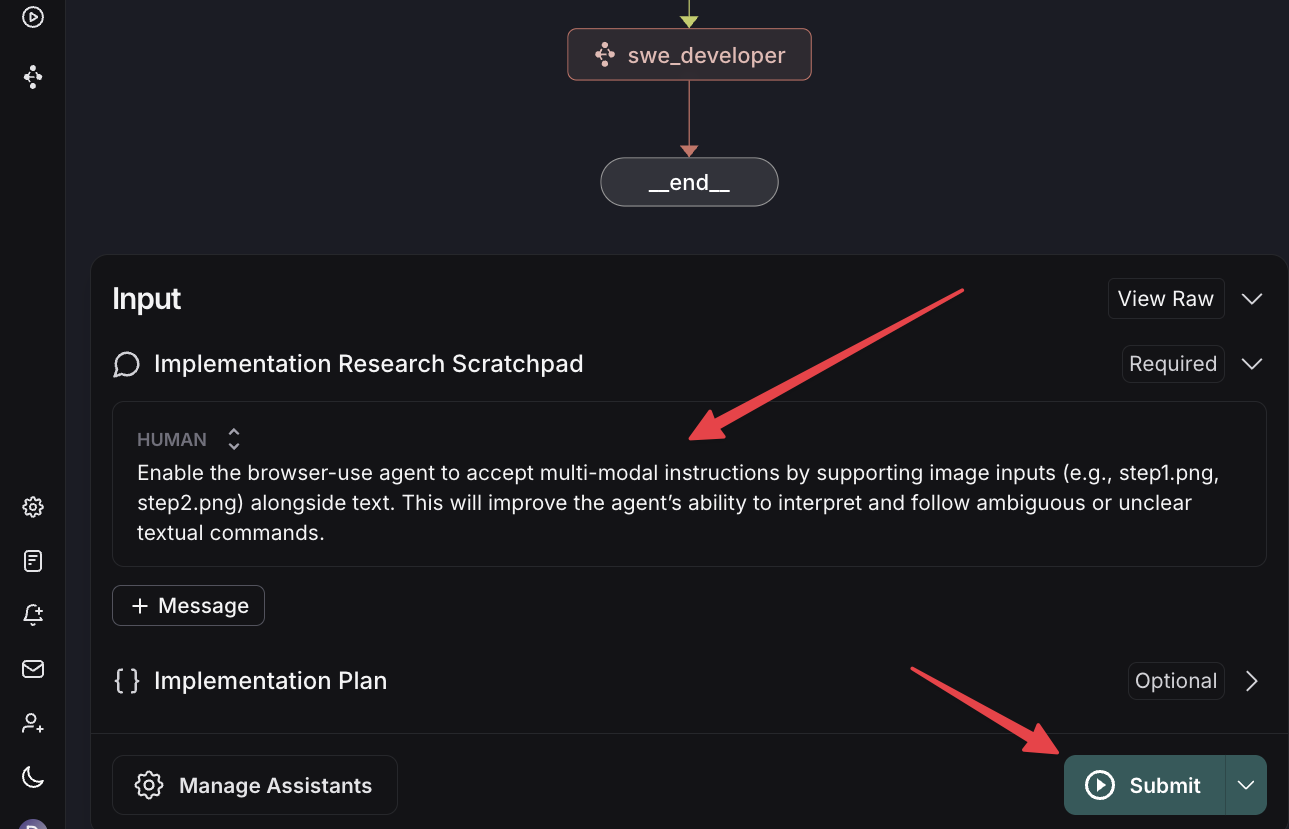
Enable the browser-use agent to accept multi-modal instructions by supporting image inputs (e.g., step1.png, step2.png) alongside text. This will improve the agent’s ability to interpret and follow ambiguous or unclear textual commands
Output: (browsing the workspace repo git)
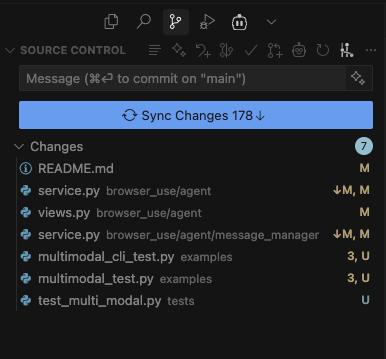
🛠️ Development
Project Structure
agent/
├── architect/          # Planning and research agent
│   ├── graph.py       # Main architect workflow
│   ├── state.py       # State definitions
│   └── prompts/       # Prompt templates
├── developer/          # Implementation agent
│   ├── graph.py       # Main developer workflow
│   ├── state.py       # State definitions
│   └── prompts/       # Prompt templates
├── common/            # Shared entities and state
│   └── entities.py    # Pydantic models
└── tools/             # File operations and search tools
    ├── search.py      # Code search tools
    ├── codemap.py     # Code analysis tools
    └── write.py       # File operations

workspace_repo/        # Target codebase for modifications
scripts/              # Utility scripts
helpers/              # Prompt templates and utilities
static/               # Documentation images
Core Components
Entities & State Management:
ImplementationPlan: Structured task breakdownAtomicTask: Individual code modification unitsImplementationTask: File-level implementation steps
Agent Workflows:
- Research-driven planning with hypothesis validation
- Tool-assisted code exploration and analysis
- Incremental implementation with verification
Running Tests
# Run all tests
uv run pytest

# Run with coverage
uv run pytest --cov=agent

# Run specific test modules
uv run pytest tests/test_architect.py
📁 Main Directory Files
| File | Description |
|---|---|
README.md |
Project documentation (this file) |
pyproject.toml |
Python project configuration and dependencies |
langgraph.json |
LangGraph application configuration with graph definitions |
langgraph_debug.py |
Debug configurations for development and testing |
uv.lock |
Locked dependency versions for reproducible builds |
.env |
Environment variables (create from .env.example) |
.env.example |
Template for environment configuration |
.gitignore |
Git ignore patterns for Python and IDE files |
.python-version |
Python version specification for pyenv |
🎯 Use Cases
- Feature Development: Implement new features based on high-level requirements
- Bug Fixes: Analyze and fix issues with automated code changes
- Code Refactoring: Restructure code while maintaining functionality
- Documentation: Generate and update code documentation
- Testing: Create test cases and fix failing tests
🗺️ Roadmap - LangTalks Community Project!
We're building the future of AI-powered software development together! These are the next major features we're looking for community contributions on:
🔄 Core Agent Enhancements
- [ ] Multi-step Research & Development Loop: Iterative refinement of implementation plans with feedback cycles
- [ ] Testing Agent: Dedicated agent for unit testing, functional testing, and test case generation
- [ ] Error Fixer Agent: Specialized agent for detecting, analyzing, and fixing code errors
- [ ] Product Manager Agent: High-level planning and requirement analysis agent
🔧 Development Tools & Quality
- [ ] Add Linters: Integrate code quality tools (ESLint, Black, Pylint) into the workflow
- [ ] Components Evaluation Benchmarking: Performance metrics and quality assessment frameworks
- [ ] Code Semantic Indexing: Advanced code understanding and similarity detection
🌐 Integrations & Connectivity
- [ ] GitHub MCP Integration: Direct integration with GitHub repositories and workflows
- [ ] Context7 MCP Integration: Enhanced context management and code understanding
- [ ] Multi-Language Support: Extend beyond Python to JavaScript, TypeScript, Java, Go, etc.
📈 Advanced Features (Future)
- [ ] Interactive Planning UI: Web interface for plan review and modification
- [ ] Collaborative Workflows: Multi-developer coordination and conflict resolution
- [ ] Performance Optimization: Faster research and implementation cycles
- [ ] Plugin System: Extensible tool and agent architecture
Want to contribute? Pick any feature above and join our LangTalks community! Each feature is designed to be tackled by individual contributors or small teams.
🤝 Contributing
We welcome contributions! This project aims to push the boundaries of AI-powered software development. Areas where we need help:
Priority Areas
- Agent Improvements: Better reasoning and planning strategies
- Tool Development: New code analysis and modification tools
- Testing: Comprehensive test coverage and validation frameworks
- Documentation: Examples, tutorials, and use cases
- Performance: Optimization and benchmarking
How to Contribute
- Fork the repository
- Create a feature branch (
git checkout -b feature/amazing-feature) - Make your changes following the existing code patterns
- Add tests for new functionality
- Ensure tests pass (
uv run pytest) - Update documentation if needed
- Commit your changes (
git commit -m 'Add amazing feature') - Push to the branch (
git push origin feature/amazing-feature) - Open a Pull Request with a clear description
Development Setup
# Clone your fork
git clone https://github.com/langtalks/swe-agent-langgraph.git
cd swe-agent-langgraph

# Set up development environment
uv sync --dev

# Install pre-commit hooks (optional but recommended)
pre-commit install

# Run tests to ensure everything works
uv run pytest
📊 Technical Details
Dependencies
- LangGraph: Multi-agent workflow orchestration
- LangChain: AI integration and tool management
- Anthropic: Claude Sonnet 4 for intelligent reasoning
- Tree-sitter: Robust code parsing and analysis
- Pydantic: Type-safe data validation and serialization
Performance Considerations
- Atomic task execution for reliability
- Efficient code analysis with tree-sitter
- Structured state management for scalability
- Tool-based architecture for extensibility
🔧 Configuration
Key configuration files:
langgraph.json: Defines agent graphs and dependencies.env: API keys and environment variablespyproject.toml: Python dependencies and project metadata
📄 License
This project is licensed under the MIT License - see the LICENSE file for details.
🙏 Acknowledgments
- Built with LangGraph for reliable agent workflows
- Powered by Anthropic Claude for intelligent reasoning
- Uses tree-sitter for robust code parsing
- See our deepwiki
📞 Support & Community
- LangTalks Homepage: Visit www.langtalks.ai for community resources and support
- Issues: Report bugs and request features via GitHub Issues
- Discussions: Join conversations in GitHub Discussions
- Documentation: Complete documentation is available in this README
Ready to revolutionize software development with AI? Join us at LangTalks and help build the future of automated coding! ⚡🤖