← 开源
kuaikuaikim

dface

Deep learning face detection and recognition, implemented by pytorch. (pytorch实现的人脸检测和人脸识别)

ApplicationsObject detectionPython
在 GitHub 打开
增长势头
+024 小时新增 Star0.0%
1.34k
Star
347
Fork
+1
本周
4
贡献者
创建于 2017-11-19 · 更新于 2026-10-14 · 今日第 10636 名
主要开发者
kuaikuaikimcoscubesSDUmzg

kuaikuaikim/dface 排名第 10,636,有 1,340 个星标。

同类别比较

kuaikuaikim/dface 排名第 10,636,此处有 8 个同类条目;bloc97/CrossAttentionControl 排名第 10,638。

同类别比较
名称排名指标
tsinghua-fib-lab/AgentSociety10,621
语言:
Python
星标数:
1,344
分叉数:
217
简介:
AgentSociety 2 is a modern, LLM-native agent simulation platform designed for social science research and experimental design. It provides a flexible framework for creating and managing intelligent agents in simulated environments.
receyuki/stable-diffusion-prompt-reader10,627
语言:
Python
星标数:
1,343
分叉数:
89
简介:
A simple standalone viewer for reading prompts from Stable Diffusion generated image outside the webui.
a-real-ai/pywinassistant10,632
语言:
Python
星标数:
1,341
分叉数:
190
简介:
The first open-source Artificial Narrow Intelligence generalist agentic framework Computer-Using-Agent that fully operates graphical-user-interfaces (GUIs) by using only natural language. Uses Visualization-of-Thought and Chain-of-Thought reasoning to elicit spatial reasoning and perception, emulates, plans and simulates synthetic HID interactions.
jbilcke-hf/ai-comic-factory10,633
语言:
TypeScript
星标数:
1,341
分叉数:
310
简介:
Generate comic panels using a LLM + SDXL. Powered by Hugging Face 🤗
bloc97/CrossAttentionControl10,638
语言:
Jupyter Notebook
星标数:
1,339
分叉数:
83
简介:
Unofficial implementation of "Prompt-to-Prompt Image Editing with Cross Attention Control" with Stable Diffusion
GuitarML/SmartGuitarAmp10,642
语言:
C++
星标数:
1,337
分叉数:
62
简介:
Guitar plugin made with JUCE that uses neural networks to emulate a tube amplifier.
ChaokunHong/MetaScreener10,648
语言:
Python
星标数:
1,336
分叉数:
50
简介:
AI-powered tool for efficient abstract and PDF screening in systematic reviews.
ahmetozlu/tensorflow_object_counting_api10,658
语言:
Python
星标数:
1,333
分叉数:
537
简介:
🚀 The TensorFlow Object Counting API is an open source framework built on top of TensorFlow and Keras that makes it easy to develop object counting systems!
关键参数与规格
关键参数与规格
参数值
语言Python
类别Applications
子类别Object detection
星标数1,340
分叉数347
贡献者4
创建日期2017-11-19
更新日期2026-10-14
1 天星标数0
7 天星标数1
排名10,636
上次排名10,620
排名变化-16
7 天星标排名9,926
上次 7 天星标排名12,724
7 天星标排名变化2,798
总星标排名8,867
上次总星标排名8,855
总星标排名变化-12
国家China
README 摘录

Based on the MTCNN** Official Website( **We also provide fully face recognize SDK, Contains tracking, detection, face recognition, face anti-spoofing and so on. ** **Dface** is an open source software for face detection and recognition. All features implemented by the **pytorch** (the facebook deeplearning framework). With PyTorch, we use a technique called reverse-mode auto-differentiation, which allows developer to change the way your network behaves arbitrarily with zero lag or overhead. DFace inherit these advanced characteristic, that make it

dynamic and ease code review. DFace support GPU acceleration with NVIDIA cuda. We highly recommend you use the linux GPU version. Our inspiration comes from several research papers on this topic, as well as current and past work such as Joint Face Detection and Alignment using Multi-task Cascaded Convolutional Networks and face recognition topic FaceNet: A Unified Embedding for Face Recognition and Clustering **MTCNN Structure** **If you want to contribute to DFace, please review the CONTRIBUTING. We use Slack

for tracking requests and bugs. Recommended Model is ResNet inception v2. Refer this Paper and FaceNet Face Anti-Spoofing, distinguish from face light and texture。 Recomend with the LBP algorithm and SVM. Docker support, gpu version Installation DFace has two major module, detection and recognition. In these two, We provide all tutorials about how to train a model and running. We suggest Anaconda to make a virtual and independent python envirment. **If you want to train on GPU,please install

Nvidia cuda and cudnn. 0 anaconda pytorch torchvision cv2 matplotlib Also we provide a anaconda environment dependency list called environment. yml (windows please use environment-win64. You can create your DFace environment very easily. Add Dface to your local python path Face Detetion and Recognition If you are interested in how to train a mtcnn model, you can follow next step. Train mtcnn Model MTCNN have three networks called **PNet**, **RNet** and **ONet**. So we should train it on three

stage, and each stage depend on previous network which will generate train data to feed current train net, also propel the minimum loss between two networks. Please download the train face **datasets** before your training. WIDER FACE is used for training face classification and face bounding box, also CelebA is used for face landmarks. The original wider face annotation file is matlab format, you must transform it to text. I have put the transformed annotation text file into anno_store

/wider_origin_anno. py** Demo QQ交流群 681403076 本人微信(wechat) cobbestne License Apache License 2.

常见问题

记录了多少星标和分叉?

kuaikuaikim/dface 有 1,340 个星标和 347 个分叉。

仓库排名是多少?

kuaikuaikim/dface 排名第 10,636。

记录的语言和类别是什么?

kuaikuaikim/dface 有 1,340 个星标,语言为 Python,类别为 Applications。

哪个仓库排名最接近?

kuaikuaikim/dface 与 bloc97/CrossAttentionControl 比较,后者排名第 10,638,有 1,339 个星标。

README


Dface •

Linux CPU Linux GPU Mac OS CPU Windows CPU

Free and open source face detection. Based on the MTCNN

Official Website(https://dface.tech)

We also provide fully face recognize SDK, Contains tracking, detection, face recognition, face anti-spoofing and so on. See dface.tech for details.

Dface is an open source software for face detection and recognition. All features implemented by the pytorch (the facebook deeplearning framework). With PyTorch, we use a technique called reverse-mode auto-differentiation, which allows developer to change the way your network behaves arbitrarily with zero lag or overhead. DFace inherit these advanced characteristic, that make it dynamic and ease code review.

DFace support GPU acceleration with NVIDIA cuda. We highly recommend you use the linux GPU version.It's very fast and extremely realtime.

Our inspiration comes from several research papers on this topic, as well as current and past work such as Joint Face Detection and Alignment using Multi-task Cascaded Convolutional Networks and face recognition topic FaceNet: A Unified Embedding for Face Recognition and Clustering

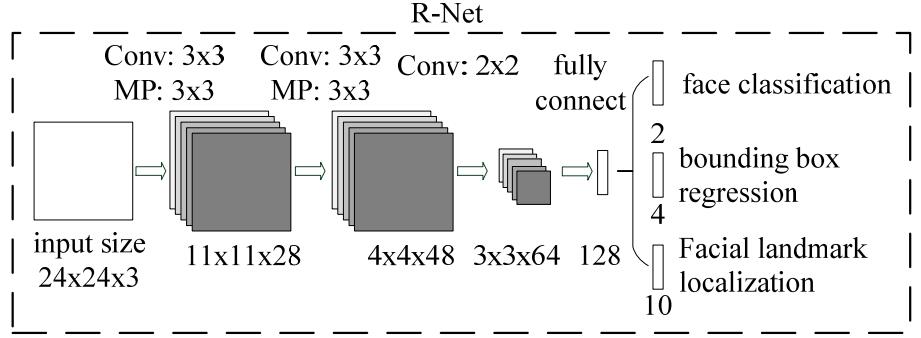
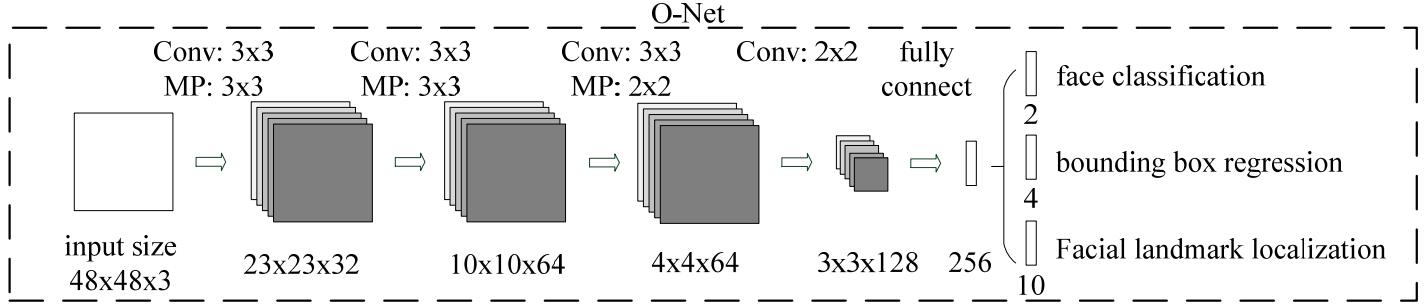
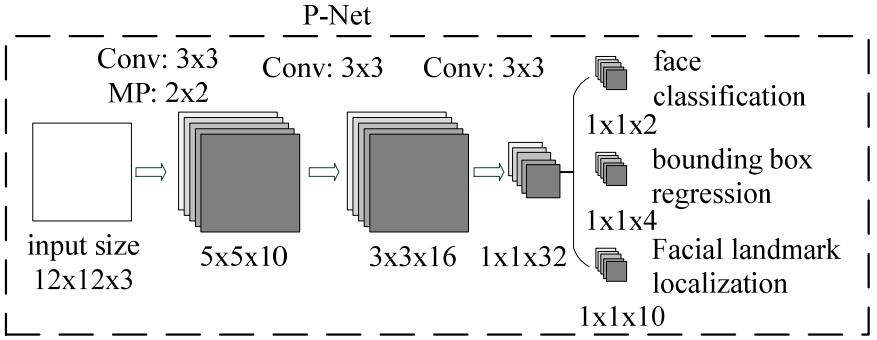
MTCNN Structure  
If you want to contribute to DFace, please review the CONTRIBUTING.md in the project.We use Slack for tracking requests and bugs. Also you can following the QQ group 681403076 or my wechat jinkuaikuai005

TODO(contribute to DFace)

  • Based on cener loss or triplet loss implement the face conpare. Recommended Model is ResNet inception v2. Refer this Paper and FaceNet
  • Face Anti-Spoofing, distinguish from face light and texture。Recomend with the LBP algorithm and SVM.
  • 3D mask Anti-Spoofing.
  • Mobile first with caffe2 and c++.
  • Tensor rt migration.
  • Docker support, gpu version

Installation

DFace has two major module, detection and recognition.In these two, We provide all tutorials about how to train a model and running. First setting a pytorch and cv2. We suggest Anaconda to make a virtual and independent python envirment.If you want to train on GPU,please install Nvidia cuda and cudnn.

Requirements

  • cuda 8.0
  • anaconda
  • pytorch
  • torchvision
  • cv2
  • matplotlib
git clone https://github.com/kuaikuaikim/dface.git

Also we provide a anaconda environment dependency list called environment.yml (windows please use environment-win64.yml,Mac environment_osx.yaml) in the root path. You can create your DFace environment very easily.

cd DFace

conda env create -f path/to/environment.yml

Add Dface to your local python path

export PYTHONPATH=$PYTHONPATH:{your local DFace root path}

Face Detetion and Recognition

If you are interested in how to train a mtcnn model, you can follow next step.

Train mtcnn Model

MTCNN have three networks called PNet, RNet and ONet.So we should train it on three stage, and each stage depend on previous network which will generate train data to feed current train net, also propel the minimum loss between two networks. Please download the train face datasets before your training. We use WIDER FACE and CelebA .WIDER FACE is used for training face classification and face bounding box, also CelebA is used for face landmarks. The original wider face annotation file is matlab format, you must transform it to text. I have put the transformed annotation text file into anno_store/wider_origin_anno.txt. This file is related to the following parameter called --anno_file.

  • Create the DFace train data temporary folder, this folder is involved in the following parameter --dface_traindata_store
mkdir {your dface traindata folder}
  • Generate PNet Train data and annotation file
python dface/prepare_data/gen_Pnet_train_data.py --prefix_path {annotation file image prefix path, just your local wider face images folder} --dface_traindata_store  {dface train data temporary folder you made before }  --anno_file {wider face original combined  annotation file, default anno_store/wider_origin_anno.txt}
  • Assemble annotation file and shuffle it
python dface/prepare_data/assemble_pnet_imglist.py
  • Train PNet model
python dface/train_net/train_p_net.py
  • Generate RNet Train data and annotation file
python dface/prepare_data/gen_Rnet_train_data.py --prefix_path {annotation file image prefix path, just your local wider face images folder} --dface_traindata_store {dface train data temporary folder you made before } --anno_file {wider face original combined  annotation file, default anno_store/wider_origin_anno.txt} --pmodel_file {your PNet model file trained before}
  • Assemble annotation file and shuffle it
python dface/prepare_data/assemble_rnet_imglist.py
  • Train RNet model
python dface/train_net/train_r_net.py
  • Generate ONet Train data and annotation file
python dface/prepare_data/gen_Onet_train_data.py --prefix_path {annotation file image prefix path, just your local wider face images folder} --dface_traindata_store {dface train data temporary folder you made before } --anno_file {wider face original combined  annotation file, default anno_store/wider_origin_anno.txt} --pmodel_file {your PNet model file trained before} --rmodel_file {your RNet model file trained before}
  • Generate ONet Train landmarks data
python dface/prepare_data/gen_landmark_48.py
  • Assemble annotation file and shuffle it
python dface/prepare_data/assemble_onet_imglist.py
  • Train ONet model
python dface/train_net/train_o_net.py

Test face detection

If you don't want to train,i have put onet_epoch.pt,pnet_epoch.pt,rnet_epoch.pt in model_store folder.You just try test_image.py

python test_image.py

Demo  

QQ交流群

681403076

本人微信(wechat)

cobbestne

License

Apache License 2.0

Reference

排名相邻
同类项目